Nota
L-aċċess għal din il-paġna jeħtieġ l-awtorizzazzjoni. Tista’ tipprova tidħol jew tibdel id-direttorji.
L-aċċess għal din il-paġna jeħtieġ l-awtorizzazzjoni. Tista’ tipprova tibdel id-direttorji.
Applies to: ✔️ Front Door Standard ✔️ Front Door Premium
In this article, you learn how to configure and test native gRPC services through Azure Front Door Standard and Premium. You can route calls by service and method, distribute traffic across healthy origins, and apply supported request-metadata controls.
Important
gRPC support in Azure Front Door is currently in public preview. See the Supplemental Terms of Use for Microsoft Azure Previews for legal terms that apply to Azure features that are in beta, preview, or otherwise not yet released into general availability.
The public preview is available to all Azure Front Door Standard and Premium customers. You don't need to enroll in the preview or meet additional preview-access requirements.
What is gRPC?
gRPC is an open-source remote procedure call framework. A client invokes a method on a remote service through a defined service contract. Native gRPC uses HTTP/2 and commonly uses Protocol Buffers to serialize messages.
gRPC provides the following benefits:
- Efficient transport through HTTP/2 binary framing, header compression, and connection multiplexing.
- Strongly typed service contracts and generated client and server code across supported languages.
- Unary calls, client streaming, server streaming, and bidirectional streaming, with support for deadlines, cancellation, metadata, and status codes.
For more information, see gRPC core concepts, architecture, and lifecycle.
Protocol Buffers and method paths
Protocol Buffers provide language-neutral, platform-neutral structured-data serialization. A .proto file defines messages, services, and RPC methods. The Protocol Buffers compiler, protoc, generates corresponding code.
The following greet.proto example defines a unary SayHello method:
syntax = "proto3";

package greet;

service Greeter {
  rpc SayHello (HelloRequest) returns (HelloReply);
}

message HelloRequest {
  string name = 1;
}

message HelloReply {
  string message = 1;
}
The fully qualified request path is /greet.Greeter/SayHello. Use this path to match the method in an Azure Front Door route.
How gRPC works with Azure Front Door
The client's TLS connection terminates at the Azure Front Door edge. Front Door matches the gRPC route, evaluates supported policies against HTTP/2 request metadata, selects a healthy origin, and forwards the call over a separate HTTPS and HTTP/2 connection. Response messages and gRPC trailers return to the client.
The following behavior applies to gRPC-enabled routes during the preview:
| Area | Behavior or limitation |
|---|---|
| Tiers | Standard and Premium only. |
| Transport | HTTPS and HTTP/2 are required from client to Front Door and from Front Door to origin. |
| RPC patterns | Unary, client-streaming, server-streaming, and bidirectional-streaming calls are supported. |
| Route matching | Use a complete /package.Service/Method path, or intentionally use a broad pattern such as /*. |
| Caching | Caching isn't supported and is disabled on gRPC-enabled routes. |
| Redirects and forwarding | Redirects aren't valid for gRPC traffic. Keep route and rule-set forwarding configured for HTTPS. |
| Rule sets and Edge Actions | Supported, subject to the HTTPS forwarding requirements and preview limitations in this table. |
| Private Link | Private Link isn't supported for gRPC-enabled origins during the preview. |
| Route-configuration overrides | A gRPC-enabled origin group can't be the target of a route-configuration override rule during the preview. |
| Web Application Firewall (WAF) | Supported request-metadata checks apply. Protobuf messages aren't decoded for request-body inspection. |
Prerequisites
- An Azure Front Door Standard or Premium profile. To create one, see Create an Azure Front Door profile.
- A gRPC origin that accepts TLS and HTTP/2 on its configured HTTPS origin port. Every origin in the route's origin group must be enabled for gRPC.
Configure origins and health probes
Configure the origin group before attaching it to a gRPC route:
- In the Azure portal, open your Front Door profile.
- Under Settings, select Origin groups, and add or edit the origin group for your gRPC service.
- Add or edit each origin. Enable gRPC for every origin and configure its HTTPS port to match the gRPC service. Don't enable Private Link for these origins during the preview.
- Configure health probes by using the following table.
- Save the origin group.
| Setting | Configuration |
|---|---|
| Health probes | Enable probes to check origin health. |
| Protocol | Select gRPC for a native gRPC probe. Each origin must implement the standard grpc.health.v1.Health/Check RPC. |
| HTTP or HTTPS probes | As an alternative to native gRPC probes, select HTTP or HTTPS and configure an HTTP health endpoint on the origins. |
| Probe interval and load balancing | Select values that meet your application's health-detection and origin-load requirements. |
A native gRPC probe requires the standard gRPC health service, not just an application RPC such as SayHello. For more information, see gRPC health checking. For HTTP and HTTPS probes, see Azure Front Door health probes.
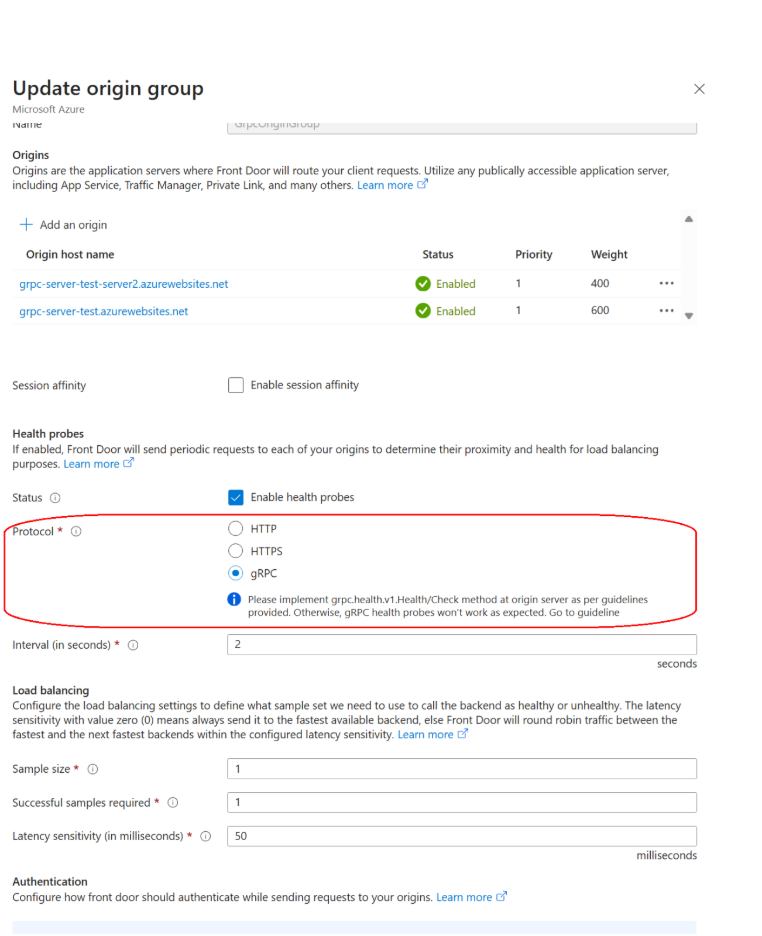
The screenshot shows example probe and load-balancing settings. Select values that meet your application's requirements.
Configure a gRPC route
Create or update a route to send gRPC calls to the origin group:
- In your Front Door profile, under Settings, select Front Door manager.
- Select the endpoint, then add or edit a route.
- Select the domain and the origin group that contains your gRPC-enabled origins.
- Turn on Enable gRPC.
- Configure the route by using the following table.
- Save the route.
| Setting | Configuration |
|---|---|
| Patterns to match | For one RPC, enter the complete /package.Service/Method path, such as /greet.Greeter/SayHello. Use a broad /* route only when you intend to expose multiple methods or server reflection. |
| Accepted protocol | Enabling gRPC automatically sets this value to HTTPS only. |
| Forwarding protocol | Enabling gRPC automatically sets this value to HTTPS only. |
| Caching | Disabled for gRPC-enabled routes. |
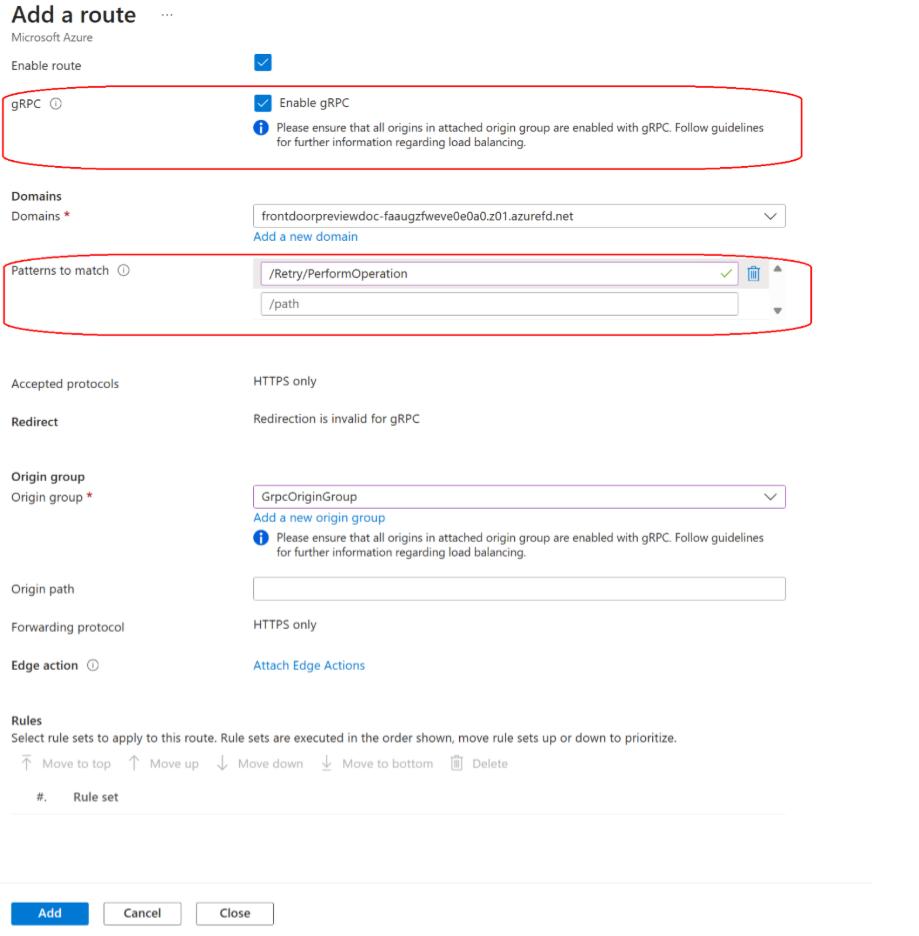
The screenshot shows an example route. Use your own domain, origin group, and RPC method path.
Rule sets and Edge Actions are supported on gRPC-enabled routes. If a rule set configures the forwarding protocol to HTTP, Azure Front Door returns an HTTP 301 response to the gRPC client. This response doesn't enable redirect support for gRPC traffic. Keep route and rule-set forwarding configured for HTTPS.
If you configure the route through infrastructure as code, explicitly use compatible HTTPS and gRPC settings. Incompatible HTTP protocol combinations are rejected.
Test with grpcurl
To run the following test examples, install grpcurl. You don't need this tool to configure gRPC support in Azure Front Door.
Use your deployed service's .proto file or compiled descriptor to test a method-specific route without relying on server reflection. Server reflection is an optional alternative. The following examples use the greet.Greeter contract shown earlier.
Replace contoso.azurefd.net with your Front Door endpoint or custom domain. Use the domain that matches the endpoint's TLS certificate. All examples connect over TLS on port 443; don't add -plaintext.
Test a method-specific route with a local proto file
Save the service definition as greet.proto in your current directory. For a route that matches /greet.Greeter/SayHello, run:
grpcurl -import-path "." -proto "greet.proto" -d "{}" contoso.azurefd.net:443 greet.Greeter/SayHello
| Argument | Purpose |
|---|---|
-import-path "." |
Directory containing your proto files. Replace . if the files are in another directory. |
-proto "greet.proto" |
Service definition that matches the deployed origin. |
-d "{}" |
JSON request body. Replace it with the message required by your service. |
contoso.azurefd.net:443 |
Front Door endpoint or custom domain and HTTPS port. |
greet.Greeter/SayHello |
Fully qualified RPC name, without the leading / used in the route pattern. |
Supplying the local proto lets grpcurl invoke the application method without a preliminary reflection call. You can also supply a compiled descriptor with grpcurl instead of a proto file.
Test an intentional broad route with server reflection
Server reflection is optional. When you don't supply a local proto or descriptor, grpcurl uses server reflection to discover the service contract. The origin must implement reflection, and the Front Door route must match its RPC path.
For example, the reflection RPC grpc.reflection.v1alpha.ServerReflection/ServerReflectionInfo uses the request path /grpc.reflection.v1alpha.ServerReflection/ServerReflectionInfo. A route limited to /greet.Greeter/SayHello doesn't match that path. The test can fail before the application RPC is invoked, even if the application route is correct.
If you intentionally configured a broad /* route and enabled reflection on the origin, list services:
grpcurl contoso.azurefd.net:443 list
Then invoke the method by using the reflected contract:
grpcurl -d "{}" contoso.azurefd.net:443 greet.Greeter/SayHello
Important
Expose reflection only when intended. Prefer local proto or descriptor files when testing method-specific routes instead of broadening the route just to make discovery work.
Troubleshoot grpcurl tests
| Symptom | Check or action |
|---|---|
grpcurl list fails, but a call with -proto succeeds. |
Check whether the route matches the application RPC but not the reflection RPC. Continue using the local proto or descriptor for a method-specific route. |
| Reflection discovery fails. | Check that the origin implements reflection and the route matches its RPC path. Otherwise, supply a local proto or descriptor. |
| The requested method doesn't match the route. | Compare the package, service, and method in the deployed proto with the complete route path. Include the leading / in the route pattern, but not in the RPC argument to grpcurl. |
| A TLS hostname or certificate error occurs. | Check that the hostname supplied to grpcurl matches the Front Door domain and certificate. Use TLS, not -plaintext. |
Web Application Firewall considerations
Azure Front Door WAF can evaluate supported HTTP/2 request metadata, such as the URI, headers, client IP address, and geography. Supported metadata-based rate-limiting scenarios can also apply.
Front Door doesn't decode protobuf messages. WAF rules that depend on inspecting the gRPC message body don't provide protobuf payload inspection. Validate messages in the gRPC application or another component that understands the protobuf schema. Don't treat metadata checks as message-level protection.
For more information, see Web Application Firewall on Azure Front Door.
Monitor gRPC traffic
Configure diagnostic logs and correlate Front Door access logs with origin-side gRPC application logs. Check both the HTTP status and the gRPC status returned in trailers. An HTTP 200 response can still carry a non-OK gRPC application status.
If you send access logs to the AzureDiagnostics table in a Log Analytics workspace, use the following query to inspect HTTP metadata for the example service:
AzureDiagnostics
| where ResourceProvider == "MICROSOFT.CDN"
    and Category == "FrontDoorAccessLog"
| where TimeGenerated > ago(1d)
| where requestUri_s contains "/greet.Greeter/"
| project TimeGenerated, ResourceId, requestUri_s,
          httpVersion_s, httpStatusCode_s
Replace /greet.Greeter/ with your service path. The query shows request URIs, HTTP versions, and HTTP status codes, not the gRPC status in response trailers. Use origin-side gRPC logs to investigate application status and correlate failures with the Front Door access logs.