Nota
L-aċċess għal din il-paġna jeħtieġ l-awtorizzazzjoni. Tista’ tipprova tidħol jew tibdel id-direttorji.
L-aċċess għal din il-paġna jeħtieġ l-awtorizzazzjoni. Tista’ tipprova tibdel id-direttorji.
This page explains how to add SQL examples and instructions in a Genie Space to improve response accuracy.
Add SQL examples and instructions
You can add sample SQL queries, Unity Catalog functions, and plain-text instructions to help generate accurate responses. Click Configure > Instructions. Use the SQL Queries tab to manage queries and Unity Catalog functions. Use the Text tab to add plain text instructions.
Each Genie Space has two separate limits:
- Instructions (100 per space): Each example SQL query, each SQL function, and the entire General instructions text block each count as one instruction.
- Knowledge store snippets (200 per space): Table descriptions, join relationships, and SQL expressions (measures, filters, and dimensions) share this limit. See View columns, Define join relationships, and Define SQL expressions.
A Genie Space aims to provide consistent and predictable responses based on clear and precise guidance. Because Genie operates in a nondeterministic manner, it's important to make the guidance free from conflicting or ambiguous information to minimize the risk of undesirable responses. When setting up the space, a key task is to review and resolve any inconsistencies. This helps to achieve reliable results.
Add example SQL queries and functions
Use the SQL Queries tab to add the following:
Example queries (Recommended): Example SQL queries help Genie generate the correct SQL to answer common user questions. Queries can be static or parameterized. For each example SQL query, provide the SQL and use the most typical phrasing of the user's question as the title. This improves Genie's ability to match prompts to the example. Genie can either use the example query directly or learn from it to handle similar questions. When a parameterized query is used, the response is marked as Trusted. Users with CAN EDIT privileges in the space can view the query used to generate the response, which helps with troubleshooting and refinement.
SQL functions: For questions that cannot be answered with a static or parameterized SQL query, you can register a custom function to Unity Catalog. Functions can be shared across your teams and used by Genie to answer specific questions. Responses that are answered using a SQL function are marked as Trusted. To learn more about using SQL functions in your Genie Space, see Trusted assets.
How Genie uses example queries
Example queries show Genie how to use the available data to answer questions. Enter a sample question into the text field, and then enter a SQL query that answers that question. Write the sample question the way a user would naturally ask it. When Genie receives a matching question, it can use the example query directly to provide an answer. When Genie gets a similar question, it uses clues from the example query to learn and structure the SQL provided in the response. Focus on providing samples that highlight logic that is unique to your organization and data, as in the following example:
  -- Return our current total open pipeline by region.
  -- Opportunities are only considered pipelines if they are tagged as such.
  SELECT
    a.region__c AS `Region`,
    sum(o.amount) AS `Open Pipeline`
  FROM
    sales.crm.opportunity o
    JOIN sales.crm.accounts a ON o.accountid = a.id
  WHERE
    o.forecastcategory = 'Pipeline' AND
    o.stagename NOT ILIKE '%closed%'
  GROUP BY ALL;
Add query parameters
Parameterized example queries allow space users to specify a value that is inserted into the query at runtime. With parameters, Genie can take specific inputs from user questions and reuse the structure of an example query to provide verified answers labeled as Trusted.
To add a parameter to a query:
Place your cursor where you want to insert the parameter.
Click Add parameter.
This creates a new parameter with the default name
parameter. To change the name, replace it in the query editor. You can also add a parameter by typing a colon followed by a parameter name (:parameter_name) directly in the editor.
To edit a parameter, click  next to the parameter name. A Parameter details dialog includes the following options:
- Keyword: The keyword representing the parameter in the query. You can only change it by editing the query text directly.
- Display name: The human-readable name Genie uses in the chat response. When Genie generates a response using a parameterized query, it includes the display name and value.
- Type: Supported types include String, Date, Date and Time, and Numeric. The default is String. For Numeric, you can specify Decimal (default) or Integer.
Note
If the input value does not match the selected type, Genie treats it as the incorrect type, which can lead to inaccurate results.
When the exact text of a parameterized query is used in a response, the response is labeled Trusted. See Trusted assets.
Trusted assets
Trusted assets are example SQL queries and SQL functions that provide verified answers to questions you anticipate from users. When Genie uses a trusted asset to answer a question, the response is labeled Trusted, giving space users an extra layer of confidence in the result's accuracy.
Trusted assets include:
- Parameterized example SQL queries: When the exact text of a parameterized query is used to generate a response, the response is labeled Trusted. Space users can edit the parameter value and rerun the query. See Add query parameters.
- SQL functions: SQL functions registered in Unity Catalog can be added to a Genie Space. Responses generated using a SQL function are labeled Trusted. See How does Genie use SQL functions?.
Users with at least CAN EDIT permission on a Genie Space can add or remove trusted assets. Space users must have EXECUTE permission on any SQL functions used as trusted assets.
Provide usage guidance
You can provide Genie additional context to explain when an example query is particularly relevant.
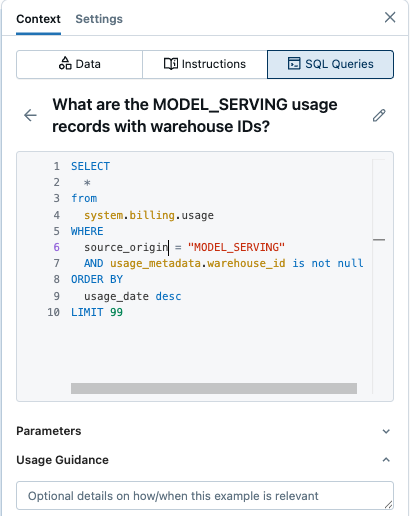
To add usage guidance:
- Click Configure > Instructions > SQL Queries to access the list of example queries.
- Click an example query.
- Click Usage guidance near the bottom of the screen.
- Enter details about how and when to use this example query.
How does Genie use SQL functions?
SQL functions are useful when a question involves complex logic that cannot be captured with a static or parameterized query. They are stored in Unity Catalog and can be called by Genie using user-supplied parameters. Genie cannot view or modify the SQL used in the function, making this approach well-suited for logic that should not be surfaced or changed. For guidance on registering a function in Unity Catalog, see Create a SQL table function and User-defined functions (UDFs) in Unity Catalog.
Provide instructions
Click the Text tab to write plain text instructions that help Genie understand how to respond to specific questions about your business. You can format the instructions as a single comprehensive note or categorize them by topic for better organization.
Instructions help guide Genie's responses so that it can process the unique jargon, logic, and concepts in a given domain. General text instructions apply to all prompts. If an instruction is relevant only to a subset of prompts, it should be included as an example query or function, or documented in the relevant table as comments or metadata. Text instructions are only for context that should be applied globally and do not fit into the other formats.
The following example includes information you could include in general instructions:
- **Company-specific business information**:
  - Fiscal year starts in February, for example fiscal year 26 or FY26 is February 1, 2026 through January 31, 2027
- **Formatting**:
  - Always respond in Spanish
  - If no other specification exists, round all decimals to two places
  - Omit commas in results for any column including "Id" or "id" or "\_id"