Nota
L-aċċess għal din il-paġna jeħtieġ l-awtorizzazzjoni. Tista’ tipprova tidħol jew tibdel id-direttorji.
L-aċċess għal din il-paġna jeħtieġ l-awtorizzazzjoni. Tista’ tipprova tibdel id-direttorji.
This page is updated frequently with the latest updates in Defender endpoint security for Android devices. To get a notification in your RSS feed whenever the page is updated, copy and paste this URL into your feed reader: https://aka.ms/mde/android-rss
For news about earlier releases, see Archive of past updates for Microsoft Defender for Endpoint on Android.
Want to experience Microsoft Defender for Endpoint? Sign up for a free trial.
December 2025
| Build | Release Date | What's New |
|---|---|---|
| 1.0.8412.0101 | December 15, 2025 | Performance improvement and bug fixes. |
| 1.0.8321.0101 | December 2, 2025 | Native root detection for Microsoft Defender is now GA. See the Blog for more details. Performance improvement and bug fixes. |
November 2025
| Build | Release Date | What's New |
|---|---|---|
| 1.0.8315.0101 | November 17, 2025 | Native root detection for Microsoft Defender is now in preview. See the Blog for more details. Performance improvement and bug fixes. |
| 1.0.8303.0101 | November 4, 2025 | An improved user feedback experience: See Key changes - November 2025 for details. Added landscape mode UI support for the Defender app. Additional telemetry features to improve app performance monitoring and detect specific scenarios, such as entering landscape mode or invalid authentication attempts. Fixed the bug where feedback sending wasn't disabled in Defender app despite 'Control Feedback Sending' key being disabled (set as 0) in Intune app configuration. |
October 2025
| Build | Release Date | What's New |
|---|---|---|
| 1.0.8217.0101 | October 28, 2025 | We have refreshed the Defender app with a new icon. |
| 1.0.8201.0101 | October 2, 2025 | Improved UX experience for the onboarding screens. For more details, see UX Enhancement. Global Secure Access Kerberos SSO support on Android (GA): Kerberos SSO experience for users on Android devices with Global Secure Access is now supported. Users need to install and configure a third-party SSO client. Performance Improvement and bug fixes. |
September 2025
| Build | Release Date | What's New |
|---|---|---|
| 1.0.8102.0101 | September 4, 2025 | Resolved the sign-in loop issue for shared device mode. Now, if a user attempts to sign in on a shared device, which isn't supported by MDE Mobile, user will be redirected back to the sign-in page. Other accessibility bug fixes and performance improvements. |
August 2025
| Build | Release Date | What's New |
|---|---|---|
| 1.0.8018.0103 | August 19, 2025 | Performance improvements and bug fixes. |
July 2025
| Build | Release Date | What's New |
|---|---|---|
| 1.0.7901.0101 | July 10, 2025 | UX Improvement for home page and tiles screens, for more details see Android UX Enhancement |
May 2025
Alerts for activities related to open wireless connection and certificates are now detected as events
Starting May 19, 2025, security operations center (SOC) analysts can now view the following as events instead of alerts:
- Connecting or disconnecting to open wireless networks
- Download/installation/removal of self-signed certificates
These events can be viewed in the Timeline tab of a device page. For more information, see Network protection.
April 2025
Deploy Defender for Endpoint prerelease builds on Android devices using Google Play preproduction tracks
Set up a secure environment to test prerelease builds of Defender for Endpoint on Android
Learn the steps on how to set up your environment for prerelease testing of Defender for Endpoint on Android. These steps are for Android devices that are onboarded to Microsoft Defender for Endpoint through the following methods:
- Android Enterprise scenarios
- Mobile Application Management (MAM) enrollment scenarios
For more information, see Deploy Defender for Endpoint prerelease builds on Android devices using Google Play preproduction tracks.
February 2025
Defender for Endpoint on Android now supports Android 10 as the minimum version
Defender for Endpoint is ending support for Android 8, 8.1, and 9 on April 30, 2025. Moving forward, only devices running Android 10 and later are supported.
How does this change affect your organization's users?
- New Users: The application will no longer be available for new installations on devices running below Android 10. When users with Android versions below 10 attempt to download the Microsoft Defender app, Google Play store will notify them that the device is incompatible.
- Existing users: The Microsoft Defender app continues to function for existing users on Android 8, 8.1, and 9 versions, but they don't receive updates from the Google Play store as they don't meet the minimum SDK version requirements. Therefore, any new updates on the app aren't available to users running an Android version prior to version 10.
After discontinuing support for deprecated versions, Microsoft no longer addresses bugs or provides maintenance for unsupported operating system versions. Any issues occurring on devices running Android version prior to version 10 won't be investigated.
This change is planned to go live on April 30, 2025. No explicit admin or end-user action is required.
Microsoft Defender for Mobile: Open Wi-Fi Detection Update
As part of our Microsoft Defender for Mobile application, we offer Open Wi-Fi detection within our Network Protection feature set. When enabled, this feature generates an alert in the Security portal. Currently, the alert is informational and doesn't require any action from the SOC analyst or admin. It provides valuable information that aids in triaging incidents involving mobile devices.
Current Behavior:
- Every time the end user connects to an open Wi-Fi network, an alert is raised.
- If the user goes out of the open Wi-Fi range and reconnects to the same network, another alert is raised.
Based on our research insights and inputs from Microsoft and other SOC teams, we're implementing a caching behavior to ensure the value of the alerts remains and also doesn't cause fatigue to SOC teams due to sheer volume.
New behavior:
- Every time the end user connects to an open Wi-Fi network, an alert is raised.
- If a user reconnects to the same open wi-fi in the next seven days, another alert won't be raised.
Note
If a user connects to a different open Wi-Fi network, an alert is immediately generated, and there's no change to that behavior.
January 2025
Upgrading your experience: Upcoming enhancements you should know about
Key changes:
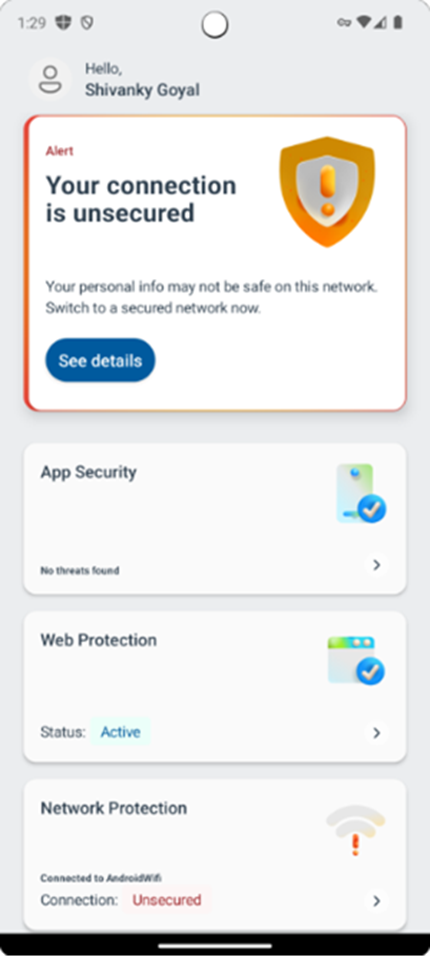
We're pleased to introduce the new dashboard for our enterprise users, which has been designed to be more user-friendly and accessible. The updated dashboard structure now includes recommendation cards for alerts and feature tiles.
Recommendation cards prominently display any active alerts, ensuring you stay informed. Additionally, features are now presented in the form of tiles, enhancing ease of use and navigation.
The following screenshot is an example of what the user sees in their dashboard:
Recommendation cards for alerts:
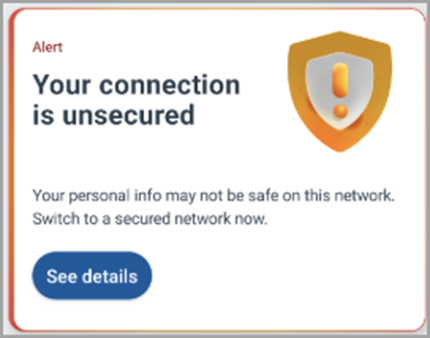
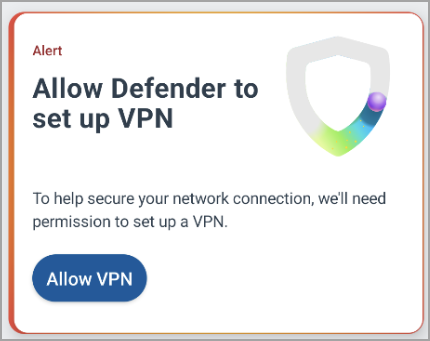
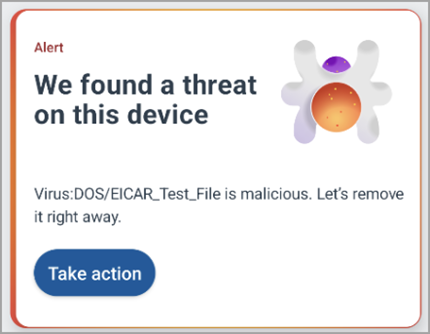
The structure of the dashboard has been updated to include a recommendation card that contains active alerts (if any). In case there are multiple alerts, resolving the top alert brings forward the next one. Recommendation cards have been implemented to provide a more cohesive user experience. These cards are designed to display important alerts and notifications prominently on the dashboard, as shown in the following table:
| Card | Description |
|---|---|
|
Network protection The user is advised to switch to a secure network. |
|
VPN option The user is prompted to set up a VPN connection on their device. |
|
Malware detection The user is prompted to take action on a detected threat. |
Feature tiles:
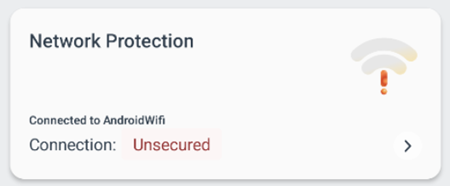
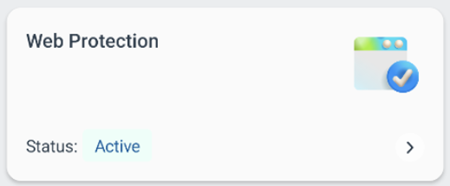
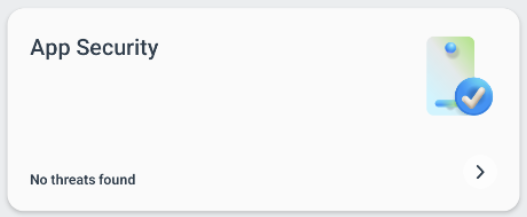
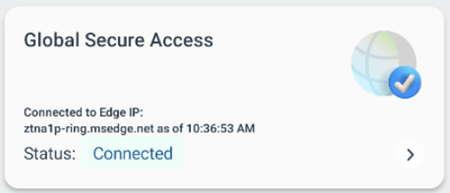
The current enterprise dashboard experience now features a tile view for your security team. The following table describes tiles your security team might see.
| Tile | Description |
|---|---|
|
Network protection The user can see whether a connection is secured or unsecured. |
|
Web protection The user can see whether web protection is enabled on a user's device. |
|
App security The user can see whether any threats were found in apps installed on a user's device. |
|
Global secure access The user can see current connection status. |
Tip
Do you want to learn more? Engage with the Microsoft Security community in our Tech Community: Microsoft Defender for Endpoint Tech Community.