Nota
L-aċċess għal din il-paġna jeħtieġ l-awtorizzazzjoni. Tista’ tipprova tidħol jew tibdel id-direttorji.
L-aċċess għal din il-paġna jeħtieġ l-awtorizzazzjoni. Tista’ tipprova tibdel id-direttorji.
These features require installing additional NuGet packages, as described in each section.
Tip
When using Microsoft.Testing.Platform.MSBuild (included transitively by MSTest, NUnit, and xUnit runners), these extensions are auto-registered when you install their NuGet packages — no code changes needed. The manual registration specified in this article is only required if you disabled the auto-generated entry point by setting <GenerateTestingPlatformEntryPoint>false</GenerateTestingPlatformEntryPoint>.
Report file names
Every report extension writes its file to the test results directory, which you can set with the --results-directory option. To override the name, use the matching --report-*-filename option. Each report section lists the default name for that report.
A file name can include a relative path that stays within the test results directory, and it can use the following replacement items (placeholders):
| Placeholder | Description |
|---|---|
{asm} |
Entry assembly name, or unknown when it's unavailable. |
{tfm} |
Target framework moniker detected at runtime, such as net9.0. |
{arch} |
Process architecture, such as x64, x86, or arm64. |
{pname} |
Process name. |
{pid} |
Process ID. |
{time} |
High-precision timestamp. |
For example, --report-trx-filename "{asm}_{tfm}_{arch}.trx" reproduces the default TRX name.
Note
Placeholder names are case-sensitive and use lowercase. Placeholder support for report file names is available in MTP starting with version 2.3.0.
Visual Studio test reports (TRX)
The Visual Studio test result file (or TRX) is the default format for publishing test results. This extension requires the Microsoft.Testing.Extensions.TrxReport NuGet package.
Manual registration
var builder = await TestApplication.CreateBuilderAsync(args);
builder.AddTrxReportProvider();
Note
When using manual registration, register the TRX report provider last. The current implementation depends on registration order, so registering it after all other extensions ensures it captures all test data.
Note
Available in MTP starting with version 1.9.0, the TRX report includes the test Description field.
Note
Available in MTP starting with version 2.3.0, TRX results stream to disk as the run progresses. If the test host crashes, the TRX file keeps the results collected before the crash.
Options
| Option | Description |
|---|---|
--report-trx |
Generates the TRX report. |
--report-trx-filename |
The name of the generated TRX report. Starting with MTP 2.3.0, the default is the deterministic {asm}_{tfm}_{arch}.trx form; before MTP 2.3.0, the default was <UserName>_<MachineName>_<yyyy-MM-dd_HH_mm_ss.fffffff>.trx. To customize the name, see Report file names. |
The report is saved inside the default TestResults folder that can be specified through the --results-directory command line argument.
HTML reports
The HTML report creates an interactive, self-contained HTML file for a test session. This extension requires the Microsoft.Testing.Extensions.HtmlReport NuGet package.
Note
Available in MTP starting with version 2.3.0. This extension is experimental, and its options and output format might change in a future version.
Manual registration
var builder = await TestApplication.CreateBuilderAsync(args);
builder.AddHtmlReportProvider();
Options
| Option | Description |
|---|---|
--report-html |
Generates the HTML report. |
--report-html-filename |
The name of the generated HTML report. The value must end with .html. The default is {asm}_{tfm}_{arch}.html. To customize the name, see Report file names. Requires --report-html. |
JUnit reports
The JUnit report creates a JUnit-compatible XML file for a test session. This extension requires the Microsoft.Testing.Extensions.JUnitReport NuGet package.
Note
Available in MTP starting with version 2.3.0. This extension is experimental, and its options and output format might change in a future version.
Manual registration
var builder = await TestApplication.CreateBuilderAsync(args);
builder.AddJUnitReportProvider();
Options
| Option | Description |
|---|---|
--report-junit |
Generates the JUnit XML report. |
--report-junit-filename |
The name of the generated JUnit XML report. The value must end with .xml. The default is {asm}_{tfm}_{arch}.xml. To customize the name, see Report file names. Requires --report-junit. |
CTRF reports
The CTRF report creates a JSON file that uses the Common Test Report Format for a test session. This extension requires the Microsoft.Testing.Extensions.CtrfReport NuGet package.
Note
Available in MTP starting with version 2.3.0. This extension is experimental, and its options and output format might change in a future version.
Manual registration
var builder = await TestApplication.CreateBuilderAsync(args);
builder.AddCtrfReportProvider();
Options
| Option | Description |
|---|---|
--report-ctrf |
Generates the CTRF JSON report. |
--report-ctrf-filename |
The name of the generated CTRF JSON report. The value must end with .json. The default is <UserName>_<MachineName>_<assembly>_<tfm>_<timestamp>.ctrf.json. To customize the name, see Report file names. Requires --report-ctrf. |
Azure DevOps reports
Azure DevOps report plugin enhances test running for developers that host their code on GitHub, but build on Azure DevOps build agents. It adds additional information to failures to show failure directly in GitHub PR.
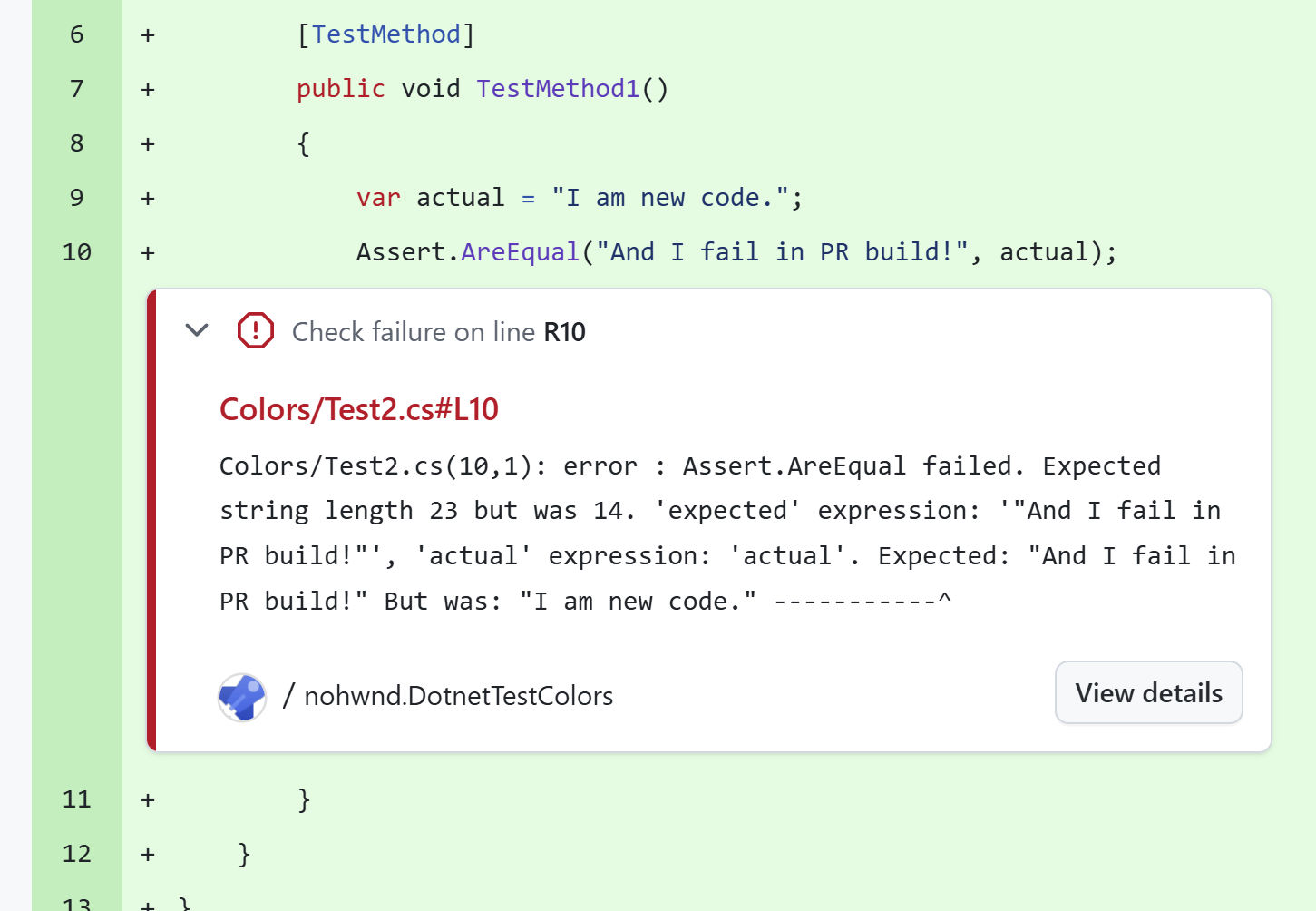
This extension requires the Microsoft.Testing.Extensions.AzureDevOpsReport NuGet package.
Manual registration
var builder = await TestApplication.CreateBuilderAsync(args);
builder.TestHost.AddAzureDevOpsProvider();
Options
| Option | Description |
|---|---|
--report-azdo |
Enables the Azure DevOps report generator. Errors and warnings are written to the output in a format that Azure DevOps understands. |
--report-azdo-severity |
Severity to use for reported events. Valid values are error (default) and warning. |
--report-azdo-flaky-history |
Queries Azure DevOps test result history for the past N days (1-90) and annotates reported failures with flakiness context. Requires --report-azdo. |
--report-azdo-demote-known-flaky |
Demotes failures that are flaky enough in the Azure DevOps history window (default threshold is 25%) from errors to warnings. Requires --report-azdo and --report-azdo-flaky-history. |
--report-azdo-quarantine-file |
Path to a text file that lists quarantined test fully qualified names or glob patterns. Matching failures are reported as warnings. Requires --report-azdo. |
--report-azdo-summary |
Writes a Markdown job summary at the end of the test run and uploads it through ##vso[task.uploadsummary]. An optional file path argument overrides the default location ({testResultsDir}/azdo-summary-{tfm}.md). Requires --report-azdo. |
--report-azdo-stackframe-filter |
Adds regex patterns, matched against the fully qualified type prefix of each stack frame, that are skipped when the extension locates the user's call site to annotate. The option is repeatable, up to 16 patterns, and each pattern is compiled with a 500-ms match timeout. These patterns are additive to the extension's built-in MSTest assertion-implementation prefixes. Requires --report-azdo. |
--report-azdo-upload-artifacts |
Uploads test result files and/or adds build tags to Azure DevOps. Valid values are off (default), tags-only, files, and all. |
--report-azdo-upload-artifact-include |
Includes files in the Azure DevOps artifact upload using glob patterns relative to the test results directory. Defaults to **/*. Requires --report-azdo-upload-artifacts to be a value other than off. |
--report-azdo-upload-artifact-exclude |
Excludes files from the Azure DevOps artifact upload using glob patterns relative to the test results directory. Requires --report-azdo-upload-artifacts to be a value other than off. |
--report-azdo-upload-artifact-name |
Overrides the Azure DevOps artifact container name. Defaults to TestResults_{assemblyName}_{tfm}. Requires --report-azdo-upload-artifacts to be a value other than off. |
--publish-azdo-test-results |
Publishes test results live to the Azure DevOps Tests tab. |
--publish-azdo-run-name |
Sets a custom Azure DevOps test run name for live test-result publishing. Requires --publish-azdo-test-results. |
Note
The Azure DevOps extension became stable in MTP 1.9.0 (--report-azdo and --report-azdo-severity). All other options in the table — --report-azdo-flaky-history, --report-azdo-demote-known-flaky, --report-azdo-quarantine-file, --report-azdo-summary, --report-azdo-stackframe-filter, --report-azdo-upload-artifacts, --report-azdo-upload-artifact-include, --report-azdo-upload-artifact-exclude, --report-azdo-upload-artifact-name, --publish-azdo-test-results, and --publish-azdo-run-name — are available in MTP starting with version 2.3.0.
The extension automatically detects that it is running in continuous integration (CI) environment by checking the TF_BUILD environment variable.
Ikkollabora magħna fuq GitHub
Is-sors għal dan il-kontenut jista’ jinstab fuq GitHub, fejn tista’ wkoll toħloq u tirrevedi l-problemi u t-talbiet għall-immerġjar. Għal aktar informazzjoni, ara l-gwida għall-kontributuri tagħna.
