Nota
L-aċċess għal din il-paġna jeħtieġ l-awtorizzazzjoni. Tista’ tipprova tidħol jew tibdel id-direttorji.
L-aċċess għal din il-paġna jeħtieġ l-awtorizzazzjoni. Tista’ tipprova tibdel id-direttorji.
Shortcuts in OneLake serve as pointers to data residing in various storage accounts, whether within OneLake itself or in external systems like Azure Data Lake Storage (ADLS). This article explains the permissions required to create shortcuts and access data by using them.
To ensure clarity around the components of a shortcut, this article uses the following terms:
- Target path: The location that a shortcut points to.
- Shortcut path: The location where the shortcut appears.
Create and delete shortcuts
To create a shortcut, you need Write permission on the Fabric item where you create the shortcut. In addition, you need Read access to the data the shortcut points to. Shortcuts to external sources might require certain permissions in the external system. The What are shortcuts? article has the full list of shortcut types and required permissions.
| Capability | Permission on shortcut path | Permission on target path |
|---|---|---|
| Create a shortcut | Item Write permission or OneLake security ReadWrite | OneLake security Read1 |
| Delete a shortcut | Item Write permission or OneLake security ReadWrite | N/A |
1 For items that don't support OneLake security yet, this permission is the item ReadAll permission.
Accessing shortcuts
A combination of the permissions in the shortcut path and the target path governs the permissions for shortcuts. When a user accesses a shortcut, the most restrictive permission of the two locations is applied. Therefore, a user who has read and write permissions in the lakehouse but only read permissions in the target path can't write to the target path. Likewise, a user who only has read permissions in the lakehouse but read and write permissions in the target path also can't write to the target path.
This table shows the permissions needed for each shortcut action.
| Capability | Permission on shortcut path | Permission on target path |
|---|---|---|
| Read file or folder content of shortcut | OneLake security Read1 | OneLake security Read1, 2 |
| Write to shortcut target location | Item Write permission or OneLake security ReadWrite | Item Write permission or OneLake security ReadWrite |
1 For items that don't support OneLake security yet, this permission is the item ReadAll permission.
Important
2 Exception to identity passthrough: While OneLake security typically passes through the calling user's identity to enforce permissions, certain query engines operate differently. When accessing shortcut data through Power BI semantic models using DirectLake over SQL or T-SQL engines configured for Delegated identity mode, these engines don't pass through the calling user's identity to the shortcut target. Instead, they use the item owner's identity to access the data, and then apply OneLake security roles to filter what the calling user can see.
This condition means:
- The shortcut target is accessed using the item owner's permissions (not the end user's)
- OneLake security roles still determine what data the end user can read
- Any permissions configured directly at the shortcut target path for the end user are bypassed
OneLake security
OneLake security enables you to apply role-based access control (RBAC) to your data stored in OneLake. You can define security roles that grant read access to specific tables and folders within a Fabric item, and assign them to users or groups. The access permissions determine what users can do across all engines in Fabric, ensuring consistent access control.
Users in the Admin, Member, and Contributor roles have full access to read data from a shortcut. To create or update a shortcut, they also need Read access to the target path.
Users in the Viewer role, or users with item Read permissions, have access determined by their OneLake security roles. To perform shortcut operations, these users need the corresponding OneLake security permission in addition to Fabric Read permission.
The following table shows the combined permissions required for each shortcut operation:
| Shortcut operation | Permission on shortcut path | Permission on target path |
|---|---|---|
| Create | Fabric Read plus OneLake security ReadWrite | OneLake security Read |
| Read (GET/LIST shortcuts) | Fabric Read plus OneLake security Read | N/A |
| Update | Fabric Read plus OneLake security ReadWrite | OneLake security Read (on the new target) |
| Delete | Fabric Read plus OneLake security ReadWrite | N/A |
For more information on the access control model with shortcuts, see Data access control model in OneLake.
Shortcut authentication models
OneLake shortcuts use two authentication models: passthrough and delegated. The model depends on the type of shortcut.
| Shortcut type | Authentication model | Details |
|---|---|---|
| Same-tenant OneLake to OneLake | Passthrough or delegated | Passthrough is the default. To use delegated authentication instead, choose Delegated identity when creating the shortcut. |
| Cross-tenant OneLake to OneLake | Delegated only | Configure an organizational account or service principal in the producer's tenant when creating the cross-tenant shortcut. |
| External (multicloud) | Delegated only | Users can access external data without direct access to the external system. Configure OneLake security on the shortcut to control what data in the external system can be accessed. |
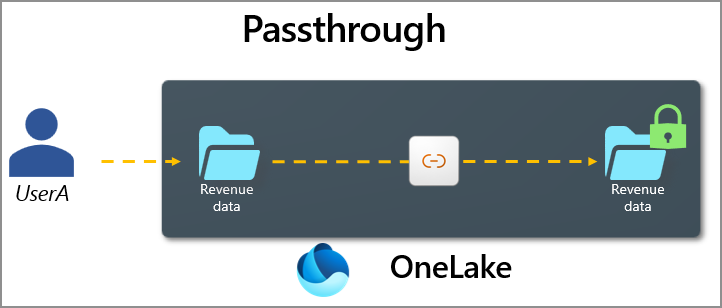
Passthrough authentication
In the passthrough model, the shortcut accesses data in the target location by passing the user's identity to the target system. Any user accessing the shortcut can only see data they have access to in the target. The source system retains full control over its data, and there's no need to replicate or redefine access controls.
Delegated authentication
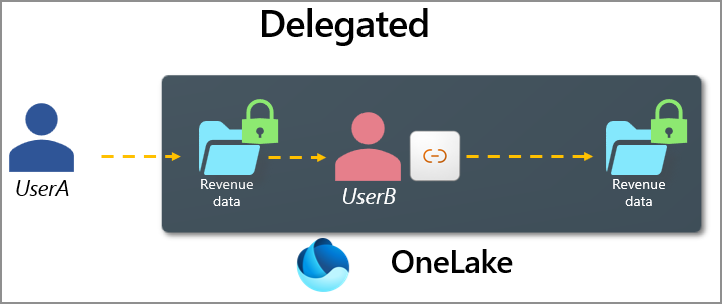
In the delegated model, the shortcut accesses data by using an intermediate credential, such as another user's identity, a service principal, or an account key. Delegated shortcuts allow permission management to be separated or "delegated" to another team or downstream user to manage. All delegated shortcuts in OneLake can have OneLake security roles defined for them.
Use delegated authentication when the default passthrough behavior doesn't match the access pattern you want for your data. For example, a delegated shortcut can use a fixed connection identity that represents a business unit instead of requiring each downstream user to have access to the source data. The business unit can manage OneLake security access for its users while honoring the security controls applied to the connection identity.
Shortcuts to external systems like Amazon S3 or Google Cloud Storage always use delegated authentication. Shortcuts to internal OneLake targets can use delegated authentication if it's configured at the time of shortcut creation.
Delegated OneLake shortcuts
Delegated OneLake shortcuts use a configured connection identity instead of the signed-in user's identity. When accessing a delegated shortcut, the calling user sees the intersection of their security and the security that applies to the delegated identity. The following table outlines example scenarios.
For same-tenant OneLake shortcuts, delegated authentication is optional. If you don't select it, the shortcut uses passthrough authentication. Cross-tenant OneLake shortcuts always use delegated authentication. The configured connection identity needs access to the target data. To switch an existing shortcut between passthrough and delegated authentication, delete and recreate the shortcut with the desired authentication method.
| Permission on shortcut path (consumer) | Permission on target path (producer) | Resulting access |
|---|---|---|
| Full access | Full access | Full access |
| Full access | CLS - only columns C1, C2 | CLS - only columns C1, C2 |
| CLS - only column C1 | CLS - only columns C1, C2 | CLS - only column C1 |
The following security considerations apply to delegated shortcuts:
- A user can only be in a single OneLake security role with CLS on the consumer side, if the producer side also has RLS.
- Column-level security (CLS) is supported for both the producer and consumer of a delegated shortcut.
- Row-level security (RLS) is supported for the producer side of a delegated shortcut, but you can't set it on the consumer side.
- In addition to OneLake security access to the producer path, accessing external shortcuts via Spark or direct API calls also requires read permissions on the item containing the external shortcut path.