Nota
L-aċċess għal din il-paġna jeħtieġ l-awtorizzazzjoni. Tista’ tipprova tidħol jew tibdel id-direttorji.
L-aċċess għal din il-paġna jeħtieġ l-awtorizzazzjoni. Tista’ tipprova tibdel id-direttorji.
On January 6, 2025, we published a Message Center announcement (Message ID MC973179) to Power Platform customers regarding updates to data policy enforcement for Copilot Studio agents. To ensure all agents comply with tenant-defined data policies, Copilot Studio no longer supports the earlier opt-in data policy enforcement process.
It's critical to take proactive steps to align your data policies with your production workloads to avoid potential disruptions. Misaligned configurations, such as data policies blocking new connectors by default, could result in production outages. For example, essential features like Direct Line or unauthenticated agent deployments on websites might be unexpectedly blocked.
This document provides guidance to help you review and adjust your data policies to ensure seamless operations while maintaining compliance with organizational standards.
Symptoms
Data policy violations can affect your agents in multiple ways. In the following example, data loss prevention changes are mentioned as the reason why publishing failed:
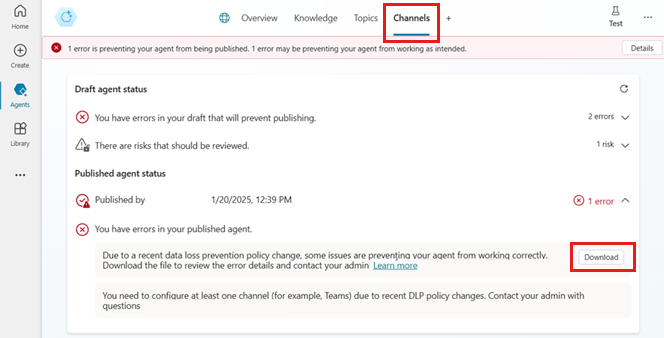
In this example, the error messages say:
- Draft agent status: You have errors in your draft that will prevent publishing. Due to a recent data policy change, some issues are preventing your agent from working correctly. Download the file to review the error details and contact your admin. You need to configure at least one channel (for example, Teams) due to recent data policy changes. Contact your admin with questions.
- Published agent status: You have errors in your published agent. Due to a recent data policy change, some issues are preventing your agent from working correctly. Download the file to review the error details and contact your admin. You need to configure at least one channel (for example, Teams) due to recent data policy changes. Contact your admin with questions.
Data policy violations for agent makers in Copilot Studio
If the agent is violating a data policy for the environment, you see a warning notification in Copilot Studio that says, "1 error is preventing your agent from being published. 1 error may be preventing your agent from working as intended."
Data policy violations when trying to publish
If you try to publish an agent that violates a data policy, an error message appears.
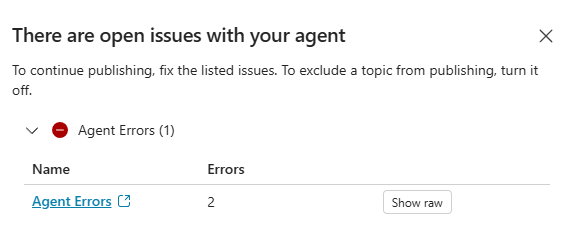
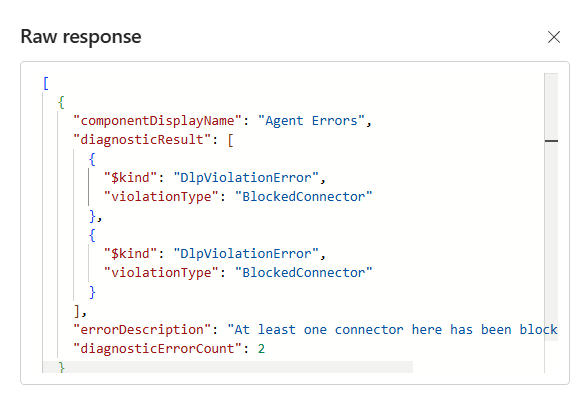
Select Show raw to get detailed error information in JSON format, including the violation type and a description of the error. In this example, the JSON literal contains values for the following keys:
| Key | Value |
|---|---|
| errorDescription | At least one connector here has been blocked by your admin |
| $kind | DlpViolationError |
| violationType | BlockedConnector |
Data policy violations for end users of the agent
If your published agent is in violation of your data policies, users of the agent see a DataLossPreventionViolation error when trying to interact with it.
The message says "Sorry, something unexpected happened. We're looking into it. Error code: DataLossPreventionViolation." and includes the conversation ID and time of the error.
Agent users should contact their admin to resolve the issue. The admin can check the data policy violations and update the policies or the agent configuration as needed.
Reason
Since March 2025, agents can't be exempted from data policy enforcement. It's no longer possible to exempt agents with a PowerShell command.
Mitigation
Makers need to work with admins to check the published agent status of all agents deployed in production to identify any potential issues caused by data policy violations. Using the insights from the publish errors and reports you can download from the Channels page, admins can adjust their data policies to align with their production workloads.
Identify agents in violation of a data policy
From the Channels tab in Copilot Studio, you can immediately see warnings if your agent is in violation of data policies.
You can also select the Details link in the error notification to get more information about a violation. The Channels tab automatically opens and summarizes the data policy violations preventing new publication for an unpublished (or "draft") agent, or that are causing errors for a published agent.
Select Download to retrieve an Excel workbook that contains detailed information about the data policy violations. The workbook includes a summary of the errors, including the specific data policy name, ID, and the blocked connector causing the issue.
There are two worksheets in the Excel file:
- DLP violations, containing details for the data policy violations for that agent.
- Blocked channels, containing a list of the channels that are currently blocked by data policies for the agent.
The DLP violations sheet provides the name of the agent (as Copilot name) and its environment, followed by a table with the following columns:
| Column | Description |
|---|---|
| Content | The publication status of the agent |
| Topic name | Name of the topic that triggered the violation, if applicable |
| Subcomponent | Category of the activity |
| Subcomponent type | Category for the data policy surface area |
| DLP policy name | The name of the policy (defined by the admin when the policy was created) |
| Policy id | GUID for the policy |
| DLP error type | The outcome of the policy (for example, Connector blocked) |
| Connector (data group) | Name of the connector that triggered the violation |
The Blocked channels sheet includes the name of the agent (as Copilot name), along with the environment name. It's followed by a table with the following columns:
| Column | Description |
|---|---|
| Channel name | The name of the channel where the agent is blocked due to a data policy violation |
| DLP policy name | The name of the policy (defined by the admin when the policy was created) |
| Policy id | GUID for the policy |
Important
If all channels for the agent are blocked by data policies, you can't publish your agent.
Identify users with sufficient permissions to update data policies
After identifying data policies that might need to be updated, you need an admin to update Data policies in the Power Platform admin center.
For more information and examples of using data policies in Copilot Studio, see Configure data policies for agents.
When an agent is in violation of data policies, you need to determine what policies are affecting it. Data policies can be defined at the tenant level (applying to all environments in a tenant) or for one or more specific environments.
Tenant-wide data policies require tenant-level administrator permissions. Environment-specific data policies can be configurable by users with a less permissive role in the environment.