Inventory Visibility on-hand change schedules and available-to-promise
You can use the on-hand change schedule feature in Inventory Visibility to schedule future on-hand inventory changes and calculate available-to-promise quantities. Available-to-promise is the amount of an item that's readily available and can be promised to a customer in the next period. This feature is beneficial if you value having visibility into the future availability of your products.
Enable and set up the features
Before you get started with available-to-promise, you'll need to set up some calculated measures for your available-to-promise quantities. Calculated measures are arithmetic expressions that you can set up by using fields from your data sources. A few different methods are available for you to choose from to set up your calculated measures for available-to-promise quantities.
For more information, see Inventory Visibility on-hand change schedules and available to promise.
After setting up your calculated measures, you'll need to enable the feature in Microsoft Power Apps. To do so, open your Inventory Visibility app and then go to the Configuration page on the left pane. Go to the Feature Management tab and ensure that the OnhandChangeSchedule feature is enabled. Select the Update Configuration button in the upper-right corner if you plan to make changes to the configurations. After the feature has been enabled, go to the ATP Setting tab. Select the Add button to add a calculated measure for available-to-promise. Make sure that you specify the data source, the calculated measure that's associated with it, and the Schedule Period or the number of days that users can view and submit on-hand changes when the selected calculated measure is used.
How the on-hand change schedule and available-to-promise
You can use the on-hand change schedule to set expected dates and quantities of scheduled, on-hand changes. If the dates are within your predefined Schedule period setting, you can submit an on-hand change schedule to Inventory Visibility. If you query for stock information, the on-hand quantity, scheduled on-hand changes, and available-to-promise will display for each day in that period.
Because scheduled changes are uncommitted, they don't affect your actual on-hand quantities in the system. If you want to commit changes, you'll need to submit an on-hand change event, which would update the actual available on-hand quantity. After that update has been posted, you'll revert the scheduled change by submitting a change schedule for the matching negative amount.
Track time-series inventory in Inventory Visibility
The Inventory Visibility service allows external systems to query Microsoft Dynamics 365 Supply Chain Management for inventory changes projected up to 180 days in advance. This capability enables users in external systems to access future inventory availability information, facilitating accurate predictions about order delivery timelines.
The Inventory Visibility service can import details about planned inbound and outbound inventory changes, along with their associated dates. The available-to-promise (ATP) functionality within Inventory Visibility can then analyze these time-series inventory changes to calculate omnichannel ATP. External systems can access and retrieve this information from Inventory Visibility in near-real time through its API.
Prior to enabling the Track time-series inventory in Inventory Visibility feature, you must be running Supply Chain Management 10.0.41 or later. Continuing, you must enable the Inventory Visibility integration with ATP feature in Feature management.
Enable Inventory Visibility integration with ATP in Supply Chain Management
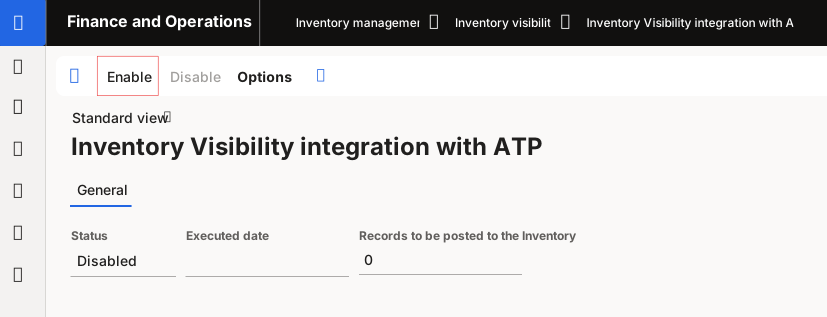
To configure Supply Chain Management to exchange ATP information in Inventory Visibility, navigate to Inventory management > Inventory Visibility > Inventory Visibility integration with ATP. Select Enable in the Action Pane.
Available-to-promise calculation work
Available-to-promise is a measure of the quantity of an item that is available and can be promised to a customer on a specific period. You can use this feature to anticipate changes in demand or supply and ensure that you have sufficient inventory on hand. By using the Inventory Visibility On-hand change schedule feature, you can proactively prepare for changes in demand or supply, ensuring that they have enough inventory to fulfill customer orders, leading to increased customer satisfaction, reduced stockouts, and improved overall efficiency and profitability.
The Available-to-promise calculation takes into account uncommitted inventory, lead times, planned receipts, and issues. This means that delivery promises are based on real-time data, and the system considers sales orders that have already been entered but not yet fulfilled. ATP can be fine-tuned with margin time and takes into account the working calendars of the business, carriers, and customers. It does not require a planning run and uses already existing supply, making it a good fit for the distribution industry and make-to-stock manufacturers.
Querying Inventory Visibility for on-hand and available-to-promise quantities will return specific information:
Date - The date that's attributed to the result
On-hand quantity - The actual on-hand quantity for the specified date
Scheduled supply - A sum of all scheduled inbound quantities that aren't physically available for immediate consumption on the given date
Scheduled demand - The sum of all scheduled outbound orders that haven't been consumed or shipped as of the given date
ATP quantity - The minimum projected on-hand quantity that's readily available during the specified scheduling period
To calculate, the Inventory Visibility On-hand change schedule feature considers the factors:
Current inventory levels: This is the amount of inventory that is currently available in stock.
Incoming inventory: This is the amount of inventory that is expected to arrive in the near future, such as incoming shipments.
Outgoing inventory: This is the amount of inventory that has already been committed to fulfill existing orders or customer demands. Based on these factors, the tool calculates the amount of inventory that is available to fulfill new customer orders. This helps you to better manage your inventory levels and ensure that you have enough stock to meet customer demands, while also avoiding overstocking and excess inventory.