Merk
Tilgang til denne siden krever autorisasjon. Du kan prøve å logge på eller endre kataloger.
Tilgang til denne siden krever autorisasjon. Du kan prøve å endre kataloger.
Applies to: ✔️ Front Door Standard ✔️ Front Door Premium ✔️ Front Door (classic)
Important
Azure Front Door (classic) will be retired on March 31, 2027. To avoid any service disruption, it's important that you migrate your Azure Front Door (classic) profiles to Azure Front Door Standard or Premium tier by March 2027. For more information, see Azure Front Door (classic) retirement.
Azure Front Door supports four traffic routing methods to manage how your HTTP/HTTPS traffic is distributed among different origins. When user requests reach the Front Door edge locations, the configured routing method ensures requests are forwarded to the best backend resource.
Note
In this article, an Origin refers to the backend, and an origin group refers to the backend pool in the Azure Front Door (classic) configuration.
The four traffic routing methods are:
Latency: Routes requests to the origins with the lowest latency within an acceptable sensitivity range, ensuring requests are sent to the nearest origins in terms of network latency.
Priority: Allows you to set a priority for your origins, designating a primary origin to handle all traffic and a secondary origin as a backup if the primary becomes unavailable.
Weighted: Assigns a weight to each origin to distribute traffic evenly or according to specified weight coefficients. Traffic is distributed based on weight values if the origins' latencies are within the acceptable sensitivity range.
Session Affinity: Ensures requests from the same end user are sent to the same origin by configuring session affinity for your frontend hosts or domains.
Note
In Azure Front Door Standard and Premium tiers, Endpoint name is referred to as Frontend host in Azure Front Door (classic).
All Front Door configurations include backend health monitoring and automated global failover. For more information, see Front Door backend monitoring. Azure Front Door can use a single routing method or combine multiple methods to create an optimal routing topology based on your application needs.
Note
By using the Front Door rules engine, you can configure rules to override route configurations in Azure Front Door Standard and Premium tiers or override the backend pool in Azure Front Door (classic) for a request. The origin group or backend pool set by the rules engine overrides the routing process described in this article.
Overall decision flow
The following diagram illustrates the overall decision flow:
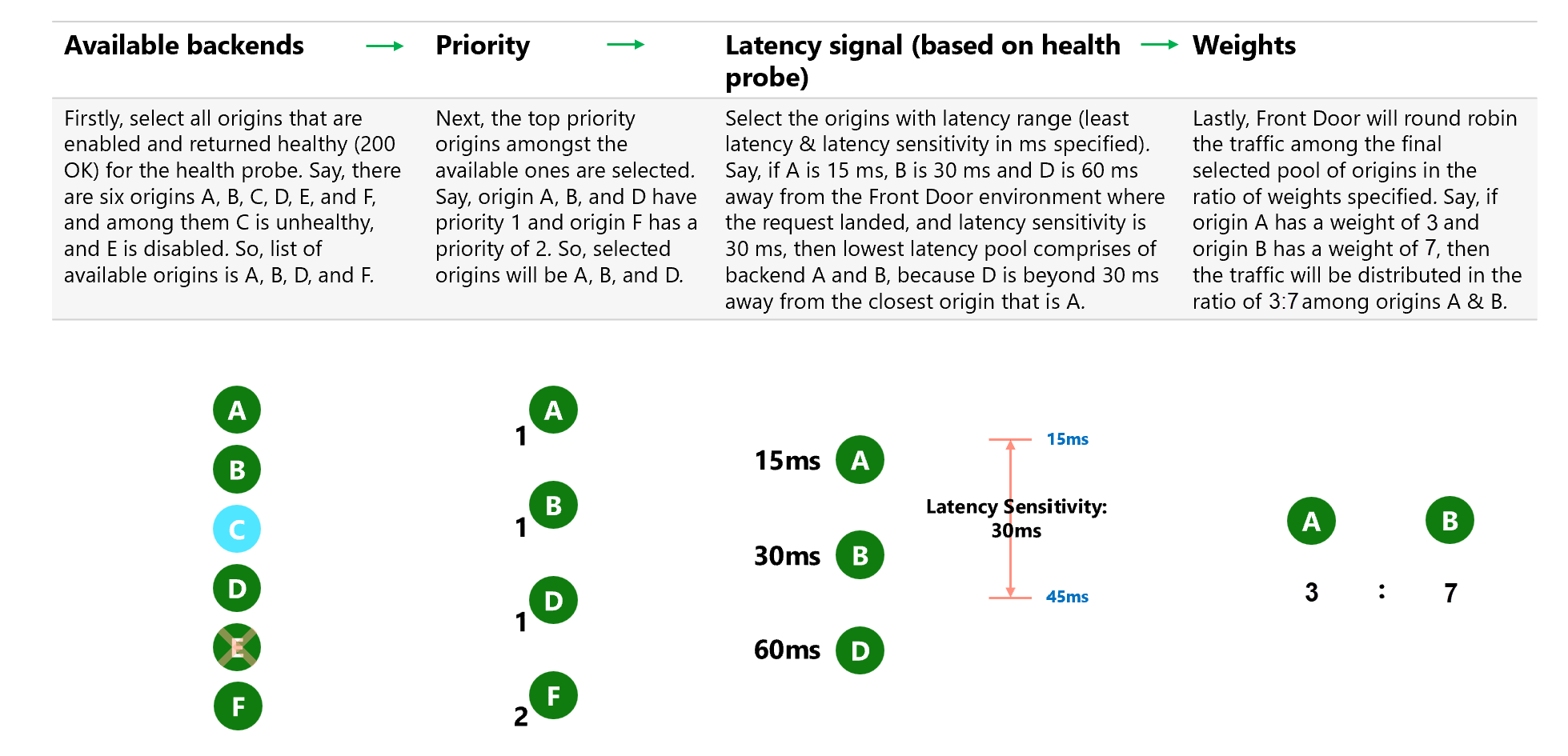
The decision steps are:
- Available origins: Select all origins that are enabled and healthy (200 OK) based on the health probe.
- Example: If there are six origins A, B, C, D, E, and F, and C is unhealthy and E is disabled, the available origins are A, B, D, and F.
- Priority: Select the top priority origins from the available ones.
- Example: If origins A, B, and D have priority 1 and origin F has priority 2, the selected origins are A, B, and D.
- Latency signal (based on health probe): Select origins within the allowable latency range from the Front Door environment where the request arrived. This range is based on the latency sensitivity setting of the origin group and the latency of the closest origins.
- Example: If the latency to origin A is 15 ms, to B is 30 ms, and to D is 60 ms, and the latency sensitivity is set to 30 ms, the selected origins are A and B, as D exceeds the 30-ms range.
- Weights: Distribute traffic among the final selected origins based on the specified weight ratios.
- Example: If origin A has a weight of 3 and origin B has a weight of 7, traffic is distributed 3/10 to A and 7/10 to B.
If you enable session affinity, the first request in a session follows the flow previously explained. Subsequent requests go to the origin selected in the first request.
Lowest latencies based traffic-routing
Deploying origins in multiple global locations can enhance your application's responsiveness by routing traffic to the origin that is "closest" to your end users. The Latency routing method is the default for Azure Front Door configurations. This method directs user requests to the origin with the lowest network latency, rather than the closest geographic location, ensuring optimal performance.
Azure Front Door's anycast architecture, combined with the Latency routing method, ensures that each user experiences the best performance based on their location. Each Front Door environment independently measures the latency to origins, meaning users in different locations are routed to the origin that offers the best performance for their specific environment.
Note
By default, the latency sensitivity property is set to 0 ms. With this setting, requests are always forwarded to the fastest available origins. Weights on the origins only take effect if two origins have the same network latency.
For more information, see Azure Front Door routing architecture.
Priority-based traffic-routing
To ensure high availability, deploy backup services to take over if the primary service fails. This setup is known as Active/Standby or Active/Passive deployment. The Priority traffic-routing method in Azure Front Door helps you implement this failover pattern.
By default, Azure Front Door routes traffic to the origins with the highest priority (lowest priority value). If these primary origins become unavailable, it routes traffic to the secondary origins (next lowest priority value). This process continues with tertiary origins if both primary and secondary origins are unavailable. Health probes monitor the availability of origins based on their configured status and health.
Configuring priority for origins
Each origin in your Azure Front Door origin group has a Priority property, which you can set to a value between 1 and 5. Lower values indicate higher priority. Multiple origins can share the same priority value.
Weighted traffic-routing method
Note
For customers with very low RPS (requests per second), due to the nature of how distributed AFD POPs and machines are, Azure Front Door can't guarantee that the weights you configure are strictly followed and the load balancing might appear skewed.
The Weighted traffic-routing method distributes traffic based on predefined weights.
In this method, you assign a weight to each origin in your Azure Front Door origin group. The weight is an integer between 1 and 1,000, with a default value of 50.
Traffic is distributed among available origins by using a round-robin mechanism based on the specified weight ratios, provided the origins meet the acceptable latency sensitivity. If you set the latency sensitivity to 0 milliseconds, weights only take effect if two origins have the same network latency.
The weighted method supports several scenarios:
- Gradual application upgrade: Route a percentage of traffic to a new origin and gradually increase it over time.
- Application migration to Azure: Create an origin group with both Azure and external origins. Adjust weights to prefer new origins, gradually increasing their traffic share until they handle most traffic, then disable and remove less preferred origins.
- Cloud-bursting for additional capacity: Expand on-premises deployments into the cloud by adding or enabling more origins and specifying traffic distribution.
Session affinity
By default, Azure Front Door forwards requests from the same client to different origins. However, session affinity is useful for stateful applications or scenarios where subsequent requests from the same user need to be processed by the same origin. This feature ensures that the same origin handles a user's session, which is beneficial for scenarios like client authentication.
Azure Front Door uses cookie-based session affinity, where managed cookies with SHA256 of the origin URL as the identifier are used. This method directs subsequent traffic from a user session to the same origin.
You can enable session affinity at the origin group level in Azure Front Door Standard and Premium tiers, and at the frontend host level in Azure Front Door (classic) for each configured domain or subdomain. When you enable this feature, Azure Front Door adds cookies named ASLBSA and ASLBSACORS to the user's session. These cookies help identify different users even if they share the same IP address, which allows for a more even distribution of traffic among origins.
The cookie's lifetime matches the user's session, as Front Door currently supports only session cookies.
Note
The browser session cookie maintains session affinity at the domain level. Subdomains under the same wildcard domain can share session affinity as long as the user's browser sends requests for the same origin resource.
Public proxies might interfere with session affinity because establishing a session requires Front Door to add a session affinity cookie to the response. This action can't be done if the response is cacheable, as it would disrupt cookies for other clients requesting the same resource. To prevent this problem, session affinity isn't established if the origin sends a cacheable response. If the session is already established, the cacheability of the response doesn't matter.
Session affinity is established in the following circumstances beyond the standard non-cacheable scenarios:
- The response includes the
Cache-Controlheader with no-store. - The response contains a valid
Authorizationheader. - The response is an HTTP 302 status code.
Next steps
- Learn how to create an Azure Front Door.
- Learn how Azure Front Door works.