Merk
Tilgang til denne siden krever autorisasjon. Du kan prøve å logge på eller endre kataloger.
Tilgang til denne siden krever autorisasjon. Du kan prøve å endre kataloger.
Azure Stream Analytics is a highly resilient service that processes and analyzes streaming data from multiple sources simultaneously. Stream Analytics provides the information that you can use to build complex event processing pipelines by using SQL-like queries.
When you use Azure, reliability is a shared responsibility. Microsoft provides a range of capabilities to support resiliency and recovery. You're responsible for understanding how those capabilities work within all of the services you use, and selecting the capabilities you need to meet your business objectives and uptime goals.
This article describes how Stream Analytics is resilient to potential problems like transient faults and availability zone outages. It provides guidance about how to protect mission-critical jobs against region outages and service maintenance. It also highlights key information about the Stream Analytics service-level agreement (SLA).
Important
Improving the resiliency of Stream Analytics alone might have limited effect if the other components aren't equally resilient. Consider the reliability of your data sources, including inputs and outputs. Depending on your resiliency requirements, you might need to make configuration changes across multiple areas.
Production deployment recommendations
To ensure high reliability in production environments that use Stream Analytics, we recommend that you take the following actions:
- Use regions that support availability zones. Deploy your streaming jobs and other resources in regions that support availability zones.
- Deploy sufficient capacity. Set your streaming units (SUs) based on your expected throughput and additional capacity to handle peak loads. Add a buffer above your baseline requirements to handle sudden increases.
- Monitor health. Implement comprehensive monitoring by using Azure Monitor metrics and diagnostic logs to track job health, input and output events, and resource utilization. Set up alerts for critical metrics like watermark delay and runtime errors to detect problems before they affect data processing. For more information, see Monitor Stream Analytics.
- Implement multi-region redundancy for mission-critical workloads. Deploy identical Stream Analytics jobs across multiple regions. Replicate their configurations and ensure appropriate data routing to achieve regional resiliency. Stream Analytics doesn't provide native multi-region replication, but this approach enables failover and continuity. For more information, see Custom multi-region solutions for resiliency.
Reliability architecture overview
This section describes some of the important aspects of how the service works that are most relevant from a reliability perspective. The section introduces the logical architecture, which includes some of the resources and features that you deploy and use. It also discusses the physical architecture, which provides details on how the service works under the covers.
Logical architecture
A job is the fundamental unit in Stream Analytics that lets you define and run your stream processing logic. A job consists of the following major components:
- Inputs that read streaming data from data sources like Azure Event Hubs, Azure IoT Hub, or Azure Storage.
- A query that processes and transforms the data.
- Outputs that continuously write results to different destinations, like Azure SQL Database, Azure Data Lake Storage, Azure Cosmos DB, and Power BI.
For more information, see Stream Analytics resource model.
Physical architecture
Stream Analytics achieves high reliability by applying multiple layers of resiliency to mitigate problems in the underlying infrastructure and input and output data sources. The following components help ensure that your jobs run robustly:
Worker nodes: Stream Analytics jobs run within a cluster. The virtual machines (VMs) within the cluster are known as worker nodes. When you use the Standard or Standard V2 SKUs, your jobs run on shared clusters. When you use the Dedicated SKU, your jobs run on their own dedicated cluster.
The platform automatically manages worker node creation, job placement across worker nodes, health monitoring, and the replacement of unhealthy worker nodes, so you don't see or manage the VMs directly.
SUs: SUs represent the compute resources that run a job. The higher the number of SUs, the more compute resources are allocated for the job. The platform manages worker nodes and job distribution across worker nodes, but you're responsible for allocating SUs to jobs. For more information, see Understand and adjust Stream Analytics SUs.
Checkpoints: Stream Analytics maintains job state through regular checkpointing of state. Checkpoints help failed jobs recover quickly with minimal data reprocessing, even for jobs that use stateful query logic.
When processing failures occur, Stream Analytics automatically restarts from the last checkpoint and reprocesses events that fail during processing. This guarantee applies to all built-in functions and user-defined functions within the job. But achieving end-to-end, exactly-once delivery depends on your output destination's capabilities. For more information, see Checkpoint and replay concepts in Stream Analytics jobs.
Note
By using Stream Analytics on IoT Edge, you can run jobs on your own infrastructure. When you use Stream Analytics on IoT Edge, you're responsible for setting it up to meet your reliability requirements. Stream Analytics on IoT Edge is outside the scope of this article.
Resilience to transient faults
Transient faults are short, intermittent failures in components. They occur frequently in a distributed environment like the cloud, and they're a normal part of operations. Transient faults correct themselves after a short period of time. It's important that your applications can handle transient faults, usually by retrying affected requests.
All cloud-hosted applications should follow the Azure transient fault handling guidance when they communicate with any cloud-hosted APIs, databases, and other components. For more information, see Recommendations for handling transient faults.
Stream Analytics automatically handles many transient faults when it ingests data from inputs and writes data to outputs by using built-in retry mechanisms. After a worker node restart or job reassignment, the job uses checkpoints to replay any events that weren't fully processed and continues processing until it reaches the current input stream.
It's a good practice to set up output error policies. But these policies only apply to data conversion errors, and they don't change how Stream Analytics handles transient faults.
Resilience to availability zone failures
Availability zones are physically separate groups of datacenters within an Azure region. When one zone fails, services can fail over to one of the remaining zones.
Stream Analytics is automatically zone-redundant in regions that support availability zones, which means that jobs use multiple availability zones. Zone redundancy ensures that your job remains resilient to a wide range of failures, including catastrophic datacenter outages, without any changes to the application logic.
When you create a Stream Analytics job in a zone-enabled region, the service distributes your job's compute resources across multiple availability zones.
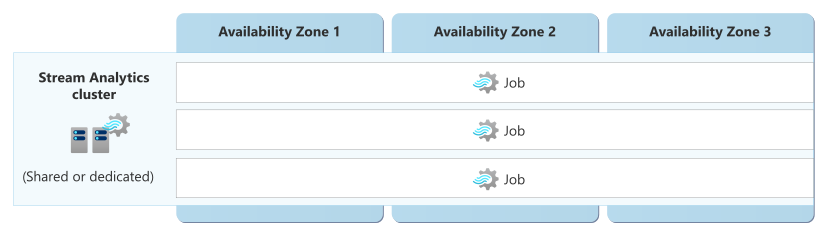
This zone-redundant deployment model ensures that your streaming jobs continue to process data even if an entire availability zone becomes unavailable. For example, the following diagram shows how jobs continue to run if zone 3 experiences an outage.
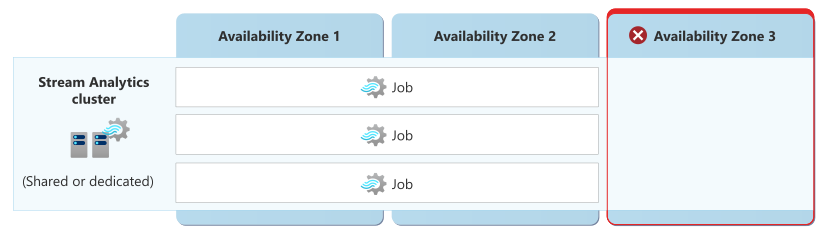
Zone redundancy applies to all Stream Analytics features, including query processing, checkpointing, and job management tasks. Stream Analytics automatically replicates your job's state and checkpoint data across availability zones, which prevents data loss and reduces downtime during zone failures.
Requirements
- Region support: Zone redundancy for Stream Analytics resources is supported in any region that supports availability zones. For the complete list of regions that support availability zones, see Azure regions list.
- SKU requirements: Zone redundancy is available in all Stream Analytics SKUs.
Cost
Zone redundancy on Stream Analytics doesn't incur extra charges. You pay the same rate for SUs whether your job runs in a zone-redundant configuration or in a non-zone-redundant configuration. For more information, see Stream Analytics pricing.
Configure availability zone support
Create a zone-redundant Stream Analytics job. Stream Analytics jobs are automatically zone redundant when you create them in a supported region. No configuration is required.
For deployment instructions, see Quickstart: Create a Stream Analytics job by using the Azure portal and Quickstart: Create a dedicated Stream Analytics cluster by using the Azure portal.
Enable zone redundancy. All jobs and dedicated clusters are automatically zone-redundant in regions that have availability zones. You don't need to enable zone redundancy.
Turn off zone redundancy. You can't turn off zone redundancy.
Behavior when all zones are healthy
This section describes what to expect when Stream Analytics jobs are zone-redundant and all availability zones are operational.
Traffic routing between zones: Stream Analytics runs each job on worker nodes. Workers in any zone might process incoming streaming data. The service uses internal load balancing to distribute processing tasks across zones.
Data replication between zones: Stream Analytics replicates job state and checkpoint data synchronously across availability zones. As the job processes events and updates its state, Stream Analytics writes those changes to multiple availability zones before it acknowledges them. This synchronous replication ensures zero data loss even if an entire zone becomes unavailable. The replication process is transparent to your application and doesn't affect processing latency under normal conditions.
Behavior during a zone failure
This section describes what to expect when Stream Analytics jobs are zone-redundant and there's an availability zone outage.
- Detection and response: The Stream Analytics platform is responsible for detecting a failure in an availability zone and responding to it. Stream Analytics marks workers in the failed zone as unhealthy and automatically redistributes jobs to workers in the remaining healthy zones. You don't need to do anything to initiate a zone failover.
- Notification: Microsoft doesn't automatically notify you when a zone is down. However, you can use Azure Resource Health to monitor for the health of an individual resource, and you can set up Resource Health alerts to notify you of problems. You can also use Azure Service Health to understand the overall health of the service, including any zone failures, and you can set up Service Health alerts to notify you of problems.
Active requests: Stream Analytics shifts running jobs to another worker in a healthy availability zone.
Stream Analytics uses checkpointing to maintain processing state. During a zone failure, workers in healthy zones automatically reprocess jobs running in the failed zone from the last checkpoint.
Expected data loss: The job checkpointing system ensures no data loss.
Expected downtime: Jobs in progress automatically resume after the platform moves them to a healthy worker.
Traffic rerouting: The service automatically redirects all new input data to workers in healthy zones. Existing connections from input sources are reestablished with workers in operational zones. Output connections are similarly reestablished, which ensures continuous data flow through your streaming pipeline.
Zone recovery
When the failed availability zone recovers, Stream Analytics automatically reintegrates it into the active processing pool. Jobs begin to use the recovered infrastructure.
You don't take any action for zone recovery. The platform handles all zone recovery tasks, including state replication and workload redistribution.
Test for zone failures
The Stream Analytics platform manages traffic routing, failover, and zone recovery, so you don't need to initiate or validate availability zone failure processes.
Resilience to region-wide failures
Stream Analytics deploys resources into a single Azure region. If the region becomes unavailable, your jobs (and dedicated clusters, if applicable) are also unavailable.
Custom multi-region solutions for resiliency
To achieve multi-region resilience for your streaming workloads, consider deploying separate jobs in multiple regions. When you take this approach, you're responsible for deploying and managing the jobs and for setting up the appropriate data routing and replication strategies. The Stream Analytics jobs are two separate entities. It's your application's responsibility to send input data into both regional inputs and to reconcile the regional outputs. For more information, see Achieve geo-redundancy for Stream Analytics jobs.
Backup and recovery
Stream Analytics doesn't have a built-in backup and restore feature.
If you want to move, copy, or back up the definition and configuration of your jobs, you can use the Stream Analytics extension for Visual Studio Code to export an existing job in the Azure cloud to your local computer. After you save the entire configuration of your Stream Analytics jobs locally, you can deploy it to the same region or another Azure region. For more information, see Copy, back up, and move your Stream Analytics jobs.
Resilience to service maintenance
Stream Analytics does automatic platform maintenance to apply security updates, deploy new features, and improve service reliability. It might deploy service updates weekly or more frequently. Stream Analytics tests all new updates to ensure high quality.
Consider the following points to ensure that your jobs are resilient to service maintenance activities:
Set up jobs to be resilient to replays. Stream Analytics typically uses checkpoints to restore data after service maintenance. But sometimes it needs to use a replay technique instead. You need to set up your input data sources so that replays don't cause incorrect or partial results in your output. For more information, see Job recovery from a service upgrade.
Consider mitigating the risk of bugs by deploying identical jobs. The service proactively looks for signals after deployment to each batch to check whether the deployment introduces bugs. But no matter how much you test, an existing in-progress job might fail when maintenance introduces a problem. If you run mission‑critical jobs, take steps to mitigate this risk.
You can reduce the risk of a bug affecting your workload by deploying identical jobs to two Azure regions. Monitor these jobs to receive notifications when something unexpected occurs. If one of these jobs enters a failed state after a Stream Analytics service update, take the following actions:
- Contact Azure support to help identify the cause and fix the problem.
- Fail over any downstream consumers to use the healthy job output.
When you select Azure regions to use for your secondary job, consider whether your region has a paired region. The Azure regions list has the most up-to-date information about which regions are paired. Stream Analytics guarantees that infrastructure in paired regions is updated at different times. Updates to Stream Analytics don't deploy at the same time in a set of paired regions. A sufficient time gap exists between the updates to identify and fix potential problems.
Service-level agreement
The service-level agreement (SLA) for Azure services describes the expected availability of each service and the conditions that your solution must meet to achieve that availability expectation. For more information, see SLAs for online services.
Stream Analytics provides separate availability SLAs for API calls to manage jobs and for the operations of the jobs.