Merk
Tilgang til denne siden krever autorisasjon. Du kan prøve å logge på eller endre kataloger.
Tilgang til denne siden krever autorisasjon. Du kan prøve å endre kataloger.
This article provides best practice guidelines that help you use access tiers to optimize performance and reduce costs. To learn more about access tiers, see Access tiers for blob data.
Choose the most cost-efficient access tiers
You can reduce costs by placing blob data into the most cost-efficient access tiers. Choose from three tiers that are designed to optimize your costs around data use. For example, the hot tier has a higher storage cost but lower read cost. Therefore, if you plan to access data frequently, the hot tier might be the most cost-efficient choice. If you read data less often, the cool, cold, or archive tier may be best because it lowers storage costs but raises read costs.
To find the most optimal access tier, estimate what percentage of the data reads each month. The following chart shows the impact on monthly spending given various read percentages.
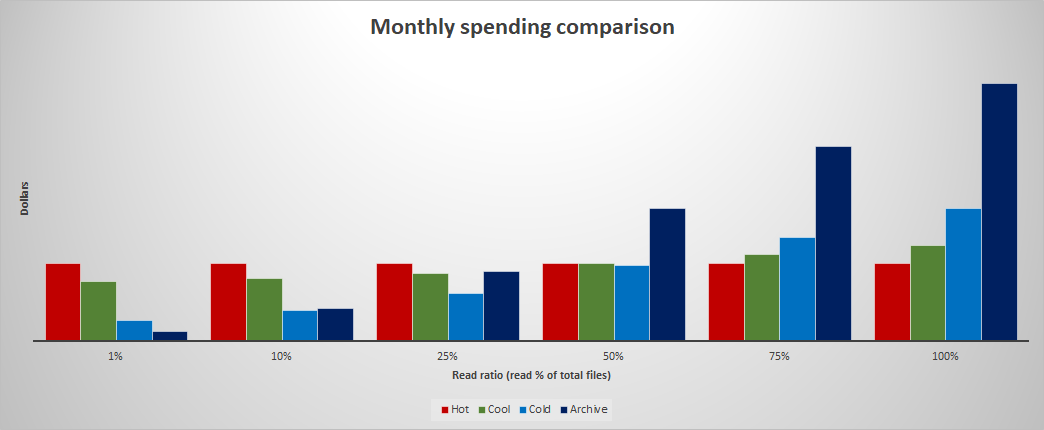
To model and analyze the cost of using cool or cold versus archive storage, see Archive versus cold and cool. You can apply similar modeling techniques to compare the cost of hot to cool, cold, or archive.
Apply smart tier to optimize costs automatically
If you aren't aware of the most optimal access tier for every object or do not want to manage the placement of these objects, Smart tier might be great option to choose. The automatic down tiering of inactive data can lead to large cost savings over time. While charging a small monitoring fee, it provides additional simplification to the billing model by not charging tier transitions, early deletes or capacity rehydration. See Optimize costs with smart tier for details.
Migrate data directly to the most cost-efficient access tiers
Choosing the most optimal tier up front can reduce costs. If you change the tier of a block blob you upload, you pay for writing to the initial tier when you upload it and then pay for writing to the new tier. If you change tiers by using a lifecycle management policy, then that policy requires a day to take effect and a day to complete execution. You also pay the capacity cost of storing data in the initial tier before the tier changes.
For guidance about how to upload to a specific access tier, see Set a blob's access tier.
For offline data movement to the desired tier, see Azure Data Box.
Move data into the most cost-efficient access tiers
After data is uploaded, you should periodically analyze your containers and blobs to understand how they're stored, organized, and used in production. Then, use lifecycle management policies to move data to the most cost-efficient tiers. For example, data not accessed for more than 30 days might be more cost-efficient if placed in the cool tier. Consider archiving data that hasn't been accessed for over 180 days.
To gather telemetry, enable blob inventory reports and enable last access time tracking. Analyze use patterns based on the last access time by using tools such as Azure Synapse or Azure Databricks. To learn about ways to analyze your data, see any of these articles:
Calculate blob count and total size per container using Azure Storage inventory
How to calculate Container Level Statistics in Azure Blob Storage with Azure Databricks
Tier append and page blobs
Your analysis might reveal append or page blobs that aren't actively used. For example, you might have log files (append blobs) that are no longer being read or written to, but you'd like to store them for compliance reasons. Similarly, you might want to back up disks or disk snapshots (page blobs). You can move these blobs into cooler tiers as well. However, you must first convert them to block blobs.
For information about how to convert append and page blobs to block blobs, see Convert append blobs and page blobs to block blobs.
Pack small files before moving data to cooler tiers
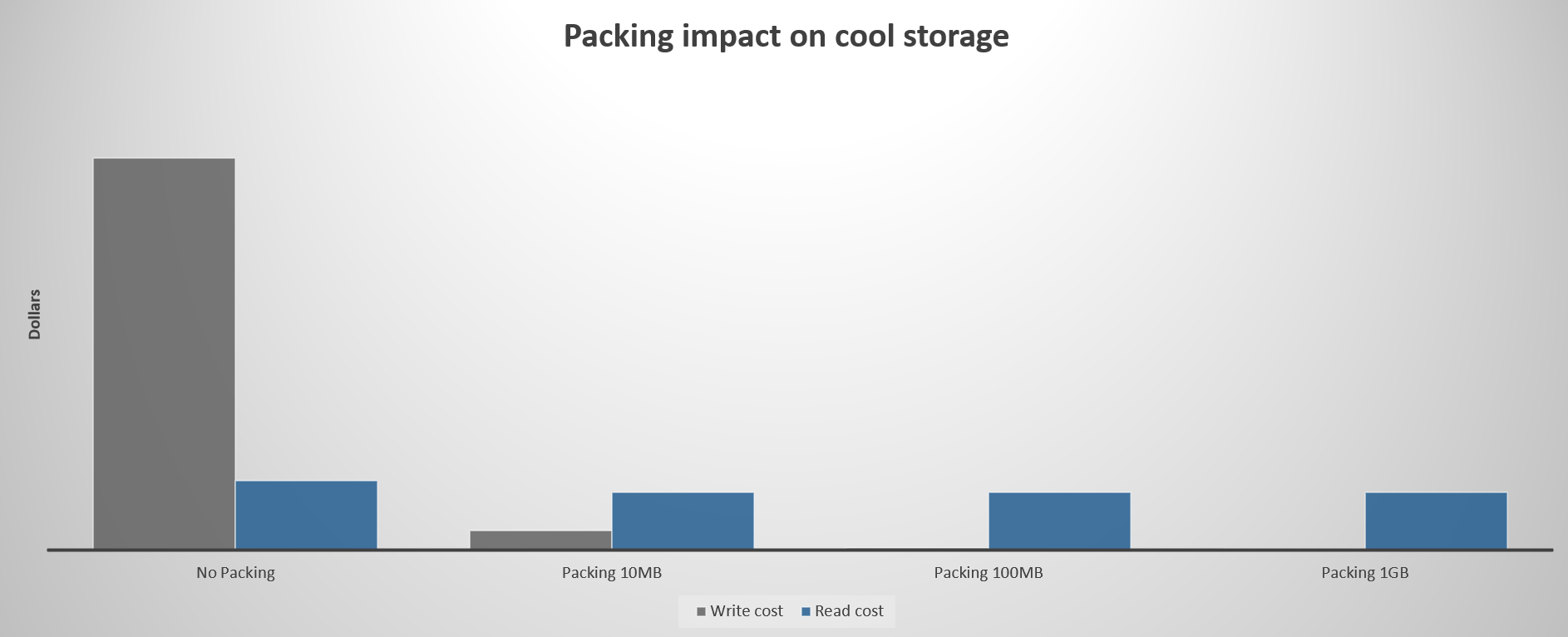
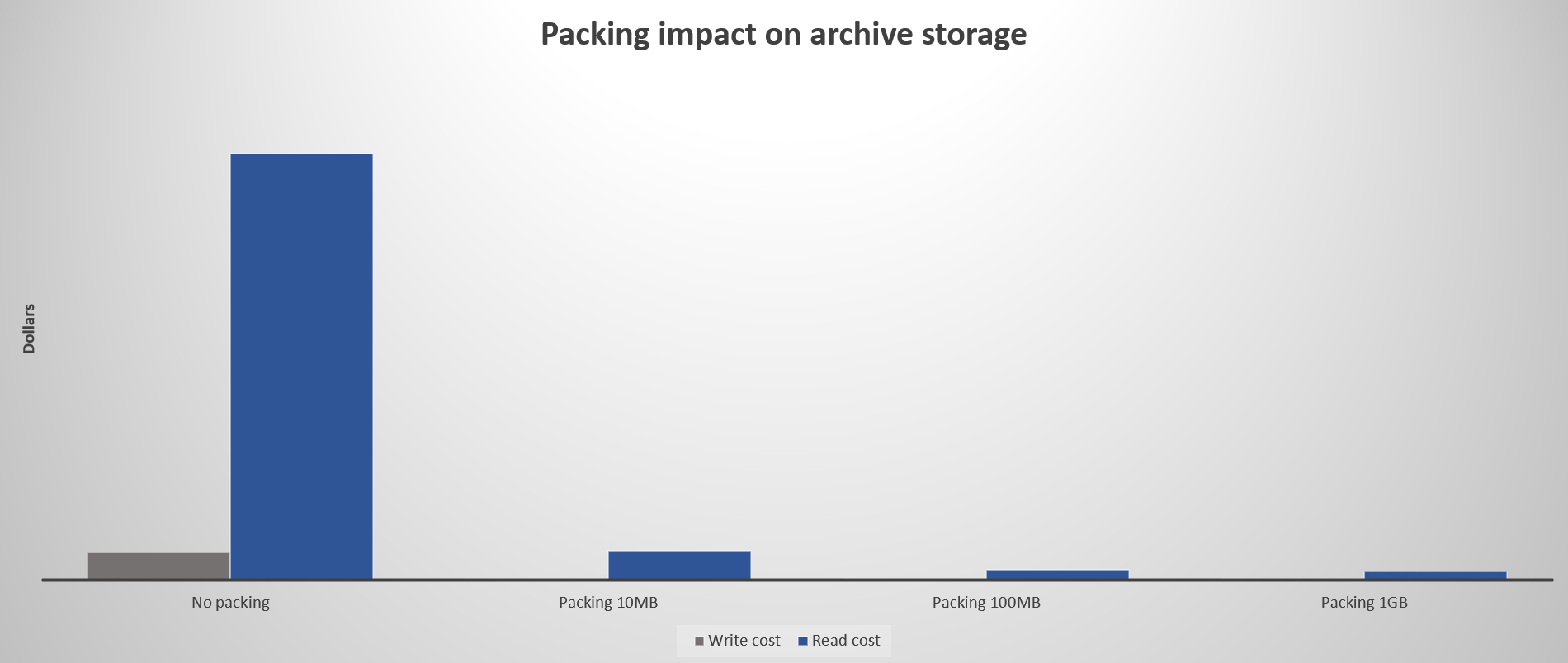
Each read or write operation incurs a cost. To reduce the cost of reading and writing data, consider packing small files into larger ones by using file formats such as TAR or ZIP. Fewer files reduce the number of operations required to transfer data.
The following chart shows the relative impact of packing files for the cool tier. The read cost assumes a monthly read percentage of 30%.
The following chart shows the relative impact of packing files for the archive tier. The read cost assumes a monthly read percentage of 30%.
To model and analyze the cost saving of packing files, see Packing Saving tab in this workbook.
Tip
To facilitate search and read scenarios, consider creating an index that maps packed file paths with original file paths, and then storing these indexes as block blobs in the hot tier.