Merk
Tilgang til denne siden krever autorisasjon. Du kan prøve å logge på eller endre kataloger.
Tilgang til denne siden krever autorisasjon. Du kan prøve å endre kataloger.
Innføring
Hvis du vil arbeide med Stoff-API-er, som mange andre Microsoft-tjenester, må du først få et Microsoft Entra-token for Fabric-tjenesten, og deretter bruke dette tokenet i autorisasjonshodet for API-kallet.
I denne hurtigstartopplæringen skal du opprette en C#-konsollapp, som henter et Entra ID-token ved hjelp av MSAL.Net bibliotek, og deretter bruker du C# HttpClient til å kalle API for listearbeidsområder.
Opprett appregistrering
Hvis du vil ha et Microsoft Entra-token, må du først registrere et program med Microsoft Entra ID.
Hvis du vil lære mer om hvordan du registrerer et program og ulike egenskaper for programmet og hvordan det kan være aktuelt for scenarioet ditt, kan du se Registrere en app i Microsofts identitetsplattform.
I denne hurtigstartopplæringen skal du opprette en offentlig klient med omadresserings-URI = http://localhost
Logg på administrasjonssenteret for Microsoft Entra som minst en administrator for skyprogrammet.
Bla til appregistreringer for programmer > .
Klikk ny registrering.
Skriv inn et visningsnavn for programmet, og legg til URI for omadressering av offentlig klient
http://localhost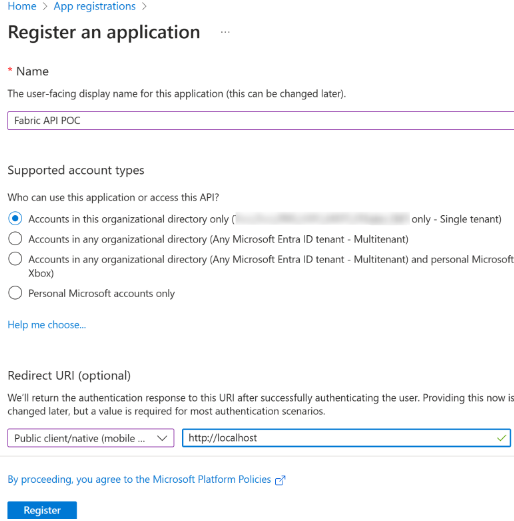
Velg Registrer.
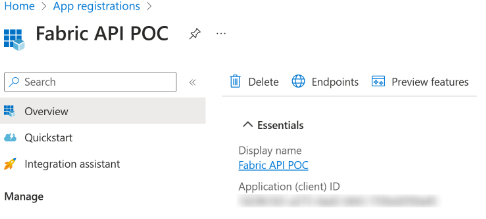
Kopier program-ID-en (klient) og lim den inn i en notisblokk som skal brukes senere.
Hent token
I denne opplæringen skal du bruke MSAL.Net til å skaffe deg et Entra ID-token for Fabric-tjenesten med følgende omfang: Workspace.ReadWrite.All, Item.ReadWrite.All.
Hvis du vil ha mer informasjon om tokenanskaffelsering med MSAL.Net til, kan du se Token Acquisition – Microsoft Authentication Library for .NET.
Lim inn program-ID-en (klient)-ID-en du kopierte tidligere, og lim den inn for ClientId-variabelen.
C#-kodeeksempel for anskaffelse av et Microsoft Entra-tilgangstoken
#region parameters section
string ClientId = "YourApplicationId";
string Authority = "https://login.microsoftonline.com/organizations";
string RedirectURI = "http://localhost";
#endregion

#region Acquire a token for Fabric APIs
// In this sample we acquire a token for Fabric service with the scopes
// Workspace.ReadWrite.All and Item.ReadWrite.All
string[] scopes = new string[] { "https://api.fabric.microsoft.com/Workspace.ReadWrite.All https://api.fabric.microsoft.com/Item.ReadWrite.All" };

PublicClientApplicationBuilder PublicClientAppBuilder =
        PublicClientApplicationBuilder.Create(ClientId)
        .WithAuthority(Authority)
        .WithRedirectUri(RedirectURI);

IPublicClientApplication PublicClientApplication = PublicClientAppBuilder.Build();

AuthenticationResult result = await PublicClientApplication.AcquireTokenInteractive(scopes)
        .ExecuteAsync()
        .ConfigureAwait(false);

Console.WriteLine(result.AccessToken);
#endregion
API for samtalelistearbeidsområder
I denne delen vil du:
- Opprett C# HttpClient med tokenet vi kjøpte i forrige del.
- Legg til
https://api.fabric.microsoft.com/v1/som basis-URL-adresse for klienten. - API for samtalelistearbeidsområder og skriv svaret på konsollen.
C#-kodeeksempel for oppretting av en API for http-klient og kall til API for listearbeidsområder
// Create client
HttpClient client = new HttpClient();
client.DefaultRequestHeaders.Authorization = new AuthenticationHeaderValue("Bearer", result.AccessToken);
string baseUrl = "https://api.fabric.microsoft.com/v1/";
client.BaseAddress = new Uri(baseUrl);

// Call list workspaces API
HttpResponseMessage response = await client.GetAsync("workspaces");
string responseBody = await response.Content.ReadAsStringAsync();
Console.WriteLine(responseBody);
Eksempel på full C#-konsollappkode
using Microsoft.Identity.Client;
using System.Net.Http.Headers;

#region parameters section
string ClientId = "YourApplicationId";
string Authority = "https://login.microsoftonline.com/organizations";
string RedirectURI = "http://localhost";
#endregion

#region Acquire a token for Fabric APIs
// In this sample we acquire a token for Fabric service with the scopes Workspace.ReadWrite.All and Item.ReadWrite.All
string[] scopes = new string[] { "https://api.fabric.microsoft.com/Workspace.ReadWrite.All https://api.fabric.microsoft.com/Item.ReadWrite.All" };

PublicClientApplicationBuilder PublicClientAppBuilder =
        PublicClientApplicationBuilder.Create(ClientId)
        .WithAuthority(Authority)
        .WithRedirectUri(RedirectURI);

IPublicClientApplication PublicClientApplication = PublicClientAppBuilder.Build();

AuthenticationResult result = await PublicClientApplication.AcquireTokenInteractive(scopes)
        .ExecuteAsync()
        .ConfigureAwait(false);

Console.WriteLine(result.AccessToken);
#endregion

#region Create an HTTP client and call the Fabric APIs
// Create client
HttpClient client = new HttpClient();
client.DefaultRequestHeaders.Authorization = new AuthenticationHeaderValue("Bearer", result.AccessToken);
string baseUrl = "https://api.fabric.microsoft.com/v1/";
client.BaseAddress = new Uri(baseUrl);

// Call list workspaces API
HttpResponseMessage response = await client.GetAsync("workspaces");
string responseBody = await response.Content.ReadAsStringAsync();
Console.WriteLine(responseBody);
#endregion