Merk
Tilgang til denne siden krever autorisasjon. Du kan prøve å logge på eller endre kataloger.
Tilgang til denne siden krever autorisasjon. Du kan prøve å endre kataloger.
Applies to:  SQL Server 2016 (13.x) and later versions
Azure SQL Database
Azure SQL Managed Instance
SQL database in Microsoft Fabric
SQL Server 2016 (13.x) and later versions
Azure SQL Database
Azure SQL Managed Instance
SQL database in Microsoft Fabric
Data virtualization lets you run Transact-SQL (T-SQL) queries over external data without loading it into your database. PolyBase is the Database Engine feature that implements data virtualization across SQL Server and Azure SQL. You define an external data source, optional file format, and external table, and then query the external table with SELECT like any other table.
This guide helps you:
- Understand which PolyBase features your SQL platform and version support.
- Choose between
OPENROWSET, external tables, andBULK INSERTfor querying or ingesting data. - Follow step-by-step links for common scenarios.
- Review performance, troubleshooting, and best practices for production workloads.
Common use cases
The following table describes possible usage scenarios.
| Scenario | Use |
|---|---|
| Ad-hoc file exploration | OPENROWSET(BULK ...) |
| Reusable file querying for BI/reporting | External tables over files |
| Cross-database querying (SQL Server, Oracle, Teradata, MongoDB, ODBC) | PolyBase connectors with external tables |
| Exporting query results to files | CREATE EXTERNAL TABLE AS SELECT (CETAS) |
| Bulk ingestion into tables | BULK INSERT or OPENROWSET(BULK ...) with INSERT ... SELECT |
Which features are available where?
The following table shows which core PolyBase and data virtualization features are available on each SQL platform. Use this table to determine what you can do on your platform before you use the detailed guides.
| Feature | SQL Server 2019 | SQL Server 2022 | SQL Server 2025 | Azure SQL Database | Azure SQL Managed Instance | SQL database in Microsoft Fabric |
|---|---|---|---|---|---|---|
| External tables | Yes | Yes | Yes | Yes | Yes | Yes |
| OPENROWSET (BULK) | Yes 1 | Yes | Yes | Yes | Yes | Yes |
| CETAS (export) | No | Yes | Yes | No | Yes | No |
| CSV / delimited files | Yes 2 | Yes | Yes | Yes | Yes | Yes |
| Parquet files | No | Yes | Yes | Yes | Yes | Yes |
| Delta Lake tables | No | Yes | Yes | No | No | No |
| Connect to another SQL Server | Yes | Yes | Yes | No | No | No |
| Connect to Azure SQL Database or Azure SQL Managed Instance | Yes 3 | Yes 3 | Yes 3 | No | No | No |
| Connect to Oracle / Teradata / MongoDB | Yes | Yes | Yes | No | No | No |
| Connect to Azure Blob Storage | Yes | Yes | Yes | Yes | Yes | No |
| Connect to ADLS Gen2 | No | Yes | Yes | Yes | Yes | No |
| Connect to S3-compatible storage | No | Yes | Yes | No | No | No |
| Connect to OneLake (Fabric) | No | No | No | No | No | Yes |
| Pushdown computation | Yes | Yes | Yes | No | No | No |
| Managed Identity authentication | No | No | Yes 4 | Yes | Yes | No |
1 SQL Server 2019 (15.x) supports OPENROWSET(BULK...) for local and network file paths. In SQL Server 2022 (16.x) and later versions, OPENROWSET(BULK...) also supports reading from cloud storage with FORMAT = 'PARQUET', FORMAT = DELTA, and FORMAT = 'CSV'.
2 CSV support in SQL Server 2019 (15.x) required Hadoop. In SQL Server 2022 (16.x) and later versions, CSV is natively supported without Hadoop.
3 Uses the SQL Server connector (sqlserver://). The database scoped credential targets the Azure SQL endpoint, same steps as connecting to another SQL Server.
4 Managed Identity authentication is supported for connecting to Azure Blob Storage (ABS) and ADLS Gen2. It requires Azure Arc-enabled SQL Server or SQL Server on an Azure VM for on-premises SQL Server. It's natively available on Azure SQL Database and Azure SQL Managed Instance.
Note
Starting in SQL Server 2025 (17.x), querying data files (CSV, Parquet, and Delta) on Azure Blob Storage, ADLS Gen2, or S3-compatible storage is a native engine capability and no longer requires installing or running PolyBase services. RDBMS connectors (SQL Server, Oracle, Teradata, MongoDB, ODBC) still require PolyBase services to be installed and running. SQL Server 2025 (17.x) also adds Linux support for these connectors, which were previously available on Windows only.
Query external data
Before you choose a specific scenario, understand the three ways to query external data:
| Approach | Syntax | Use when | Authentication | PolyBase required |
|---|---|---|---|---|
| OLE DB ad hoc queries | OPENROWSET(provider, connection, query) |
You want a quick one-time query without persistent objects, or need Microsoft Entra ID authentication | SQL authentication, Windows authentication, Microsoft Entra ID (MSOLEDBSQL) | No |
| File ad hoc queries | OPENROWSET(BULK ...) |
You want to explore file data quickly or test schemas before creating a table | SAS token, access key, Managed Identity, Microsoft Entra ID | Yes for Azure SQL Database and Azure SQL Managed Instance No for SQL Server instances |
| Persistent data connectors | CREATE EXTERNAL TABLE with sqlserver://, oracle://, teradata://, etc. |
You need recurring access, governance, statistics, and pushdown computation for production | SQL authentication only | Yes |
PolyBase services are required for cloud file access in SQL Server 2019 (15.x) and SQL Server 2022 (16.x). SQL Server 2025 (17.x) and later versions have native support for CSV, Parquet, and Delta without PolyBase.
Decision guide
| Scenario | Recommendation |
|---|---|
| I need Microsoft Entra ID authentication for remote SQL, or want to avoid PolyBase services | Use OPENROWSET(MSOLEDBSQL, ...) (ad hoc, no persistent objects) |
| I need persistent tables, statistics, or pushdown computation to remote databases | Use CREATE EXTERNAL TABLE with PolyBase connectors (sqlserver://, oracle://, teradata://, mongodb://, odbc://). OPENROWSET does not support connectors |
| I'm exploring a new file or testing a schema | Use OPENROWSET(BULK ...) (fast iteration, no persistent objects) |
| I'm ingesting file data into a table with transformations | Use INSERT ... SELECT from OPENROWSET(BULK ...) |
| I need governance or shared access for many users or applications | Use CREATE EXTERNAL TABLE so permissions and metadata are centralized |
| I'm working in SQL database in Fabric | Use OPENROWSET(BULK ...) for ad hoc OneLake queries or external tables for reusable access; for external storage use OneLake shortcuts |
Choose your scenario
Now that you understand the three approaches, use one of the following guides to implement your specific use case.
Query files (Parquet, CSV, or Delta)
If your data is in Parquet, CSV, or Delta files on Azure Blob Storage, ADLS Gen2, S3-compatible storage, or OneLake, follow one of these guides:
| Scenario | Recommended guide | Platforms |
|---|---|---|
| Quick ad hoc query on a Parquet or CSV file | Use OPENROWSET. No external table needed |
SQL Server 2022 (16.x) and later versions, Azure SQL Database, Azure SQL Managed Instance, SQL database in Fabric |
| Repeated queries on Parquet files with a persistent schema | Create an external table over Parquet | SQL Server 2022 (16.x) and later versions, Azure SQL Database, Azure SQL Managed Instance, SQL database in Fabric |
| Query CSV files with an external table | Create an external table with a file format for delimited text | SQL Server 2019 (15.x) and later versions, Azure SQL Database, Azure SQL Managed Instance, SQL database in Fabric |
| Query Delta Lake tables | Create an external table with FILE_FORMAT = DeltaLakeFileFormat |
SQL Server 2022 (16.x) and later versions |
| Export query results to Parquet or CSV files (CETAS) | Use CREATE EXTERNAL TABLE AS SELECT |
SQL Server 2022 (16.x) and later versions, Azure SQL Managed Instance |
You can also follow one of these step-by-step tutorials:
| Tutorial | Description |
|---|---|
| Get started with PolyBase in SQL Server 2022 | Covers OPENROWSET with Parquet and CSV, external tables, and folder navigation. |
| Virtualize parquet file in a S3-compatible object storage with PolyBase | Tutorial for SQL Server 2022 (16.x) and later versions. |
| Virtualize CSV file with PolyBase | Tutorial for SQL Server 2022 (16.x) and later versions. |
| Virtualize delta table with PolyBase | Tutorial for SQL Server 2022 (16.x) and later versions. |
| Data virtualization with Azure SQL Database (Preview) | Azure SQL Database guide for Parquet and CSV. |
| Data virtualization with Azure SQL Managed Instance | Azure SQL Managed Instance guide for Parquet, CSV, and CETAS. |
| Data virtualization in SQL database in Fabric | SQL database in Fabric guide for OneLake files. |
Connect to another SQL Server instance, Azure SQL Database, or SQL Managed Instance
In SQL Server 2019 (15.x) and later versions, PolyBase can query tables in another SQL Server instance, Azure SQL Database, or Azure SQL Managed Instance, without using linked servers.
Important
The sqlserver:// connector isn't supported in SQL database in Fabric. PolyBase RDBMS connectors use SQL authentication through CREATE DATABASE SCOPED CREDENTIAL and don't support Microsoft Entra ID, Managed Identity, or service principal authentication. Because SQL database in Fabric requires Microsoft Entra authentication, you can't connect to it using PolyBase.
| Step | What to do |
|---|---|
| 1. Install PolyBase | Install PolyBase on Windows or Install PolyBase on Linux |
| 2. Create a credential | CREATE DATABASE SCOPED CREDENTIAL with the target login |
| 3. Create an external data source | CREATE EXTERNAL DATA SOURCE ... WITH (LOCATION = 'sqlserver://<server>') |
| 4. Create an external table | CREATE EXTERNAL TABLE ... WITH (LOCATION = '<db>.<schema>.<table>') |
| 5. Query | SELECT * FROM <external_table> |
Tip
The SQL Server connector (sqlserver://) also works for Azure SQL Database and Azure SQL Managed Instance. Use the same steps, and set LOCATION to the Azure SQL endpoint (for example, sqlserver://myserver.database.windows.net).
For a detailed guide, see Configure PolyBase to access external data in SQL Server.
Connect to Oracle, Teradata, or MongoDB
SQL Server 2019 (15.x) and later versions can query Oracle, Teradata, MongoDB, and Cosmos DB through PolyBase ODBC connectors.
| Data source | Guide | Requirements |
|---|---|---|
| Oracle | Configure PolyBase to access external data in Oracle | SQL Server 2019 (15.x) and later versions, Oracle client drivers |
| Teradata | Configure PolyBase to access external data in Teradata | SQL Server 2019 (15.x) and later versions, Teradata ODBC driver |
| MongoDB / Cosmos DB | Configure PolyBase to access external data in MongoDB | SQL Server 2019 (15.x) and later versions, MongoDB ODBC driver |
| Any ODBC source | Configure PolyBase to access external data with ODBC generic types | SQL Server 2019 (15.x) and later versions (Windows) (Linux beginning with SQL Server 2025 (17.x)) |
Connect to Azure Blob Storage or ADLS Gen2
| SQL platform | Authentication options | Guide |
|---|---|---|
| SQL Server 2022 (16.x) and later versions | SAS token, access key, Managed Identity (beginning with SQL Server 2025 (17.x)) | Configure PolyBase to access external data in Azure Blob Storage |
| SQL Server 2019 (15.x) | Access key (via Hadoop connector) | Configure PolyBase to access external data in Azure Blob Storage |
| Azure SQL Database | SAS token, Managed Identity, Microsoft Entra pass-through | Data virtualization with Azure SQL Database (Preview) |
| Azure SQL Managed Instance | SAS token, Managed Identity | Data virtualization with Azure SQL Managed Instance |
In SQL Server 2022 (16.x), the URI prefixes changed. When migrating from SQL Server 2019 (15.x) or earlier versions:
- Azure Blob Storage: Change
wasb[s]://toabs:// - ADLS Gen2: Change
abfs[s]://toadls://
For more information, see Configure PolyBase to access external data in Azure Blob Storage.
Connect to S3-compatible object storage
SQL Server 2022 (16.x) and later versions support S3-compatible storage, such as Amazon S3, MinIO, and Ceph.
For more information, see Configure PolyBase to access external data in S3-compatible object storage.
Export data with CREATE EXTERNAL TABLE AS SELECT (CETAS)
CETAS exports query results to external files (Parquet or CSV) in Azure Blob Storage, ADLS Gen2, or S3-compatible storage.
| SQL platform | Supported | Export formats | Notes |
|---|---|---|---|
| SQL Server 2022 (16.x) and later versions | Yes | Parquet, CSV | Requires Server configuration: allow polybase export |
| Azure SQL Managed Instance | Yes | Parquet, CSV | Disabled by default |
| Azure SQL Database | No | None | Not available |
| SQL database in Fabric | No | None | Not available |
For the Transact-SQL reference, see CREATE EXTERNAL TABLE AS SELECT (CETAS).
Quick start examples
Example 1: Ad hoc query on a Parquet file (OPENROWSET)
No external table needed. Works on SQL Server 2022 (16.x) and later versions, Azure SQL Database, Azure SQL Managed Instance, and SQL database in Fabric.
SELECT TOP 10 *
FROM OPENROWSET (
    BULK 'abs://mycontainer@mystorageaccount.blob.core.windows.net/data/sales/*.parquet',
    FORMAT = 'PARQUET'
) AS [result];
Example 2: External table over CSV in Azure Blob Storage
This example works on all SQL platforms that support PolyBase.
Step 1: Create a database master key (DMK). This step is required because the credential stores a SAS token secret. However, you can this step if you use Managed Identity or Microsoft Entra authentication.
CREATE MASTER KEY ENCRYPTION BY PASSWORD = '<strong_password>';Step 2: Create a credential with a SAS token. Omit the leading
?.CREATE DATABASE SCOPED CREDENTIAL MyStorageCred WITH IDENTITY = 'SHARED ACCESS SIGNATURE', SECRET = '<your_SAS_token>'; -- omit the leading '?'Step 3: Create an external data source.
CREATE EXTERNAL DATA SOURCE MyAzureStorage
WITH (
    LOCATION = 'abs://mycontainer@mystorageaccount.blob.core.windows.net',
    CREDENTIAL = MyStorageCred
);
Step 4: Create a file format for the CSV.
CREATE EXTERNAL FILE FORMAT CsvFormat
WITH (
    FORMAT_TYPE = DELIMITEDTEXT,
    FORMAT_OPTIONS (
        FIELD_TERMINATOR = ',',
        STRING_DELIMITER = '"',
        FIRST_ROW = 2
    )
);
Step 5: Create the external table.
CREATE EXTERNAL TABLE dbo.SalesExternal
(
    OrderId INT,
    OrderDate DATE,
    Amount DECIMAL (18, 2),
    Customer NVARCHAR (100)
)
WITH (
    DATA_SOURCE = MyAzureStorage,
    LOCATION = '/data/sales/',
    FILE_FORMAT = CsvFormat
);
Step 6: Query the external table.
SELECT *
FROM dbo.SalesExternal
WHERE OrderDate >= '2025-01-01';
Example 3: Query a table in another SQL Server
This example works on SQL Server 2019 (15.x) and later versions.
Step 1: Create a database master key (required because the credential stores a password).
CREATE MASTER KEY ENCRYPTION
BY PASSWORD = '<strong_password>';
Step 2: Create a credential for the remote SQL Server instance.
CREATE DATABASE SCOPED CREDENTIAL RemoteSqlCred
WITH IDENTITY = 'remote_user',
     SECRET = '<password>';
Step 3: Create the external data source.
CREATE EXTERNAL DATA SOURCE RemoteSqlServer
WITH (
    LOCATION = 'sqlserver://remote-server.contoso.com',
    PUSHDOWN = ON,
    CREDENTIAL = RemoteSqlCred
);
Step 4: Create the external table (three-part name in
LOCATION).CREATE EXTERNAL TABLE dbo.RemoteCustomers ( CustomerId INT, CustomerName NVARCHAR (200) COLLATE SQL_Latin1_General_CP1_CI_AS ) WITH ( DATA_SOURCE = RemoteSqlServer, LOCATION = 'SalesDB.dbo.Customers' );Step 5: Query across servers.
SELECT c.CustomerName,
       s.Amount
FROM dbo.RemoteCustomers AS c
     INNER JOIN dbo.LocalSales AS s
         ON c.CustomerId = s.CustomerId;
Example 4: Export results to Parquet with CETAS
Works on SQL Server 2022 (16.x) and later versions, Azure SQL Managed Instance.
Step 1: Enable CETAS (SQL Server only).
EXECUTE sp_configure 'allow polybase export', 1;
RECONFIGURE;
Step 2: Create credential and data source (reuse from earlier examples).
Step 3: Create a file format for Parquet export.
CREATE EXTERNAL FILE FORMAT ParquetFormat
WITH (
    FORMAT_TYPE = PARQUET
);
Step 4: Export query results.
CREATE EXTERNAL TABLE dbo.Sales2025Export
WITH (
    DATA_SOURCE = MyAzureStorage,
    LOCATION = '/exports/sales_2025.parquet',
    FILE_FORMAT = ParquetFormat
) AS
SELECT *
FROM Sales.Orders
WHERE OrderDate >= '2025-01-01';
T-SQL building blocks for PolyBase
Before implementing any scenario, understand the core T-SQL objects that PolyBase uses and how they fit together:
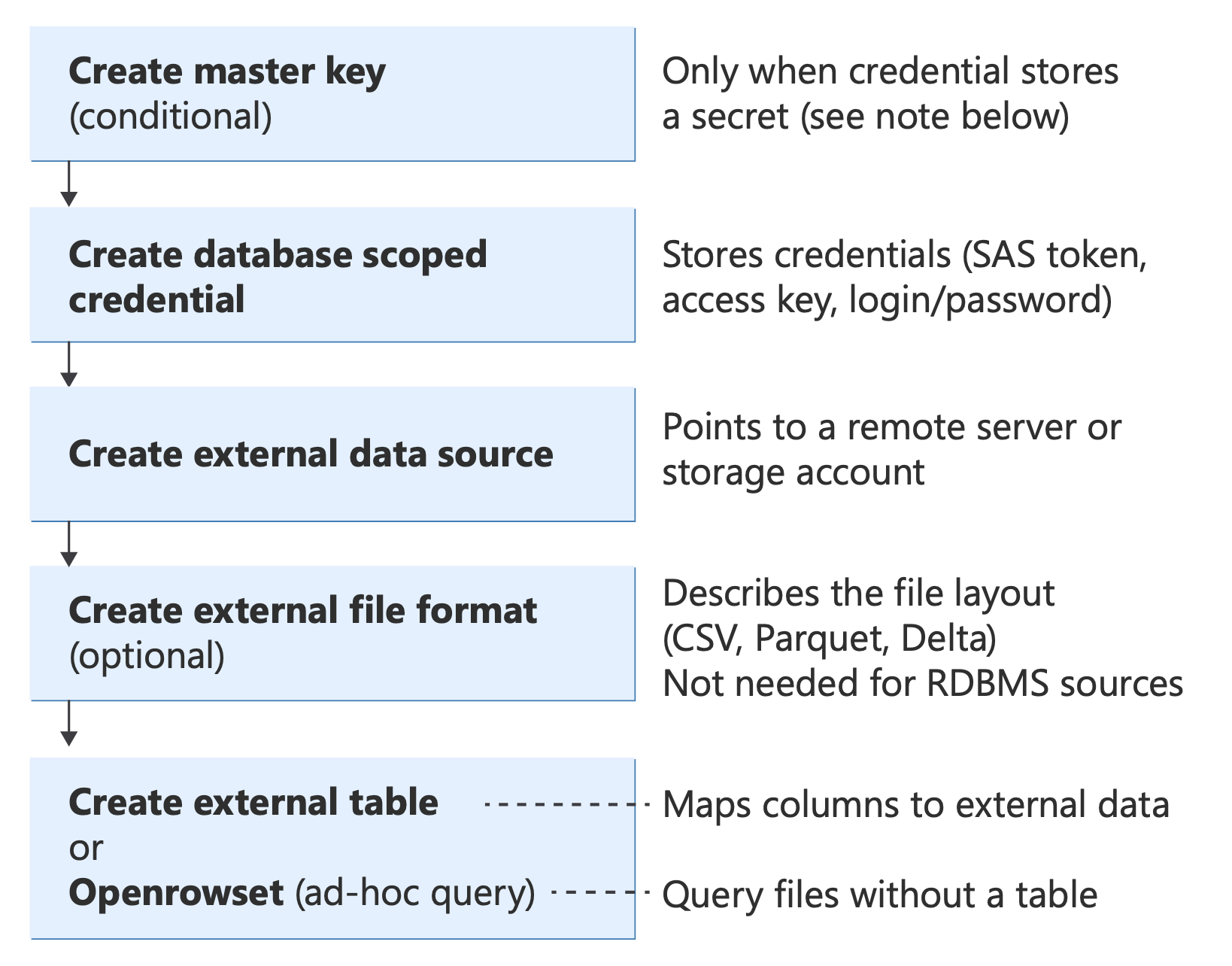
Diagram showing PolyBase T-SQL objects and their relationships, from authentication (database master key, credentials) through data sources and file formats to query methods (External Table, OPENROWSET, BULK INSERT, CETAS).
For information about these T-SQL statements, see:
- CREATE EXTERNAL DATA SOURCE
- CREATE EXTERNAL FILE FORMAT
- CREATE EXTERNAL TABLE
- OPENROWSET
- CREATE EXTERNAL TABLE AS SELECT (CETAS)
For a full Transact-SQL reference for all objects, see PolyBase Transact-SQL reference.
Important
Check the data type mapping for your external file format. When you create an external file format, or query files using OPENROWSET, PolyBase automatically maps source data types (Parquet, CSV, Delta, Oracle, Teradata, MongoDB) to SQL Server data types. Mismatched types can cause silent truncation, precision loss, or query errors. For example, a Parquet DECIMAL(38,18) maps to DECIMAL(18,0). Review the mapping tables before you define external table columns or a WITH clause. For the complete reference, see Type mapping with PolyBase.
When is CREATE MASTER KEY required?
A database master key (DMK) is created using CREATE MASTER KEY syntax. The DMK encrypts the secrets stored inside database scoped credentials. It's required only when the credential contains a secret value, that is, when it stores a password, token, or access key.
DMK is required (credential stores a secret):
Authentication type IDENTITYvalueHas secret DMK SAS token 'SHARED ACCESS SIGNATURE'Yes Required S3 access key 'S3 ACCESS KEY'Yes Required SQL login / basic authentication '<username>'Yes Required Storage account access key '<storage_account_name>'Yes Required DMK is not required (no secret stored):
Authentication type IDENTITYvalueHas secret DMK Managed Identity 'Managed Identity'No Not required Microsoft Entra ID 'User Identity'or'Managed Identity'No Not required
Tip
If there's no secret in your CREATE DATABASE SCOPED CREDENTIAL statement, you don't need a DMK. Managed Identity and Microsoft Entra ID authentication delegate trust to the platform. The database doesn't store passwords or tokens.
Examples:
In this example query, the DMK is required (Credential stores a SAS token).
CREATE MASTER KEY ENCRYPTION BY PASSWORD = '<strong_password>';

CREATE DATABASE SCOPED CREDENTIAL SasCred
WITH IDENTITY = 'SHARED ACCESS SIGNATURE',
     SECRET = '<your_SAS_token>';
In this example query, the DMK isn't required (Managed Identity, no secret).
CREATE DATABASE SCOPED CREDENTIAL ManagedIdentityCred
WITH IDENTITY = 'Managed Identity';
In this example query, the DMK isn't required (Microsoft Entra pass-through, no secret).
CREATE DATABASE SCOPED CREDENTIAL EntraIdCred
WITH IDENTITY = 'User Identity';
Remote data access with OPENROWSET and external tables
SQL Server offers three distinct approaches to query remote data. You can choose the right approach when you understand the differences in syntax, authentication, and architecture.
| Approach | Syntax | Connects to | Authentication | PolyBase services | Platforms |
|---|---|---|---|---|---|
| OLE DB queries | OPENROWSET(provider, connection, query) |
Any OLE DB source via MSOLEDBSQL, SQLOLEDB, or other providers | SQL authentication, Windows authentication, Microsoft Entra ID (MSOLEDBSQL) | No | SQL Server (all supported versions) |
| File queries | OPENROWSET(BULK ...) |
Files on local disk, network, or cloud (Azure Blob, ADLS, S3, OneLake) | SAS token, access key, Managed Identity, Microsoft Entra ID | Yes for cloud*; No for local | SQL Server 2005; SQL Server 2022 (16.x) and later versions (cloud); Azure SQL |
| PolyBase connectors | CREATE EXTERNAL TABLE with CREATE EXTERNAL DATA SOURCE using sqlserver://, oracle://, teradata://, mongodb://, odbc:// |
Remote SQL Server, Oracle, Teradata, MongoDB, ODBC sources | SQL authentication only | Yes | SQL Server 2019 (15.x) and later versions (Windows); SQL Server 2025 (17.x) and later versions (Linux) |
PolyBase services are required for cloud file access in SQL Server 2019 (15.x) and SQL Server 2022 (16.x). SQL Server 2025 (17.x) and later versions have native cloud file support and no longer require PolyBase for CSV, Parquet, or Delta.
When to use each approach
Use OLE DB OPENROWSET for:
- Quick, one-time ad hoc queries without creating persistent objects
- Microsoft Entra ID or Managed Identity authentication (via MSOLEDBSQL)
- Avoiding PolyBase service dependencies
- Connecting to any data source with an OLE DB provider
Use File OPENROWSET(BULK) for:
- Ad hoc file exploration and schema discovery
- Quick transformations and previews before committing to a table definition
- Flexible column transformations inline (casting, filtering, computed columns)
- Data that doesn't change frequently, and doesn't need persistent metadata
Use PolyBase connectors with CREATE EXTERNAL TABLE for:
- Persistent, reusable table definitions accessed by multiple users or applications
- Production workloads requiring statistics and query plan optimization
- Pushdown computation to remote sources (filters push to Oracle, SQL Server, etc.)
- Shared governance and security (once created, users only need
SELECTpermission) - When you have SQL authentication available to the remote source
OPENROWSET (OLE DB) - ad hoc remote queries (no PolyBase services required)
The OLE DB form of OPENROWSET connects to a remote data source through an OLE DB provider, executes a pass-through query, and returns the results as a rowset. It's a one-time, ad hoc alternative to a linked server. No persistent metadata is created. This syntax doesn't require PolyBase services, and doesn't support cloud files or external data sources.
This example query connects to a remote SQL Server via OLE DB (not PolyBase).
SELECT *
FROM OPENROWSET (
    'MSOLEDBSQL',
    'Server=remote-server;Database=AdventureWorks;Trusted_Connection=yes;',
    'SELECT TOP 10 * FROM AdventureWorks.Sales.SalesOrderHeader'
);
OPENROWSET(BULK) - file-based queries (PolyBase)
The BULK form of OPENROWSET reads data directly from files. On SQL Server 2019 (15.x) and earlier versions, it reads from local or UNC file paths and requires a format file. In SQL Server 2022 (16.x) and later versions, you can read from cloud storage using the DATA_SOURCE and FORMAT parameters. This approach is the PolyBase-integrated version used for data virtualization.
In the context of PolyBase and data virtualization, when this guide refers to OPENROWSET it means the OPENROWSET(BULK ...) syntax with a FORMAT clause for querying external files.
Examples:
This example query reads a Parquet file from Azure Blob Storage (SQL Server 2022 and later versions).
SELECT TOP 10 *
FROM OPENROWSET (
    BULK 'data/sales/*.parquet',
    DATA_SOURCE = 'MyAzureStorage',
    FORMAT = 'PARQUET'
) AS [result];
This example query reads a Parquet file with an inline path (Azure SQL Database, Azure SQL Managed Instance).
SELECT TOP 10 *
FROM OPENROWSET (
    BULK 'abs://mycontainer@mystorageaccount.blob.core.windows.net/data/sales/*.parquet',
    FORMAT = 'PARQUET'
) AS [result];
When to use OPENROWSET vs. external tables
Both OPENROWSET(BULK ...) and external tables let you query external data with T-SQL, but they're designed for different use cases. The following table summarizes the key differences to help you decide which approach fits your scenario.
| Capability | OPENROWSET(BULK ...) |
External table |
|---|---|---|
| Purpose | Ad hoc exploration and one-off queries | Persistent, reusable table definition |
| Metadata stored in database | No. Nothing is saved after the query runs | Yes. The table definition, data source, and file format are stored as database objects |
| Schema definition | Inferred automatically from the file (Parquet) or specified inline with a WITH clause |
Defined explicitly in the CREATE EXTERNAL TABLE statement |
| Permissions | Requires ADMINISTER BULK OPERATIONS or ADMINISTER DATABASE BULK OPERATIONS |
Once created, standard SELECT permission on the table is sufficient |
| Computed columns | Yes. Add expressions and computed columns in the SELECT list; metadata functions like filename() and filepath() are only available here. |
No. Fixed column list; perform transformations in a view or in the query that reads the external table |
| Statistics | Azure SQL: manual single-column stats via sys.sp_create_openrowset_statistics; SQL Server 2022 (16.x) and later versions: autocreate stats on predicates (no manual stats on SQL Server). See OPENROWSET manual statistics. |
Full CREATE STATISTICS support on all platforms, plus autocreate in SQL Server 2022 (16.x) and later versions. See Create external table manual statistics. |
| Pushdown | Limited support. The engine might push filters down to the file scan but there's no pushdown to remote RDBMS sources | Yes. Supports pushdown computation for RDBMS connectors (SQL Server, Oracle, Teradata, MongoDB) |
| Best for | Data exploration, schema discovery, prototyping queries, one-time data loads, flexible transformations | Production workloads, repeated queries, shared access across users, dashboards, and reporting |
Use OPENROWSET when you need flexibility
Use OPENROWSET to explore a file, test different schemas, or add computed columns and transformations without creating any persistent objects. For example, you can extract the file path as a column, cast data types inline, or filter on computed expressions in a single query.
This example query includes computed columns and transformations:
SELECT result.filename() AS [FileName],
       result.filepath(1) AS [Year],
       result.filepath(2) AS [Month],
       CAST (OrderDate AS DATE) AS OrderDate,
       Amount,
       OrderDate
FROM OPENROWSET (
    BULK 'abs://mycontainer@mystorageaccount.blob.core.windows.net/data/sales/*/*/*/*.parquet',
    FORMAT = 'PARQUET'
) AS result
WHERE result.filepath(1) = '2025';
Tip
The filepath() and filename() functions are available in Azure SQL Database, Azure SQL Managed Instance, and SQL Server 2022 (16.x) and later versions. They let you filter on parts of the file path (partition elimination) and expose the source file name as a column, which isn't directly possible with external tables.
Use external tables when you need persistence and governance
Use external tables when multiple users or applications need to query the same external data repeatedly. You define the schema, data source, and credentials once and store them in the database. Consumers only need SELECT permission on the table.
External tables also support statistics, which the query optimizer uses to build better execution plans. You can create statistics manually or let the engine create them automatically (SQL Server 2022 (16.x) and later versions).
This example query creates statistics on an external table for better query plans.
CREATE STATISTICS Stats_OrderDate
ON dbo.SalesExternal(OrderDate)
WITH FULLSCAN;
For more information on statistics for both approaches, see PolyBase performance considerations - Statistics.
BULK INSERT vs. OPENROWSET(BULK): Which one should I use?
Both BULK INSERT and OPENROWSET(BULK ...) import data from files into SQL Server by using the same underlying bulk-load engine. However, they differ in syntax, flexibility, and what you can do with the results. The following table summarizes the key differences:
Note
BULK INSERT isn't available in SQL database in Fabric. For Fabric, use OPENROWSET(BULK ...) against OneLake.
| Capability | BULK INSERT |
OPENROWSET(BULK ...) |
|---|---|---|
| Basic purpose | Loads data from a file directly into a target table | Returns a rowset that you use in a SELECT or INSERT ... SELECT statement |
| Usage pattern | Standalone statement: BULK INSERT <table> FROM '<file>' |
Must be used inside a query: SELECT * FROM OPENROWSET(BULK ...) or INSERT INTO <table> SELECT * FROM OPENROWSET(BULK ...) |
| Requires a target table? | Yes. Always writes directly to a table | No. You can SELECT from it without inserting anywhere, or insert into any table or temp table |
| Column transformations during load | Limited support. The data flows from file to table as-is (mapping controlled by format file or column order) | Full support. You can add expressions, CAST, WHERE filters, JOIN other tables, and computed columns in the surrounding SELECT |
| Table hints | The WITH clause includes support for BATCHSIZE, CHECK_CONSTRAINTS, FIRE_TRIGGERS, KEEPIDENTITY, KEEPNULLS, TABLOCK, and more |
Supports table hints via the INSERT ... SELECT * FROM OPENROWSET(BULK ...) WITH (TABLOCK, IGNORE_CONSTRAINTS, ...) syntax |
| Large-object (LOB) single-value import | Not supported | Yes. Supports SINGLE_BLOB, SINGLE_CLOB, SINGLE_NCLOB to import an entire file as one varbinary(max), varchar(max), or nvarchar(max) value |
| Format files | Yes. Supported via (XML and non-XML) | Yes. Supported (XML and non-XML) |
| Cloud file access (Azure Blob Storage, ADLS Gen2, S3) | Yes. Supported via DATA_SOURCE parameter (SQL Server 2017 (14.x) and later versions, Azure SQL) |
Yes. Supported via DATA_SOURCE parameter or inline URL with FORMAT clause (SQL Server 2022 (16.x) and later versions, Azure SQL) |
| Parquet or Delta files | Not supported. Only CSV/delimited text | Yes. Supported with FORMAT = 'PARQUET' or FORMAT = 'DELTA' (SQL Server 2022 (16.x) and later versions, Azure SQL) |
| Permission required | ADMINISTER BULK OPERATIONS or ADMINISTER DATABASE BULK OPERATIONS, plus INSERT on the target table |
ADMINISTER BULK OPERATIONS or ADMINISTER DATABASE BULK OPERATIONS |
| Minimal logging | Yes. Supported under simple or bulk-logged recovery models with TABLOCK |
Yes. Supported when used with INSERT ... SELECT and TABLOCK |
When to choose BULK INSERT
Use BULK INSERT when you have a straightforward file-to-table load and don't need to transform, filter, or join data during the import. It uses simpler syntax for CSV or other delimited files:
This example query loads a CSV file from Azure Blob Storage directly into a table.
BULK INSERT Sales.Invoices
FROM 'invoices/inv-2025-01.csv'
WITH (
    DATA_SOURCE = 'MyAzureBlobStorage',
    FORMAT = 'CSV',
    FIRSTROW = 2,
    FIELDTERMINATOR = ',',
    ROWTERMINATOR = '\n'
);
This example query loads a local file with a format file for column mapping.
BULK INSERT dbo.Products
FROM 'C:\Data\products.csv'
WITH (
    FORMATFILE = 'C:\Data\products.fmt',
    FIRSTROW = 2,
    TABLOCK
);
When to choose OPENROWSET(BULK)
Use OPENROWSET(BULK ...) when you need one or more of the following conditions:
- Query or preview file data without creating a table first.
- Transform, filter, or join data during import.
- Load Parquet or Delta files (only
OPENROWSETsupports these formats). - Import an entire file as a single LOB value (
SINGLE_BLOB,SINGLE_CLOB,SINGLE_NCLOB).
This example query previews a CSV file from Azure Blob Storage without inserting the data anywhere.
SELECT TOP 10 *
FROM OPENROWSET (
    BULK 'invoices/inv-2025-01.csv',
    DATA_SOURCE = 'MyAzureBlobStorage',
    FORMAT = 'CSV',
    FIRSTROW = 2,
    FIELDTERMINATOR = ','
) AS src;
This example query inserts data with transformation and filtering.
INSERT INTO Sales.Invoices (InvoiceDate, Amount, Customer)
SELECT CAST (InvoiceDate AS DATE),
       Amount * 1.1, -- Apply a 10% markup
       UPPER(Customer)
FROM OPENROWSET (
    BULK 'invoices/inv-2025-01.csv',
    DATA_SOURCE = 'MyAzureBlobStorage',
    FORMAT = 'CSV',
    FIRSTROW = 2
) WITH (
    InvoiceDate VARCHAR (10),
    Amount DECIMAL (18, 2),
    Customer VARCHAR (100)
) AS src
WHERE Amount IS NOT NULL;
This example query loads a Parquet file (not possible with BULK INSERT).
INSERT INTO Sales.Invoices
SELECT *
FROM OPENROWSET (
    BULK 'data/invoices/*.parquet',
    DATA_SOURCE = 'MyAzureStorage',
    FORMAT = 'PARQUET') AS src;
This example query imports an entire XML file as a single varbinary(max) value.
INSERT INTO dbo.XmlDocuments (DocContent)
SELECT BulkColumn
FROM OPENROWSET (
    BULK 'C:\Data\catalog.xml',
    SINGLE_BLOB
) AS x;
Tip
One approach is to start with OPENROWSET(BULK ...) in a SELECT to explore and validate file data, then switch to BULK INSERT for the final production load if you don't need transformations. If you need Parquet or Delta support or inline filtering, stay with OPENROWSET.
For more information, see the following related guides:
- Use BULK INSERT or OPENROWSET(BULK...) to import data to SQL Server: A detailed side-by-side guide with security considerations.
- Bulk Import and Export of Data (SQL Server): An overview of all bulk data movement methods (bcp,
BULK INSERT,OPENROWSET). - BULK INSERT (Transact-SQL): A full T-SQL reference.
- OPENROWSET BULK (Transact-SQL): A full T-SQL reference.
- Examples of bulk access to data in Azure Blob Storage: Side-by-side examples using both methods with Azure storage.
- Bulk import large-object data with OPENROWSET Bulk Rowset Provider (SQL Server):
SINGLE_BLOB,SINGLE_CLOB, andSINGLE_NCLOBexamples. - Use a format file to bulk import data (SQL Server): Format file usage with both methods.
Useful metadata functions
When you query external files with OPENROWSET or external tables, you can use several built-in functions and procedures to inspect file metadata, discover schemas, and implement partition-aware queries.
filepath() and filename()
The filepath() and filename() functions return parts of the file path or the file name for each row in the result set. They're especially useful for:
Partition elimination: Filter on folder segments (for example, year/month/day partitions) so the engine reads only the matching files instead of scanning everything.
Exposing source metadata: Include the originating file name or path as a column in the query results, which is helpful for auditing or debugging.
| Function | Returns | Example |
|---|---|---|
filename() |
The file name (including extension) of the source file for each row | sales_2025_01.parquet |
filepath(N) |
The Nth folder segment from the wildcard (*) in the BULK path, where N starts at 1 |
For path sales/2025/01/*.parquet, filepath(1) returns 2025, filepath(2) returns 01 |
Applies to: Azure SQL Database, Azure SQL Managed Instance, SQL Server 2022 (16.x) and later versions, SQL database in Fabric.
This example query uses filepath() for partition elimination and filename() to identify source files. It only reads files under the /2025/ folder, and only reads files under the /06/ subfolder.
SELECT result.filename() AS SourceFile,
       result.filepath(1) AS [Year],
       result.filepath(2) AS [Month],
       *
FROM OPENROWSET (
    BULK 'abs://mycontainer@mystorageaccount.blob.core.windows.net/data/sales/*/*/*.parquet',
    FORMAT = 'PARQUET'
) AS result
WHERE result.filepath(1) = '2025'
      AND result.filepath(2) = '06';
Tip
Place filepath() filters in the WHERE clause rather than in a subquery or CTE. When the filter is in the WHERE clause, the engine can perform partition elimination at the file scan level, which significantly reduces I/O.
sp_describe_first_result_set - discover OPENROWSET column types
When you use OPENROWSET with Parquet files, the engine infers column data types automatically (schema inference). The inferred types might be larger than necessary. For example, character columns are often inferred as varchar(8000) because Parquet metadata doesn't include a maximum length. This choice can degrade performance and consume more memory.
Use sp_describe_first_result_set to inspect the inferred schema before you finalize your query. After you see the inferred types, specify narrower types in a WITH clause to improve performance.
Step 1: Inspect the inferred schema.
EXECUTE sp_describe_first_result_set N'
SELECT *
FROM OPENROWSET(
    BULK ''abs://mycontainer@mystorageaccount.blob.core.windows.net/data/sales/*.parquet'',
    FORMAT = ''PARQUET''
) AS result';
The output shows each column's name, inferred data type, max length, precision, and scale. If you see varchar(8000) where a varchar(100) would suffice, override it:
Step 2: Use explicit types for better performance.
SELECT TOP 100 *
FROM OPENROWSET (
    BULK 'abs://mycontainer@mystorageaccount.blob.core.windows.net/data/sales/*.parquet',
    FORMAT = 'PARQUET'
) WITH (
    OrderId INT,
    OrderDate DATE,
    Amount DECIMAL (18, 2),
    Customer VARCHAR (100) -- much narrower than the inferred varchar(8000)
) AS result;
Schema inference only works with Parquet files. For CSV files, always specify column definitions either in a WITH clause (for OPENROWSET) or in the CREATE EXTERNAL TABLE statement. sp_describe_first_result_set is a general SQL Server and Azure SQL procedure, but it's especially useful for OPENROWSET queries. For more information, see sp_describe_first_result_set.
Performance, troubleshooting, and best practices
After you implement data virtualization, use these guides to optimize performance, diagnose issues, and ensure production readiness:
| Area | Article | Details |
|---|---|---|
| PolyBase performance | Performance considerations in PolyBase for SQL Server | Statistics, pushdown, parallelism, and memory management |
| Pushdown computation | Pushdown computations in PolyBase | Specifies which operations push to the remote source |
| How to tell if pushdown occurred | How to tell if external pushdown occurred | Query plans and DMVs |
| Troubleshooting | Monitor and troubleshoot PolyBase | Common errors and resolutions |
| Kerberos connectivity | Troubleshoot PolyBase Kerberos connectivity | |
| FAQ | PolyBase frequently asked questions | |
| Errors and solutions | PolyBase errors and possible solutions |