Note
Access to this page requires authorization. You can try signing in or changing directories.
Access to this page requires authorization. You can try changing directories.
The Row summary feature in apps provides you with a concise, AI-generated overview of key details about a record. Summaries help you quickly understand essential information without manually scanning fields, related records, or activity timelines. You see summaries as a paragraph or bullet points, so they're easy to read.
Access summaries in two ways:
- From the Insights bar at the top of main forms.
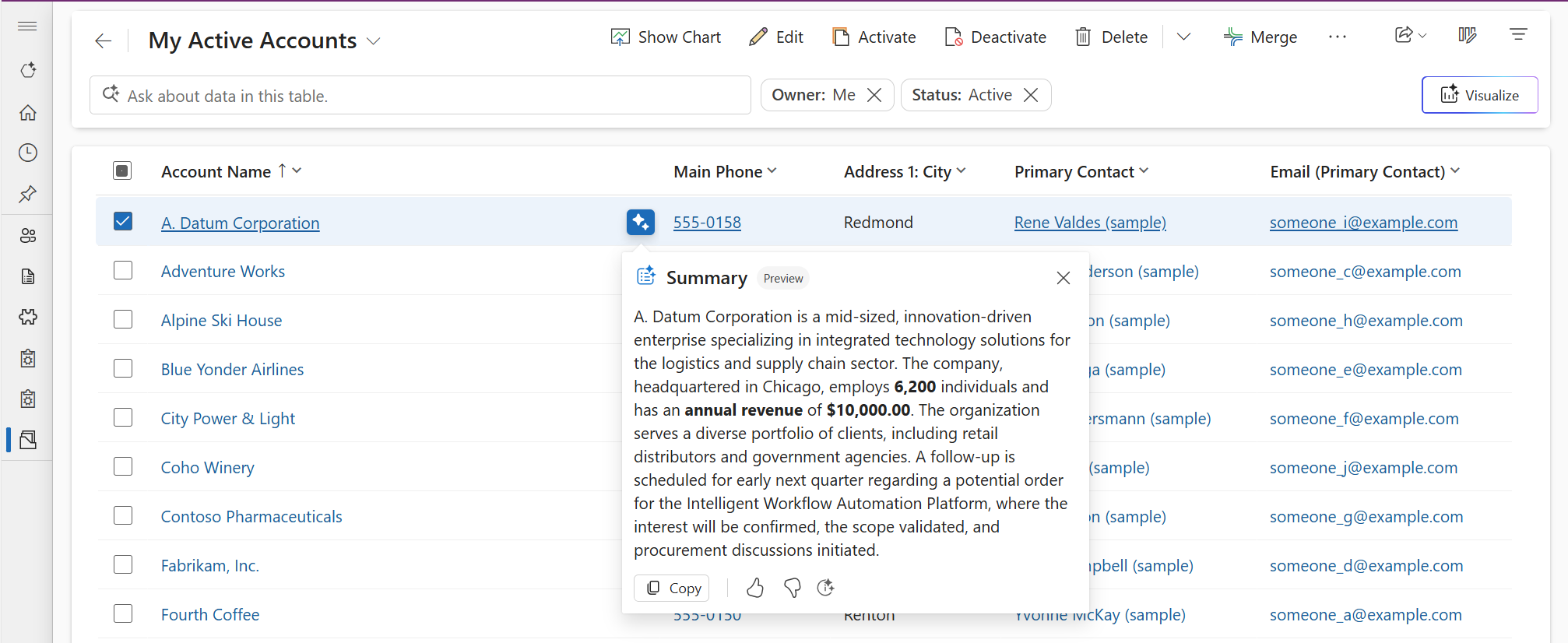
- From view pages by selecting the inline Summary action in the grid, which opens the summary for a record in a modal popup.
The feature enhances user efficiency by delivering context-rich insights on main forms and view pages. You can interact with summaries to copy content, regenerate updated information, and provide feedback on their relevance, improving both usability and accuracy.
Prerequisite
A Power Platform administrator must enable Row summaries for the environment in the Power Platform admin center under Copilot > Settings > Power Apps > Summary. This setting controls row summaries on both main forms and view pages. For more information, see Admin control.
Feature details
Accessing record summaries
View the record summary from a form or view when a table is configured to display summaries.
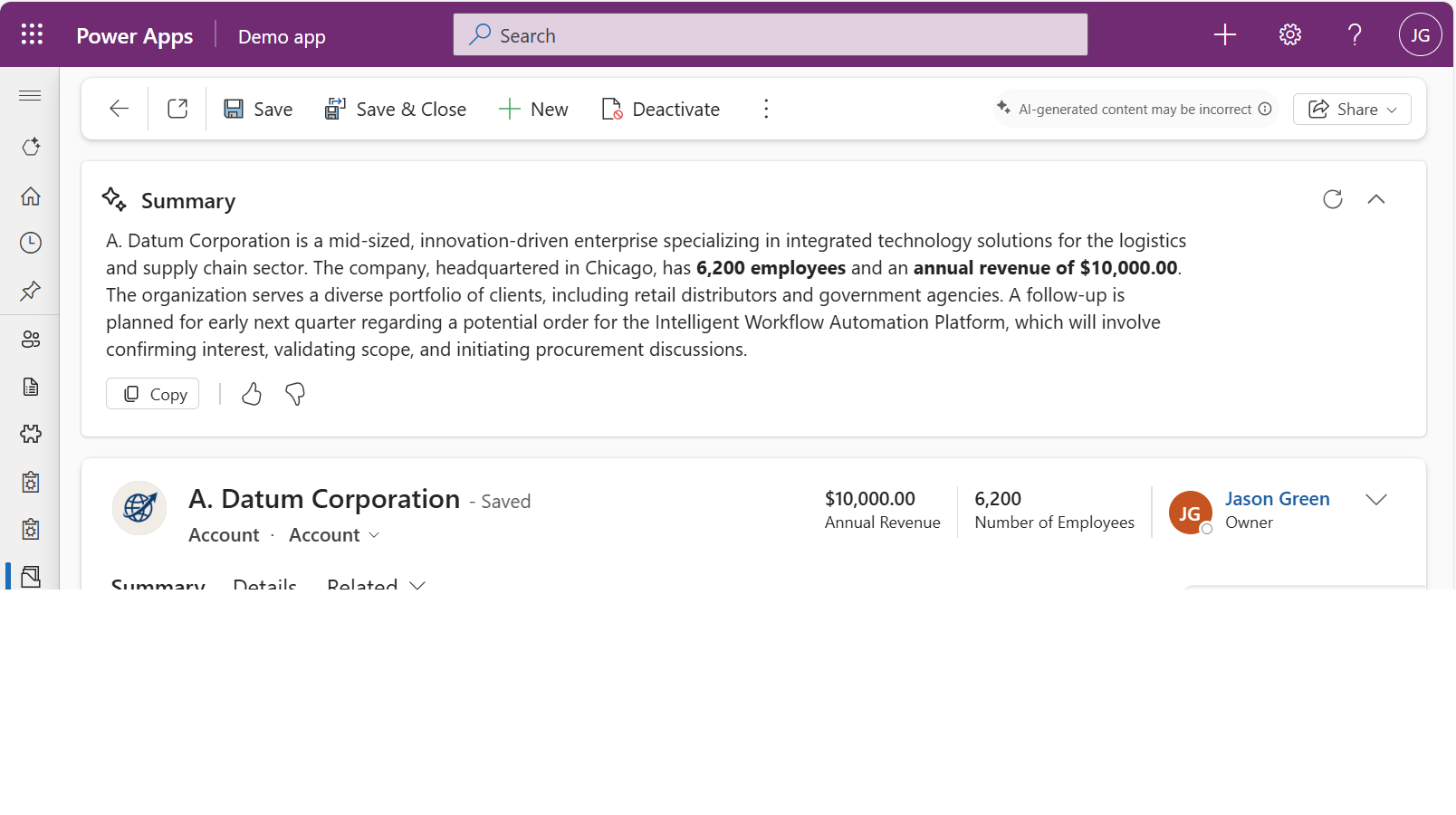
- Forms: When viewing a record in a main form, the summary appears in the insights bar at the top of the main form.
Note
You see the record summary after you save a new record. If you don't save the record, the summary area stays hidden.
- Views: When browsing records in a view, select the inline Summary action next to a record to open the summary in a modal popup.
Interacting with summaries
Here are some actions you can take with summaries:
- Copy: Select to copy the summary content directly to your clipboard for easy sharing or documentation. The summary copies in markdown format, so when you paste it into other applications, the formatting might not appear exactly as it appears in the app.
- Feedback: Use the thumbs up or thumbs down icons to rate the summary's usefulness. Your feedback helps improve future summaries so they better meet your expectations and needs.
- Refresh (forms only): Select the Refresh button to regenerate the summary so it reflects the latest updates to the record.
- Expand/Collapse (forms only): In forms, the insights bar is collapsed by default and shows a one-line peek of the summary. Expand the insights bar to see more details.

Licensing requirements
The row summary feature requires specific user licenses based on the product. If the user doesn't have the license, the feature is hidden. This license enforcement gradually rolls out following the feature's general availability.
- Power Apps model-driven app: The user must have a Power Apps premium license. For details, see the Power Platform License Guide.
- Dynamics 365 model-driven app: The user must have a Dynamics 365 enterprise or premium license as outlined in Dynamics 365 License Guide.
Usage might be subject to service limits or throttling. Microsoft reserves the right to update the limits.
Admin control
Use the Copilot settings experience in the Power Platform admin center as the primary environment-level control for row summaries:
- Sign in to the Power Platform admin center.
- In the navigation pane, select Copilot, and then select Settings.
- Under Power Apps, locate Row summaries in the Summary section.
- Select the environment, and then select Edit setting.
- Configure the setting, and then select Save.
This setting controls row summaries on both model-driven app main forms and view pages. For more information about this settings experience, see Copilot settings.
Note
The same control is currently also available as AI insight cards in the environment feature settings. Use the Copilot settings experience as the preferred location. The AI insight cards location will be removed in a future release.
Related information
Manage Copilot settings in the Power Platform admin center
Configuring summaries for tables