Note
Access to this page requires authorization. You can try signing in or changing directories.
Access to this page requires authorization. You can try changing directories.
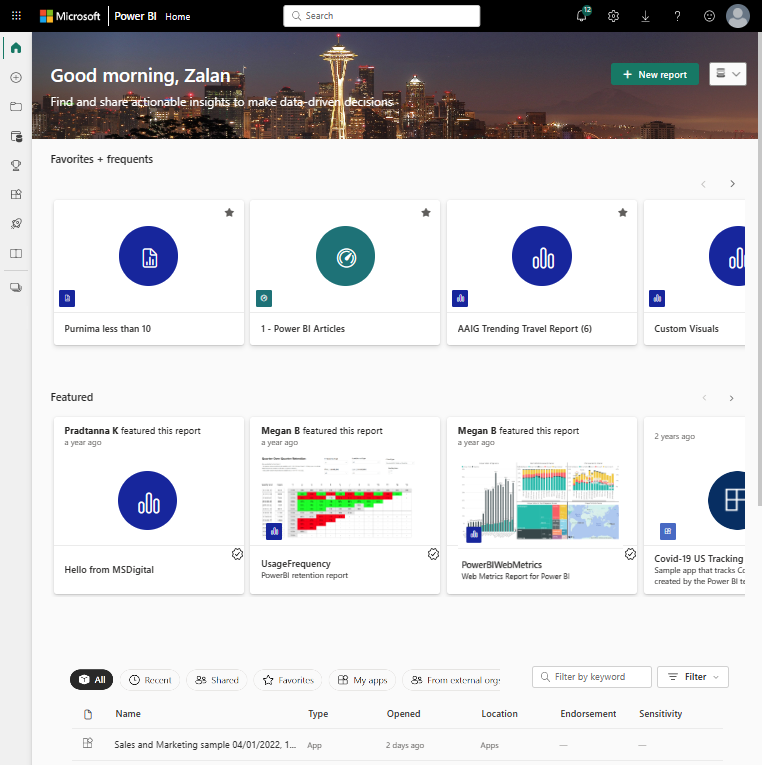
This article helps you find your way around the Power BI service as a business user - someone who views and interacts with reports, dashboards, and apps that others create. The following image shows Home in the Power BI experience.
Tip
For creation tasks, see Get started creating in the Power BI service. For interactions like filtering, exporting, and subscriptions, see Interact with reports and dashboards.
Prerequisites
- Sign up for Power BI if you don't already have an account.
- Familiarity with Power BI service basics is helpful but not required.
Navigation pane
Use the navigation pane on the left to move around the Power BI service. Here's what each item does:
| Navigation item | Purpose |
|---|---|
| Home | Your landing page with recent items, favorites, and recommendations. |
| Browse | Lists of recent, favorite, and shared content. |
| OneLake | Discover semantic models and reusable data. |
| OneLake catalog | Search governed data assets across your organization. |
| Create | Build a new report based on existing data or add data to create a semantic model. For more information, see Get data from files for Power BI. |
| Apps | Find and return to workspace apps, org apps, Fabric Apps, and template apps, where applicable. Learn more about the Apps page. |
| Workspaces | Team content containers. Learn more about Workspaces. |
| Metrics | Track organizational goals and KPIs. |
| Copilot | AI assistance for insights (if enabled). |
| Learn | Tutorials, samples, and training resources. |
Some items appear only with specific roles or licenses: Monitor, Real-Time, Deployment pipelines, and Workloads.
Note
A new Apps page is progressively rolling out, and you might see the new or previous experience. Open the Apps page from the navigation pane in either the Power BI or Fabric experience. You can use the experience selector to move between experiences, but switching experiences doesn't change which apps you can access. For details, see The new Apps page.
My apps on Power BI Home is separate from the Apps page. At this time, My apps lists only workspace apps; it doesn't list org apps or Fabric Apps. Use the Apps page to find workspace apps, org apps, and Fabric Apps together. An app missing from My apps doesn't mean that you lack access to it.
Key concepts
- Dashboards display key visuals from one or more reports on a single page. Learn more about dashboards.
- Reports contain multiple pages with detailed visualizations. Learn more about reports.
- Workspace apps package and publish Power BI content from a workspace. Org apps are a newer evolution of workspace apps, implemented as Fabric items. Fabric Apps (Preview) are purpose-built Fabric application items. Template apps remain a separate app type.
- Workspaces are containers where content is stored and organized.