Note
Access to this page requires authorization. You can try signing in or changing directories.
Access to this page requires authorization. You can try changing directories.
Important
This content is archived and is not being updated. For the latest documentation, go to Overview of AI Builder. For the latest release plans, go to Release plans for Dynamics 365, Power Platform, and Copilot.
| Enabled for | Public preview | General availability |
|---|---|---|
| Admins, makers, marketers, or analysts, automatically |  Nov 18, 2024
 |
Mar 31, 2025 |
Business value
With this capability, businesses can use GPT to extract specific fields from documents, forms, and images without pretraining models with sample data. This approach drastically reduces the time and resources typically needed to prepare and fine-tune custom models for document processing.
Feature details
Automating document-related tasks—such as summarizing reports, classifying documents, or extracting content from invoices—saves time and significantly reduces the manual work involved in managing large volumes of data. When you streamline these document and image-based workflows, your organization boosts productivity and efficiency. With automation, you can spend more time on higher-level decision-making and strategic initiatives instead of routine administrative tasks.
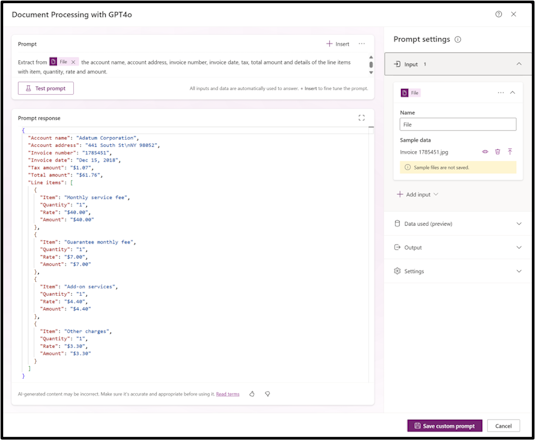
With advancements in AI-driven tools, you can define how to process documents or images in an end-to-end workflow by using simple natural language commands. By using the AI Builder prompt in Power Automate or Power Apps, you can easily set parameters for automatic document or image processing. Examples of parameters include key fields to extract, document categories, content summaries, and specific elements to detect within a document or image. With these capabilities, you can automate complex workflows without advanced technical skills.
This innovation eliminates the traditionally complex and time-consuming steps of labeling data and training AI models. You don't need specialized skills in machine learning or data science to automate document processing. Instead, you can seamlessly integrate these capabilities into your existing workflows by using natural language instructions. This approach makes the setup process faster, more intuitive, and accessible to a wider range of users. By democratizing AI-powered automation, you can quickly deploy intelligent document and image processing solutions that drive operational efficiency and enhance the accuracy and speed of routine tasks.
Geographic areas
Visit the Explore Feature Geography report for Microsoft Azure areas where this feature is planned or available.
Language availability
Visit the Explore Feature Language report for information on this feature's availability.