Note
Access to this page requires authorization. You can try signing in or changing directories.
Access to this page requires authorization. You can try changing directories.
| Enabled for | Public preview | General availability |
|---|---|---|
| Admins, makers, marketers, or analysts, automatically | - |  Dec 11, 2025
 |
Business value
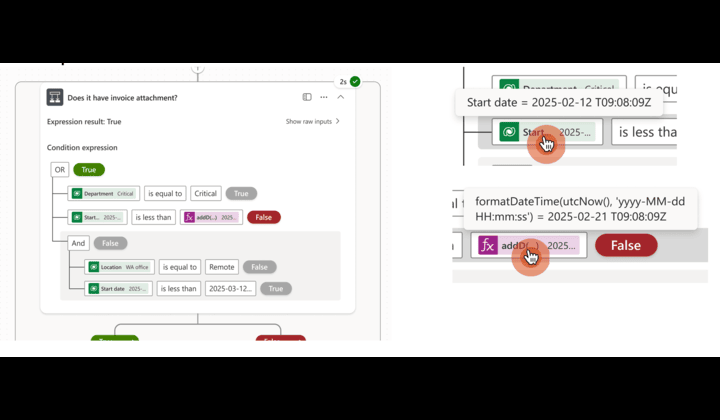
You can save time debugging your complex condition action by displaying the values passed to dynamic content and the output of the expressions used in the condition action.
Feature details
When a condition action runs in Power Automate cloud flows, it returns only true or false as the final output. If the condition action doesn't run as expected, especially with complex condition logic that uses multiple dynamic content and expressions, it can be hard to debug the execution process. This feature simplifies the debugging experience for the Condition action after your flow runs. You can see detailed results for each row in a condition action, including the values in dynamic content and expressions, so you can find which part of the condition didn't work as expected.
Geographic areas
Visit the Explore Feature Geography report for Microsoft Azure areas where this feature is planned or available.
Language availability
Visit the Explore Feature Language report for information on this feature's availability.