Note
Access to this page requires authorization. You can try signing in or changing directories.
Access to this page requires authorization. You can try changing directories.
A Power Query template is a file that includes the Power Query script and its related metadata for a single Power Query project.
You can use it to package your entire Power Query project into a single file so you can share it or import it into other Power Query integrations.
Note
A Power Query project is a single instance of the Power Query editor that can have any number of parameters, queries, and settings like the locale used to interpret data types.
Important
Items outside the mashup document or its metadata aren't part of a Power Query template. Examples include dataflow-related items like scheduled refresh definitions, refresh history, dataflow IDs, referenced connections, and other items that aren't stored in the mashup document or its metadata.
Export a template
Note
This guide applies to all Power Query Online hosts.
For Power Query in Excel for Windows, see Export queries in Excel to a Power Query template.
On the Home tab of the ribbon, go to the Share group and select Export template.

When you select this button, a dialog opens where you can enter the template name and description.
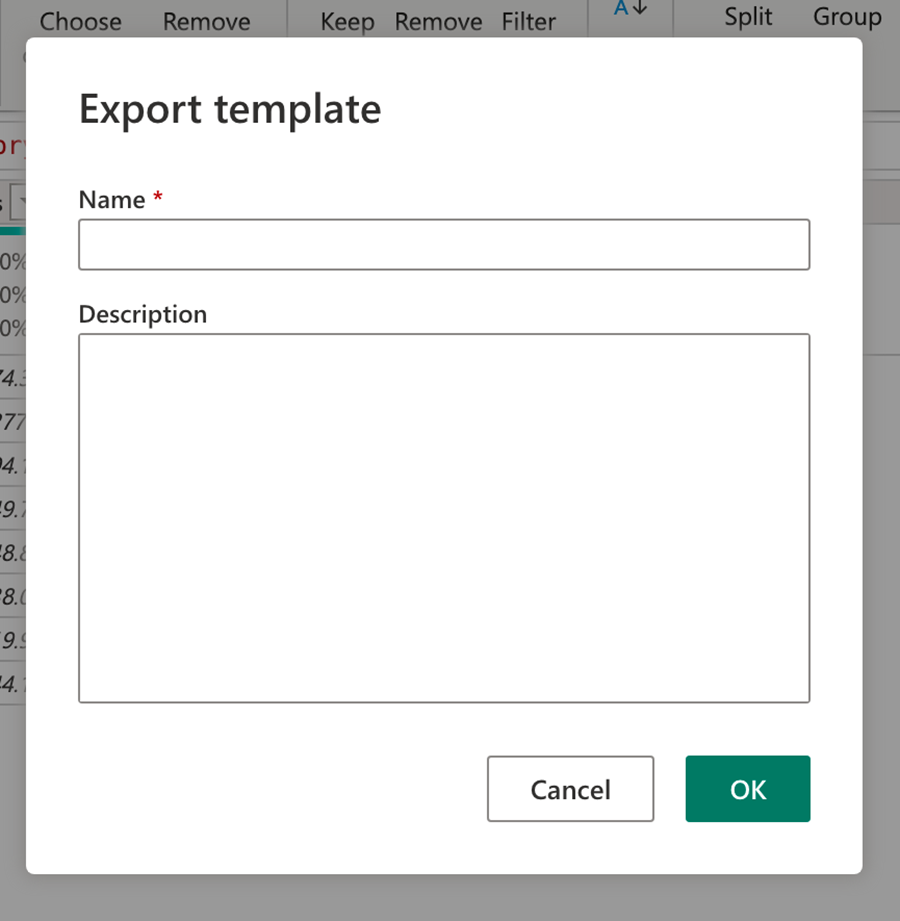
This action downloads a .pqt file, which is your Power Query template file.
Note
Different product integrations let you export specific scripts, like destination queries and query attributes in the Fabric Dataflow Gen2 experience.
Import a template
Note
This feature is only available in the Dataflows Gen2 experience for Microsoft Fabric.
The option to import from a template is only available in Power Query projects that don't have queries or parameters set. On the Power Query editor home screen, you can select Import from Power Query template.

When you select Import from Power Query template, you can upload your Power Query template and immediately load the project with all its queries, parameters, and settings.
Important
Connections and credential definitions aren't stored in a Power Query template file. You need to set them up after you import the template.