Note
Access to this page requires authorization. You can try signing in or changing directories.
Access to this page requires authorization. You can try changing directories.
PowerShell 7.4 introduced the concept of feedback providers. A feedback provider is a
PowerShell module that implements the IFeedbackProvider interface to provide command suggestions
based on user command execution attempts. The provider is triggered when there's a success or
failure execution. Feedback providers use information from the success or failure to provide
feedback.
Prerequisites
To create a feedback provider, you must satisfy the following prerequisites:
- Install PowerShell 7.4 or higher
- You must enable the
PSFeedbackProviderexperimental feature to enable support for feedback providers and predictors. For more information, see Using Experimental Features.
- You must enable the
- Install .NET 8 SDK - 8.0.0 or higher
- See the Download .NET 8.0 page to get the latest version of the SDK.
Overview of a feedback provider
A feedback provider is a PowerShell binary module that implements the
System.Management.Automation.Subsystem.Feedback.IFeedbackProvider interface. This interface
declares the methods to get feedback based on the command line input. The feedback interface can
provide suggestions based on the success or failure of the command invoked by the user. The
suggestions can be anything that you want. For example, you might suggest ways to address an
error or better practices, like avoiding the use of aliases. For more information, see the
What are Feedback Providers? blog post.
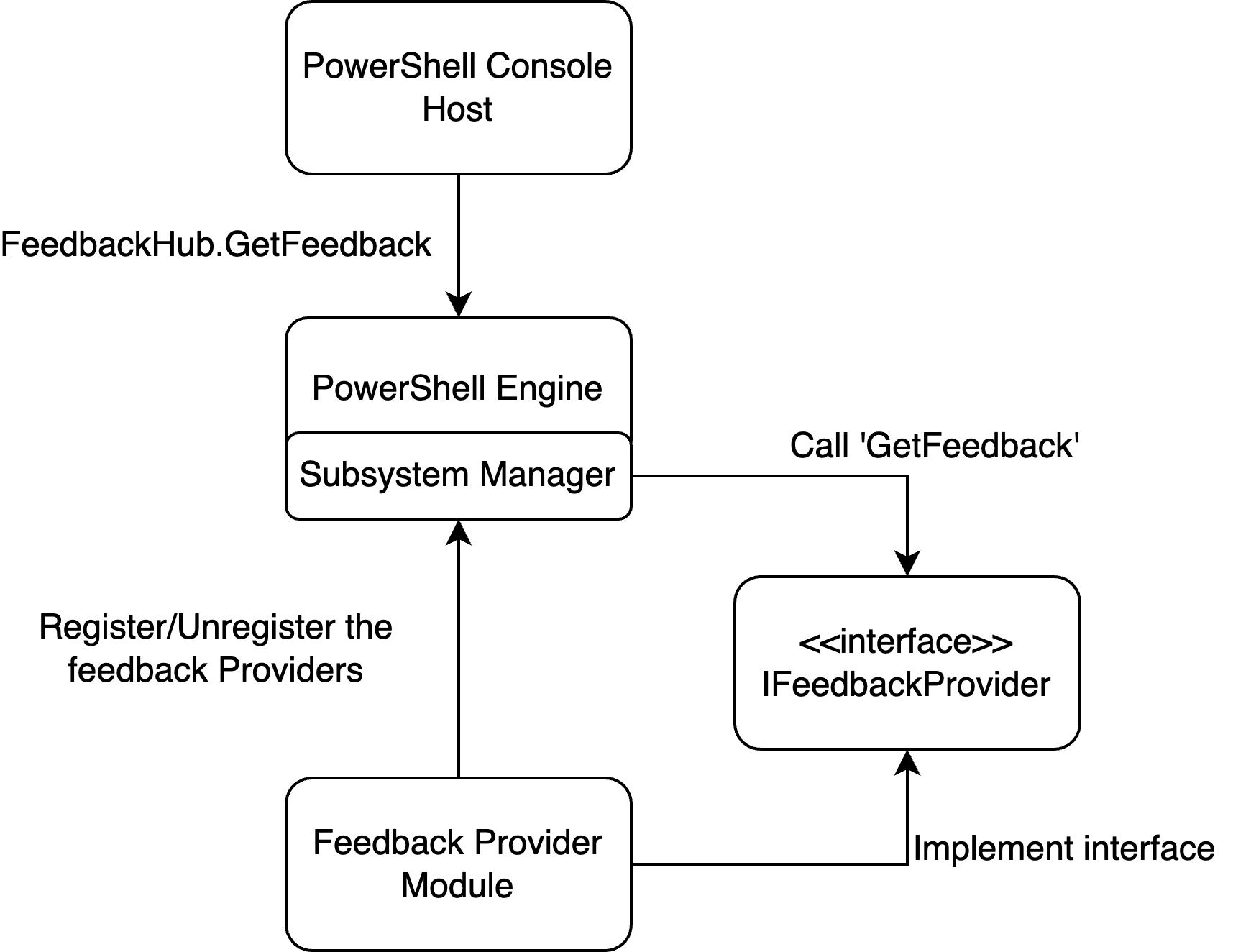
The following diagram shows the architecture of a feedback provider:
The following examples walk you through the process of creating a simple feedback provider. Also, you can register the provider with the command predictor interface to add feedback suggestions to the command-line predictor experience. For more information about predictors, see Using predictors in PSReadLine and How to create a command line predictor.
Step 1 - Create a new class library project
Use the following command to create a new project in the project directory:
dotnet new classlib --name MyFeedbackProvider
Add a package reference for the System.Management.Automation package to your
.csproj file. The following example shows the updated .csproj file:
<Project Sdk="Microsoft.NET.Sdk">

  <PropertyGroup>
    <TargetFramework>net8.0</TargetFramework>
    <ImplicitUsings>enable</ImplicitUsings>
    <Nullable>enable</Nullable>
  </PropertyGroup>

  <ItemGroup>
    <PackageReference Include="System.Management.Automation" Version="7.4.0-preview.3">
        <ExcludeAssets>contentFiles</ExcludeAssets>
        <PrivateAssets>All</PrivateAssets>
    </PackageReference>
  </ItemGroup>
</Project>
Note
You should change the version of the System.Management.Automation assembly to match the version
of the PowerShell preview that you are targeting. The minimum version is 7.4.0-preview.3.
Step 2 - Add the class definition for your provider
Change the name of the Class1.cs file to match the name of your provider. This example uses
myFeedbackProvider.cs. This file contains the two main classes that define the feedback provider.
The following example shows the basic template for the class definitions.
using System.Management.Automation;
using System.Management.Automation.Subsystem;
using System.Management.Automation.Subsystem.Feedback;
using System.Management.Automation.Subsystem.Prediction;
using System.Management.Automation.Language;

namespace myFeedbackProvider;

public sealed class myFeedbackProvider : IFeedbackProvider, ICommandPredictor
{

}

public class Init : IModuleAssemblyInitializer, IModuleAssemblyCleanup
{

}
Step 3 - Implement the Init class
The Init class registers and unregisters the feedback provider with the subsystem manager. The
OnImport() method runs when the binary module is being loaded. The OnRemove()
method runs when the binary module is being removed. This example registers both
the feedback provider and command predictor subsystem.
public class Init : IModuleAssemblyInitializer, IModuleAssemblyCleanup
{
    private const string Id = "<ADD YOUR GUID HERE>";

    public void OnImport()
    {
        var feedback = new myFeedbackProvider(Id);
        SubsystemManager.RegisterSubsystem(SubsystemKind.FeedbackProvider, feedback);
        SubsystemManager.RegisterSubsystem(SubsystemKind.CommandPredictor, feedback);
    }

    public void OnRemove(PSModuleInfo psModuleInfo)
    {
        SubsystemManager.UnregisterSubsystem<ICommandPredictor>(new Guid(Id));
        SubsystemManager.UnregisterSubsystem<IFeedbackProvider>(new Guid(Id));
    }
}
Replace the <ADD YOUR GUID HERE> placeholder value with a unique Guid. You can generate a Guid
using the New-Guid cmdlet.
New-Guid
The Guid is a unique identifier for your provider. The provider must have a unique Id to be registered with the subsystem.
Step 4 - Add class members and define the constructor
The following code implements the properties defined in the interfaces, adds needed class members, and creates the constructor for the myFeedbackProvider class.
/// <summary>
/// Gets the global unique identifier for the subsystem implementation.
/// </summary>
private readonly Guid _guid;
public Guid Id => _guid;

/// <summary>
/// Gets the name of a subsystem implementation, this will be the name displayed when triggered
/// </summary>
public string Name => "myFeedbackProvider";

/// <summary>
/// Gets the description of a subsystem implementation.
/// </summary>
public string Description => "This is very simple feedback provider";

/// <summary>
/// Default implementation. No function is required for a feedback provider.
/// </summary>
Dictionary<string, string>? ISubsystem.FunctionsToDefine => null;

/// <summary>
/// Gets the types of trigger for this feedback provider.
/// </summary>
/// <remarks>
/// The default implementation triggers a feedback provider by <see cref="FeedbackTrigger.CommandNotFound"/> only.
/// </remarks>
public FeedbackTrigger Trigger => FeedbackTrigger.All;

/// <summary>
/// List of candidates from the feedback provider to be passed as predictor results
/// </summary>
private List<string>? _candidates;

/// <summary>
/// PowerShell session used to run PowerShell commands that help create suggestions.
/// </summary>
private PowerShell _powershell;

internal myFeedbackProvider(string guid)
{
    _guid = new Guid(guid); // Save guid
    _powershell = PowerShell.Create(); // Create PowerShell instance
}
Step 5 - Create the GetFeedback() method
The GetFeedback method takes two parameters, context and token. The context parameter
receives the information about the trigger so you can decide how to respond with suggestions. The
token parameter is used for cancellation. This function returns a FeedbackItem containing the
suggestion.
/// <summary>
/// Gets feedback based on the given commandline and error record.
/// </summary>
/// <param name="context">The context for the feedback call.</param>
/// <param name="token">The cancellation token to cancel the operation.</param>
/// <returns>The feedback item.</returns>
public FeedbackItem? GetFeedback(FeedbackContext context, CancellationToken token)
{
    // Target describes the different kinds of triggers to activate on,
    var target = context.Trigger;
    var commandLine = context.CommandLine;
    var ast = context.CommandLineAst;

    // defining the header and footer variables
    string header;
    string footer;

    // List of the actions
    List<string>? actions = new List<string>();

    // Trigger on success code goes here

    // Trigger on error code goes here

    return null;
}
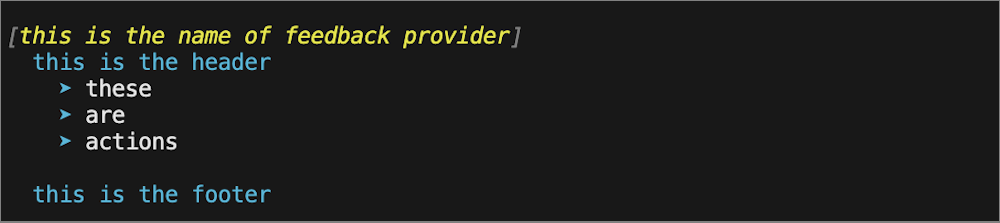
The following image shows how these fields are used in the suggestions that are displayed to the user.
Create suggestions for a Success trigger
For a successful invocation, we want to expand any aliases used in the last execution. Using the
CommandLineAst, we identify any aliased commands and create a suggestion to use the fully
qualified command name instead.
// Trigger on success
if (target == FeedbackTrigger.Success)
{
    // Getting the commands from the AST and only finding those that are Commands
    var astCmds = ast.FindAll((cAst) => cAst is CommandAst, true);

    // Inspect each of the commands
    foreach(var command in astCmds)
    {

        // Get the command name
        var aliasedCmd = ((CommandAst) command).GetCommandName();

        // Check if its an alias or not, if so then add it to the list of actions
        if(TryGetAlias(aliasedCmd, out string commandString))
        {
            actions.Add($"{aliasedCmd} --> {commandString}");
        }
    }

    // If no alias was found return null
    if(actions.Count == 0)
    {
        return null;
    }

    // If aliases are found, set the header to a description and return a new FeedbackItem.
    header = "You have used an aliased command:";
    // Copy actions to _candidates for the predictor
    _candidates = actions;

    return new FeedbackItem(header, actions);
}
Implement the TryGetAlias() method
The TryGetAlias() method is a private helper function that returns a boolean value to indicate
whether the command is an alias. In the class constructor, we created a PowerShell instance that we
can use to run PowerShell commands. The TryGetAlias() method uses this PowerShell instance to
invoke the GetCommand method to determine if the command is an alias. The AliasInfo object
returned by GetCommand contains full name of the aliased command.
/// <summary>
/// Checks if a command is an alias.
/// </summary>
/// <param name="command">The command to check if alias</param>
/// <param name="targetCommand">The referenced command by the aliased command</param>
/// <returns>True if an alias and false if not</returns>
private bool TryGetAlias(string command, out string targetCommand)
{
    // Create PowerShell runspace as a session state proxy to run GetCommand and check
    // if its an alias
    AliasInfo? pwshAliasInfo =
        _powershell.Runspace.SessionStateProxy.InvokeCommand.GetCommand(command, CommandTypes.Alias) as AliasInfo;

    // if its null then it is not an aliased command so just return false
    if(pwshAliasInfo is null)
    {
        targetCommand = String.Empty;
        return false;
    }

    // Set targetCommand to referenced command name
    targetCommand = pwshAliasInfo.ReferencedCommand.Name;
    return true;
}
Create suggestions for a Failure trigger
When a command execution fails, we want to suggest that the user Get-Help to get more information
about how to use the command.
// Trigger on error
if (target == FeedbackTrigger.Error)
{
    // Gets the command that caused the error.
    var erroredCommand = context.LastError?.InvocationInfo.MyCommand;
    if (erroredCommand is null)
    {
        return null;
    }

    header = $"You have triggered an error with the command {erroredCommand}. Try using the following command to get help:";

    actions.Add($"Get-Help {erroredCommand}");
    footer = $"You can also check online documentation at https://learn.microsoft.com/en-us/powershell/module/?term={erroredCommand}";

    // Copy actions to _candidates for the predictor
    _candidates = actions;
    return new FeedbackItem(header, actions, footer, FeedbackDisplayLayout.Portrait);
}
Step 6 - Send suggestions to the command line predictor
Another way your feedback provider can enhance the user experience is to provide command suggestions to the ICommandPredictor interface. For more information about creating a command line predictor, see How to create a command line predictor.
The following code implements the methods necessary from the ICommandPredictor interface to add predictor behavior to your feedback provider.
CanAcceptFeedback()- This method returns a Boolean value that indicates whether the predictor accepts a specific type of feedback.GetSuggestion()- This method returns aSuggestionPackageobject that contains the suggestions to be displayed by the predictor.OnCommandLineAccepted()- This method is called when a command line is accepted to execute.
/// <summary>
/// Gets a value indicating whether the predictor accepts a specific kind of feedback.
/// </summary>
/// <param name="client">Represents the client that initiates the call.</param>
/// <param name="feedback">A specific type of feedback.</param>
/// <returns>True or false, to indicate whether the specific feedback is accepted.</returns>
public bool CanAcceptFeedback(PredictionClient client, PredictorFeedbackKind feedback)
{
    return feedback switch
    {
        PredictorFeedbackKind.CommandLineAccepted => true,
        _ => false,
    };
}

/// <summary>
/// Get the predictive suggestions. It indicates the start of a suggestion rendering session.
/// </summary>
/// <param name="client">Represents the client that initiates the call.</param>
/// <param name="context">The <see cref="PredictionContext"/> object to be used for prediction.</param>
/// <param name="cancellationToken">The cancellation token to cancel the prediction.</param>
/// <returns>An instance of <see cref="SuggestionPackage"/>.</returns>
public SuggestionPackage GetSuggestion(
    PredictionClient client,
    PredictionContext context,
    CancellationToken cancellationToken)
{
    if (_candidates is not null)
    {
        string input = context.InputAst.Extent.Text;
        List<PredictiveSuggestion>? result = null;

        foreach (string c in _candidates)
        {
            if (c.StartsWith(input, StringComparison.OrdinalIgnoreCase))
            {
                result ??= new List<PredictiveSuggestion>(_candidates.Count);
                result.Add(new PredictiveSuggestion(c));
            }
        }

        if (result is not null)
        {
            return new SuggestionPackage(result);
        }
    }

    return default;
}

/// <summary>
/// A command line was accepted to execute.
/// The predictor can start processing early as needed with the latest history.
/// </summary>
/// <param name="client">Represents the client that initiates the call.</param>
/// <param name="history">History command lines provided as references for prediction.</param>
public void OnCommandLineAccepted(PredictionClient client, IReadOnlyList<string> history)
{
    // Reset the candidate state once the command is accepted.
    _candidates = null;
}
Step 7 - Build the feedback provider
Now you are ready to build and begin using your feedback provider! To build the project, run the following command:
dotnet build
This command create the PowerShell module as a DLL file in the following path of your project
folder: bin/Debug/net8.0/myFeedbackProvider
You may run into the error error NU1101: Unable to find package System.Management.Automation.
when building on Windows machines. To fix this add a nuget.config file to your project directory
and add the following:
<?xml version="1.0" encoding="utf-8"?>
<configuration>
  <packageSources>
    <clear />
    <add key="nuget.org" value="https://api.nuget.org/v3/index.json" />
  </packageSources>
  <disabledPackageSources>
    <clear />
  </disabledPackageSources>
</configuration>
Using a feedback provider
To test your new feedback provider, import the compiled module into your PowerShell session. This can be done by importing the folder described after building has succeeded:
Import-Module ./bin/Debug/net8.0/myFeedbackProvider
Once you're satisfied with your module, you should create a module manifest, publish it to the
PowerShell Gallery, and install it in your $Env:PSModulePath. For more information, see
How to create a module manifest. You can add the Import-Module command to your $PROFILE
script so the module is available in PowerShell session.
You can get a list of installed feedback providers, using the following command:
Get-PSSubsystem -Kind FeedbackProvider
Kind              SubsystemType      IsRegistered Implementations
----              -------------      ------------ ---------------
FeedbackProvider  IFeedbackProvider          True {general}
Note
Get-PSSubsystem is an experimental cmdlet that was introduced in PowerShell 7.1 You must enable
the PSSubsystemPluginModel experimental feature to use this cmdlet. For more information, see
Using Experimental Features.
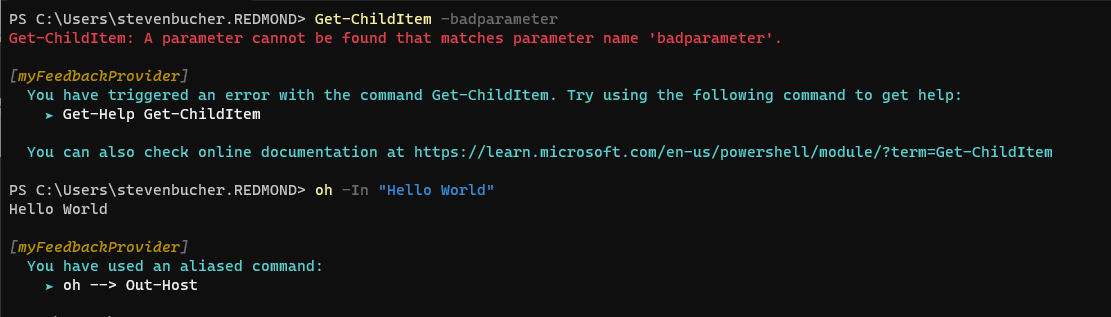
The following screenshot shows some example suggestions from the new provider.
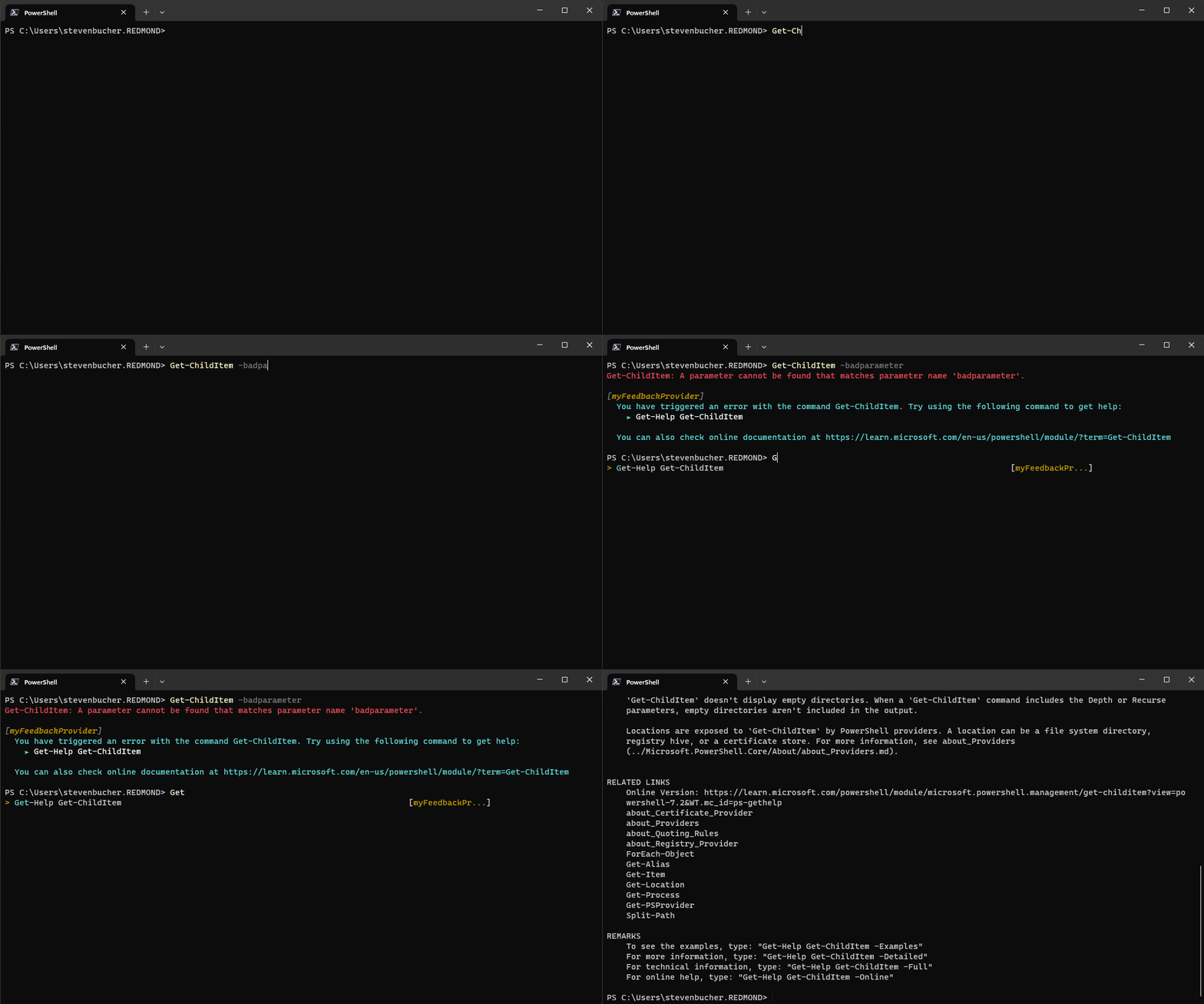
The following is a GIF showing how the predictor integration works from the new provider.
Other feedback providers
We have created other feedback provider that can be used as a good reference for deeper examples.
command-not-found
The command-not-found feedback provider utilizes the command-not-found utility tool on Linux systems
to provide suggestions when native commands are attempted to run but are missing. You can find the code
in the GitHub Repository or can download for yourself on the PowerShell Gallery.
PowerShell Adapter
The Microsoft.PowerShell.PowerShellAdapter is a feedback provider that helps you convert text outputs
from native commands into PowerShell objects. It detects "adapters" on your system and suggests you to use
them when you use the native command. You can learn more about PowerShell Adapters from,
PowerShell Adapter Feedback Provider blog post. You can also find the code in the GitHub Repository
or can download for yourself on the PowerShell Gallery.
Appendix - Full implementation code
The following code combines the previous examples into the find full implementation of the provider class.
using System.Management.Automation;
using System.Management.Automation.Subsystem;
using System.Management.Automation.Subsystem.Feedback;
using System.Management.Automation.Subsystem.Prediction;
using System.Management.Automation.Language;

namespace myFeedbackProvider;

public sealed class myFeedbackProvider : IFeedbackProvider, ICommandPredictor
{
    /// <summary>
    /// Gets the global unique identifier for the subsystem implementation.
    /// </summary>
    private readonly Guid _guid;
    public Guid Id => _guid;

    /// <summary>
    /// Gets the name of a subsystem implementation, this will be the name displayed when triggered
    /// </summary>
    public string Name => "myFeedbackProvider";

    /// <summary>
    /// Gets the description of a subsystem implementation.
    /// </summary>
    public string Description => "This is very simple feedback provider";

    /// <summary>
    /// Default implementation. No function is required for a feedback provider.
    /// </summary>
    Dictionary<string, string>? ISubsystem.FunctionsToDefine => null;

    /// <summary>
    /// Gets the types of trigger for this feedback provider.
    /// </summary>
    /// <remarks>
    /// The default implementation triggers a feedback provider by <see cref="FeedbackTrigger.CommandNotFound"/> only.
    /// </remarks>
    public FeedbackTrigger Trigger => FeedbackTrigger.All;

    /// <summary>
    /// List of candidates from the feedback provider to be passed as predictor results
    /// </summary>
    private List<string>? _candidates;

    /// <summary>
    /// PowerShell session used to run PowerShell commands that help create suggestions.
    /// </summary>
    private PowerShell _powershell;

    // Constructor
    internal myFeedbackProvider(string guid)
    {
        _guid = new Guid(guid); // Save guid
        _powershell = PowerShell.Create(); // Create PowerShell instance
    }

    #region IFeedbackProvider
    /// <summary>
    /// Gets feedback based on the given commandline and error record.
    /// </summary>
    /// <param name="context">The context for the feedback call.</param>
    /// <param name="token">The cancellation token to cancel the operation.</param>
    /// <returns>The feedback item.</returns>
    public FeedbackItem? GetFeedback(FeedbackContext context, CancellationToken token)
    {
        // Target describes the different kinds of triggers to activate on,
        var target = context.Trigger;
        var commandLine = context.CommandLine;
        var ast = context.CommandLineAst;

        // defining the header and footer variables
        string header;
        string footer;

        // List of the actions
        List<string>? actions = new List<string>();

        // Trigger on success
        if (target == FeedbackTrigger.Success)
        {
            // Getting the commands from the AST and only finding those that are Commands
            var astCmds = ast.FindAll((cAst) => cAst is CommandAst, true);

            // Inspect each of the commands
            foreach(var command in astCmds)
            {

                // Get the command name
                var aliasedCmd = ((CommandAst) command).GetCommandName();

                // Check if its an alias or not, if so then add it to the list of actions
                if(TryGetAlias(aliasedCmd, out string commandString))
                {
                    actions.Add($"{aliasedCmd} --> {commandString}");
                }
            }

            // If no alias was found return null
            if(actions.Count == 0)
            {
                return null;
            }

            // If aliases are found, set the header to a description and return a new FeedbackItem.
            header = "You have used an aliased command:";
            // Copy actions to _candidates for the predictor
            _candidates = actions;

            return new FeedbackItem(header, actions);
        }

        // Trigger on error
        if (target == FeedbackTrigger.Error)
        {
            // Gets the command that caused the error.
            var erroredCommand = context.LastError?.InvocationInfo.MyCommand;
            if (erroredCommand is null)
            {
                return null;
            }

            header = $"You have triggered an error with the command {erroredCommand}. Try using the following command to get help:";

            actions.Add($"Get-Help {erroredCommand}");
            footer = $"You can also check online documentation at https://learn.microsoft.com/en-us/powershell/module/?term={erroredCommand}";

            // Copy actions to _candidates for the predictor
            _candidates = actions;
            return new FeedbackItem(header, actions, footer, FeedbackDisplayLayout.Portrait);
        }
        return null;
    }

    /// <summary>
    /// Checks if a command is an alias.
    /// </summary>
    /// <param name="command">The command to check if alias</param>
    /// <param name="targetCommand">The referenced command by the aliased command</param>
    /// <returns>True if an alias and false if not</returns>
    private bool TryGetAlias(string command, out string targetCommand)
    {
        // Create PowerShell runspace as a session state proxy to run GetCommand and check
        // if its an alias
        AliasInfo? pwshAliasInfo =
            _powershell.Runspace.SessionStateProxy.InvokeCommand.GetCommand(command, CommandTypes.Alias) as AliasInfo;

        // if its null then it is not an aliased command so just return false
        if(pwshAliasInfo is null)
        {
            targetCommand = String.Empty;
            return false;
        }

        // Set targetCommand to referenced command name
        targetCommand = pwshAliasInfo.ReferencedCommand.Name;
        return true;
    }
    #endregion IFeedbackProvider

    #region ICommandPredictor

    /// <summary>
    /// Gets a value indicating whether the predictor accepts a specific kind of feedback.
    /// </summary>
    /// <param name="client">Represents the client that initiates the call.</param>
    /// <param name="feedback">A specific type of feedback.</param>
    /// <returns>True or false, to indicate whether the specific feedback is accepted.</returns>
    public bool CanAcceptFeedback(PredictionClient client, PredictorFeedbackKind feedback)
    {
        return feedback switch
        {
            PredictorFeedbackKind.CommandLineAccepted => true,
            _ => false,
        };
    }

    /// <summary>
    /// Get the predictive suggestions. It indicates the start of a suggestion rendering session.
    /// </summary>
    /// <param name="client">Represents the client that initiates the call.</param>
    /// <param name="context">The <see cref="PredictionContext"/> object to be used for prediction.</param>
    /// <param name="cancellationToken">The cancellation token to cancel the prediction.</param>
    /// <returns>An instance of <see cref="SuggestionPackage"/>.</returns>
    public SuggestionPackage GetSuggestion(
        PredictionClient client,
        PredictionContext context,
        CancellationToken cancellationToken)
    {
        if (_candidates is not null)
        {
            string input = context.InputAst.Extent.Text;
            List<PredictiveSuggestion>? result = null;

            foreach (string c in _candidates)
            {
                if (c.StartsWith(input, StringComparison.OrdinalIgnoreCase))
                {
                    result ??= new List<PredictiveSuggestion>(_candidates.Count);
                    result.Add(new PredictiveSuggestion(c));
                }
            }

            if (result is not null)
            {
                return new SuggestionPackage(result);
            }
        }

        return default;
    }

    /// <summary>
    /// A command line was accepted to execute.
    /// The predictor can start processing early as needed with the latest history.
    /// </summary>
    /// <param name="client">Represents the client that initiates the call.</param>
    /// <param name="history">History command lines provided as references for prediction.</param>
    public void OnCommandLineAccepted(PredictionClient client, IReadOnlyList<string> history)
    {
        // Reset the candidate state once the command is accepted.
        _candidates = null;
    }

    #endregion;
}

public class Init : IModuleAssemblyInitializer, IModuleAssemblyCleanup
{
    private const string Id = "<ADD YOUR GUID HERE>";

    public void OnImport()
    {
        var feedback = new myFeedbackProvider(Id);
        SubsystemManager.RegisterSubsystem(SubsystemKind.FeedbackProvider, feedback);
        SubsystemManager.RegisterSubsystem(SubsystemKind.CommandPredictor, feedback);
    }

    public void OnRemove(PSModuleInfo psModuleInfo)
    {
        SubsystemManager.UnregisterSubsystem<ICommandPredictor>(new Guid(Id));
        SubsystemManager.UnregisterSubsystem<IFeedbackProvider>(new Guid(Id));
    }
}
Collaborate with us on GitHub
The source for this content can be found on GitHub, where you can also create and review issues and pull requests. For more information, see our contributor guide.
