Observação
O acesso a essa página exige autorização. Você pode tentar entrar ou alterar diretórios.
O acesso a essa página exige autorização. Você pode tentar alterar os diretórios.
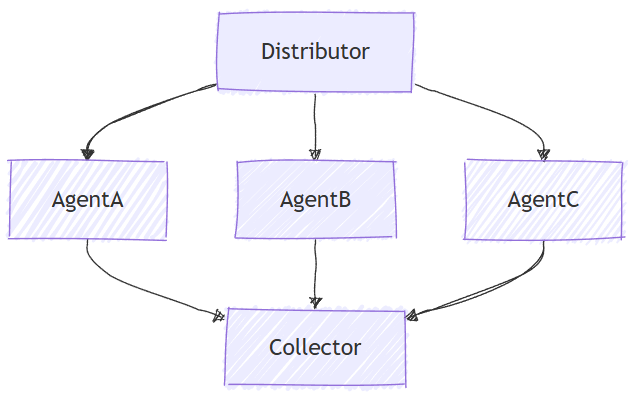
A orquestração simultânea permite que vários agentes trabalhem na mesma tarefa em paralelo. Cada agente processa a entrada de forma independente e seus resultados são coletados e agregados. Essa abordagem é adequada para cenários em que perspectivas ou soluções diversas são valiosas, como brainstorming, raciocínio de conjunto ou sistemas de votação.
O que você vai aprender
- Como definir vários agentes com conhecimentos diferentes
- Como orquestrar esses agentes para trabalhar simultaneamente em uma única tarefa
- Como coletar e processar os resultados
Na orquestração simultânea, vários agentes trabalham na mesma tarefa simultaneamente e independentemente, fornecendo perspectivas diversas sobre a mesma entrada.
Configurar o cliente do Azure OpenAI
using System;
using System.Collections.Generic;
using System.Linq;
using System.Threading.Tasks;
using Azure.AI.Projects;
using Azure.Identity;
using Microsoft.Agents.AI.Workflows;
using Microsoft.Extensions.AI;
using Microsoft.Agents.AI;

// 1) Set up the Azure OpenAI client
var endpoint = Environment.GetEnvironmentVariable("AZURE_OPENAI_ENDPOINT") ??
    throw new InvalidOperationException("AZURE_OPENAI_ENDPOINT is not set.");
var deploymentName = Environment.GetEnvironmentVariable("AZURE_OPENAI_DEPLOYMENT_NAME") ?? "gpt-4o-mini";
var client = new AIProjectClient(new Uri(endpoint), new DefaultAzureCredential())
    .GetProjectOpenAIClient()
    .GetProjectResponsesClient()
    .AsIChatClient(deploymentName);
Aviso
DefaultAzureCredential é conveniente para o desenvolvimento, mas requer uma consideração cuidadosa na produção. Em produção, considere o uso de uma credencial específica (por exemplo, ManagedIdentityCredential) para evitar problemas de latência, investigação de credenciais não intencionais e possíveis riscos de segurança de mecanismos de fallback.
Definir seus agentes
Crie vários agentes especializados que trabalharão na mesma tarefa simultaneamente:
// 2) Helper method to create translation agents
static ChatClientAgent GetTranslationAgent(string targetLanguage, IChatClient chatClient) =>
    new(chatClient,
        $"You are a translation assistant who only responds in {targetLanguage}. Respond to any " +
        $"input by outputting the name of the input language and then translating the input to {targetLanguage}.");

// Create translation agents for concurrent processing
var translationAgents = (from lang in (string[])["French", "Spanish", "English"]
                         select GetTranslationAgent(lang, client));
Configurar a orquestração simultânea
Crie o fluxo de trabalho usando AgentWorkflowBuilder para executar agentes em paralelo:
// 3) Build concurrent workflow
var workflow = AgentWorkflowBuilder.BuildConcurrent(translationAgents);
Executar o fluxo de trabalho simultâneo e coletar resultados
Execute o fluxo de trabalho e processe eventos de todos os agentes em execução simultaneamente:
// 4) Run the workflow
var messages = new List<ChatMessage> { new(ChatRole.User, "Hello, world!") };

await using StreamingRun run = await InProcessExecution.RunStreamingAsync(workflow, messages);
await run.TrySendMessageAsync(new TurnToken(emitEvents: true));

List<ChatMessage> result = new();
await foreach (WorkflowEvent evt in run.WatchStreamAsync())
{
    if (evt is AgentResponseUpdateEvent e)
    {
        Console.WriteLine($"{e.ExecutorId}: {e.Update.Text}");
    }
    else if (evt is WorkflowOutputEvent outputEvt)
    {
        result = outputEvt.As<List<ChatMessage>>()!;
        break;
    }
}

// Display aggregated results from all agents
Console.WriteLine("===== Final Aggregated Results =====");
foreach (var message in result)
{
    Console.WriteLine($"{message.Role}: {message.Text}");
}
Saída de exemplo
French_Agent: English detected. Bonjour, le monde !
Spanish_Agent: English detected. ¡Hola, mundo!
English_Agent: English detected. Hello, world!

===== Final Aggregated Results =====
User: Hello, world!
Assistant: English detected. Bonjour, le monde !
Assistant: English detected. ¡Hola, mundo!
Assistant: English detected. Hello, world!
Conceitos-chave
- Execução paralela: todos os agentes processam a entrada simultaneamente e independentemente
- AgentWorkflowBuilder.BuildConcurrent(): cria um fluxo de trabalho simultâneo de uma coleção de agentes
- Agregação automática: os resultados de todos os agentes são coletados automaticamente no resultado final
-
Streaming de Eventos: monitoramento em tempo real do progresso do agente
AgentResponseUpdateEvent - Perspectivas diversas: cada agente traz sua experiência exclusiva para o mesmo problema
Os agentes são entidades especializadas que podem processar tarefas. O código a seguir define três agentes: um especialista em pesquisa, um especialista em marketing e um especialista em direito.
import os

from agent_framework.foundry import FoundryChatClient
from azure.identity import AzureCliCredential

# 1) Create three domain agents using FoundryChatClient
chat_client = FoundryChatClient(
    project_endpoint=os.environ["FOUNDRY_PROJECT_ENDPOINT"],
    model=os.environ["FOUNDRY_MODEL"],
    credential=AzureCliCredential(),
)

researcher = chat_client.as_agent(
    instructions=(
        "You're an expert market and product researcher. Given a prompt, provide concise, factual insights,"
        " opportunities, and risks."
    ),
    name="researcher",
)

marketer = chat_client.as_agent(
    instructions=(
        "You're a creative marketing strategist. Craft compelling value propositions and target messaging"
        " aligned to the prompt."
    ),
    name="marketer",
)

legal = chat_client.as_agent(
    instructions=(
        "You're a cautious legal/compliance reviewer. Highlight constraints, disclaimers, and policy concerns"
        " based on the prompt."
    ),
    name="legal",
)
Configurar a orquestração simultânea
A ConcurrentBuilder classe permite que você construa um fluxo de trabalho para executar vários agentes em paralelo. Você passa a lista de agentes como participantes.
from agent_framework.orchestrations import ConcurrentBuilder

# 2) Build a concurrent workflow
# Participants are either Agents (type of SupportsAgentRun) or Executors
workflow = ConcurrentBuilder(participants=[researcher, marketer, legal]).build()
Executar o fluxo de trabalho simultâneo e coletar os resultados
O agregador padrão produz um único AgentResponse que contém uma mensagem de assistente por participante:
from agent_framework import AgentResponse

# 3) Run with a single prompt and print the aggregated agent responses
events = await workflow.run("We are launching a new budget-friendly electric bike for urban commuters.")
outputs = events.get_outputs()

if outputs:
    print("===== Final Aggregated Results =====")
    final: AgentResponse = outputs[0]
    for msg in final.messages:
        name = msg.author_name or "assistant"
        print(f"{'-' * 60}\n\n[{name}]:\n{msg.text}")
Saída de exemplo
===== Final Aggregated Results =====
------------------------------------------------------------

[researcher]:
**Insights:**

- **Target Demographic:** Urban commuters seeking affordable, eco-friendly transport;
    likely to include students, young professionals, and price-sensitive urban residents.
- **Market Trends:** E-bike sales are growing globally, with increasing urbanization,
    higher fuel costs, and sustainability concerns driving adoption.
...
------------------------------------------------------------

[marketer]:
**Value Proposition:**
"Empowering your city commute: Our new electric bike combines affordability, reliability, and
    sustainable design—helping you conquer urban journeys without breaking the bank."
...
------------------------------------------------------------

[legal]:
**Constraints, Disclaimers, & Policy Concerns for Launching a Budget-Friendly Electric Bike for Urban Commuters:**

**1. Regulatory Compliance**
- Verify that the electric bike meets all applicable federal, state, and local regulations
    regarding e-bike classification, speed limits, power output, and safety features.
Avançado: executores de Agentes Personalizados
A orquestração simultânea dá suporte a executores personalizados que encapsulam agentes com lógica adicional. Isso é útil quando você precisa de mais controle sobre como os agentes são inicializados e como eles processam solicitações:
Definir Executores de Agentes Personalizados
from agent_framework import (
    AgentExecutorRequest,
    AgentExecutorResponse,
    Agent,
    Executor,
    WorkflowContext,
    handler,
)

class ResearcherExec(Executor):
    def __init__(self, chat_client: FoundryChatClient, id: str = "researcher"):
        self.agent = chat_client.as_agent(
            instructions=(
                "You're an expert market and product researcher. Given a prompt, provide concise, factual insights,"
                " opportunities, and risks."
            ),
            name=id,
        )
        super().__init__(id=id)

    @handler
    async def run(self, request: AgentExecutorRequest, ctx: WorkflowContext[AgentExecutorResponse]) -> None:
        response = await self.agent.run(request.messages)
        full_conversation = list(request.messages) + list(response.messages)
        await ctx.send_message(AgentExecutorResponse(self.id, response, full_conversation=full_conversation))

class MarketerExec(Executor):
    def __init__(self, chat_client: FoundryChatClient, id: str = "marketer"):
        self.agent = chat_client.as_agent(
            instructions=(
                "You're a creative marketing strategist. Craft compelling value propositions and target messaging"
                " aligned to the prompt."
            ),
            name=id,
        )
        super().__init__(id=id)

    @handler
    async def run(self, request: AgentExecutorRequest, ctx: WorkflowContext[AgentExecutorResponse]) -> None:
        response = await self.agent.run(request.messages)
        full_conversation = list(request.messages) + list(response.messages)
        await ctx.send_message(AgentExecutorResponse(self.id, response, full_conversation=full_conversation))
Criar um fluxo de trabalho com executores personalizados
chat_client = FoundryChatClient(
    project_endpoint=os.environ["FOUNDRY_PROJECT_ENDPOINT"],
    model=os.environ["FOUNDRY_MODEL"],
    credential=AzureCliCredential(),
)

researcher = ResearcherExec(chat_client)
marketer = MarketerExec(chat_client)
legal = LegalExec(chat_client)

workflow = ConcurrentBuilder(participants=[researcher, marketer, legal]).build()
Avançado: Agregador Personalizado
Por padrão, a orquestração simultânea agrega todas as respostas do agente em uma única AgentResponse com uma mensagem de assistente por participante. Você pode substituir esse comportamento por um agregador personalizado que processa os resultados de uma maneira específica:
O callback pode ser síncrono ou assíncrono. Também há suporte para objetos callable assíncronos e wrappers que retornam um awaitable. O fluxo de trabalho aguarda o valor retornado antes de produzir a saída do agregador.
Definir um agregador personalizado
from agent_framework import AgentExecutorResponse

# Create a summarizer agent for the aggregator
summarizer_agent = chat_client.as_agent(
    instructions=(
        "You are a helpful assistant that consolidates multiple domain expert outputs "
        "into one cohesive, concise summary with clear takeaways. Keep it under 200 words."
    ),
    name="summarizer",
)

# Define a custom aggregator callback
async def summarize_results(results: list[AgentExecutorResponse]) -> str:
    # Extract one final assistant message per agent
    expert_sections: list[str] = []
    for r in results:
        try:
            messages = getattr(r.agent_response, "messages", [])
            final_text = messages[-1].text if messages and hasattr(messages[-1], "text") else "(no content)"
            expert_sections.append(f"{r.executor_id}:\n{final_text}")
        except Exception as e:
            expert_sections.append(f"{r.executor_id}: (error: {type(e).__name__}: {e})")

    # Ask the model to synthesize a concise summary of the experts' outputs
    prompt = "\n\n".join(expert_sections)
    response = await summarizer_agent.run(prompt)
    # Return the model's final assistant text as the completion result
    return response.messages[-1].text if response.messages else ""
Criar um fluxo de trabalho com o agregador personalizado
workflow = (
    ConcurrentBuilder(participants=[researcher, marketer, legal])
    .with_aggregator(summarize_results)
    .build()
)

output = None
async for event in workflow.run("We are launching a new budget-friendly electric bike for urban commuters.", stream=True):
    if event.type == "output":
        output = event.data

if output:
    print("===== Final Consolidated Output =====")
    print(output)
Saída de exemplo com agregador personalizado
===== Final Consolidated Output =====
Urban e-bike demand is rising rapidly due to eco-awareness, urban congestion, and high fuel costs,
with market growth projected at a ~10% CAGR through 2030. Key customer concerns are affordability,
easy maintenance, convenient charging, compact design, and theft protection. Differentiation opportunities
include integrating smart features (GPS, app connectivity), offering subscription or leasing options, and
developing portable, space-saving designs. Partnering with local governments and bike shops can boost visibility.

Risks include price wars eroding margins, regulatory hurdles, battery quality concerns, and heightened expectations
for after-sales support. Accurate, substantiated product claims and transparent marketing (with range disclaimers)
are essential. All e-bikes must comply with local and federal regulations on speed, wattage, safety certification,
and labeling. Clear warranty, safety instructions (especially regarding batteries), and inclusive, accessible
marketing are required. For connected features, data privacy policies and user consents are mandatory.

Effective messaging should target young professionals, students, eco-conscious commuters, and first-time buyers,
emphasizing affordability, convenience, and sustainability. Slogan suggestion: "Charge Ahead—City Commutes Made
Affordable." Legal review in each target market, compliance vetting, and robust customer support policies are
critical before launch.
Saídas Intermediárias
Por padrão, apenas a saída do agregador é exibida como um evento (terminal) do fluxo de trabalho "output". Passe intermediate_output_from com os participantes que você deseja designar como fontes intermediárias para também exibir suas saídas individuais como "intermediate" eventos:
workflow = ConcurrentBuilder(
    participants=[researcher, marketer, legal],
    intermediate_output_from=[researcher, marketer, legal],
).build()
Você pode lidar com esses eventos em tempo real no modo de streaming:
from agent_framework import AgentResponseUpdate

# Track the last author to format streaming output.
last_author: str | None = None

async for event in workflow.run("Analyze our new product launch strategy.", stream=True):
    if event.type == "intermediate" and isinstance(event.data, AgentResponseUpdate):
        update = event.data
        author = update.author_name
        if author != last_author:
            if last_author is not None:
                print()  # Newline between different authors
            print(f"{author}: {update.text}", end="", flush=True)
            last_author = author
        else:
            print(update.text, end="", flush=True)
Conceitos-chave
- Execução paralela: todos os agentes trabalham na tarefa simultaneamente e independentemente
-
Saída de Resposta do Agente: o agregador padrão gera um único
AgentResponsecom uma mensagem de assistente por participante (sem prompt do usuário incluído) - Perspectivas diversas: cada agente traz sua experiência exclusiva para o mesmo problema
- Participantes flexíveis: você pode usar agentes diretamente ou envolvê-los em executores personalizados
- Processamento personalizado: substitua o agregador padrão para sintetizar resultados de maneiras específicas do domínio
-
Saídas Intermediárias: passe
intermediate_output_from=[participant, ...]para exibir a saída de cada participante listado como eventos"intermediate", além do evento terminal"output"do agregador
O Go dá suporte a fluxos de trabalho de agente simultâneos com agentworkflow.NewConcurrentWorkflowBuilder. Você também pode criar o mesmo padrão manualmente com arestas de fan-out e fan-in quando precisar de um comportamento personalizado do executor.
Configuração do Foundry
Configure o endpoint do projeto do Foundry, a implantação do modelo e a autenticação:
endpoint := os.Getenv("FOUNDRY_PROJECT_ENDPOINT")
model := cmp.Or(os.Getenv("FOUNDRY_MODEL"), "gpt-4o-mini")

token, err := azidentity.NewDefaultAzureCredential(nil)
if err != nil {
    return err
}
Aviso
azidentity.NewDefaultAzureCredential é conveniente para o desenvolvimento, mas requer uma consideração cuidadosa na produção. Em produção, considere usar uma credencial específica, como azidentity.NewManagedIdentityCredential, para evitar problemas de latência, tentativas não intencionais de credenciais e possíveis riscos de segurança decorrentes de mecanismos de fallback.
Definir seus agentes
Crie vários agentes especializados que trabalharão na mesma tarefa simultaneamente:
newTranslationAgent := func(language string) *agent.Agent {
    return foundryprovider.NewAgent(
        endpoint,
        token,
        foundryprovider.ModelDeployment(model),
        foundryprovider.AgentConfig{
            Instructions: fmt.Sprintf(
                "You are a translation assistant who only responds in %s. Respond to any input by outputting the name of the input language and then translating the input to %s.",
                language,
                language,
            ),
            Config: agent.Config{Name: language},
        },
    )
}

agents := []*agent.Agent{
    newTranslationAgent("French"),
    newTranslationAgent("Spanish"),
    newTranslationAgent("English"),
}
Configurar a orquestração simultânea
Crie o fluxo de trabalho com agentworkflow.NewConcurrentWorkflowBuilder:
wf, err := agentworkflow.NewConcurrentWorkflowBuilder(agents...).
    WithName("translation-concurrent").
    Build()
if err != nil {
    return err
}
Executar o fluxo de trabalho simultâneo e coletar resultados
Execute o fluxo de trabalho com uma mensagem de usuário e um token de turno. Quando a emissão de eventos é habilitada, as atualizações do agente são exibidas como eventos de saída de fluxo de trabalho antes da saída agregada final.
run, err := inproc.Default.RunStreaming(ctx, wf, []*message.Message{message.NewText("Hello, world!")})
if err != nil {
    return err
}
defer run.Close(ctx)

emitEvents := true
if err := run.SendMessage(ctx, workflow.TurnToken{EmitEvents: &emitEvents}); err != nil {
    return err
}

for evt, err := range run.WatchStream(ctx) {
    if err != nil {
        return err
    }
    if output, ok := evt.(workflow.OutputEvent); ok {
        switch value := output.Output.(type) {
        case *agent.ResponseUpdate:
            fmt.Printf("%s: %s\n", output.ExecutorID, value.String())
        case []*message.Message:
            fmt.Println("===== Final Aggregated Results =====")
            for _, msg := range value {
                fmt.Printf("%s: %s\n", msg.Role, msg.String())
            }
        }
    }
}
Saída de exemplo
French: English detected. Bonjour, le monde !
Spanish: English detected. ¡Hola, mundo!
English: English detected. Hello, world!

===== Final Aggregated Results =====
assistant: English detected. Bonjour, le monde !
assistant: English detected. ¡Hola, mundo!
assistant: English detected. Hello, world!
Avançado: executores de Agentes Personalizados
Crie fluxos de trabalho simultâneos manualmente quando você precisar de comportamento de executor personalizado. Um executor personalizado pode chamar um agente e, em seguida, participar de um fluxo de trabalho fan-out/fan-in.
agentExecutor := func(id string, ag *agent.Agent) workflow.ExecutorBinding {
    return workflow.BindNewExecutorFunc(id, func(_ string, executorID string) (*workflow.Executor, error) {
        return workflow.NewExecutor(executorID, func(ctx *workflow.Context, prompt string) (string, error) {
            response, err := ag.RunText(ctx, prompt).Collect()
            if err != nil {
                return "", err
            }
            return response.String(), nil
        }), nil
    })
}

researcher := agentExecutor("researcher", researcherAgent)
marketer := agentExecutor("marketer", marketerAgent)
aggregate := aggregateStrings("ConcurrentAggregationExecutor")

wf, err := workflow.NewBuilder(start).
    AddFanOutEdge(start, []workflow.ExecutorBinding{researcher, marketer}).
    AddFanInBarrierEdge([]workflow.ExecutorBinding{researcher, marketer}, aggregate).
    WithOutputFrom(aggregate).
    Build()
Avançado: Agregador Personalizado
Use WithAggregator para substituir o comportamento de agregação de mensagem padrão:
wf, err := agentworkflow.NewConcurrentWorkflowBuilder(agents...).
    WithName("translation-concurrent").
    WithAggregator(func(_ context.Context, batches [][]*message.Message) []*message.Message {
        results := make([]*message.Message, 0, len(batches))
        for _, batch := range batches {
            if len(batch) > 0 {
                results = append(results, batch[len(batch)-1])
            }
        }
        return results
    }).
    Build()
if err != nil {
    return err
}
Saídas Intermediárias
Por padrão, NewConcurrentWorkflowBuilder emite saídas de participante e envio em lote como saídas de fluxo de trabalho intermediárias e emite o resultado agregado como a saída do terminal. Para fluxos de trabalho de executores personalizados, marque os executores de ramificação como intermediários e o agregador como terminal:
wf, err := workflow.NewBuilder(start).
    AddFanOutEdge(start, []workflow.ExecutorBinding{physics, chemistry}).
    AddFanInBarrierEdge([]workflow.ExecutorBinding{physics, chemistry}, aggregate).
    WithIntermediateOutputFrom(physics, chemistry).
    WithOutputFrom(aggregate).
    Build()
Cada workflow.OutputEvent inclui o ExecutorID que produziu a saída. Use OutputEvent.IsIntermediate() para distinguir saídas de ramificação intermediárias da agregação final.
Conceitos-chave
- Execução paralela: todos os agentes ou executores processam a entrada de forma independente.
- agentworkflow. NewConcurrentWorkflowBuilder(): cria um fluxo de trabalho simultâneo de uma coleção de agentes.
-
Arestas de Fan-out/Fan-in: fluxos de trabalho simultâneos personalizados usam
AddFanOutEdgeeAddFanInBarrierEdge. - Agregação de mensagem: o agregador padrão retorna a última mensagem de cada participante; os agregadores personalizados podem substituir esse comportamento.
- Transmissão de eventos: os eventos de saída podem apresentar atualizações individuais do agente e resultados finais agregados.
-
Saídas Intermediárias:
WithIntermediateOutputFrommarca saídas selecionadas comworkflow.OutputTagIntermediate.
Tip
Consulte o exemplo de fluxo de trabalho simultâneo e o exemplo de padrões de fluxo de trabalho do agente para obter exemplos executáveis completos.