Observação
O acesso a essa página exige autorização. Você pode tentar entrar ou alterar diretórios.
O acesso a essa página exige autorização. Você pode tentar alterar os diretórios.
Este tutorial mostra como usar o Fabric para avaliar o desempenho do aplicativo RAG. A avaliação se concentra em dois componentes principais do RAG: o recuperador (Azure AI Search) e o gerador de resposta (um LLM que usa a consulta do usuário, o contexto recuperado e um prompt para gerar uma resposta). Estas são as principais etapas:
- Configurar o Azure OpenAI e os serviços do Azure AI Search
- Carregar dados do conjunto de dados de QUALIDADE do CMU de artigos da Wikipédia para criar um parâmetro de comparação
- Executar um teste de fumaça com uma consulta para confirmar se o sistema RAG funciona de ponta a ponta
- Definir métricas determinísticas e assistidas por IA para avaliação
- Check-in 1: Avaliar o desempenho do recuperador usando a precisão de N superior
- Check-in 2: Avaliar o desempenho do gerador de resposta usando métricas de fundamentação, relevância e similaridade
- Visualizar e armazenar resultados de avaliação no OneLake para referência futura e avaliação contínua
Pré-requisitos
Antes de iniciar este tutorial, conclua o guia passo a passo da Geração Aumentada de Recuperação de Construção no Fabric.
Você precisa desses serviços para executar o notebook:
- Microsoft Fabric
- Adicione um lakehouse a este notebook (ele contém os dados que você adicionou no tutorial anterior).
- Azure AI Studio para OpenAI
- Azure AI Search (ele contém os dados indexados no tutorial anterior).
No tutorial anterior, você carregou dados no lakehouse e criou um índice de documento usado pelo sistema RAG. Use o índice neste exercício para aprender técnicas principais para avaliar o desempenho do RAG e identificar possíveis problemas. Se você não criou um índice ou o removeu, siga o guia de início rápido para concluir o pré-requisito.

Configurar o acesso ao Azure OpenAI e ao Azure AI Search
Defina endpoints e chaves necessárias. Importar bibliotecas e funções necessárias. Instanciar clientes do Azure OpenAI e do Azure AI Search. Defina um wrapper de função com um prompt para consultar o sistema RAG.
# Enter your Azure OpenAI service values
aoai_endpoint = "https://<your-resource-name>.openai.azure.com" # TODO: Provide the Azure OpenAI resource endpoint (replace <your-resource-name>)
aoai_key = "" # TODO: Fill in your API key from Azure OpenAI
aoai_deployment_name_embeddings = "text-embedding-ada-002"
aoai_model_name_query = "gpt-4-32k"
aoai_model_name_metrics = "gpt-4-32k"
aoai_api_version = "2024-02-01"

# Setup key accesses to Azure AI Search
aisearch_index_name = "" # TODO: Create a new index name: must only contain lowercase, numbers, and dashes
aisearch_api_key = "" # TODO: Fill in your API key from Azure AI Search
aisearch_endpoint = "https://.search.windows.net" # TODO: Provide the url endpoint for your created Azure AI Search
import warnings
warnings.filterwarnings("ignore", category=DeprecationWarning)

import os, requests, json

from datetime import datetime, timedelta
from azure.core.credentials import AzureKeyCredential
from azure.search.documents import SearchClient

from pyspark.sql import functions as F
from pyspark.sql.functions import to_timestamp, current_timestamp, concat, col, split, explode, udf, monotonically_increasing_id, when, rand, coalesce, lit, input_file_name, regexp_extract, concat_ws, length, ceil
from pyspark.sql.types import StructType, StructField, StringType, IntegerType, TimestampType, ArrayType, FloatType
from pyspark.sql import Row
import pandas as pd
from azure.search.documents.indexes import SearchIndexClient
from azure.search.documents.models import (
    VectorizedQuery,
)
from azure.search.documents.indexes.models import (
    SearchIndex,
    SearchField,
    SearchFieldDataType,
    SimpleField,
    SearchableField,
    SemanticConfiguration,
    SemanticPrioritizedFields,
    SemanticField,
    SemanticSearch,
    VectorSearch,
    HnswAlgorithmConfiguration,
    HnswParameters,
    VectorSearchProfile,
    VectorSearchAlgorithmKind,
    VectorSearchAlgorithmMetric,
)

import openai
from openai import AzureOpenAI
import uuid
import matplotlib.pyplot as plt
from synapse.ml.featurize.text import PageSplitter
import ipywidgets as widgets
from IPython.display import display as w_display
Saída da célula:StatementMeta(, 21cb8cd3-7742-4c1f-8339-265e2846df1d, 6, Finished, Available, Finished)
# Configure access to OpenAI endpoint
openai.api_type = "azure"
openai.api_key = aoai_key
openai.api_base = aoai_endpoint
openai.api_version = aoai_api_version

# Create client for accessing embedding endpoint
embed_client = AzureOpenAI(
    api_version=aoai_api_version,
    azure_endpoint=aoai_endpoint,
    api_key=aoai_key,
)

# Create client for accessing chat endpoint
chat_client = AzureOpenAI(
    azure_endpoint=aoai_endpoint,
    api_key=aoai_key,
    api_version=aoai_api_version,
)

# Configure access to Azure AI Search
search_client = SearchClient(
    aisearch_endpoint,
    aisearch_index_name,
    credential=AzureKeyCredential(aisearch_api_key)
)
Saída da célula:StatementMeta(, 21cb8cd3-7742-4c1f-8339-265e2846df1d, 7, Finished, Available, Finished)
As funções a seguir implementam os dois componentes principais do RAG : retriever (get_context_source) e gerador de resposta (get_answer). O código é semelhante ao tutorial anterior. O topN parâmetro permite definir quantos recursos relevantes recuperar (este tutorial usa 3, mas o valor ideal pode variar de acordo com o conjunto de dados):
# Implement retriever
def get_context_source(question, topN=3):
    """
    Retrieves contextual information and sources related to a given question using embeddings and a vector search.
    Parameters:
    question (str): The question for which the context and sources are to be retrieved.
    topN (int, optional): The number of top results to retrieve. Default is 3.

    Returns:
    List: A list containing two elements:
        1. A string with the concatenated retrieved context.
        2. A list of retrieved source paths.
    """
    embed_client = openai.AzureOpenAI(
        api_version=aoai_api_version,
        azure_endpoint=aoai_endpoint,
        api_key=aoai_key,
    )

    query_embedding = embed_client.embeddings.create(input=question, model=aoai_deployment_name_embeddings).data[0].embedding

    vector_query = VectorizedQuery(vector=query_embedding, k_nearest_neighbors=topN, fields="Embedding")

    results = search_client.search(
        vector_queries=[vector_query],
        top=topN,
    )

    retrieved_context = ""
    retrieved_sources = []
    for result in results:
        retrieved_context += result['ExtractedPath'] + "\n" + result['Chunk'] + "\n\n"
        retrieved_sources.append(result['ExtractedPath'])

    return [retrieved_context, retrieved_sources]

# Implement response generator
def get_answer(question, context):
    """
    Generates a response to a given question using provided context and an Azure OpenAI model.

    Parameters:
        question (str): The question that needs to be answered.
        context (str): The contextual information related to the question that will help generate a relevant response.

    Returns:
        str: The response generated by the Azure OpenAI model based on the provided question and context.
    """
    messages = [
        {
            "role": "system",
            "content": "You are a chat assistant. Use provided text to ground your response. Give a one-word answer when possible ('yes'/'no' is OK where appropriate, no details). Unnecessary words incur a $500 penalty."
        }
    ]

    messages.append(
        {
            "role": "user",
            "content": question + "\n" + context,
        },
    )

    chat_client = openai.AzureOpenAI(
        azure_endpoint=aoai_endpoint,
        api_key=aoai_key,
        api_version=aoai_api_version,
    )

    chat_completion = chat_client.chat.completions.create(
        model=aoai_model_name_query,
        messages=messages,
    )

    return chat_completion.choices[0].message.content
Saída da célula:StatementMeta(, 21cb8cd3-7742-4c1f-8339-265e2846df1d, 8, Finished, Available, Finished)
Dataset
A versão 1.2 do conjunto de dados do Carnegie Mellon University Question-Answer é um corpus de artigos da Wikipédia com perguntas factuais e respostas escritas manualmente. Ele está hospedado no Armazenamento de Blobs do Azure sob a GFDL. O conjunto de dados usa uma tabela com estes campos:
-
ArticleTitle: nome do artigo da Wikipédia de onde as perguntas e respostas são provenientes -
Question: pergunta escrita manualmente sobre o artigo -
Answer: resposta escrita manualmente com base no artigo -
DifficultyFromQuestioner: classificação de dificuldade que o autor atribui à pergunta -
DifficultyFromAnswerer: dificuldade de classificação que o avaliador atribui; pode ser diferente deDifficultyFromQuestioner -
ExtractedPath: caminho para o artigo original (um artigo pode ter vários pares de perguntas e respostas) -
text: texto do artigo da Wikipédia limpo
Baixe os arquivos LICENSE-S08 e LICENSE-S09 do mesmo local para obter detalhes da licença.
Histórico e citação
Use esta citação para o conjunto de dados:
CMU Question/Answer Dataset, Release 1.2
August 23, 2013
Noah A. Smith, Michael Heilman, and Rebecca Hwa
Question Generation as a Competitive Undergraduate Course Project
In Proceedings of the NSF Workshop on the Question Generation Shared Task and Evaluation Challenge, Arlington, VA, September 2008.
Available at http://www.cs.cmu.edu/~nasmith/papers/smith+heilman+hwa.nsf08.pdf.
Original dataset acknowledgments:
This research project was supported by NSF IIS-0713265 (to Smith), an NSF Graduate Research Fellowship (to Heilman), NSF IIS-0712810 and IIS-0745914 (to Hwa), and Institute of Education Sciences, U.S. Department of Education R305B040063 (to Carnegie Mellon).
cmu-qa-08-09 (modified version)
June 12, 2024
Amir Jafari, Alexandra Savelieva, Brice Chung, Hossein Khadivi Heris, Journey McDowell
This release uses the GNU Free Documentation License (GFDL) (http://www.gnu.org/licenses/fdl.html).
The GNU license applies to all copies of the dataset.
Criar parâmetro de comparação
Importe o parâmetro de comparação. Para essa demonstração, use um subconjunto de perguntas dos buckets S08/set1 e S08/set2. Para manter uma pergunta por artigo, aplique df.dropDuplicates(["ExtractedPath"]). Elimine perguntas duplicadas. O processo de curadoria adiciona rótulos de dificuldade; este exemplo os limita a medium.
df = spark.sql("SELECT * FROM data_load_tests.cmu_qa")

# Filter the DataFrame to include the specified paths
df = df.filter((col("ExtractedPath").like("S08/data/set1/%")) | (col("ExtractedPath").like("S08/data/set2/%")))

# Keep only medium-difficulty questions.
df = df.filter(col("DifficultyFromQuestioner") == "medium")


# Drop duplicate questions and source paths.
df = df.dropDuplicates(["Question"])
df = df.dropDuplicates(["ExtractedPath"])

num_rows = df.count()
num_columns = len(df.columns)
print(f"Number of rows: {num_rows}, Number of columns: {num_columns}")

# Persist the DataFrame
df.persist()
display(df)
Saída da célula:StatementMeta(, 21cb8cd3-7742-4c1f-8339-265e2846df1d, 9, Finished, Available, Finished)Number of rows: 20, Number of columns: 7SynapseWidget(Synapse.DataFrame, 47aff8cb-72f8-4a36-885c-f4f3bb830a91)
O resultado é um DataFrame com 20 linhas - o benchmark de demonstração. Os campos-chave são Question, Answer (resposta de verdade fundamental curada por humanos) e ExtractedPath (o documento de origem). Ajuste os filtros para incluir outras perguntas e variar a dificuldade para um exemplo mais realista. Experimente.
Executar um simples teste de ponta a ponta
Comece com um teste de fumaça de ponta a ponta de RAG (geração aumentada de recuperação).
question = "How many suborders are turtles divided into?"
retrieved_context, retrieved_sources = get_context_source(question)
answer = get_answer(question, retrieved_context)
print(answer)
Saída da célula:StatementMeta(, 21cb8cd3-7742-4c1f-8339-265e2846df1d, 10, Finished, Available, Finished)Three
Esse teste de fumaça ajuda você a encontrar problemas na implementação do RAG, como credenciais incorretas, um índice de vetor ausente ou vazio ou interfaces de função incompatíveis. Se o teste falhar, verifique se há problemas. Saída esperada: Three. Se o teste de fumaça for aprovado, vá para a próxima seção para avaliar o RAG ainda mais.
Estabelecer métricas
Defina uma métrica determinística para avaliar o recuperador. Ele é inspirado por mecanismos de pesquisa. Ele verifica se a lista de fontes recuperadas inclui a fonte de verdade básica. Essa métrica é uma pontuação de precisão top-N porque o parâmetro topN define o número de fontes recuperadas.
def get_retrieval_score(target_source, retrieved_sources):
    if target_source in retrieved_sources:
        return 1
    else:
        return 0
Saída da célula:StatementMeta(, 21cb8cd3-7742-4c1f-8339-265e2846df1d, 11, Finished, Available, Finished)
De acordo com o parâmetro de comparação, a resposta está contida na origem com a ID "S08/data/set1/a9". Testar a função no exemplo que fizemos acima retorna 1, conforme o esperado, porque ela estava entre os três principais blocos de texto relevantes.
print("Retrieved sources:", retrieved_sources)
get_retrieval_score("S08/data/set1/a9", retrieved_sources)
Saída da célula:StatementMeta(, 21cb8cd3-7742-4c1f-8339-265e2846df1d, 12, Finished, Available, Finished)Retrieved sources: ['S08/data/set1/a9', 'S08/data/set1/a9', 'S08/data/set1/a5']1
Esta seção define as métricas assistidas por IA. O modelo de prompt inclui alguns exemplos de entrada (CONTEXT e ANSWER) e saída sugerida - também conhecida como um modelo de poucas capturas. É o mesmo prompt usado no Azure AI Studio. Saiba mais em métricas de avaliação internas. Essa demonstração usa as métricas groundedness e relevance, que geralmente são as mais úteis e confiáveis para avaliar modelos de GPT. Outras métricas podem ser úteis, mas fornecem menos intuição - por exemplo, as respostas não precisam ser semelhantes para serem corretas, portanto similarity , as pontuações podem ser enganosas. A escala para todas as métricas é de 1 a 5. Mais alto é melhor. A coerência utiliza apenas duas entradas (contexto e resposta gerada), enquanto as outras duas métricas também usam a verdade de referência para avaliação.
def get_groundedness_metric(context, answer):
    """Get the groundedness score from the LLM using the context and answer."""

    groundedness_prompt_template = """
    You are presented with a CONTEXT and an ANSWER about that CONTEXT. Decide whether the ANSWER is entailed by the CONTEXT by choosing one of the following ratings:
    1. 5: The ANSWER follows logically from the information contained in the CONTEXT.
    2. 1: The ANSWER is logically false from the information contained in the CONTEXT.
    3. an integer score between 1 and 5 and if such integer score does not exist, use 1: It is not possible to determine whether the ANSWER is true or false without further information. Read the passage of information thoroughly and select the correct answer from the three answer labels. Read the CONTEXT thoroughly to ensure you know what the CONTEXT entails. Note the ANSWER is generated by a computer system, it can contain certain symbols, which should not be a negative factor in the evaluation.
    Independent Examples:
    ## Example Task #1 Input:
    "CONTEXT": "Some are reported as not having been wanted at all.", "QUESTION": "", "ANSWER": "All are reported as being completely and fully wanted."
    ## Example Task #1 Output:
    1
    ## Example Task #2 Input:
    "CONTEXT": "Ten new television shows appeared during the month of September. Five of the shows were sitcoms, three were hourlong dramas, and two were news-magazine shows. By January, only seven of these new shows were still on the air. Five of the shows that remained were sitcoms.", "QUESTION": "", "ANSWER": "At least one of the shows that were cancelled was an hourlong drama."
    ## Example Task #2 Output:
    5
    ## Example Task #3 Input:
    "CONTEXT": "In Quebec, an allophone is a resident, usually an immigrant, whose mother tongue or home language is neither French nor English.", "QUESTION": "", "ANSWER": "In Quebec, an allophone is a resident, usually an immigrant, whose mother tongue or home language is not French."
    5
    ## Example Task #4 Input:
    "CONTEXT": "Some are reported as not having been wanted at all.", "QUESTION": "", "ANSWER": "All are reported as being completely and fully wanted."
    ## Example Task #4 Output:
    1
    ## Actual Task Input:
    "CONTEXT": {context}, "QUESTION": "", "ANSWER": {answer}
    Reminder: The return values for each task should be correctly formatted as an integer between 1 and 5. Do not repeat the context and question.  Don't explain the reasoning. The answer should include only a number: 1, 2, 3, 4, or 5.
    Actual Task Output:
    """

    metric_client = openai.AzureOpenAI(
        api_version=aoai_api_version,
        azure_endpoint=aoai_endpoint,
        api_key=aoai_key,
    )

    messages = [
        {
            "role": "system",
            "content": "You are an AI assistant. You will be given the definition of an evaluation metric for assessing the quality of an answer in a question-answering task. Your job is to compute an accurate evaluation score using the provided evaluation metric."
        },
        {
            "role": "user",
            "content": groundedness_prompt_template.format(context=context, answer=answer)
        }
    ]

    metric_completion = metric_client.chat.completions.create(
        model=aoai_model_name_metrics,
        messages=messages,
        temperature=0,
    )

    return metric_completion.choices[0].message.content
Saída da célula:StatementMeta(, 21cb8cd3-7742-4c1f-8339-265e2846df1d, 13, Finished, Available, Finished)
def get_relevance_metric(context, question, answer):
    relevance_prompt_template = """
    Relevance measures how well the answer addresses the main aspects of the question, based on the context. Consider whether all and only the important aspects are contained in the answer when evaluating relevance. Given the context and question, score the relevance of the answer between one to five stars using the following rating scale:
    One star: the answer completely lacks relevance
    Two stars: the answer mostly lacks relevance
    Three stars: the answer is partially relevant
    Four stars: the answer is mostly relevant
    Five stars: the answer has perfect relevance

    This rating value should always be an integer between 1 and 5. So the rating produced should be 1 or 2 or 3 or 4 or 5.

    context: Marie Curie was a Polish-born physicist and chemist who pioneered research on radioactivity and was the first woman to win a Nobel Prize.
    question: What field did Marie Curie excel in?
    answer: Marie Curie was a renowned painter who focused mainly on impressionist styles and techniques.
    stars: 1

    context: The Beatles were an English rock band formed in Liverpool in 1960, and they are widely regarded as the most influential music band in history.
    question: Where were The Beatles formed?
    answer: The band The Beatles began their journey in London, England, and they changed the history of music.
    stars: 2

    context: The recent Mars rover, Perseverance, was launched in 2020 with the main goal of searching for signs of ancient life on Mars. The rover also carries an experiment called MOXIE, which aims to generate oxygen from the Martian atmosphere.
    question: What are the main goals of Perseverance Mars rover mission?
    answer: The Perseverance Mars rover mission focuses on searching for signs of ancient life on Mars.
    stars: 3

    context: The Mediterranean diet is a commonly recommended dietary plan that emphasizes fruits, vegetables, whole grains, legumes, lean proteins, and healthy fats. Studies have shown that it offers numerous health benefits, including a reduced risk of heart disease and improved cognitive health.
    question: What are the main components of the Mediterranean diet?
    answer: The Mediterranean diet primarily consists of fruits, vegetables, whole grains, and legumes.
    stars: 4

    context: The Queen's Royal Castle is a well-known tourist attraction in the United Kingdom. It spans over 500 acres and contains extensive gardens and parks. The castle was built in the 15th century and has been home to generations of royalty.
    question: What are the main attractions of the Queen's Royal Castle?
    answer: The main attractions of the Queen's Royal Castle are its expansive 500-acre grounds, extensive gardens, parks, and the historical castle itself, which dates back to the 15th century and has housed generations of royalty.
    stars: 5

    Don't explain the reasoning. The answer should include only a number: 1, 2, 3, 4, or 5.

    context: {context}
    question: {question}
    answer: {answer}
    stars:
    """

    metric_client = openai.AzureOpenAI(
        api_version=aoai_api_version,
        azure_endpoint=aoai_endpoint,
        api_key=aoai_key,
    )


    messages = [
        {
            "role": "system",
            "content": "You are an AI assistant. You are given the definition of an evaluation metric for assessing the quality of an answer in a question-answering task. Compute an accurate evaluation score using the provided evaluation metric."
        },
        {
            "role": "user",
            "content": relevance_prompt_template.format(context=context, question=question, answer=answer)
        }
    ]

    metric_completion = metric_client.chat.completions.create(
        model=aoai_model_name_metrics,
        messages=messages,
        temperature=0,
    )

    return metric_completion.choices[0].message.content
Saída da célula:StatementMeta(, 21cb8cd3-7742-4c1f-8339-265e2846df1d, 14, Finished, Available, Finished)
def get_similarity_metric(question, ground_truth, answer):
    similarity_prompt_template = """
    Equivalence, as a metric, measures the similarity between the predicted answer and the correct answer. If the information and content in the predicted answer is similar or equivalent to the correct answer, then the value of the Equivalence metric should be high, else it should be low. Given the question, correct answer, and predicted answer, determine the value of Equivalence metric using the following rating scale:
    One star: the predicted answer is not at all similar to the correct answer
    Two stars: the predicted answer is mostly not similar to the correct answer
    Three stars: the predicted answer is somewhat similar to the correct answer
    Four stars: the predicted answer is mostly similar to the correct answer
    Five stars: the predicted answer is completely similar to the correct answer

    This rating value should always be an integer between 1 and 5. So the rating produced should be 1 or 2 or 3 or 4 or 5.

    The examples below show the Equivalence score for a question, a correct answer, and a predicted answer.

    question: What is the role of ribosomes?
    correct answer: Ribosomes are cellular structures responsible for protein synthesis. They interpret the genetic information carried by messenger RNA (mRNA) and use it to assemble amino acids into proteins.
    predicted answer: Ribosomes participate in carbohydrate breakdown by removing nutrients from complex sugar molecules.
    stars: 1

    question: Why did the Titanic sink?
    correct answer: The Titanic sank after it struck an iceberg during its maiden voyage in 1912. The impact caused the ship's hull to breach, allowing water to flood into the vessel. The ship's design, lifeboat shortage, and lack of timely rescue efforts contributed to the tragic loss of life.
    predicted answer: The sinking of the Titanic was a result of a large iceberg collision. This caused the ship to take on water and eventually sink, leading to the death of many passengers due to a shortage of lifeboats and insufficient rescue attempts.
    stars: 2

    question: What causes seasons on Earth?
    correct answer: Seasons on Earth are caused by the tilt of the Earth's axis and its revolution around the Sun. As the Earth orbits the Sun, the tilt causes different parts of the planet to receive varying amounts of sunlight, resulting in changes in temperature and weather patterns.
    predicted answer: Seasons occur because of the Earth's rotation and its elliptical orbit around the Sun. The tilt of the Earth's axis causes regions to be subjected to different sunlight intensities, which leads to temperature fluctuations and alternating weather conditions.
    stars: 3

    question: How does photosynthesis work?
    correct answer: Photosynthesis is a process by which green plants and some other organisms convert light energy into chemical energy. This occurs as light is absorbed by chlorophyll molecules, and then carbon dioxide and water are converted into glucose and oxygen through a series of reactions.
    predicted answer: In photosynthesis, sunlight is transformed into nutrients by plants and certain microorganisms. Light is captured by chlorophyll molecules, followed by the conversion of carbon dioxide and water into sugar and oxygen through multiple reactions.
    stars: 4

    question: What are the health benefits of regular exercise?
    correct answer: Regular exercise can help maintain a healthy weight, increase muscle and bone strength, and reduce the risk of chronic diseases. It also promotes mental well-being by reducing stress and improving overall mood.
    predicted answer: Routine physical activity can contribute to maintaining ideal body weight, enhancing muscle and bone strength, and preventing chronic illnesses. In addition, it supports mental health by alleviating stress and augmenting general mood.
    stars: 5

    Don't explain the reasoning. The answer should include only a number: 1, 2, 3, 4, or 5.

    question: {question}
    correct answer:{ground_truth}
    predicted answer: {answer}
    stars:
    """

    metric_client = openai.AzureOpenAI(
        api_version=aoai_api_version,
        azure_endpoint=aoai_endpoint,
        api_key=aoai_key,
    )

    messages = [
        {
            "role": "system",
            "content": "You are an AI assistant. You will be given the definition of an evaluation metric for assessing the quality of an answer in a question-answering task. Your job is to compute an accurate evaluation score using the provided evaluation metric."
        },
        {
            "role": "user",
            "content": similarity_prompt_template.format(question=question, ground_truth=ground_truth, answer=answer)
        }
    ]

    metric_completion = metric_client.chat.completions.create(
        model=aoai_model_name_metrics,
        messages=messages,
        temperature=0,
    )

    return metric_completion.choices[0].message.content
Saída da célula:StatementMeta(, 21cb8cd3-7742-4c1f-8339-265e2846df1d, 15, Finished, Available, Finished)
Teste a métrica de relevância:
get_relevance_metric(retrieved_context, question, answer)
Saída da célula:StatementMeta(, 21cb8cd3-7742-4c1f-8339-265e2846df1d, 16, Finished, Available, Finished)'2'
Uma pontuação de 5 significa que a resposta é relevante. O código a seguir obtém a métrica de similaridade:
get_similarity_metric(question, 'three', answer)
Saída da célula:StatementMeta(, 21cb8cd3-7742-4c1f-8339-265e2846df1d, 17, Finished, Available, Finished)'5'
Uma pontuação de 5 significa que a resposta corresponde à resposta verdadeira estabelecida por um especialista humano. As pontuações de métricas assistidas por IA podem flutuar com os mesmos dados. Eles são mais rápidos do que usar juízes humanos.
Avaliar o desempenho do RAG no benchmark de perguntas e respostas
Crie encapsuladores de função para serem executados em grande escala. Envolva cada função que termina com _udf (abreviação de user-defined function) para que ela esteja em conformidade com os requisitos do Spark (@udf(returnType=StructType([ ... ]))) e execute cálculos em grandes volumes de dados de forma mais rápida em todo o cluster.
# UDF wrappers for RAG components
@udf(returnType=StructType([
    StructField("retrieved_context", StringType(), True),
    StructField("retrieved_sources", ArrayType(StringType()), True)
]))
def get_context_source_udf(question, topN=3):
    return get_context_source(question, topN)

@udf(returnType=StringType())
def get_answer_udf(question, context):
    return get_answer(question, context)


# UDF wrapper for retrieval score
@udf(returnType=StringType())
def get_retrieval_score_udf(target_source, retrieved_sources):
    return get_retrieval_score(target_source, retrieved_sources)


# UDF wrappers for AI-assisted metrics
@udf(returnType=StringType())
def get_groundedness_metric_udf(context, answer):
    return get_groundedness_metric(context, answer)

@udf(returnType=StringType())
def get_relevance_metric_udf(context, question, answer):
    return get_relevance_metric(context, question, answer)

@udf(returnType=StringType())
def get_similarity_metric_udf(question, ground_truth, answer):
    return get_similarity_metric(question, ground_truth, answer)
Saída da célula:StatementMeta(, 21cb8cd3-7742-4c1f-8339-265e2846df1d, 18, Finished, Available, Finished)
Check-in nº 1: desempenho do recuperador
O código a seguir cria as colunas result e retrieval_score no DataFrame de referência. Essas colunas incluem a resposta gerada por RAG e um indicador de se o contexto fornecido ao LLM inclui o artigo no qual a pergunta se baseia.
df = df.withColumn("result", get_context_source_udf(df.Question)).select(df.columns+["result.*"])
df = df.withColumn('retrieval_score', get_retrieval_score_udf(df.ExtractedPath, df.retrieved_sources))
print("Aggregate Retrieval score: {:.2f}%".format((df.where(df["retrieval_score"] == 1).count() / df.count()) * 100))
display(df.select(["question", "retrieval_score",  "ExtractedPath", "retrieved_sources"]))
Saída da célula:StatementMeta(, 21cb8cd3-7742-4c1f-8339-265e2846df1d, 19, Finished, Available, Finished)Aggregate Retrieval score: 100.00%SynapseWidget(Synapse.DataFrame, 14efe386-836a-4765-bd88-b121f32c7cfc)
Para todas as perguntas, o recuperador busca o contexto correto e, na maioria dos casos, o contexto correto é a primeira entrada. O Azure AI Search tem um bom desempenho. Você pode se perguntar por que, em alguns casos, o contexto tem dois ou três valores idênticos. Isso não é um erro - significa que o mecanismo de recuperação busca fragmentos do mesmo artigo que não se encaixam em um bloco durante a divisão.
Check-in nº 2: desempenho do gerador de resposta
Passe a pergunta e o contexto para a LLM para gerar uma resposta. Armazene na coluna generated_answer no DataFrame:
df = df.withColumn('generated_answer', get_answer_udf(df.Question, df.retrieved_context))
Saída da célula:StatementMeta(, 21cb8cd3-7742-4c1f-8339-265e2846df1d, 20, Finished, Available, Finished)
Use a resposta gerada, a resposta básica, a pergunta e o contexto para calcular as métricas. Exibir resultados de avaliação para cada par de perguntas e respostas:
df = df.withColumn('gpt_groundedness', get_groundedness_metric_udf(df.retrieved_context, df.generated_answer))
df = df.withColumn('gpt_relevance', get_relevance_metric_udf(df.retrieved_context, df.Question, df.generated_answer))
df = df.withColumn('gpt_similarity', get_similarity_metric_udf(df.Question, df.Answer, df.generated_answer))
display(df.select(["question", "answer", "generated_answer", "retrieval_score", "gpt_groundedness","gpt_relevance", "gpt_similarity"]))
Saída da célula:StatementMeta(, 21cb8cd3-7742-4c1f-8339-265e2846df1d, 21, Finished, Available, Finished)SynapseWidget(Synapse.DataFrame, 22b97d27-91e1-40f3-b888-3a3399de9d6b)
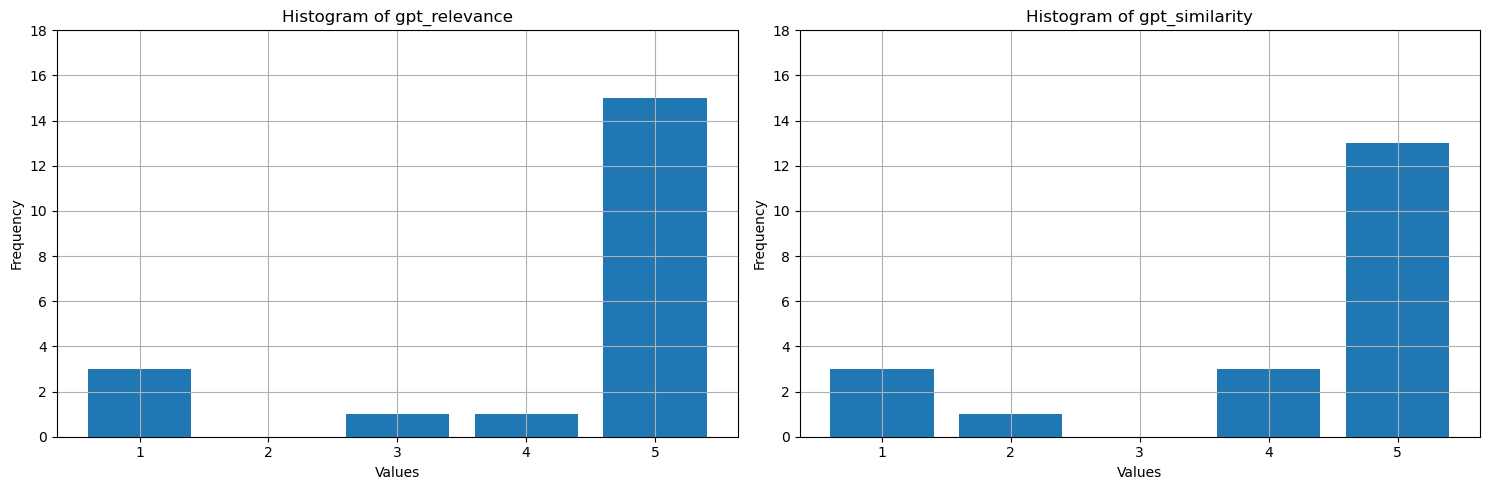
O que esses valores mostram? Para torná-los mais fáceis de interpretar, plote histogramas de fundamentação, relevância e similaridade. O LLM é mais detalhado do que as respostas humanas verdadeiras, o que reduz a métrica de similaridade - cerca de metade das respostas são semanticamente corretas, mas recebem quatro estrelas como sendo a maioria semelhantes. A maioria dos valores das três métricas é de 4 ou 5, o que sugere que o desempenho do RAG é bom. Há algumas exceções – por exemplo, para a pergunta How many species of otter are there?, o modelo gerado There are 13 species of otter, que está correto com alta relevância e similaridade (5). Por alguma razão, gpt considerou-o mal fundamentado no contexto fornecido e deu-lhe uma estrela. Nos outros três casos, com pelo menos uma métrica de uma estrela assistida por IA, uma pontuação baixa aponta para uma resposta ruim. O LLM ocasionalmente marca incorretamente, mas geralmente pontua com precisão.
# Convert Spark DataFrame to Pandas DataFrame
pandas_df = df.toPandas()

selected_columns = ['gpt_groundedness', 'gpt_relevance', 'gpt_similarity']
trimmed_df = pandas_df[selected_columns].astype(int)

# Define a function to plot histograms for the specified columns
def plot_histograms(dataframe, columns):
    # Set up the figure size and subplots
    plt.figure(figsize=(15, 5))
    for i, column in enumerate(columns, 1):
        plt.subplot(1, len(columns), i)
        # Filter the dataframe to only include rows with values 1, 2, 3, 4, 5
        filtered_df = dataframe[dataframe[column].isin([1, 2, 3, 4, 5])]
        filtered_df[column].hist(bins=range(1, 7), align='left', rwidth=0.8)
        plt.title(f'Histogram of {column}')
        plt.xlabel('Values')
        plt.ylabel('Frequency')
        plt.xticks(range(1, 6))
        plt.yticks(range(0, 20, 2))


# Call the function to plot histograms for the specified columns
plot_histograms(trimmed_df, selected_columns)

# Show the plots
plt.tight_layout()
plt.show()
Saída da célula:StatementMeta(, 21cb8cd3-7742-4c1f-8339-265e2846df1d, 24, Finished, Available, Finished)
Como etapa final, salvar os resultados do benchmark em uma tabela em seu lakehouse. Esta etapa é opcional, mas altamente recomendada- torna suas descobertas mais úteis. Quando você altera algo no RAG (por exemplo, modifica o prompt, atualiza o índice ou usa um modelo de GPT diferente no gerador de resposta), mede o impacto, quantifica melhorias e detecta regressões.
# create name of experiment that is easy to refer to
friendly_name_of_experiment = "rag_tutorial_experiment_1"

# Note the current date and time
time_of_experiment = current_timestamp()

# Generate a unique GUID for all rows
experiment_id = str(uuid.uuid4())

# Add two new columns to the Spark DataFrame
updated_df = df.withColumn("execution_time", time_of_experiment) \
                        .withColumn("experiment_id", lit(experiment_id)) \
                        .withColumn("experiment_friendly_name", lit(friendly_name_of_experiment))

# Store the updated DataFrame in the default lakehouse as a table named 'rag_experiment_runs'
table_name = "rag_experiment_run_demo1"
updated_df.write.format("parquet").mode("append").saveAsTable(table_name)
Saída da célula:StatementMeta(, 21cb8cd3-7742-4c1f-8339-265e2846df1d, 28, Finished, Available, Finished)
Retorne aos resultados do experimento a qualquer momento para revisá-los, comparar com novos experimentos e escolher a configuração que funciona melhor para produção.
Resumo
Use métricas assistidas por IA e a taxa de recuperação top-N para criar sua solução RAG (Geração Aumentada por Recuperação).