Observação
O acesso a essa página exige autorização. Você pode tentar entrar ou alterar diretórios.
O acesso a essa página exige autorização. Você pode tentar alterar os diretórios.
Forneça suporte para acompanhar o olhar, a atenção e a presença de um usuário com base no local e no movimento de seus olhos.
Observação
Para obter a entrada de olhar em Windows Mixed Reality, consulte [Gaze]/windows/mixed-reality/mrtk-unity/features/input/gaze).
APIs Importantes: Windows.Devices.Input.Preview, GazeDevicePreview, GazePointPreview, GazeInputSourcePreview
Visão geral
A entrada pelo olhar é uma maneira poderosa de interagir e usar aplicativos do Windows que é especialmente útil como uma tecnologia assistiva para usuários com doenças neuromusculares (como esclerose lateral amiotrófica - ELA) e outras deficiências envolvendo funções musculares ou nervosas prejudicadas.
Além disso, a entrada por olhar oferece oportunidades igualmente atraentes para jogos (incluindo aquisição e acompanhamento de alvos) e aplicativos de produtividade tradicionais, quiosques e outros cenários interativos em que dispositivos de entrada tradicionais (teclado, mouse, toque) não estão disponíveis, ou onde pode ser útil liberar as mãos do usuário para outras tarefas (como segurar sacolas de compras).
Observação
O suporte para o hardware de acompanhamento ocular foi introduzido no Windows 10 Fall Creators Update juntamente com o controle Eye, um recurso interno que permite que você use seus olhos para controlar o ponteiro na tela, digitar com o teclado na tela e se comunicar com pessoas que usam texto em fala. Um conjunto de APIs de Windows Runtime (Windows. Devices.Input.Preview) para a criação de aplicativos que podem interagir com o hardware de rastreamento ocular está disponível com Windows 10 Atualização de abril de 2018 (versão 1803, build 17134) e mais recente.
Privacidade
Devido aos dados pessoais potencialmente confidenciais coletados por dispositivos de rastreamento ocular, você precisará declarar a gazeInput capacidade no manifesto do aplicativo (consulte a seção Configuração a seguir). Quando declarado, Windows solicita automaticamente aos usuários uma caixa de diálogo de consentimento (quando o aplicativo é executado pela primeira vez), em que o usuário deve conceder permissão para que o aplicativo se comunique com o dispositivo de rastreamento ocular e acesse esses dados.
Além disso, se seu aplicativo coletar, armazenar ou transferir dados de acompanhamento ocular, você deverá descrever isso na política de privacidade do aplicativo e seguir todos os outros requisitos de Informações Pessoais no Contrato do Desenvolvedor de Aplicativos e nas Políticas da Microsoft Store.
Configuração
Para usar as APIs de entrada ocular em seu aplicativo Windows, você precisará:
Especifique a
gazeInputfuncionalidade no manifesto do aplicativo.Abra o arquivo Package.appxmanifest com o designer de manifesto do Visual Studio ou adicione a capacidade manualmente selecionando a opção de código View code e inserindo o seguinte
DeviceCapabilityno nóCapabilities:<Capabilities> <DeviceCapability Name="gazeInput" /> </Capabilities>Um dispositivo de acompanhamento ocular compatível com Windows conectado ao seu sistema (interno ou periférico) e ativado.
Consulte Comece com o controle ocular no Windows 10 para obter uma lista de dispositivos de rastreamento ocular com suporte.
Rastreamento básico dos olhos
Neste exemplo, demonstramos como acompanhar o foco do usuário dentro de um aplicativo Windows e usar uma função de tempo com teste de clique básico para indicar o quão bem ele pode manter seu foco em um elemento específico.
Uma pequena elipse é usada para mostrar onde o ponto de foco está dentro do visor do aplicativo, enquanto um RadialProgressBar do Windows Community Toolkit é colocado aleatoriamente na tela. Quando o foco do olhar é detectado na barra de progresso, um temporizador é iniciado e a barra de progresso é realocada aleatoriamente no canvas quando a barra de progresso atinge 100%.
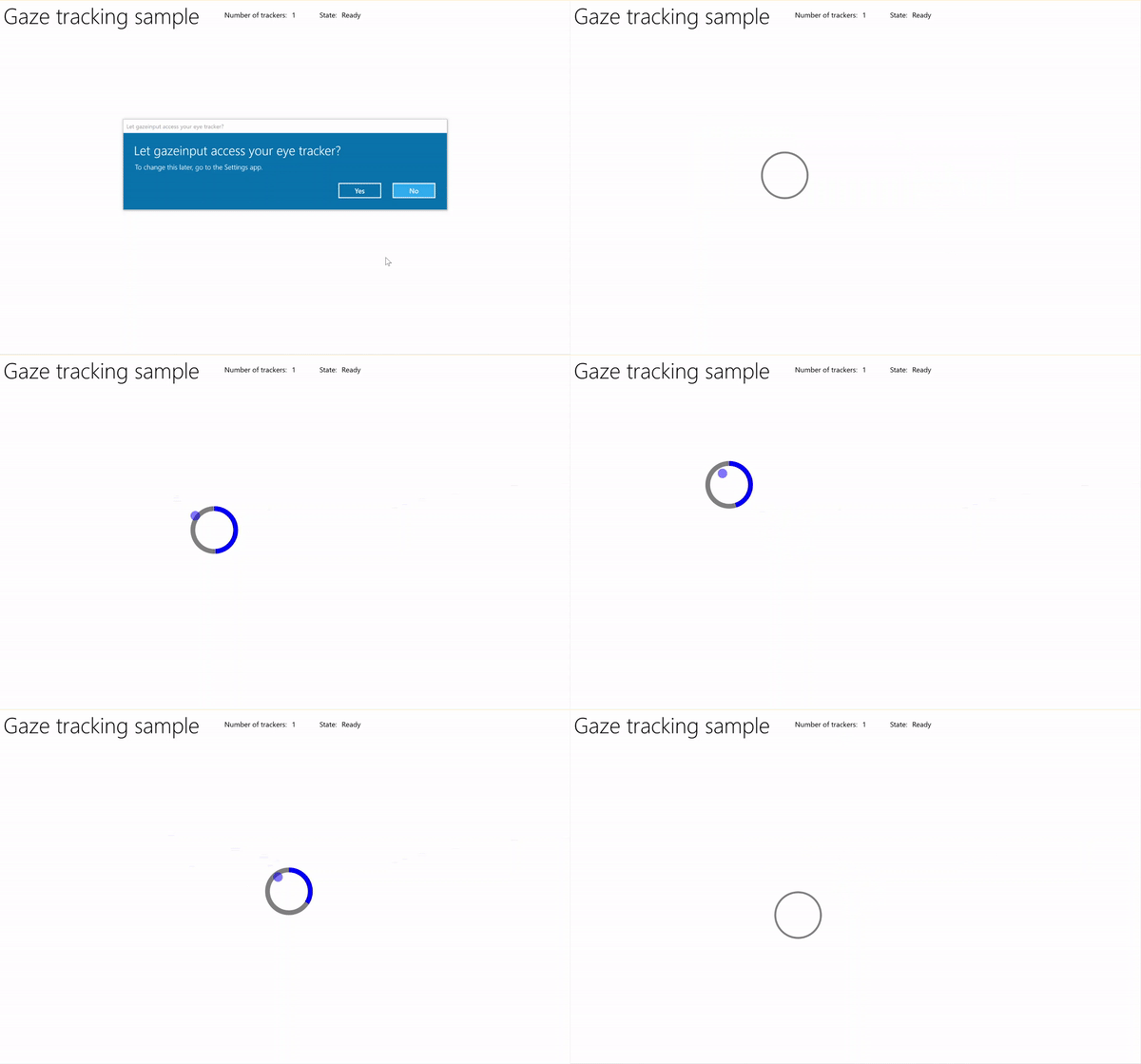
Rastreamento de foco com exemplo de temporizador
Baixe este exemplo do exemplo de entrada do Gaze (básico)
Primeiro, configuramos a interface do usuário (MainPage.xaml).
<Page
    x:Class="gazeinput.MainPage"
    xmlns="http://schemas.microsoft.com/winfx/2006/xaml/presentation"
    xmlns:x="http://schemas.microsoft.com/winfx/2006/xaml"
    xmlns:local="using:gazeinput"
    xmlns:d="http://schemas.microsoft.com/expression/blend/2008"
    xmlns:mc="http://schemas.openxmlformats.org/markup-compatibility/2006"
    xmlns:controls="using:Microsoft.Toolkit.Uwp.UI.Controls"
    mc:Ignorable="d">

    <Grid Background="{ThemeResource ApplicationPageBackgroundThemeBrush}">
        <Grid x:Name="containerGrid">
            <Grid.RowDefinitions>
                <RowDefinition Height="Auto"/>
                <RowDefinition Height="*"/>
            </Grid.RowDefinitions>
            <StackPanel x:Name="HeaderPanel"
                    Orientation="Horizontal"
                    Grid.Row="0">
                <StackPanel.Transitions>
                    <TransitionCollection>
                        <AddDeleteThemeTransition/>
                    </TransitionCollection>
                </StackPanel.Transitions>
                <TextBlock x:Name="Header"
                       Text="Gaze tracking sample"
                       Style="{ThemeResource HeaderTextBlockStyle}"
                       Margin="10,0,0,0" />
                <TextBlock x:Name="TrackerCounterLabel"
                       VerticalAlignment="Center"
                       Style="{ThemeResource BodyTextBlockStyle}"
                       Text="Number of trackers: "
                       Margin="50,0,0,0"/>
                <TextBlock x:Name="TrackerCounter"
                       VerticalAlignment="Center"
                       Style="{ThemeResource BodyTextBlockStyle}"
                       Text="0"
                       Margin="10,0,0,0"/>
                <TextBlock x:Name="TrackerStateLabel"
                       VerticalAlignment="Center"
                       Style="{ThemeResource BodyTextBlockStyle}"
                       Text="State: "
                       Margin="50,0,0,0"/>
                <TextBlock x:Name="TrackerState"
                       VerticalAlignment="Center"
                       Style="{ThemeResource BodyTextBlockStyle}"
                       Text="n/a"
                       Margin="10,0,0,0"/>
            </StackPanel>
            <Canvas x:Name="gazePositionCanvas" Grid.Row="1">
                <controls:RadialProgressBar
                    x:Name="GazeRadialProgressBar"
                    Value="0"
                    Foreground="Blue"
                    Background="White"
                    Thickness="4"
                    Minimum="0"
                    Maximum="100"
                    Width="100"
                    Height="100"
                    Outline="Gray"
                    Visibility="Collapsed"/>
                <Ellipse
                    x:Name="eyeGazePositionEllipse"
                    Width="20" Height="20"
                    Fill="Blue"
                    Opacity="0.5"
                    Visibility="Collapsed">
                </Ellipse>
            </Canvas>
        </Grid>
    </Grid>
</Page>
Em seguida, inicializamos nosso aplicativo.
Neste trecho de código, declaramos nossos objetos globais e sobrescrevemos o evento de página OnNavigatedTo para iniciar nosso monitor de dispositivos de rastreamento ocular e o evento de página OnNavigatedFrom para parar nosso monitor de dispositivos de rastreamento ocular.
using System;
using Windows.Devices.Input.Preview;
using Windows.UI.Xaml.Controls;
using Windows.UI.Xaml;
using Windows.Foundation;
using System.Collections.Generic;
using Windows.UI.Xaml.Media;
using Windows.UI.Xaml.Navigation;

namespace gazeinput
{
    public sealed partial class MainPage : Page
    {
        /// <summary>
        /// Reference to the user's eyes and head as detected
        /// by the eye-tracking device.
        /// </summary>
        private GazeInputSourcePreview gazeInputSource;

        /// <summary>
        /// Dynamic store of eye-tracking devices.
        /// </summary>
        /// <remarks>
        /// Receives event notifications when a device is added, removed,
        /// or updated after the initial enumeration.
        /// </remarks>
        private GazeDeviceWatcherPreview gazeDeviceWatcher;

        /// <summary>
        /// Eye-tracking device counter.
        /// </summary>
        private int deviceCounter = 0;

        /// <summary>
        /// Timer for gaze focus on RadialProgressBar.
        /// </summary>
        DispatcherTimer timerGaze = new DispatcherTimer();

        /// <summary>
        /// Tracker used to prevent gaze timer restarts.
        /// </summary>
        bool timerStarted = false;

        /// <summary>
        /// Initialize the app.
        /// </summary>
        public MainPage()
        {
            InitializeComponent();
        }

        /// <summary>
        /// Override of OnNavigatedTo page event starts GazeDeviceWatcher.
        /// </summary>
        /// <param name="e">Event args for the NavigatedTo event</param>
        protected override void OnNavigatedTo(NavigationEventArgs e)
        {
            // Start listening for device events on navigation to eye-tracking page.
            StartGazeDeviceWatcher();
        }

        /// <summary>
        /// Override of OnNavigatedFrom page event stops GazeDeviceWatcher.
        /// </summary>
        /// <param name="e">Event args for the NavigatedFrom event</param>
        protected override void OnNavigatedFrom(NavigationEventArgs e)
        {
            // Stop listening for device events on navigation from eye-tracking page.
            StopGazeDeviceWatcher();
        }
    }
}
Em seguida, adicionamos nossos métodos de observador de dispositivo de foco.
Em
StartGazeDeviceWatcher, chamamos CreateWatcher e declaramos os listeners de eventos para o dispositivo de rastreamento ocular (DeviceAdded, DeviceUpdated e DeviceRemoved).In
DeviceAdded, verificamos o estado do dispositivo de rastreamento ocular. Se um dispositivo for viável, incrementamos nossa contagem de dispositivos e habilitamos o rastreamento do olhar. Confira a próxima etapa para obter detalhes.Em
DeviceUpdated, também habilitamos o rastreamento de foco, pois esse evento é disparado se um dispositivo é recalibrado.Em
DeviceRemoved, decrementamos nosso contador de dispositivos e removemos os manipuladores de eventos do dispositivo.Em
StopGazeDeviceWatcher, desligamos o observador do dispositivo de foco.
    /// <summary>
    /// Start gaze watcher and declare watcher event handlers.
    /// </summary>
    private void StartGazeDeviceWatcher()
    {
        if (gazeDeviceWatcher == null)
        {
            gazeDeviceWatcher = GazeInputSourcePreview.CreateWatcher();
            gazeDeviceWatcher.Added += this.DeviceAdded;
            gazeDeviceWatcher.Updated += this.DeviceUpdated;
            gazeDeviceWatcher.Removed += this.DeviceRemoved;
            gazeDeviceWatcher.Start();
        }
    }

    /// <summary>
    /// Shut down gaze watcher and stop listening for events.
    /// </summary>
    private void StopGazeDeviceWatcher()
    {
        if (gazeDeviceWatcher != null)
        {
            gazeDeviceWatcher.Stop();
            gazeDeviceWatcher.Added -= this.DeviceAdded;
            gazeDeviceWatcher.Updated -= this.DeviceUpdated;
            gazeDeviceWatcher.Removed -= this.DeviceRemoved;
            gazeDeviceWatcher = null;
        }
    }

    /// <summary>
    /// Eye-tracking device connected (added, or available when watcher is initialized).
    /// </summary>
    /// <param name="sender">Source of the device added event</param>
    /// <param name="e">Event args for the device added event</param>
    private void DeviceAdded(GazeDeviceWatcherPreview source,
        GazeDeviceWatcherAddedPreviewEventArgs args)
    {
        if (IsSupportedDevice(args.Device))
        {
            deviceCounter++;
            TrackerCounter.Text = deviceCounter.ToString();
        }
        // Set up gaze tracking.
        TryEnableGazeTrackingAsync(args.Device);
    }

    /// <summary>
    /// Initial device state might be uncalibrated,
    /// but device was subsequently calibrated.
    /// </summary>
    /// <param name="sender">Source of the device updated event</param>
    /// <param name="e">Event args for the device updated event</param>
    private void DeviceUpdated(GazeDeviceWatcherPreview source,
        GazeDeviceWatcherUpdatedPreviewEventArgs args)
    {
        // Set up gaze tracking.
        TryEnableGazeTrackingAsync(args.Device);
    }

    /// <summary>
    /// Handles disconnection of eye-tracking devices.
    /// </summary>
    /// <param name="sender">Source of the device removed event</param>
    /// <param name="e">Event args for the device removed event</param>
    private void DeviceRemoved(GazeDeviceWatcherPreview source,
        GazeDeviceWatcherRemovedPreviewEventArgs args)
    {
        // Decrement gaze device counter and remove event handlers.
        if (IsSupportedDevice(args.Device))
        {
            deviceCounter--;
            TrackerCounter.Text = deviceCounter.ToString();

            if (deviceCounter == 0)
            {
                gazeInputSource.GazeEntered -= this.GazeEntered;
                gazeInputSource.GazeMoved -= this.GazeMoved;
                gazeInputSource.GazeExited -= this.GazeExited;
            }
        }
    }
Aqui, verificamos se o dispositivo é viável
IsSupportedDevicee, nesse caso, tentamos habilitar o rastreamento de foco.TryEnableGazeTrackingAsyncEm
TryEnableGazeTrackingAsync, declaramos os manipuladores de eventos de foco e chamamos GazeInputSourcePreview.GetForCurrentView() para obter uma referência à fonte de entrada (isso deve ser chamado no thread da interface do usuário, consulte Manter o thread da interface do usuário responsivo).Observação
Você deve chamar GazeInputSourcePreview.GetForCurrentView() somente quando um dispositivo de acompanhamento ocular compatível estiver conectado e exigido pelo aplicativo. Caso contrário, a caixa de diálogo de consentimento é desnecessária.
    /// <summary>
    /// Initialize gaze tracking.
    /// </summary>
    /// <param name="gazeDevice"></param>
    private async void TryEnableGazeTrackingAsync(GazeDevicePreview gazeDevice)
    {
        // If eye-tracking device is ready, declare event handlers and start tracking.
        if (IsSupportedDevice(gazeDevice))
        {
            timerGaze.Interval = new TimeSpan(0, 0, 0, 0, 20);
            timerGaze.Tick += TimerGaze_Tick;

            SetGazeTargetLocation();

            // This must be called from the UI thread.
            gazeInputSource = GazeInputSourcePreview.GetForCurrentView();

            gazeInputSource.GazeEntered += GazeEntered;
            gazeInputSource.GazeMoved += GazeMoved;
            gazeInputSource.GazeExited += GazeExited;
        }
        // Notify if device calibration required.
        else if (gazeDevice.ConfigurationState ==
                    GazeDeviceConfigurationStatePreview.UserCalibrationNeeded ||
                    gazeDevice.ConfigurationState ==
                    GazeDeviceConfigurationStatePreview.ScreenSetupNeeded)
        {
            // Device isn't calibrated, so invoke the calibration handler.
            System.Diagnostics.Debug.WriteLine(
                "Your device needs to calibrate. Please wait for it to finish.");
            await gazeDevice.RequestCalibrationAsync();
        }
        // Notify if device calibration underway.
        else if (gazeDevice.ConfigurationState ==
            GazeDeviceConfigurationStatePreview.Configuring)
        {
            // Device is currently undergoing calibration.
            // A device update is sent when calibration complete.
            System.Diagnostics.Debug.WriteLine(
                "Your device is being configured. Please wait for it to finish");
        }
        // Device is not viable.
        else if (gazeDevice.ConfigurationState == GazeDeviceConfigurationStatePreview.Unknown)
        {
            // Notify if device is in unknown state.
            // Reconfigure/recalbirate the device.
            System.Diagnostics.Debug.WriteLine(
                "Your device is not ready. Please set up your device or reconfigure it.");
        }
    }

    /// <summary>
    /// Check if eye-tracking device is viable.
    /// </summary>
    /// <param name="gazeDevice">Reference to eye-tracking device.</param>
    /// <returns>True, if device is viable; otherwise, false.</returns>
    private bool IsSupportedDevice(GazeDevicePreview gazeDevice)
    {
        TrackerState.Text = gazeDevice.ConfigurationState.ToString();
        return (gazeDevice.CanTrackEyes &&
                    gazeDevice.ConfigurationState ==
                    GazeDeviceConfigurationStatePreview.Ready);
    }
Em seguida, configuramos nossos manipuladores de eventos de olhar.
Exibimos e ocultamos a elipse de rastreamento de olhar em
GazeEnteredeGazeExited, respectivamente.Em
GazeMoved, movemos nossa elipse de rastreamento do olhar com base no EyeGazePosition fornecido pelo CurrentPoint do GazeEnteredPreviewEventArgs. Também gerenciamos o temporizador de foco do olhar no RadialProgressBar, que aciona o reposicionamento da barra de progresso. Confira a próxima etapa para obter detalhes./// <summary> /// GazeEntered handler. /// </summary> /// <param name="sender">Source of the gaze entered event</param> /// <param name="e">Event args for the gaze entered event</param> private void GazeEntered( GazeInputSourcePreview sender, GazeEnteredPreviewEventArgs args) { // Show ellipse representing gaze point. eyeGazePositionEllipse.Visibility = Visibility.Visible; // Mark the event handled. args.Handled = true; } /// <summary> /// GazeExited handler. /// Call DisplayRequest.RequestRelease to conclude the /// RequestActive called in GazeEntered. /// </summary> /// <param name="sender">Source of the gaze exited event</param> /// <param name="e">Event args for the gaze exited event</param> private void GazeExited( GazeInputSourcePreview sender, GazeExitedPreviewEventArgs args) { // Hide gaze tracking ellipse. eyeGazePositionEllipse.Visibility = Visibility.Collapsed; // Mark the event handled. args.Handled = true; } /// <summary> /// GazeMoved handler translates the ellipse on the canvas to reflect gaze point. /// </summary> /// <param name="sender">Source of the gaze moved event</param> /// <param name="e">Event args for the gaze moved event</param> private void GazeMoved(GazeInputSourcePreview sender, GazeMovedPreviewEventArgs args) { // Update the position of the ellipse corresponding to gaze point. if (args.CurrentPoint.EyeGazePosition != null) { double gazePointX = args.CurrentPoint.EyeGazePosition.Value.X; double gazePointY = args.CurrentPoint.EyeGazePosition.Value.Y; double ellipseLeft = gazePointX - (eyeGazePositionEllipse.Width / 2.0f); double ellipseTop = gazePointY - (eyeGazePositionEllipse.Height / 2.0f) - (int)Header.ActualHeight; // Translate transform for moving gaze ellipse. TranslateTransform translateEllipse = new TranslateTransform { X = ellipseLeft, Y = ellipseTop }; eyeGazePositionEllipse.RenderTransform = translateEllipse; // The gaze point screen location. Point gazePoint = new Point(gazePointX, gazePointY); // Basic hit test to determine if gaze point is on progress bar. bool hitRadialProgressBar = DoesElementContainPoint( gazePoint, GazeRadialProgressBar.Name, GazeRadialProgressBar); // Use progress bar thickness for visual feedback. if (hitRadialProgressBar) { GazeRadialProgressBar.Thickness = 10; } else { GazeRadialProgressBar.Thickness = 4; } // Mark the event handled. args.Handled = true; } }Por fim, aqui estão os métodos usados para gerenciar o temporizador de foco do olhar para este aplicativo.
DoesElementContainPointverifica se o ponteiro de foco está sobre a barra de progresso. Se for o caso, o sistema inicia o temporizador de olhar e incrementa a barra de progresso a cada tic do temporizador de olhar.SetGazeTargetLocationdefine o local inicial da barra de progresso e, se a barra de progresso for concluída (dependendo do temporizador de foco do olhar), moverá a barra de progresso para um local aleatório./// <summary> /// Return whether the gaze point is over the progress bar. /// </summary> /// <param name="gazePoint">The gaze point screen location</param> /// <param name="elementName">The progress bar name</param> /// <param name="uiElement">The progress bar UI element</param> /// <returns></returns> private bool DoesElementContainPoint( Point gazePoint, string elementName, UIElement uiElement) { // Use entire visual tree of progress bar. IEnumerable<UIElement> elementStack = VisualTreeHelper.FindElementsInHostCoordinates(gazePoint, uiElement, true); foreach (UIElement item in elementStack) { //Cast to FrameworkElement and get element name. if (item is FrameworkElement feItem) { if (feItem.Name.Equals(elementName)) { if (!timerStarted) { // Start gaze timer if gaze over element. timerGaze.Start(); timerStarted = true; } return true; } } } // Stop gaze timer and reset progress bar if gaze leaves element. timerGaze.Stop(); GazeRadialProgressBar.Value = 0; timerStarted = false; return false; } /// <summary> /// Tick handler for gaze focus timer. /// </summary> /// <param name="sender">Source of the gaze entered event</param> /// <param name="e">Event args for the gaze entered event</param> private void TimerGaze_Tick(object sender, object e) { // Increment progress bar. GazeRadialProgressBar.Value += 1; // If progress bar reaches maximum value, reset and relocate. if (GazeRadialProgressBar.Value == 100) { SetGazeTargetLocation(); } } /// <summary> /// Set/reset the screen location of the progress bar. /// </summary> private void SetGazeTargetLocation() { // Ensure the gaze timer restarts on new progress bar location. timerGaze.Stop(); timerStarted = false; // Get the bounding rectangle of the app window. Rect appBounds = Windows.UI.ViewManagement.ApplicationView.GetForCurrentView().VisibleBounds; // Translate transform for moving progress bar. TranslateTransform translateTarget = new TranslateTransform(); // Calculate random location within gaze canvas. Random random = new Random(); int randomX = random.Next( 0, (int)appBounds.Width - (int)GazeRadialProgressBar.Width); int randomY = random.Next( 0, (int)appBounds.Height - (int)GazeRadialProgressBar.Height - (int)Header.ActualHeight); translateTarget.X = randomX; translateTarget.Y = randomY; GazeRadialProgressBar.RenderTransform = translateTarget; // Show progress bar. GazeRadialProgressBar.Visibility = Visibility.Visible; GazeRadialProgressBar.Value = 0; }