Notă
Accesul la această pagină necesită autorizare. Puteți încerca să vă conectați sau să modificați directoarele.
Accesul la această pagină necesită autorizare. Puteți încerca să modificați directoarele.
Applies to: ✅ Warehouse in Microsoft Fabric
This article describes methods for migrating data warehouses in SQL Server to Microsoft Fabric Data Warehouse.
Tip
For more information about strategy and planning, see Migration planning: SQL Server to Fabric Data Warehouse.
Use the Fabric Migration Assistant for Data Warehouse for an automated migration experience from SQL Server. The rest of this article describes more manual migration steps.
The following table summarizes methods for migrating the data schema (DDL), database code (DML), and data. Each option is described later in this article.
| Option | Method | What it does | Skill or preference | Scenario |
|---|---|---|---|---|
| 1 | Data Factory | Schema conversion Data extraction Data ingestion |
Data Factory pipeline | Simplified schema and data migration. Recommended for dimension tables. |
| 2 | Data Factory with partitioning | Schema conversion Data extraction Data ingestion |
Data Factory pipeline | Parallelized migration for large fact tables. |
| 3 | Schema-first migration | Schema conversion | Data Factory pipeline | Migrate the schema first, and then extract and ingest data separately for greater control over throughput. |
| 4 | SQL migration scripts | Schema conversion Data extraction Code assessment |
T-SQL | Use an IDE and scripts for granular control over migration tasks. |
| 5 | SQL database projects | Schema conversion Code assessment |
SQL project | Use a database project for source control, assessment, and deployment. |
| 6 | dbt | Schema conversion Database code conversion |
dbt | Reuse an existing dbt project by changing the adapter and target configuration. |
Choose a workload for the initial migration
When you decide where to start a SQL Server to Fabric Data Warehouse migration project, choose a workload area where you can:
- Prove the viability of migrating to Fabric Data Warehouse by quickly delivering the benefits of the new environment. Start small and simple, and prepare for multiple small migrations.
- Give your technical staff time to gain relevant experience with the processes and tools that they use to migrate other workloads.
- Create a template for further migrations that's specific to your SQL Server environment, tools, and processes.
Tip
Create an inventory of objects that need to be migrated, and document the migration process from start to finish so that it can be repeated for other databases or workloads.
The volume of data in an initial migration should be large enough to demonstrate the capabilities and benefits of Fabric Data Warehouse, but small enough to demonstrate value quickly. A size in the 1-10 terabyte range is typical.
Migrate with Fabric Data Factory
Fabric Data Factory provides a low-code interface that can convert table DDL and migrate data from SQL Server.
Fabric Data Factory can perform the following tasks:
- Convert schema (DDL) to Fabric Data Warehouse syntax.
- Create schema objects in Fabric Data Warehouse.
- Migrate data to Fabric Data Warehouse.
Option 1. Schema and data migration with Copy assistant
This method uses the Data Factory Copy assistant to connect to the source SQL Server database, convert table DDL to Fabric syntax, and copy data to Fabric Data Warehouse. You can select one or more source tables. The generated pipeline uses a ForEach activity to copy the selected tables in parallel.
When you configure the copy operation:
- Use the SQL Server connector for the source connection.
- Limit parallel copies to a level that the source database and network can sustain.
- Monitor source CPU, I/O, transaction log use, and production workload latency during extraction.
Recommended use
Use Copy assistant for a simple interface that converts DDL and ingests selected tables in one operation. This method is a good fit for dimension tables and smaller workloads.
For large tables, use partitioning to increase read and write parallelism.
Option 2. Data migration with partitioning
For large fact tables, use a Copy activity for each table and configure source partitioning. Use physical partitions when available, or configure dynamic range partitioning by specifying a suitable numeric or date column and its minimum and maximum values.
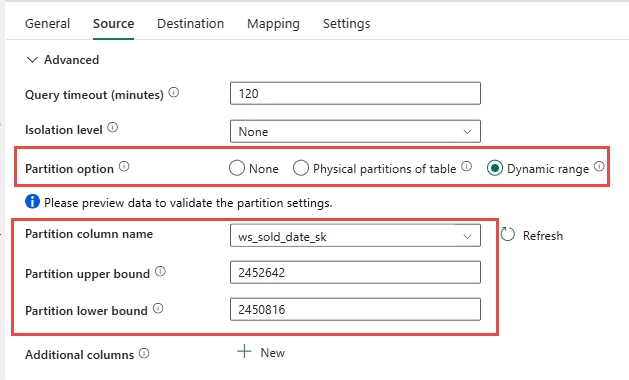
When you use partitioning:
- Choose a partition column that distributes rows evenly.
- Avoid creating more concurrent source queries than SQL Server can process without affecting production workloads.
- Test the partition range and parallel-copy settings against a representative workload.
- Increase parallelism gradually while monitoring the source and destination.
Recommended use
Use Data Factory partitioning for large fact tables when parallel extraction improves throughput. Size the batch count and partition ranges according to your source database resources and network capacity.
Option 3. Schema-first migration
For larger databases, separate schema migration from data migration:
- Convert and create table schemas in Fabric Data Warehouse.
- Extract source data into Azure Data Lake Storage (ADLS) Gen2.
- Use Data Factory or the COPY INTO command to ingest the staged data into Fabric Data Warehouse.
Separating these phases lets you tune extraction and ingestion independently.
Schema migration with Data Factory
You can use a Fabric pipeline to migrate table schemas from SQL Server to Fabric Data Warehouse without copying rows.
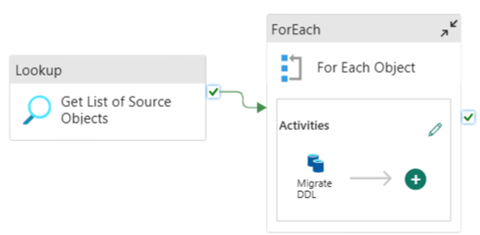
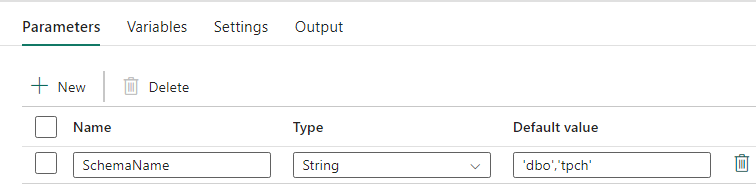
Configure pipeline parameters
Create a SchemaName parameter that specifies which schemas to migrate. Use dbo as the default, or enter a comma-delimited list such as 'dbo','sales'.
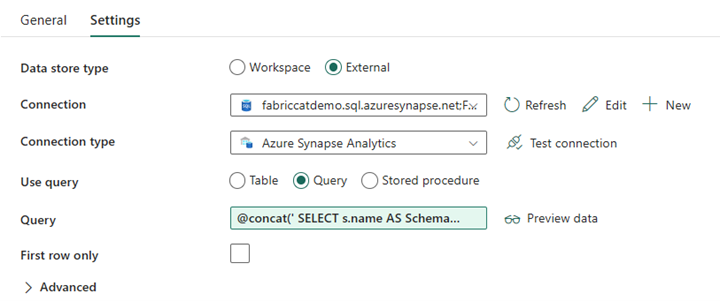
Configure the Lookup activity
Create a Lookup activity, and set its connection to the source SQL Server database. In the Settings tab:
- Set Data store type to External.
- Select the source SQL Server connection.
- Set Use query to Query.
- Add a dynamic query that returns the source schema and table names.
Use the following expression to create the query:
@concat('
SELECT s.name AS SchemaName,
t.name AS TableName
FROM sys.tables AS t
INNER JOIN sys.schemas AS s
ON t.type = ''U''
AND s.schema_id = t.schema_id
AND s.name in (',coalesce(pipeline().parameters.SchemaName, 'dbo'),')
')
Configure the ForEach activity
In the Settings tab for the ForEach activity:
- Disable Sequential to allow iterations to run concurrently.
- Set Batch count to a value the source database can sustain. Start with a conservative value and test it.
- Set Items to
@activity('Get List of Source Objects').output.value.

Configure the Copy activity
Inside the ForEach activity, add a Copy activity. In the Source tab:
- Set Data store type to External.
- Select the source SQL Server connection.
- Set Use query to Query.
- Set Query to
@concat('SELECT TOP 0 * FROM ',item().SchemaName,'.',item().TableName)so that only table metadata is migrated.
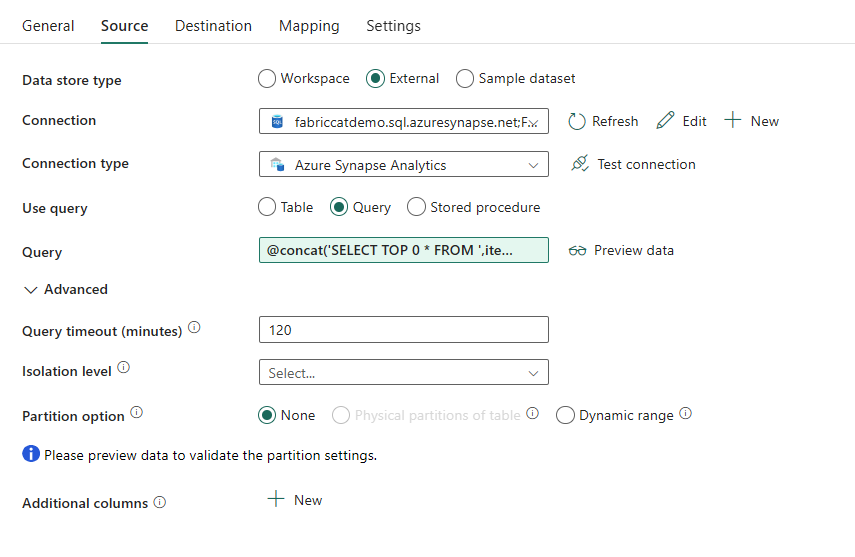
In the Destination tab:
- Set Data store type to Workspace.
- Set Workspace data store type to Data Warehouse, and select the destination warehouse.
- Set the destination schema to
@item().SchemaName. - Set the destination table to
@item().TableName.
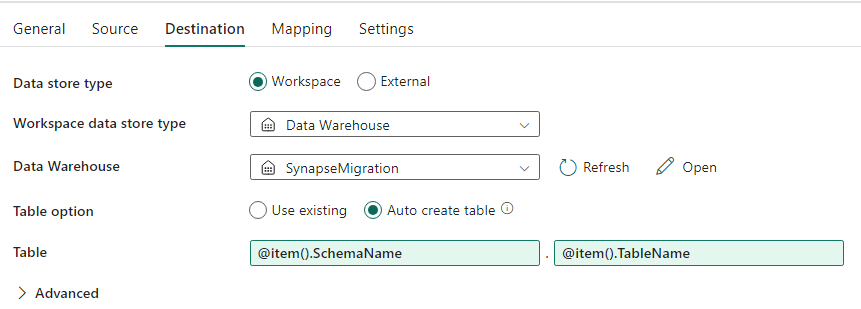
After you run the pipeline, verify that Fabric Data Warehouse contains each selected table with the expected schema.
Migrate using SQL scripts
Use T-SQL and PowerShell migration scripts when you want granular control over schema conversion, data extraction, and code assessment.
Migration scripts can:
- Convert schema (DDL) to Fabric Data Warehouse syntax.
- Create schema objects in Fabric Data Warehouse.
- Extract data from SQL Server to ADLS Gen2.
- Flag unsupported T-SQL syntax in stored procedures, functions, and views.
The Microsoft Fabric CAT team provides migration code samples in the fabric-migration repository.
Recommended use
Use scripts when you're familiar with T-SQL, prefer an integrated development environment, and need to control individual migration tasks. Use COPY INTO or Data Factory to ingest extracted data into Fabric Data Warehouse.
Migrate using SQL database projects
Fabric Data Warehouse is supported in the SQL Database Projects extension for Visual Studio Code.
A SQL database project provides source control, database testing, schema validation, and deployment capabilities. It can:
- Convert schema (DDL) to Fabric Data Warehouse syntax.
- Create schema objects in Fabric Data Warehouse.
- Assess unsupported T-SQL syntax in stored procedures, functions, and views.
For data migration, use Data Factory to copy directly from SQL Server, or extract data to ADLS Gen2 and ingest it with COPY INTO or Data Factory.
For a walkthrough of using SQL database projects with migration scripts, see the fabric-migration repository.
For more information, see Get started with the SQL Database Projects extension and Build a database project from the command line.
Migration with dbt
If your SQL Server data warehouse uses dbt, you can use the dbt adapter for Fabric Data Warehouse to convert schema and database code by changing the target profile and adapter.
The dbt framework generates DDL and DML scripts from model files. You must migrate the data separately by using Data Factory or another data migration option in this article.
To get started, see Tutorial: Set up dbt for Fabric Data Warehouse.
Data ingestion into Fabric Data Warehouse
For staged data, use COPY INTO or Fabric Data Factory to ingest files from ADLS Gen2 into Fabric Data Warehouse. Consider the following guidance:
- Extract large tables in parallel when the source database and network have sufficient capacity.
- Prefer Parquet files to reduce storage and network use and improve ingestion efficiency.
- Load multiple destination tables concurrently when your Fabric capacity can support the workload.
- Monitor both source extraction and Fabric capacity to find the optimal degree of parallelism.