Notă
Accesul la această pagină necesită autorizare. Puteți încerca să vă conectați sau să modificați directoarele.
Accesul la această pagină necesită autorizare. Puteți încerca să modificați directoarele.
OneLake file-level soft delete protects your data by retaining deleted files before permanent removal. Soft delete is turned on for each workspace by default with a seven-day retention period. You can turn soft delete on or off and set the retention period from 1 through 365 days.
You pay for soft-deleted data at the same rate as active data. Configure the retention period to balance recovery needs and storage costs.
Prerequisites
- The workspace admin role.
Configure soft delete in the Fabric portal
Configure file-level soft delete for a workspace from its OneLake settings.
Open the workspace in the Fabric portal.
Select Workspace settings > OneLake > General.
Use the Enable file-level soft delete toggle to turn retention on or off.
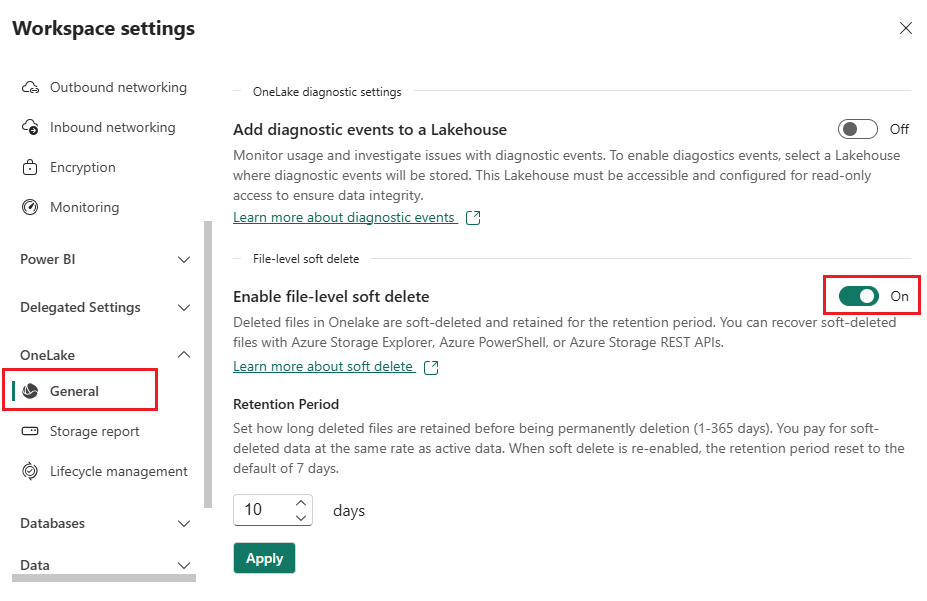
If retention is on, set Retention period to a value from 1 through 365 days.
When you turn retention on, the retention period defaults to seven days. This setting applies to files throughout the workspace, but doesn't affect workspace or item retention.
Configure soft delete by using the REST API
Use the Fabric REST API to view or update file-level soft-delete retention for a workspace.
To view the current setting, send the following request:
GET https://api.fabric.microsoft.com/v1/workspaces/{workspaceId}/onelake/softDeleteRetention
When retention is on, the response includes the status and retention period:
{
    "enabled": true,
    "retentionDays": 30
}
To update the setting, send a PATCH request to the same endpoint. To turn on retention and set the retention period, use the following request body:
PATCH https://api.fabric.microsoft.com/v1/workspaces/{workspaceId}/onelake/softDeleteRetention
{
    "enabled": true,
    "retentionDays": 30
}
To turn off retention, use the following request body:
{
    "enabled": false
}
The update succeeds only when OneLake updates all applicable storage accounts. If any account can't be updated, the request fails and the accounts remain synchronized.
Understand retention behavior and scope
A retention-period change applies only to files deleted after the change. Files that were already soft deleted keep the retention period that was active when they were deleted. For example, if you change the retention period from 28 days to seven days, files deleted before the change remain recoverable for 28 days. Files deleted after the change are recoverable for seven days.
The setting applies to data in the workspace's fully billed storage accounts, including the default storage account and the diagnostic logs storage account. It doesn't apply to data in nonbilled or partially billed storage accounts. Data in those accounts is mirrored from another database and isn't the source of truth.
Workspace and item deletion behave differently from file deletion:
- When a workspace is permanently deleted, its data is deleted immediately. File-level soft delete doesn't apply.
- When an item is permanently deleted, its data remains recoverable in OneLake for the configured file-level soft-delete retention period.