Notă
Accesul la această pagină necesită autorizare. Puteți încerca să vă conectați sau să modificați directoarele.
Accesul la această pagină necesită autorizare. Puteți încerca să modificați directoarele.
Note
This feature is in public preview. For more information, see Public preview in Microsoft Intune.
Deployments in Microsoft Intune allow administrators to create gradual, controlled, and predictable rollouts of Intune payloads, such as apps or policies. Rollouts use rings, which are group assignments that progress according to specific date and time criteria. This approach reduces risk by gradually offering payloads to devices across defined stages.
The deployments feature has two key components:
- Deployment plans: Reusable templates that define a standardized rollout pattern.
- Deployments: The execution mechanism that delivers a specific Intune payload to devices.
In this documentation, payload refers to an Intune app or device configuration policy.
You can access deployments in the [Microsoft Intune admin center] under Devices > Manage devices > Deployments.
Deployment plans
A deployment plan is a reusable template that defines a standardized rollout pattern for delivering a payload across devices in controlled stages, or rings. A plan has the following properties:
- Specifies the device platform for the plan. Selecting a specific platform determines which assignment filters are available when you add groups to rings. Selecting All platforms allows the plan to be used with different platform and payload combinations; you configure assignment filters after selecting the payload for a deployment.
- Defines rings with group assignments and assignment filters.
- Applies exclude groups to all rings in the plan.
- Supports the All users and All devices virtual groups:
- A ring that contains a virtual group is treated as the final ring in the plan and in deployments created from the plan.
- Virtual groups and Microsoft Entra security groups can't be combined in the same ring.
- When you select a virtual group, the Intune admin center displays a confirmation dialog before you continue.
- When the virtual-group ring activates, the virtual group replaces the payload's Required include-group assignments to Microsoft Entra security groups.
- Configures the number of deferral days and hours between rings.
- Doesn't specify or contain a payload.
- Supports scope tags for delegated administration and visibility.
- Can be modified after creation.
Benefits of deployment plans
| Benefit | Description |
|---|---|
| Standardization | Establishes approved organizational rollout patterns and helps ensure that deployments follow vetted, corporate-sanctioned structures. |
| Consistency | Enables reuse of well-designed deployment configurations and eliminates the need to manually recreate multiring assignments for each rollout. |
| Safer rollouts | Embeds staged rollout practices in the deployment process and reduces risk by gradually offering payloads to devices across defined rings. |
| Reduced administrative overhead | Removes the need for administrators to manually segment devices or users and repeatedly modify assignments during rollout. |
| Predictable deployment behavior | Provides precise control over when a payload is offered to devices and promotes predictable rollout patterns across departments, regions, or teams. |
| Source of truth for rollout practices | Serves as a centralized template that governs how payloads should be deployed across the organization. |
In summary, deployment plans define a reusable rollout structure, including rings, deferred timing between rings, and group assignments. A plan doesn't contain or deliver the payload itself. Plans define how a rollout should occur, while deployments execute the rollout for a specific payload.
Deployments
Administrators use deployments to deliver an Intune payload, such as an app or policy, to devices through a gradual rollout. When creating a deployment, you can use a deployment plan or manually configure rings, timing, and group assignments. A deployment executes the rollout and can be paused, resumed, or canceled as needed.
A deployment has the following properties:
- Delivers one payload by using a deployment plan or a one-time ring configuration.
- Allows its name and description to be updated after creation.
- Doesn't allow its selected payload, ring names, schedule, groups, or scope tags to be modified after creation.
- Can be paused, resumed, or canceled.
- Supports only one payload.
- Can't use a payload that's already selected in another scheduled or active deployment.
Deployment fundamentals
The following rules govern deployments:
- A deployment doesn't lock its payload. You can continue to update the payload directly through its properties.
- If you update the payload before the next scheduled ring activates:
- Existing group assignments on the payload receive the update during the next device check-in.
- Groups in the next scheduled ring receive the updated payload version.
- Include-group assignments on the payload are cumulative as each ring activates.
- Exclude groups apply to all rings in the deployment.
- Intune checks for group assignment collisions when you create a deployment and when each ring activates. A collision occurs when the same group is in the payload's assignment properties and a deployment ring.
- At creation, remove the group from either the payload assignment or the deployment configuration before you create the deployment.
- During ring activation, a collision places the deployment in an error state and pauses it. Remove the colliding group from the payload's assignments, and then resume the deployment.
- Deployments require at least a one-hour interval between rings.
- A ring that includes the All users or All devices virtual group automatically becomes the final ring. Virtual groups can't be combined with Microsoft Entra security groups in the same ring.
For Windows apps (Win32) and Enterprise App Catalog apps:
- Only the Required install intent is supported.
- Available and Uninstall intents aren't supported.
How payload assignments change as rings deploy
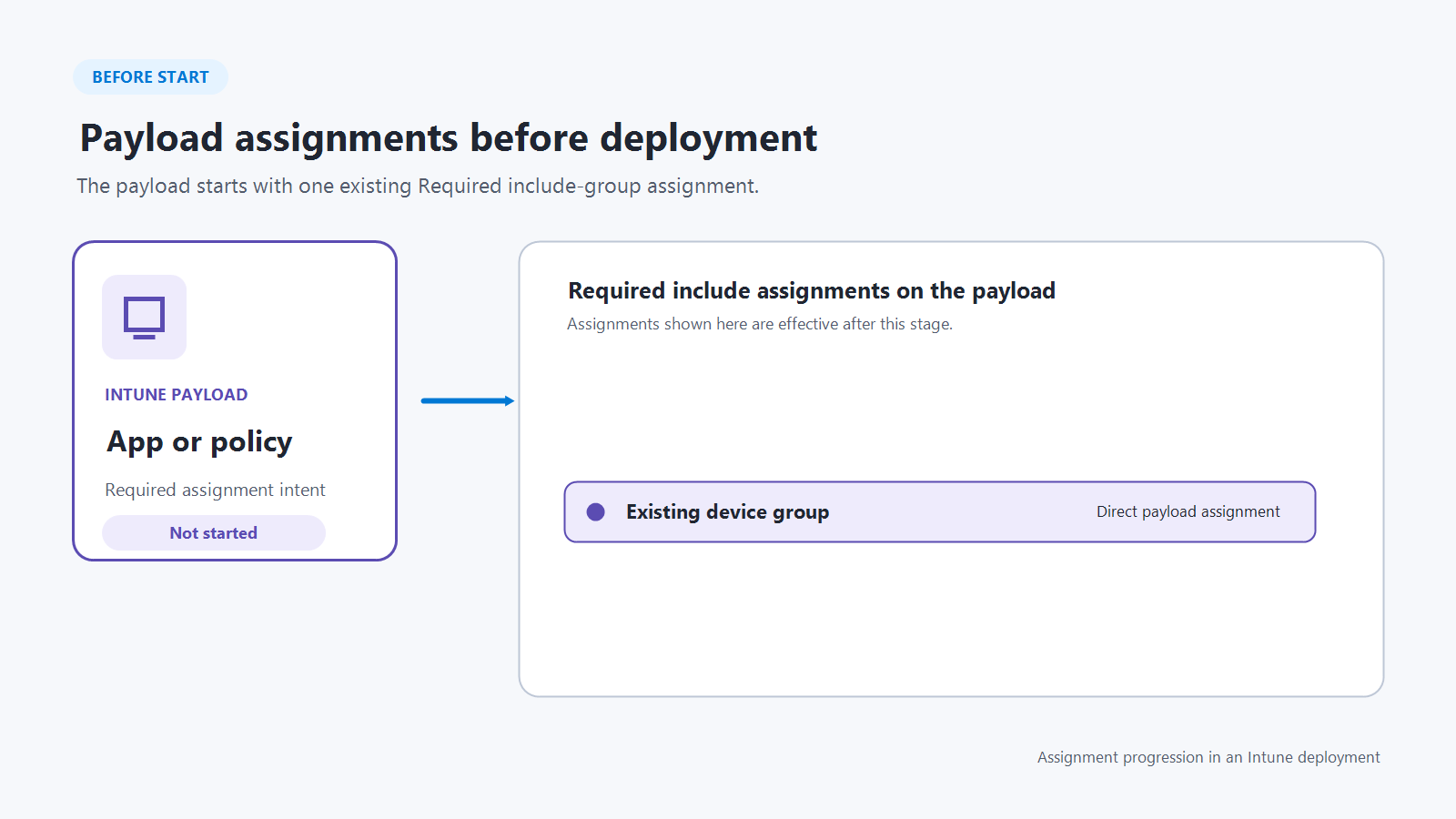
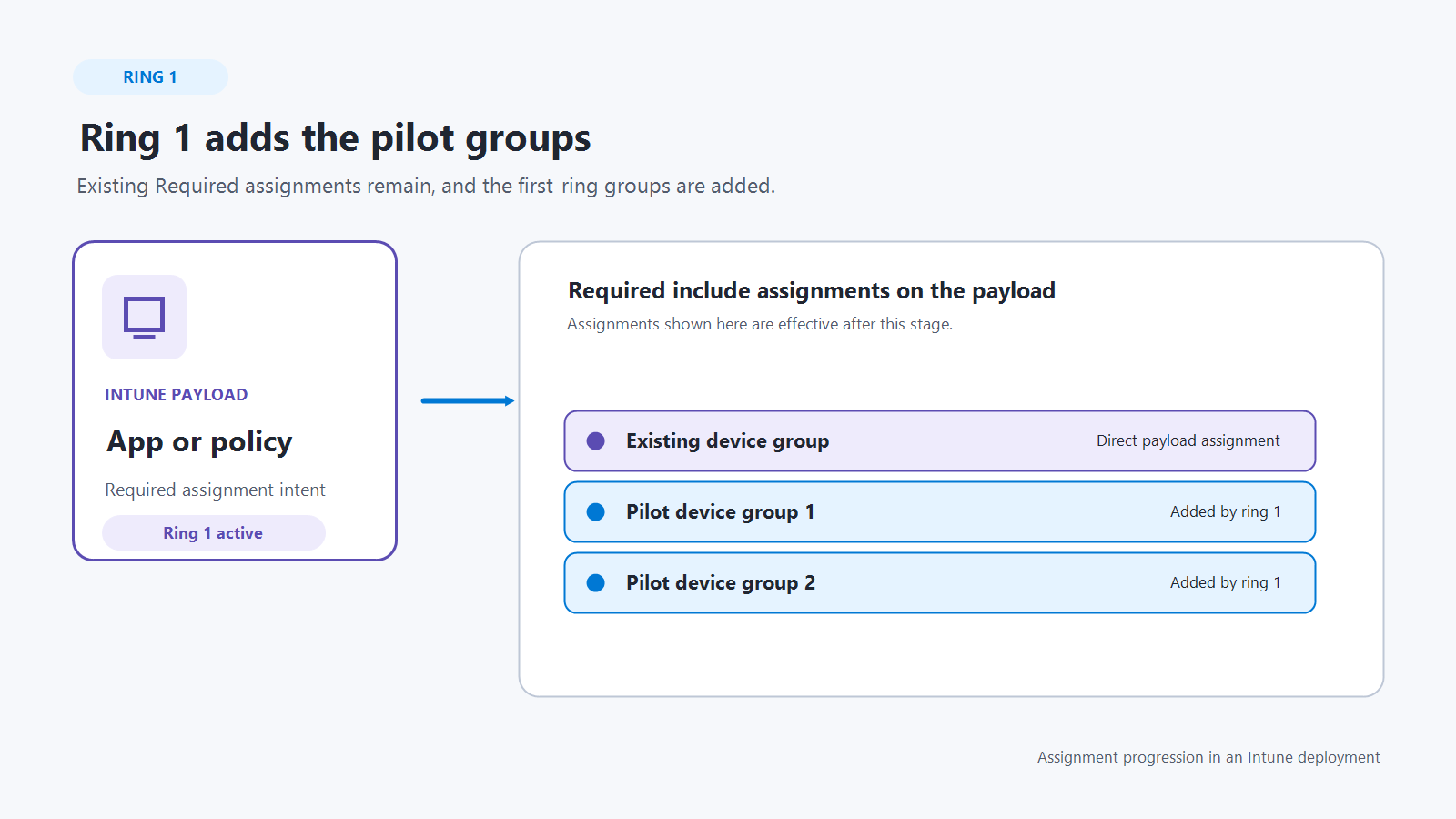
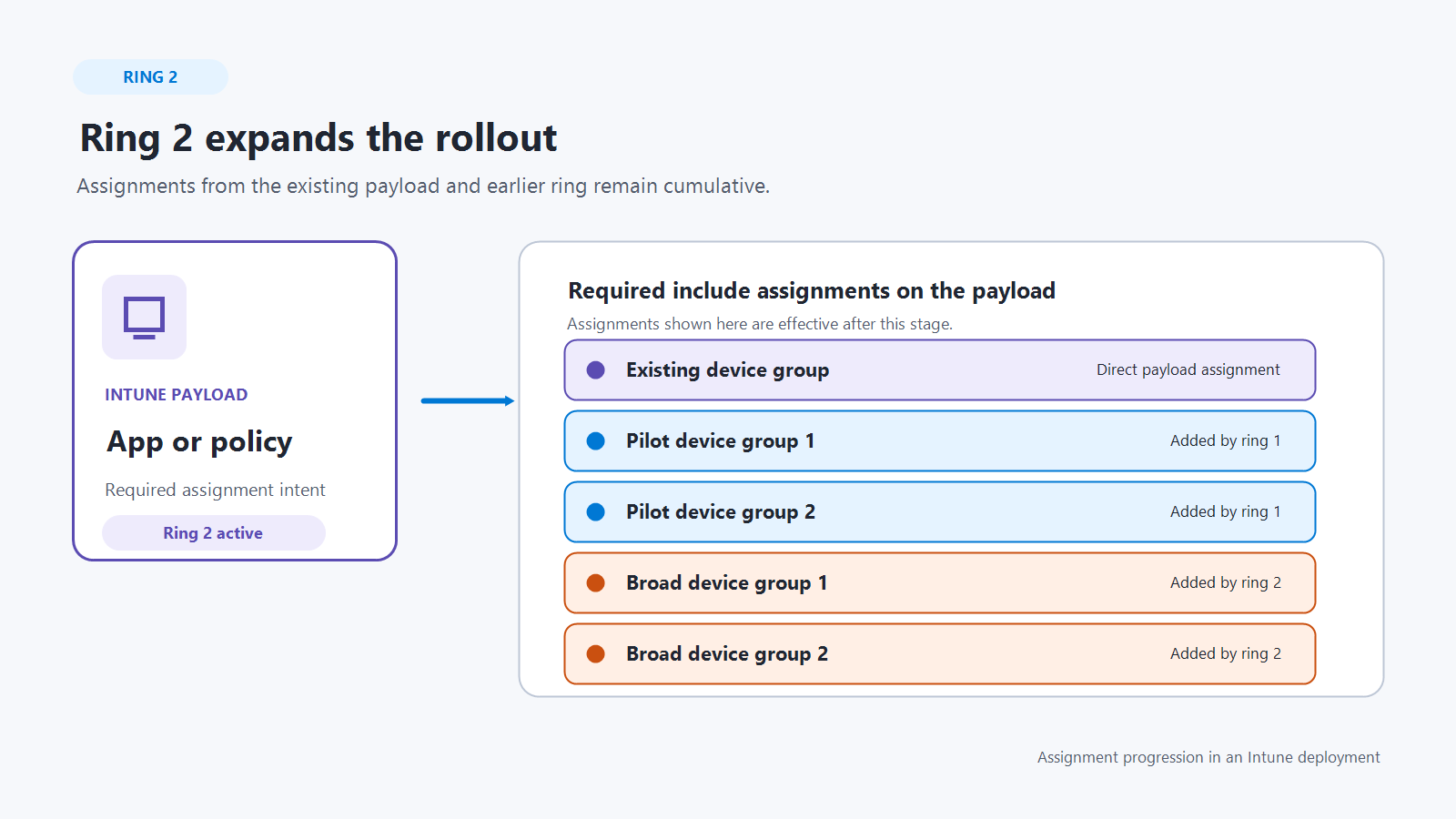
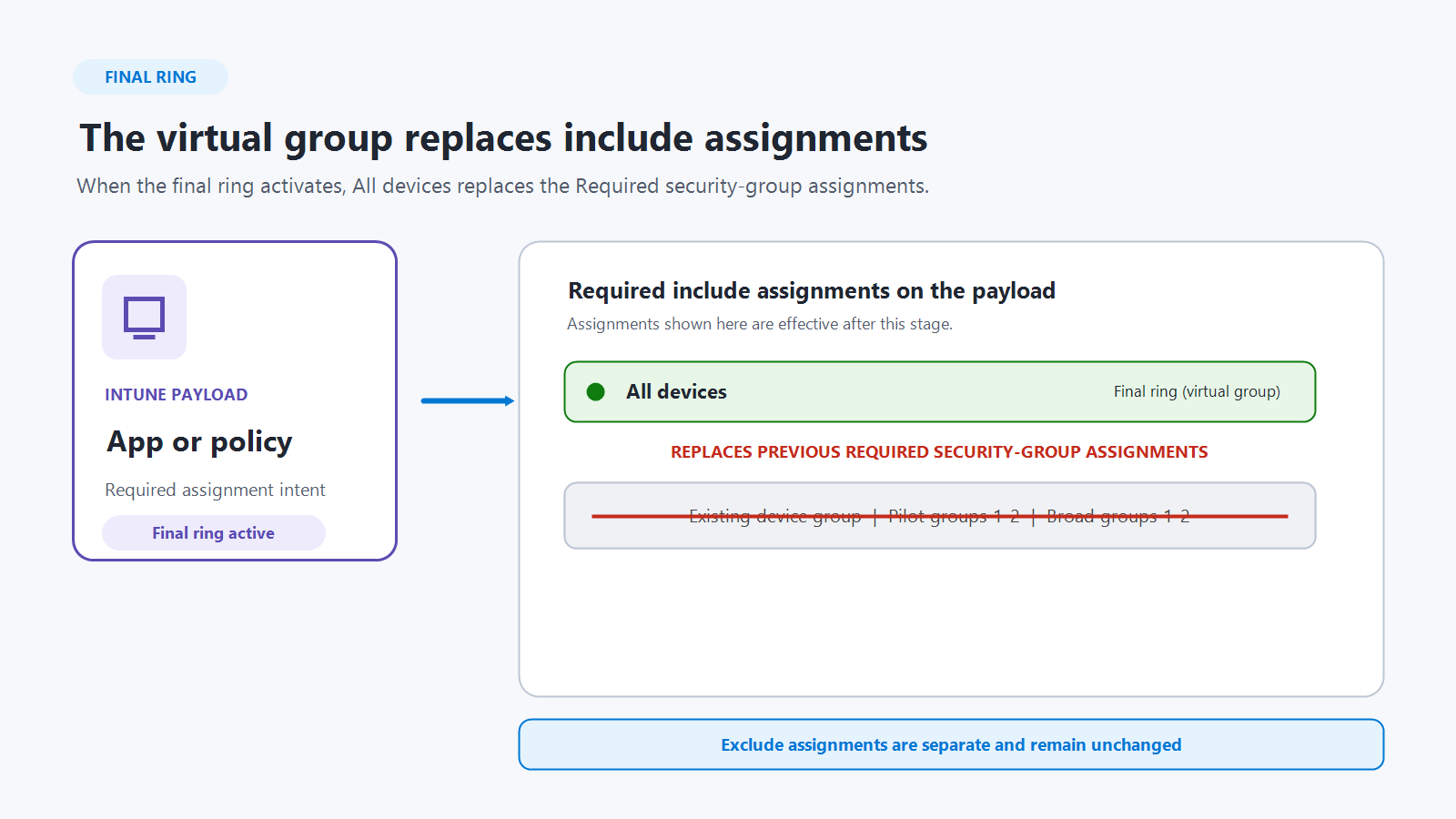
When a deployment starts, Intune updates the assignments on the underlying payload as each ring activates. Required include-group assignments are cumulative: the payload keeps its existing Required assignments, and the groups from each active ring are added to the assignment set. This behavior expands the deployment in controlled stages without replacing groups targeted by earlier rings.
The following example uses a three-ring deployment. Before the deployment starts, the payload is assigned to Existing device group. Ring 1 targets two pilot groups, ring 2 targets two broader groups, and the final ring targets the All devices virtual group.
Important
The payload remains the source of truth for assignments, and direct changes to payload assignments take precedence over the deployment. A ring that uses a virtual group (All users or All devices) is automatically the final ring. Virtual groups and Microsoft Entra security groups can't be mixed in the same ring. When the virtual-group ring activates, the virtual group replaces the payload's previous Required include-group assignments. Existing exclude assignments are preserved.
Public preview supported platforms and payloads
The following platforms and payloads are supported during public preview:
| Supported platform | Payload category | Supported payload |
|---|---|---|
| Windows 10 and later | Policy (device configuration) | Endpoint security policies; Settings catalog |
| Windows 10 and later | Apps | Windows app (Win32); Enterprise App Catalog app |
For Enterprise App Catalog apps:
- Update with supersedence is supported.
- Automatically update isn't supported with deployments.