Notă
Accesul la această pagină necesită autorizare. Puteți încerca să vă conectați sau să modificați directoarele.
Accesul la această pagină necesită autorizare. Puteți încerca să modificați directoarele.
The Microsoft Purview APIs in Microsoft Graph give you the tools to build apps that are secure, compliant, and policy-aware by design. With a rich set of APIs and services, the platform enables your applications to integrate directly with your organization's data governance, security, and compliance policies.
As organizations use Microsoft Purview to discover, classify, protect, and govern sensitive information, it’s critical that applications handling this data also respect these controls. Apps built on the Microsoft Purview APIs can:
- Interpret actions to take on sensitivity labels.
- Enforce policies defined in the Microsoft Purview portal.
- Prevent data misuse by aligning with compliance and security requirements.
- Deliver a seamless and trusted user experience by applying policies natively.
If you're building line-of-business (LoB) apps or multitenant SaaS solutions, using the Microsoft Purview APIs ensures that your app respects the value of the data it processes and the policies that protect that data.
To learn more about Microsoft Purview, see Learn about Microsoft Purview.
Why use the Microsoft Purview APIs in Microsoft Graph?
When you integrate your application with the Microsoft Purview APIs in Microsoft Graph, you can:
- Focus on the core value proposition of your app, while supporting data security and compliance outcomes as required by the organization, which enhances the overall value of the app for your customers (organizations).
- Help your customers meet their data security and compliance requirements for your app, which unblocks adoption of your app in their environment.
- Empower business users to interact with your apps in a secure and compliant manner, which improves business productivity.
Enterprise app integration benefits
You can achieve the following outcomes by integrating your enterprise applications (AI and non-AI) with the Microsoft Purview APIs:
- Protect against data loss and insider risk by:
- Enabling inline blocking of sensitive data based on data loss prevention (DLP) policies set within the enterprise.
- Supporting Insider Risk Management (IRM) alerts defined in the policies.
- Address oversharing concerns by honoring sensitivity labels applied to data.
- Enable governance for app usage, including AI interactions, to meet regulations and policies. For example, you can send AI prompts and responses into Microsoft Purview to enable visibility of app interactions, risk analytics, and support all relevant compliance outcomes (Audit, eDiscovery, Data Lifecycle Management, Communication Compliance).
Important
To set up a new DLP policy in Microsoft Purview to test DLP integration, run the New-DlpComplianceRule cmdlet. For more information, see New-DlpComplianceRule.
Scenarios and API overview
Enterprise applications (AI, line-of-business, SaaS) call Microsoft Purview APIs that are available in Microsoft Graph to evaluate and enforce data protection policies at runtime.
Applications can compute applicable protection scopes for a user, submit content for policy evaluation, and process the results to determine allowed actions. These interactions enable consistent enforcement of Microsoft Purview policies across all enterprise apps.
The following diagram shows how enterprise applications integrate with Microsoft Purview through the Microsoft Graph APIs to enforce data protection, apply sensitivity labels, and capture audit and compliance signals.
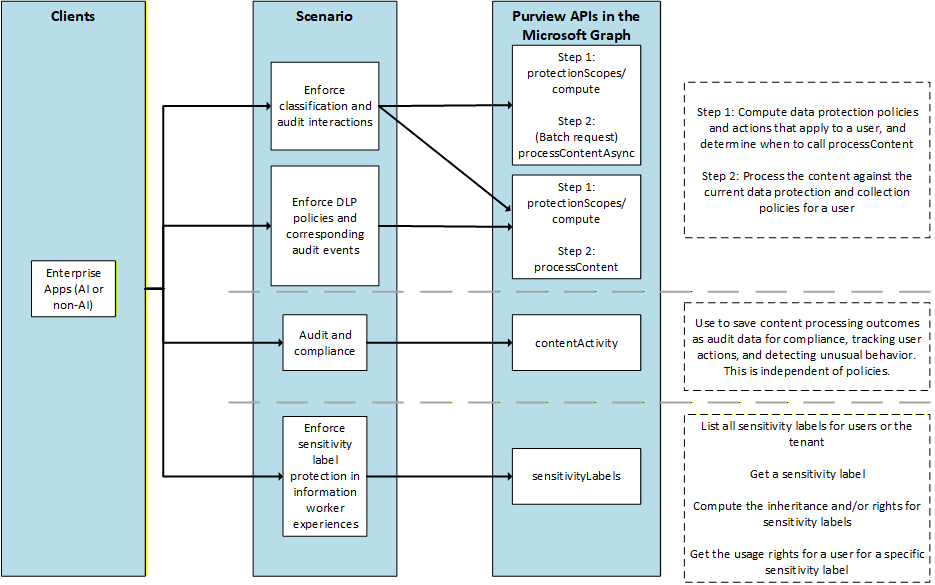
The diagram highlights several common integration patterns:
- Policy evaluation and enforcement: Applications use the
protectionScopesandprocessContentAPIs to compute which data protection scopes apply to a user/tenant, and to evaluate content against those policies. - Audit and compliance signals: Applications send content activity using the
contentActivitiesAPI, enabling auditing, compliance tracking, and detection of unusual behavior. - Sensitivity label integration: Applications query
sensitivityLabelsAPIs to list available labels, retrieve label details, and compute user rights and inheritance for labeled content.
Together, these APIs allow developers to embed Microsoft Purview governance, protection, and compliance capabilities directly into their applications using a single, unified Microsoft Graph endpoint.
Next steps
Review the following resources to learn more about Microsoft Purview and the APIs.
Learn about Microsoft Purview
Understand data security, compliance, and governance
Use Microsoft Purview APIs in Microsoft Graph
Data security and compliance for generative AI
Use Microsoft Purview with Agent Framework