Notă
Accesul la această pagină necesită autorizare. Puteți încerca să vă conectați sau să modificați directoarele.
Accesul la această pagină necesită autorizare. Puteți încerca să modificați directoarele.
This article provides information about known issues associated with SQL Server enabled by Azure Arc.
Databases
If a database isn't online and updatable, required permissions aren't assigned to that database. Features requiring permissions to that database are affected.
Resolution
Verify that the databases are online and updateable. Review Verify state of user databases.
Check the error logs. The error log might show Microsoft SQL Server error 945:
Database cannot be opened due to inaccessible files or insufficient memory or disk spaceTo resolve, follow the steps at MSSQLSERVER_945.
Cost report tags
Currently Microsoft.AzureArcData tags are not included in cost reports. For updates, review Microsoft.AzureArcData tag support
Throttling errors
You might occasionally see throttling notifications for Azure resource updates in Activity log, as shown below. This behavior is expected due to service-imposed rate limits. Updates for SQL Server instances, databases, and availability groups inventory run continuously on an hourly basis and should eventually complete successfully.
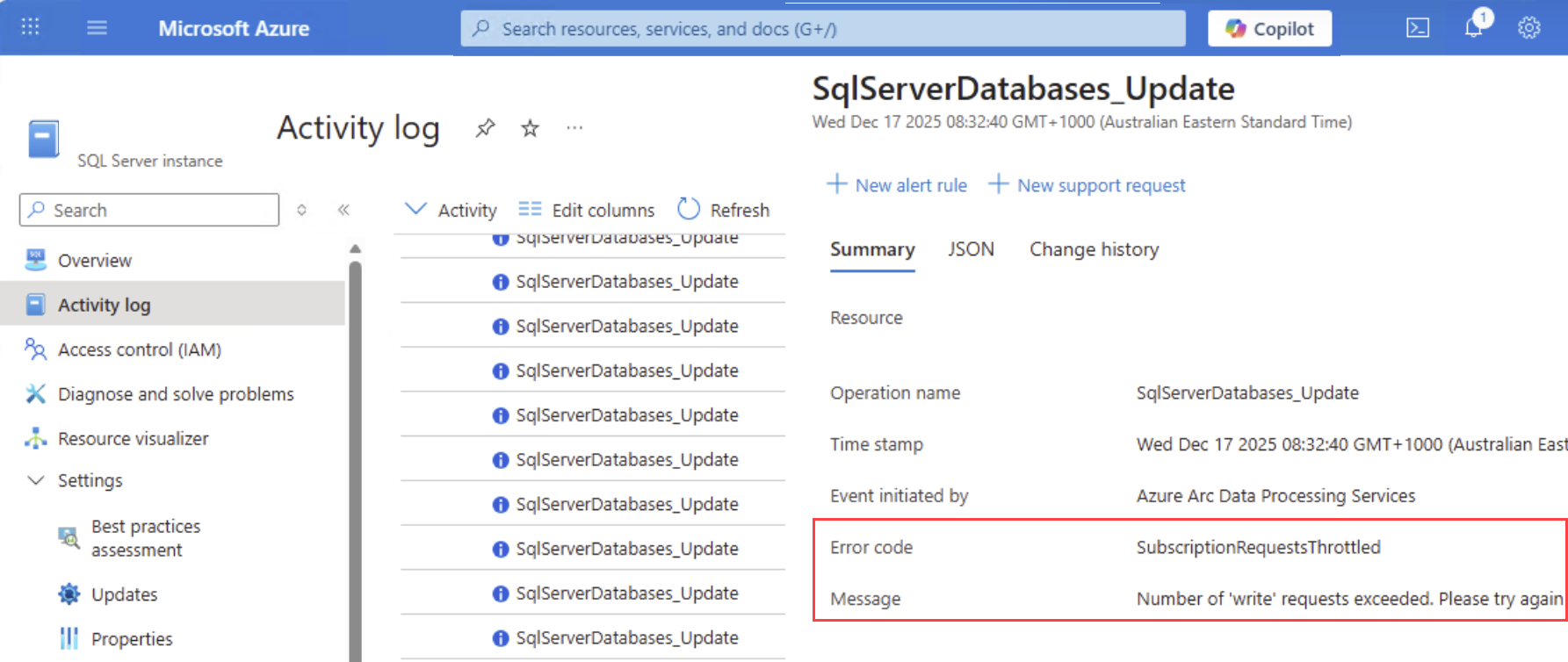
Contact the support team for assistance if you:
- Encounter these errors repeatedly
- Notice data inconsistencies in Azure for your SQL Server instances, databases, or availability groups
- Experience failures when using other features of SQL Server enabled by Azure Arc