Block.LineStackingStrategy Свойство
Определение
Важно!
Некоторые сведения относятся к предварительной версии продукта, в которую до выпуска могут быть внесены существенные изменения. Майкрософт не предоставляет никаких гарантий, явных или подразумеваемых, относительно приведенных здесь сведений.
Возвращает или задает способ определения поля строки для каждой строки текста в элементе содержимого потока на уровне блока.
public:
 property System::Windows::LineStackingStrategy LineStackingStrategy { System::Windows::LineStackingStrategy get(); void set(System::Windows::LineStackingStrategy value); };
public System.Windows.LineStackingStrategy LineStackingStrategy { get; set; }member this.LineStackingStrategy : System.Windows.LineStackingStrategy with get, setPublic Property LineStackingStrategy As LineStackingStrategyЗначение свойства
Одно из LineStackingStrategy значений, указывающее, как поле строки определяется для каждой строки текста в элементе содержимого потока на уровне блока. Значение по умолчанию — MaxHeight.
Примеры
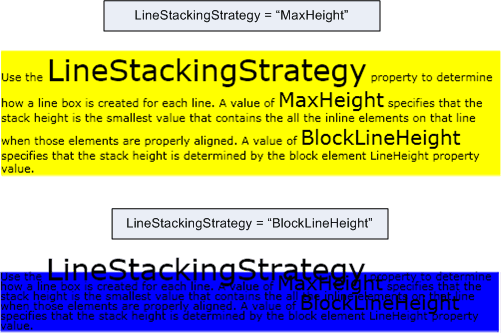
В следующем примере показано, как использовать LineStackingStrategy свойство, чтобы определить, как создаются поля строк для текстовых строк объекта TextBlock. TextBlock Первый имеет LineStackingStrategy значениеMaxHeight, а второй TextBlock имеет значение BlockLineHeight.
<Page xmlns="http://schemas.microsoft.com/winfx/2006/xaml/presentation"
  xmlns:x="http://schemas.microsoft.com/winfx/2006/xaml">
  <StackPanel>

    <!-- This TextBlock has a LineStackingStrategy set to "MaxHeight". -->
    <TextBlock LineStackingStrategy="MaxHeight" LineHeight="10" Width="500" TextWrapping="Wrap"
     Background="Yellow">
      Use the <Span FontSize="30">LineStackingStrategy</Span> property to determine how a line box is
      created for each line. A value of <Span FontSize="20">MaxHeight</Span> specifies that the stack
      height is the smallest value that contains all the inline elements on that line when those
      elements are properly aligned. A value of <Span FontSize="20">BlockLineHeight</Span> specifies
      that the stack height is determined by the block element LineHeight property value.
    </TextBlock>

    <!-- Here is the same TextBlock but the LineStackingStrategy is set to "BlockLineHeight". -->
    <TextBlock LineStackingStrategy="BlockLineHeight" LineHeight="10" Width="500" TextWrapping="Wrap"
     Background="Blue" Margin="0,40,0,0">
      Use the <Span FontSize="30">LineStackingStrategy</Span> property to determine how a line box is
      created for each line. A value of <Span FontSize="20">MaxHeight</Span> specifies that the stack
      height is the smallest value that contains all the inline elements on that line when those
      elements are properly aligned. A value of <Span FontSize="20">BlockLineHeight</Span> specifies
      that the stack height is determined by the block element LineHeight property value.
    </TextBlock>

  </StackPanel>
</Page>
На следующем рисунке показан результат предыдущего кода.
Комментарии
Это свойство зависимостей также имеет присоединенное свойство. В XAML используется<object Block.LineStackingStrategy="value".../>, где объект является элементом объекта (обычно элементом потока), содержащимся в Block производном классе, и значением является строковое значение LineStackingStrategy перечисления. В коде использование присоединенного свойства поддерживается методами GetLineStackingStrategy и SetLineStackingStrategy методами. Использование присоединенного свойства не распространено.
Сведения о свойстве зависимостей
| Элемент | Ценность |
|---|---|
| Поле идентификатора | LineStackingStrategyProperty |
Свойства метаданных, равные свойству true |
AffectsMeasure, AffectsRender |
