Заметка
Доступ к этой странице требует авторизации. Вы можете попробовать войти в систему или изменить каталог.
Доступ к этой странице требует авторизации. Вы можете попробовать сменить директорию.
В этом примере показано, как использовать возможности разделения столбцов FlowDocument.
Пример
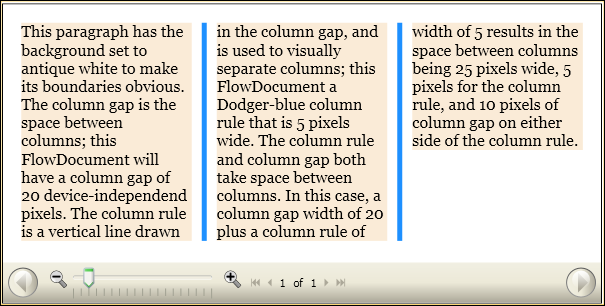
В следующем примере определяются FlowDocumentи задаются атрибуты ColumnGap, ColumnRuleBrushи ColumnRuleWidth. FlowDocument содержит один абзац примерного содержания.
<FlowDocumentReader>
  <FlowDocument
    ColumnGap="20.0"
    ColumnRuleBrush="DodgerBlue"
    ColumnRuleWidth="5.0"
    ColumnWidth="140.0"
>
    <Paragraph  Background="AntiqueWhite" TextAlignment="Left">
      This paragraph has the background set to antique white to make its
      boundaries obvious.

      The column gap is the space between columns; this FlowDocument will
      have a column gap of 20 device-independend pixels.  The column rule
      is a vertical line drawn in the column gap, and is used to visually
      separate columns; this FlowDocument a Dodger-blue column rule that
      is 5 pixels wide.

      The column rule and column gap both take space between columns.  In
      this case, a column gap width of 20 plus a column rule of width of 5
      results in the space between columns being 25 pixels wide, 5 pixels
      for the column rule, and 10 pixels of column gap on either side of the column rule.
    </Paragraph>
  </FlowDocument>
</FlowDocumentReader>
На следующем рисунке показано влияние атрибутов ColumnGap, ColumnRuleBrushи ColumnRuleWidth на визуализированный FlowDocument.
Сотрудничайте с нами на GitHub
Исходный код этого содержимого можно найти на GitHub, где вы также можете создавать и просматривать проблемы и запросы на вытягивание. Для получения дополнительной информации см. наше руководство для авторов.

.NET Desktop feedback