Примечание.
Для доступа к этой странице требуется авторизация. Вы можете попробовать войти или изменить каталоги.
Для доступа к этой странице требуется авторизация. Вы можете попробовать изменить каталоги.
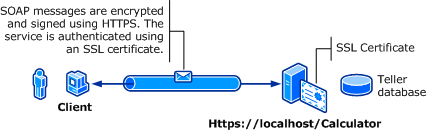
На следующем рисунке показана служба и клиент Windows Communication Foundation (WCF). Для сервера требуется действительный сертификат X.509, который можно использовать для протокола SSL, а клиенты должны доверять сертификату сервера. Кроме того, веб-служба уже имеет реализацию SSL, которую можно использовать. Дополнительные сведения о включении базовой проверки подлинности в службах IIS см. в статье "Базовая проверка подлинности".
| Характеристика | Описание |
|---|---|
| Режим безопасности | Транспорт |
| Совместимость | С существующими клиентами и веб-службами |
| Проверка подлинности (сервер) Проверка подлинности (клиент) |
Да (с помощью HTTPS) Да (с помощью имени пользователя или пароля) |
| Целостность | Да |
| Конфиденциальность | Да |
| Транспорт | HTTPS |
| Привязка | WSHttpBinding |
Услуга
Следующий код и конфигурация предназначены для самостоятельного выполнения. Выполните одно из следующих действий:
Создайте автономную службу с помощью кода без конфигурации.
Создайте службу с помощью указанной конфигурации, но не определите конечные точки.
Код
В следующем коде показано, как создать конечную точку службы, использующую имя пользователя домена Windows и пароль для обеспечения безопасности передачи. Обратите внимание, что службе требуется сертификат X.509 для проверки подлинности клиента. Дополнительные сведения см. в статье "Работа с сертификатами " и "Практическое руководство. Настройка порта с помощью SSL-сертификата".
// Create the binding.
WSHttpBinding binding = new WSHttpBinding();
binding.Security.Mode = SecurityMode.Transport;
binding.Security.Transport.ClientCredentialType =
    HttpClientCredentialType.Basic;

// Create the URI for the endpoint.
Uri httpUri = new Uri("https://localhost/Calculator");

// Create the service host and add an endpoint.
ServiceHost myServiceHost = new ServiceHost(
    typeof(ServiceModel.Calculator), httpUri);
myServiceHost.AddServiceEndpoint(
    typeof(ServiceModel.ICalculator), binding, "");

// Open the service.
myServiceHost.Open();
Console.WriteLine("Listening...");
Console.WriteLine("Press Enter to exit.");
Console.ReadLine();

// Close the service.
myServiceHost.Close();
' Create the binding.
Dim binding As New WSHttpBinding()
binding.Security.Mode = SecurityMode.Transport
binding.Security.Transport.ClientCredentialType = HttpClientCredentialType.Basic

' Create the URI for the endpoint.
Dim httpUri As New Uri("https://localhost/Calculator")

' Create the service host and add an endpoint.
Dim myServiceHost As New ServiceHost(GetType(ServiceModel.Calculator), httpUri)
myServiceHost.AddServiceEndpoint(GetType(ServiceModel.ICalculator), binding, "")

' Open the service.
myServiceHost.Open()
Console.WriteLine("Listening...")
Console.WriteLine("Press Enter to exit.")
Console.ReadLine()

' Close the service.
myServiceHost.Close()
Конфигурация
Ниже описано, как настроить службу для использования базовой проверки подлинности с безопасностью на уровне транспорта:
<?xml version="1.0" encoding="utf-8"?>
<configuration>
    <system.serviceModel>
        <bindings>
            <wsHttpBinding>
                <binding name="UsernameWithTransport">
                    <security mode="Transport">
                        <transport clientCredentialType="Basic" />
                    </security>
                </binding>
            </wsHttpBinding>
        </bindings>
        <services>
            <service name="BasicAuthentication.Calculator">
                <endpoint address="https://localhost/Calculator"
                          binding="wsHttpBinding"
                          bindingConfiguration="UsernameWithTransport"
                          name="BasicEndpoint"
                          contract="BasicAuthentication.ICalculator" />
            </service>
        </services>
    </system.serviceModel>
</configuration>
Клиент
Код
В следующем коде показан клиентский код, содержащий имя пользователя и пароль. Обратите внимание, что пользователь должен указать допустимое имя пользователя и пароль Windows. Код для возврата имени пользователя и пароля здесь не показан. Используйте диалоговое окно или другой интерфейс, чтобы запросить пользователя для получения сведений.
Замечание
Имя пользователя и пароль можно задать только с помощью кода.
// Create the binding.
WSHttpBinding myBinding = new WSHttpBinding();
myBinding.Security.Mode = SecurityMode.Transport;
myBinding.Security.Transport.ClientCredentialType =
    HttpClientCredentialType.Basic;

// Create the endpoint address. Note that the machine name
// must match the subject or DNS field of the X.509 certificate
// used to authenticate the service.
EndpointAddress ea = new
    EndpointAddress("https://machineName/Calculator");

// Create the client. The code for the calculator
// client is not shown here. See the sample applications
// for examples of the calculator code.
CalculatorClient cc =
    new CalculatorClient(myBinding, ea);
// The client must provide a user name and password. The code
// to return the user name and password is not shown here. Use
// a database to store the user name and passwords, or use the
// ASP.NET Membership provider database.
cc.ClientCredentials.UserName.UserName = ReturnUsername();
cc.ClientCredentials.UserName.Password = ReturnPassword();
try
{
    // Begin using the client.
    cc.Open();
    Console.WriteLine(cc.Add(100, 11));
    Console.ReadLine();

    // Close the client.
    cc.Close();
}
' Create the binding.
Dim myBinding As New WSHttpBinding()
myBinding.Security.Mode = SecurityMode.Transport
myBinding.Security.Transport.ClientCredentialType = HttpClientCredentialType.Basic

' Create the endpoint address. Note that the machine name
' must match the subject or DNS field of the X.509 certificate
' used to authenticate the service.
Dim ea As New EndpointAddress("https://machineName/Calculator")

' Create the client. The code for the calculator
' client is not shown here. See the sample applications
' for examples of the calculator code.
Dim cc As New CalculatorClient(myBinding, ea)

' The client must provide a user name and password. The code
' to return the user name and password is not shown here. Use
' a database to store the user name and passwords, or use the
' ASP.NET Membership provider database.
cc.ClientCredentials.UserName.UserName = ReturnUsername()
cc.ClientCredentials.UserName.Password = ReturnPassword()

' Begin using the client.
Try
    cc.Open()

    Console.WriteLine(cc.Add(100, 11))
    Console.ReadLine()

    ' Close the client.
    cc.Close()
Catch tex As TimeoutException
    Console.WriteLine(tex.Message)
    cc.Abort()
Catch cex As CommunicationException
    Console.WriteLine(cex.Message)
    cc.Abort()
Finally
    Console.WriteLine("Closed the client")
    Console.ReadLine()
End Try
Конфигурация
В следующем коде показана конфигурация клиента.
Замечание
Нельзя использовать конфигурацию для задания имени пользователя и пароля. Показанная здесь конфигурация должна быть дополнена с помощью кода, чтобы задать имя пользователя и пароль.
<?xml version="1.0" encoding="utf-8"?>
<configuration>
  <system.serviceModel>
    <bindings>
      <wsHttpBinding>
        <binding name="WSHttpBinding_ICalculator" >
          <security mode="Transport">
            <transport clientCredentialType="Basic" />
          </security>
        </binding>
      </wsHttpBinding>
    </bindings>
    <client>
      <endpoint address="https://machineName/Calculator"
                binding="wsHttpBinding"
                bindingConfiguration="WSHttpBinding_ICalculator"
                contract="ICalculator"
                name="WSHttpBinding_ICalculator" />
    </client>
  </system.serviceModel>
</configuration>
См. также
- ClientCredentials
- UserNamePasswordClientCredential
- работа с сертификатами
- Практическое руководство. Настройка порта с помощью SSL-сертификата
- Обзор безопасности
- <clientCredentials>
- Модель безопасности Windows Server App Fabric