Note
Access to this page requires authorization. You can try signing in or changing directories.
Access to this page requires authorization. You can try changing directories.
The SharePoint Add-in portions of this article are legacy guidance. The retirement below doesn't retire the other APIs or platforms discussed here.
Important
SharePoint Add-ins reached end of life in SharePoint Online on April 2, 2026. Both SharePoint-hosted and provider-hosted Add-ins are retired and no longer work in SharePoint Online, including government clouds. Add-in development, deployment, and usage guidance is retained for historical reference and for applicable SharePoint Server scenarios, not for new SharePoint Online solutions.
SharePoint Server Add-ins deployed through an on-premises app catalog are not retired by this change. Acquiring SharePoint Add-ins from the public marketplace ended on April 2, 2026 for SharePoint Server.
This retirement does not retire SharePoint REST APIs, CSOM, JSOM, or SharePoint Framework (SPFx). For SharePoint Online, use SPFx for user interface extensions and Microsoft Entra ID for authentication to external applications. See the retirement announcement and Add-in migration guidance.
In a Multi-Geo tenant, you have an app catalog per geo location, which is something to consider if you want to deploy your apps across all geo locations.
By "app", we mean all apps that you deploy by first adding them to your tenant app catalog. All such apps are in scope of this guidance, including SharePoint Add-Ins (.app files) and SharePoint Framework apps and extensions (.sppkg files).
In a Multi-Geo tenant, you have one app catalog site per geo location, as shown in the following diagram.
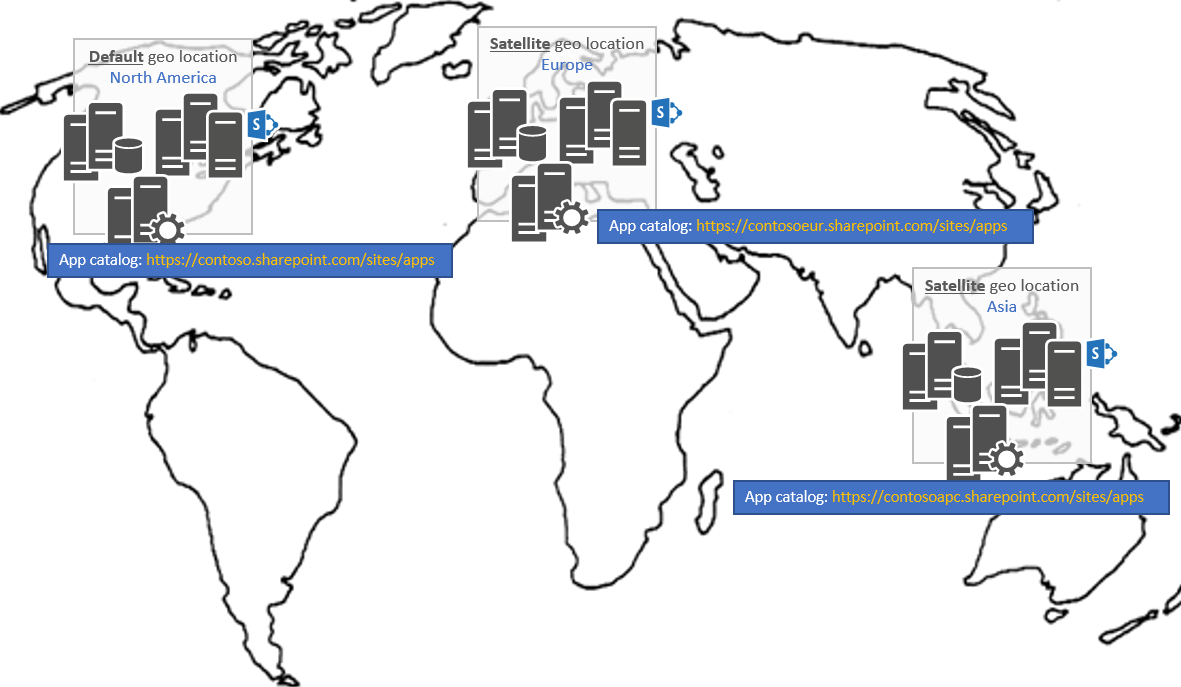
A consequence of this architecture is that you must deploy your app in all app catalogs if you want your app to be available for all sites, regardless of the geo location the site is hosted in.
To do this, you have two options:
Deploy your app manually in each of the app catalog sites.
Use the ALM APIs to automate the deployment of your apps. By using these APIs, you can write code that consistently deploys/upgrades your apps in all the geo locations of your Multi-Geo tenant.