Not
Bu sayfaya erişim yetkilendirme gerektiriyor. Oturum açmayı veya dizinleri değiştirmeyi deneyebilirsiniz.
Bu sayfaya erişim yetkilendirme gerektiriyor. Dizinleri değiştirmeyi deneyebilirsiniz.
In this article, you'll learn to create a new user-defined restore point for a dedicated SQL pool in Azure Synapse Analytics by using the Azure portal.
Azure portalı üzerinden kullanıcı tanımlı geri yükleme noktaları oluşturma
Kullanıcı tanımlı geri yükleme noktaları Azure portalı üzerinden de oluşturulabilir.
Azure portal hesabınızda oturum açın.
Navigate to the dedicated SQL pool that you want to create a restore point for.
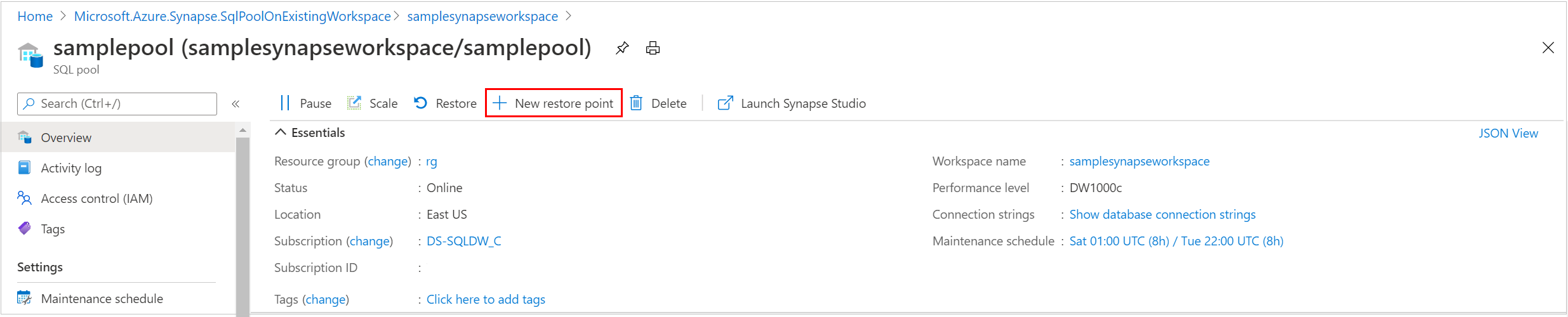
Select Overview from the left pane, select + New restore point. If the New Restore Point button isn't enabled, make sure that the dedicated SQL pool isn't paused.
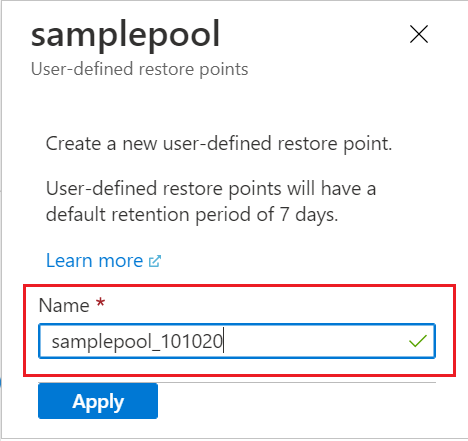
Specify a name for your user-defined restore point and select Apply. Kullanıcı tanımlı geri yükleme noktalarının varsayılan saklama süresi yedi gündür.