Not
Bu sayfaya erişim yetkilendirme gerektiriyor. Oturum açmayı veya dizinleri değiştirmeyi deneyebilirsiniz.
Bu sayfaya erişim yetkilendirme gerektiriyor. Dizinleri değiştirmeyi deneyebilirsiniz.
Bu hızlı başlangıçta, Azure Resource Manager şablonu (ARM şablonu) ve API sürümü kullanarak 2025-03-01 ile bir Azure Application Gateway nasıl dağıtılacağı gösterilmektedir. Geçiş modunda ağ geçidi bir istemci sertifikası istemektedir ancak doğrulamaz. Sertifika doğrulama ve politika yürütme arka planda gerçekleşir.
Temel özellikler
- Bir SSL profilini mTLS geçişi için dinleyiciyle ilişkilendirin.
- Ağ geçidinde istemci CA sertifikası gerekmez.
-
verifyClientAuthModeözelliği,StrictvePassthroughdeğerlerini destekler. - Portal desteği: mTLS geçişini doğrudan Azure portalında yapılandırabilirsiniz.
Uyarı
Geçiş yapılandırması için PowerShell ve CLI desteği şu anda kullanılamıyor. Azure portalını veya ARM şablonlarını kullanarak mTLS geçişini yapılandırabilirsiniz.
Azure portalını kullanarak mTLS geçişi yapılandırma
Passthrough istemci kimlik doğrulama yöntemiyle bir SSL profili oluşturarak mTLS geçişini doğrudan Azure portalında yapılandırabilirsiniz:
Azure portalında Application Gateway kaynağınıza gidin.
Ayarlar'ın altında SSL profilleri'ne tıklayın.
Yeni bir SSL profili oluşturmak için + Ekle'yi seçin.
SSL profiliniz için bir ad girin.
İstemci Kimlik Doğrulaması sekmesinde Geçiş'i seçin.
Geçiş modunda, istemci sertifikası isteğe bağlıdır ve arka uç sunucusu istemci kimlik doğrulamasından sorumludur.
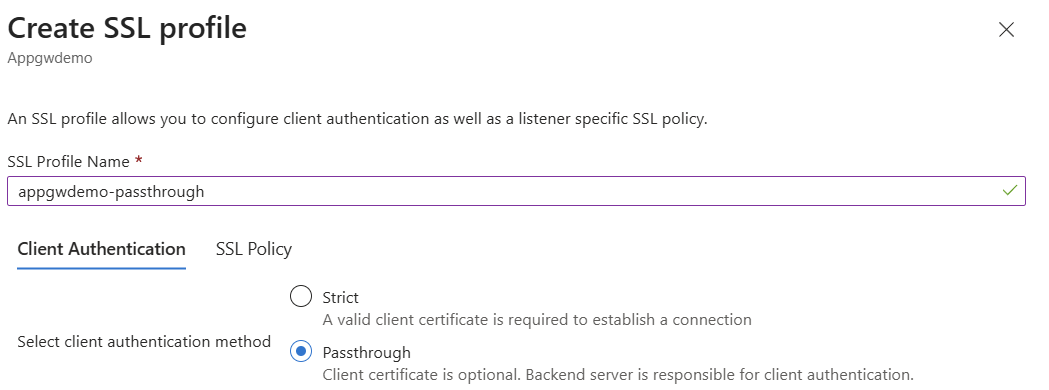
- SSL İlkesi ayarlarını gerektiği gibi yapılandırın.
- SSL profilini oluşturmak için Ekle'yi seçin.
- SSL profilini HTTPS dinleyicinizle ilişkilendirin.
Önkoşullar
- Azure aboneliği ve kaynak grubu.
- Azure CLI yerel olarak yüklenir.
- SSL sertifikası (Base64 kodlu PFX) ve parola.
- Linux VM yöneticisi için bir SSH anahtarı (varsa).
- Passthrough özelliği için API sürüm
2025-03-01veya daha yenisi.
Application Gateway'i mTLS geçiş dinleyicisi ile dağıtma
Bu şablon aşağıdaki kaynakları oluşturur:
- İki alt ağa sahip bir sanal ağ (biri Application Gateway'e devredilmiş).
- Ağ geçidi ön ucu için genel IP adresi.
- Application Gateway (Standard_v2) ile:
- İstemci sertifikası geçişi için SSL sertifikası ve SSL profili.
- HTTPS dinleyicisi ve yönlendirme kuralı.
- Bir uygulama hizmetine işaret eden arka uç havuzu.
Şablonu yapılandırma ayrıntılarınızla güncelleştirin ve geçerli bir SSL sertifikası ekleyin.
Parametre dosyası: deploymentParameters.json
{
    "$schema": "https://schema.management.azure.com/schemas/2015-01-01/deploymentParameters.json#",
    "contentVersion": "1.0.0.0",
    "parameters": {
        "addressPrefix": {
            "value": "10.0.0.0/16"
        },
        "subnetPrefix": {
            "value": "10.0.0.0/24"
        },
        "skuName": {
            "value": "Standard_v2"
        },
        "capacity": {
            "value": 2
        },
        "adminUsername": {
            "value": "ubuntu"
        },
        "adminSSHKey": {
            "value": "<your-ssh-public-key>"
        },
        "certData": {
            "value": "<Base64-encoded-PFX-data>"
        },
        "certPassword": {
            "value": "<certificate-password>"
        }
    }
}
Şablon dosyası: deploymentTemplate.json
{
    "$schema": "https://schema.management.azure.com/schemas/2019-04-01/deploymentTemplate.json#",
    "contentVersion": "1.0.0.0",
    "parameters": {
        "addressPrefix": {
            "defaultValue": "10.0.0.0/16",
            "type": "String",
            "metadata": {
                "description": "Address prefix for the Virtual Network"
            }
        },
        "subnetPrefix": {
            "defaultValue": "10.0.0.0/24",
            "type": "String",
            "metadata": {
                "description": "Subnet prefix"
            }
        },
        "skuName": {
            "defaultValue": "Standard_Medium",
            "type": "String",
            "metadata": {
                "description": "Sku Name"
            }
        },
        "capacity": {
            "defaultValue": 2,
            "type": "Int",
            "metadata": {
                "description": "Number of instances"
            }
        },
        "adminUsername": {
            "type": "String"
        },
		"adminSSHKey": {
            "type": "securestring"
        },
        "certData": {
            "type": "String",
            "metadata": {
                "description": "ssl cert data"
            }
        },
        "certPassword": {
            "type": "SecureString",
            "metadata": {
                "description": "ssl cert password"
            }
        }
    },
    "variables": {
        "applicationGatewayName": "mtlsAppGw",
        "idName": "identity",
        "publicIPAddressName": "mtlsPip",
        "virtualNetworkName": "mtlsVnet",
        "subnetName": "appgwsubnet",
        "vnetID": "[resourceId('Microsoft.Network/virtualNetworks',variables('virtualNetworkName'))]",
        "subnetRef": "[concat(variables('vnetID'),'/subnets/',variables('subnetName'))]",
        "publicIPRef": "[resourceId('Microsoft.Network/publicIPAddresses',variables('publicIPAddressName'))]",
        "applicationGatewayID": "[resourceId('Microsoft.Network/applicationGateways',variables('applicationGatewayName'))]",
        "apiVersion": "2025-03-01",
        "identityID": "[resourceId('Microsoft.ManagedIdentity/userAssignedIdentities',variables('idName'))]",
        "backendSubnetId": "[concat(variables('vnetID'),'/subnets/backendsubnet')]"
    },
    "resources": [
        {
            "type": "Microsoft.Network/virtualNetworks",
            "name": "[variables('virtualNetworkName')]",
            "apiVersion": "2024-07-01",
            "location": "[resourceGroup().location]",
            "properties": {
                "addressSpace": {
                    "addressPrefixes": [
                        "[parameters('addressPrefix')]"
                    ]
                },
                "subnets": [
                    {
                        "name": "[variables('subnetName')]",
                        "properties": {
                            "addressPrefix": "[parameters('subnetPrefix')]",
                             "delegations": [
                                {
                                    "name": "Microsoft.Network/applicationGateways",
                                    "properties": {
                                        "serviceName": "Microsoft.Network/applicationGateways"
                                    }
                                }
                            ]
                        }
                    },
                    {
                        "name": "backendSubnet",
                        "properties": {
                            "addressPrefix": "10.0.2.0/24"
                        }
                    }
                ]
            }
        },
        {
            "type": "Microsoft.Network/publicIPAddresses",
            "sku": {
                "name": "Standard"
            },
            "name": "[variables('publicIPAddressName')]",
            "apiVersion": "2024-07-01",
            "location": "[resourceGroup().location]",
            "properties": {
                "publicIPAllocationMethod": "Static"
            }
        },
        {
            "type": "Microsoft.Network/applicationGateways",
            "name": "[variables('applicationGatewayName')]",
            "apiVersion": "[variables('apiVersion')]",
            "location": "[resourceGroup().location]",
            "properties": {
                "sku": {
                    "name": "Standard_v2",
                    "tier": "Standard_v2",
                    "capacity": 3
                },
                "sslCertificates": [
                    {
                        "name": "sslCert",
                        "properties": {
                            "data": "[parameters('certData')]",
                            "password": "[parameters('certPassword')]"
                        }
                    }
                ],
                "sslPolicy": {
                    "policyType": "Predefined",
                    "policyName": "AppGwSslPolicy20220101"
                },
                "sslProfiles": [
                    {
                        "name": "sslnotrustedcert",
                        "id": "[concat(resourceId('Microsoft.Network/applicationGateways',  variables('applicationGatewayName')), '/sslProfiles/sslnotrustedcert')]",
                        "properties": {
                            "clientAuthConfiguration": {
                                "VerifyClientCertIssuerDN": false,
                                "VerifyClientRevocation": "None",
                                "VerifyClientAuthMode": "Passthrough"
                            }
                        }
                    }
                ],
                "gatewayIPConfigurations": [
                    {
                        "name": "appGatewayIpConfig",
                        "properties": {
                            "subnet": {
                                "id": "[variables('subnetRef')]"
                            }
                        }
                    }
                ],
                "frontendIPConfigurations": [
                    {
                        "name": "appGatewayFrontendIP",
                        "properties": {
                            "PublicIPAddress": {
                                "id": "[variables('publicIPRef')]"
                            }
                        }
                    }
                ],
                "frontendPorts": [
                    {
                        "name": "port2",
                        "properties": {
                            "Port": 444
                        }
                    }
                ],
                "backendAddressPools": [
                    {
                        "name": "pool2",
                        "properties": {
                            "BackendAddresses": [
							  {
                                "fqdn": "headerappgw-hsa5gjh8fpfebcfd.westus-01.azurewebsites.net"
                              }
							]
                        }
                    }
                ],
                "backendHttpSettingsCollection": [
                    {
                        "name": "settings2",
                        "properties": {
                            "Port": 80,
                            "Protocol": "Http"
                        }
                    }
                ],
                "httpListeners": [
                    {
                        "name": "listener2",
                        "properties": {
                            "FrontendIPConfiguration": {
                                "Id": "[concat(variables('applicationGatewayID'), '/frontendIPConfigurations/appGatewayFrontendIP')]"
                            },
                            "FrontendPort": {
                                "Id": "[concat(variables('applicationGatewayID'), '/frontendPorts/port2')]"
                            },
                            "Protocol": "Https",
                            "SslCertificate": {
                                "Id": "[concat(variables('applicationGatewayID'), '/sslCertificates/sslCert')]"
                            },
                            "sslProfile": {
                                "id": "[concat(variables('applicationGatewayID'), '/sslProfiles/sslnotrustedcert')]"
                            }
                        }
                    }
                ],
                "requestRoutingRules": [
                    {
                        "Name": "rule2",
                        "properties": {
                            "RuleType": "Basic",
                            "priority": 2000,
                            "httpListener": {
                                "id": "[concat(variables('applicationGatewayID'), '/httpListeners/listener2')]"
                            },
                            "backendAddressPool": {
                                "id": "[concat(variables('applicationGatewayID'), '/backendAddressPools/pool2')]"
                            },
                            "backendHttpSettings": {
                                "id": "[concat(variables('applicationGatewayID'), '/backendHttpSettingsCollection/settings2')]"
                            }
                        }
                    }
                ]
            },
            "dependsOn": [
                "[concat('Microsoft.Network/virtualNetworks/', variables('virtualNetworkName'))]",
                "[concat('Microsoft.Network/publicIPAddresses/', variables('publicIPAddressName'))]"
            ]
        }
    ]
}
Şablonu dağıt
Şablonu dağıtmak için aşağıdaki Azure CLI komutunu çalıştırın:
az deployment group create \
  --resource-group <your-resource-group> \
  --template-file deploymentTemplate.json \
  --parameters @deploymentParameters.json
Doğrulayın ve test edin
Dağıtımı doğrulayın.
Azure portalda Application Gateway kaynağınıza gidin.
JSON Görünümü'nü seçin ve API sürümü'nü
2025-03-01seçin.SSL profilinde
verifyClientAuthMode'ninPassthrougholarak ayarlandığından emin olun."sslProfiles": [ { "name": "sslnotrustedcert", "id": "<sample-subscription-id>", "etag": "W/\"851e4e20-d2b1-4338-9135-e0beac11aa0e\"", "properties": { "provisioningState": "Succeeded", "clientAuthConfiguration": { "verifyClientCertIssuerDN": false, "verifyClientRevocation": "None", "verifyClientAuthMode": "Passthrough" }, "httpListeners": [ { "id": "<sample-subscription-id>" } ] } } ]
Arka uca istemci sertifikası gönderin
İstemci sertifikasını arka uçtan iletmeniz gerekiyorsa, yeniden yazma kuralı yapılandırın. Daha fazla bilgi için bkz. Application Gateway ile HTTP üst bilgilerini ve URL'sini yeniden yazma.
İstemci bir sertifika gönderdiğinde, bu yeniden yazma, istemci sertifikasının arka uç işleme için istek üst bilgilerine eklenmesini sağlar.
Bağlantıyı test edin
İstemci sertifikası sağlanmamış olsa bile bağlantıların kurulduğunu doğrulayın.
mTLS geçiş parametreleri
Aşağıdaki tabloda mTLS geçiş yapılandırmasının parametreleri açıklanmaktadır:
| İsim | Türü | Description |
|---|---|---|
verifyClientCertIssuerDN |
Boolean | Ağ geçidinde istemci sertifikası veren adının doğrulanıp doğru edilmeyeceğini belirtir. |
verifyClientRevocation |
String | İstemci sertifikası iptal doğrulama modunu belirtir. |
verifyClientAuthMode |
String | İstemci sertifika modunu belirtir. Geçerli değerler: Strict ve Passthrough. |
Geçiş modu: Ağ geçidi bir istemci sertifikası istemektedir ancak bunu zorunlu kılmaz. Sunucu sertifikayı doğrular ve ilkeyi uygular.
Güvenlik konuları
Bu çözümü dağıtıp yönetirken kuruluşunuzun güvenlik ve veri işleme en iyi uygulamalarını izleyin.