Not
Bu sayfaya erişim yetkilendirme gerektiriyor. Oturum açmayı veya dizinleri değiştirmeyi deneyebilirsiniz.
Bu sayfaya erişim yetkilendirme gerektiriyor. Dizinleri değiştirmeyi deneyebilirsiniz.
Bu betik, Azure Event Grid kullanarak Microsoft Entra kullanıcısı tarafından korunan HTTPS uç noktalarına olay teslim etmek için yapılandırma sağlar.
Betiğin üst düzey adımları şunlardır:
- Henüz yoksa Microsoft.EventGrid için bir hizmet sorumlusu oluşturun.
- Web kancanız için Microsoft Entra uygulamasında AzureEventGridSecureWebhookSubscriber adlı bir rol oluşturun.
- Aboneliği oluşturan kullanıcının hizmet sorumlusunu AzureEventGridSecureWebhookSubscriber rolüne ekleyin.
- AzureEventGridSecureWebhookSubscriber'a Microsoft.EventGrid hizmet sorumlusu ekleyin.
Microsoft.EventGrid uygulama kimliğini alma
Azure portala gidin.
Arama çubuğuna yazın
Microsoft.EventGridve açılan listeden Microsoft.EventGrid (Hizmet Sorumlusu) öğesini seçin.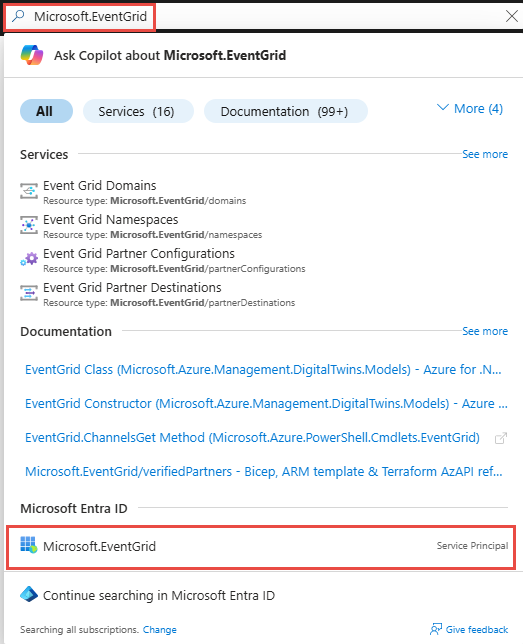
Microsoft.EventGrid sayfasında Uygulama Kimliğini not edin veya panoya kopyalayın.
Aşağıdaki betikte, değişkeni çalıştırmadan önce bu değere ayarlayın
$eventGridAppId.
Örnek betik
# NOTE: Before run this script ensure you are logged in Azure by using "az login" command.

$eventGridAppId = "[REPLACE_WITH_EVENT_GRID_APP_ID]"
$webhookAppObjectId = "[REPLACE_WITH_YOUR_ID]"
$eventSubscriptionWriterUserPrincipalName = "[REPLACE_WITH_USER_PRINCIPAL_NAME_OF_THE_USER_WHO_WILL_CREATE_THE_SUBSCRIPTION]"

# Start execution
try {

    # Creates an application role of given name and description

    Function CreateAppRole([string] $Name, [string] $Description)
    {
        $appRole = New-Object Microsoft.Graph.PowerShell.Models.MicrosoftGraphAppRole
        $appRole.AllowedMemberTypes = New-Object System.Collections.Generic.List[string]
        $appRole.AllowedMemberTypes += "Application";
        $appRole.AllowedMemberTypes += "User";
        $appRole.DisplayName = $Name
        $appRole.Id = New-Guid
        $appRole.IsEnabled = $true
        $appRole.Description = $Description
        $appRole.Value = $Name;

        return $appRole
    }

    # Creates Azure Event Grid Microsoft Entra Application if not exists
    # You don't need to modify this id
    # But Azure Event Grid Microsoft Entra Application Id is different for different clouds

    $eventGridSP = Get-MgServicePrincipal -Filter ("appId eq '" + $eventGridAppId + "'")
    if ($eventGridSP.DisplayName -match "Microsoft.EventGrid")
    {
        Write-Host "The Event Grid Microsoft Entra Application is already defined.`n"
    } else {
        Write-Host "Creating the Azure Event Grid Microsoft Entra Application"
        $eventGridSP = New-MgServicePrincipal -AppId $eventGridAppId
    }

    # Creates the Azure app role for the webhook Microsoft Entra application
    $eventGridRoleName = "AzureEventGridSecureWebhookSubscriber" # You don't need to modify this role name

    $app = Get-MgApplication -ApplicationId $webhookAppObjectId
    $appRoles = $app.AppRoles

    Write-Host "Microsoft Entra App roles before addition of the new role..."
    Write-Host $appRoles.DisplayName

    if ($appRoles.DisplayName -match $eventGridRoleName)
    {
        Write-Host "The Azure Event Grid role is already defined.`n"
    } else {
        Write-Host "Creating the Azure Event Grid role in Microsoft Entra Application: " $webhookAppObjectId
        $newRole = CreateAppRole -Name $eventGridRoleName -Description "Azure Event Grid Role"
        $appRoles += $newRole
        Update-MgApplication -ApplicationId $webhookAppObjectId -AppRoles $appRoles
    }

    Write-Host "Microsoft Entra App roles after addition of the new role..."
    Write-Host $appRoles.DisplayName

    # Creates the user role assignment for the user who will create event subscription

    $servicePrincipal = Get-MgServicePrincipal -Filter ("appId eq '" + $app.AppId + "'")

    try
    {
        Write-Host "Creating the Microsoft Entra App Role assignment for user: " $eventSubscriptionWriterUserPrincipalName
        $eventSubscriptionWriterUser = Get-MgUser -UserId $eventSubscriptionWriterUserPrincipalName
        $eventGridAppRole = $app.AppRoles | Where-Object -Property "DisplayName" -eq -Value $eventGridRoleName
        New-MgUserAppRoleAssignment -UserId $eventSubscriptionWriterUser.Id -PrincipalId $eventSubscriptionWriterUser.Id -ResourceId $servicePrincipal.Id  -AppRoleId $eventGridAppRole.Id
    }
    catch
    {
        if( $_.Exception.Message -like '*Permission being assigned already exists on the object*')
        {
            Write-Host "The Microsoft Entra User Application role is already defined.`n"
        }
        else
        {
            Write-Error $_.Exception.Message
        }
        Break
    }

    # Creates the service app role assignment for Event Grid Microsoft Entra Application

    $eventGridAppRole = $app.AppRoles | Where-Object -Property "DisplayName" -eq -Value $eventGridRoleName
    New-MgServicePrincipalAppRoleAssignment -ServicePrincipalId $eventGridSP.Id -PrincipalId $eventGridSP.Id  -ResourceId $servicePrincipal.Id -AppRoleId $eventGridAppRole.Id

    # Print output references for backup

    Write-Host ">> Webhook's Microsoft Entra Application Id: $($app.AppId)"
    Write-Host ">> Webhook's Microsoft Entra Application Object Id: $($app.Id)"
}
catch {
  Write-Host ">> Exception:"
  Write-Host $_
  Write-Host ">> StackTrace:"
  Write-Host $_.ScriptStackTrace
}
Betik açıklaması
Daha fazla bilgi için bkz . Azure Event Grid'de Microsoft Entra Id ile Web Kancası teslimini güvenli hale getirir.