TextDecorations.Strikethrough Özellik
Tanım
Önemli
Bazı bilgiler ürünün ön sürümüyle ilgilidir ve sürüm öncesinde önemli değişiklikler yapılmış olabilir. Burada verilen bilgilerle ilgili olarak Microsoft açık veya zımni hiçbir garanti vermez.
Üstü çizili TextDecorationbelirtir.
public:
 static property System::Windows::TextDecorationCollection ^ Strikethrough { System::Windows::TextDecorationCollection ^ get(); };
public static System.Windows.TextDecorationCollection Strikethrough { get; }static member Strikethrough : System.Windows.TextDecorationCollectionPublic Shared ReadOnly Property Strikethrough As TextDecorationCollectionÖzellik Değeri
Üstü çizili TextDecorationbir değeri temsil eder.
Örnekler
Aşağıdaki örnekte kalem için düz renk fırçası kullanılarak üstü çizili metin süslemesi oluşturulur. Location özelliği Strikethrough olarak ayarlanmıştır.
// Use the default font values for the strikethrough text decoration.
private void SetDefaultStrikethrough()
{
    // Set the underline decoration directly to the text block.
    TextBlock1.TextDecorations = TextDecorations.Strikethrough;
}
' Use the default font values for the strikethrough text decoration.
Private Sub SetDefaultStrikethrough()
    ' Set the underline decoration directly to the text block.
    TextBlock1.TextDecorations = TextDecorations.Strikethrough
End Sub
<!-- Use the default font values for the strikethrough text decoration. -->
<TextBlock
  TextDecorations="Strikethrough"
  FontSize="36" >
  The quick red fox
</TextBlock>
Açıklamalar
Aşağıdaki örnek, üstü çizili metin süslemesinin metne göre konumunu gösterir.
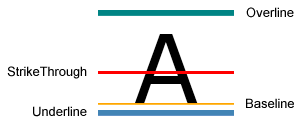 Üstü çizili metin dekorasyonu örneği
