Not
Bu sayfaya erişim yetkilendirme gerektiriyor. Oturum açmayı veya dizinleri değiştirmeyi deneyebilirsiniz.
Bu sayfaya erişim yetkilendirme gerektiriyor. Dizinleri değiştirmeyi deneyebilirsiniz.
Grup sohbeti düzenlemesi, konuşmacı seçimini ve konuşma akışını belirleyen bir düzenleyici tarafından koordine edilerek birden çok aracı arasında işbirliğine dayalı bir konuşmanın modelini oluşturur. Bu desen yinelemeli iyileştirme, işbirliğine dayalı sorun çözme veya çok perspektifli analiz gerektiren senaryolar için idealdir.
Grup sohbet orkestrasyonu, dahili olarak ajanları bir yıldız topolojisinde ve ortada bir orkestratör ile bir araya getirir. Düzenleyici, bir sonraki konuşma aracısını seçmek için hepsini bir kez deneme, istem tabanlı seçim veya konuşma bağlamını temel alan özel mantık gibi çeşitli stratejiler uygulayarak çok aracılı işbirliği için esnek ve güçlü bir desen oluşturabilir.
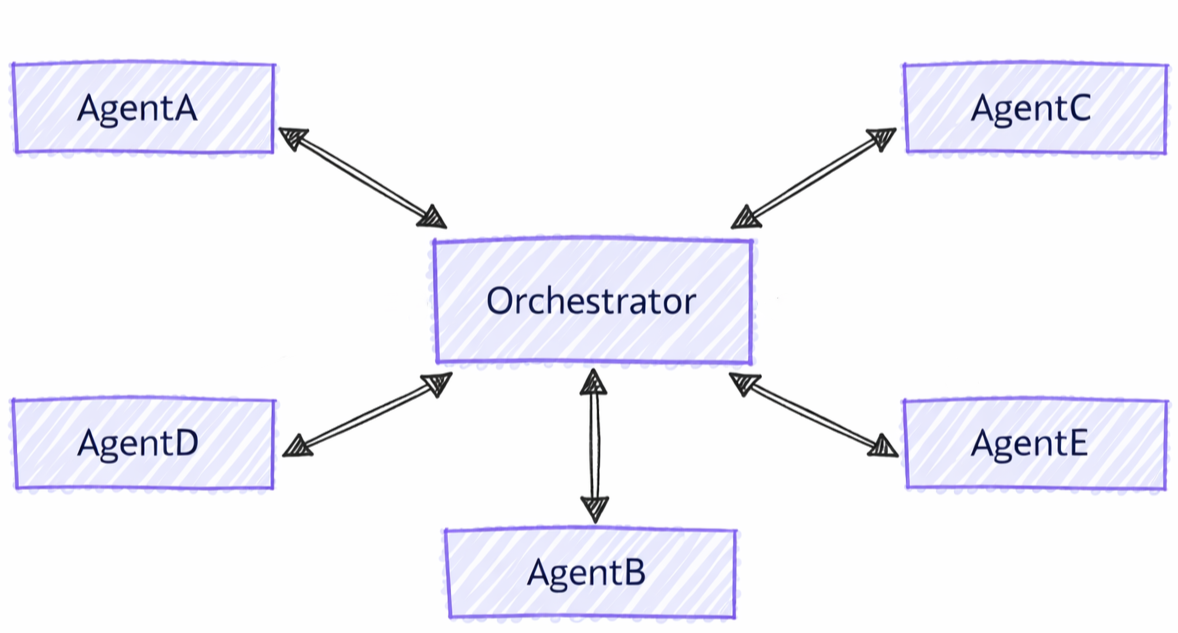
Grup Sohbeti ile Diğer Desenler Arasındaki Farklar
Grup sohbeti düzenleme, diğer çok aracılı desenlere kıyasla farklı özelliklere sahiptir:
- Merkezi Koordinasyon: Aracıların denetimi doğrudan aktardığı iletim desenlerinden farklı olarak, grup sohbeti bir düzenleyici kullanarak sıradaki kimin konuştuğunu koordine eder
- Yinelemeli İyileştirme: Aracılar birbirlerinin yanıtlarını birden çok turda inceleyebilir ve bunlar üzerinde derleme yapabilir
- Esnek Konuşmacı Seçimi: Düzenleyici, konuşmacıları seçmek için çeşitli stratejiler (hepsini bir kez deneme, istem tabanlı, özel mantık) kullanabilir
- Paylaşılan Bağlam: Tüm aracılar konuşma geçmişinin tamamını görür ve işbirliğine dayalı iyileştirmeyi etkinleştirir
Öğrenecekler
- Grup işbirliği için özel aracılar oluşturma
- Konuşmacı seçim stratejilerini yapılandırma
- İteratif ajan iyileştirmesi ile iş akışları oluşturma
- Özel düzenleyicilerle konuşma akışını özelleştirme
Azure OpenAI İstemcisini Ayarlama
using System;
using System.Collections.Generic;
using System.Threading.Tasks;
using Azure.AI.Projects;
using Azure.Identity;
using Microsoft.Agents.AI.Workflows;
using Microsoft.Extensions.AI;
using Microsoft.Agents.AI;

// Set up the Azure OpenAI client
var endpoint = Environment.GetEnvironmentVariable("AZURE_OPENAI_ENDPOINT") ??
    throw new InvalidOperationException("AZURE_OPENAI_ENDPOINT is not set.");
var deploymentName = Environment.GetEnvironmentVariable("AZURE_OPENAI_DEPLOYMENT_NAME") ?? "gpt-4o-mini";
var client = new AIProjectClient(new Uri(endpoint), new DefaultAzureCredential())
    .GetProjectOpenAIClient()
    .GetProjectResponsesClient()
    .AsIChatClient(deploymentName);
Warning
DefaultAzureCredential geliştirme için uygundur ancak üretimde dikkatli bir şekilde dikkate alınması gerekir. Üretimde gecikme sorunları, istenmeyen kimlik bilgisi yoklama ve geri dönüş mekanizmalarından kaynaklanan olası güvenlik risklerini önlemek için belirli bir kimlik bilgisi (ör ManagedIdentityCredential. ) kullanmayı göz önünde bulundurun.
Ajanlarınızı Tanımlayın
Grup konuşmasında farklı roller için özel aracılar oluşturun:
// Create a copywriter agent
ChatClientAgent writer = new(client,
    "You are a creative copywriter. Generate catchy slogans and marketing copy. Be concise and impactful.",
    "CopyWriter",
    "A creative copywriter agent");

// Create a reviewer agent
ChatClientAgent reviewer = new(client,
    "You are a marketing reviewer. Evaluate slogans for clarity, impact, and brand alignment. " +
    "Provide constructive feedback or approval.",
    "Reviewer",
    "A marketing review agent");
Round-Robin Orchestrator ile Grup Sohbeti Yapılandırma
kullanarak AgentWorkflowBuildergrup sohbeti iş akışını oluşturun:
// Build group chat with round-robin speaker selection
// The manager factory receives the list of agents and returns a configured manager
var workflow = AgentWorkflowBuilder
    .CreateGroupChatBuilderWith(agents =>
        new RoundRobinGroupChatManager(agents)
        {
            MaximumIterationCount = 5  // Maximum number of turns
        })
    .AddParticipants(writer, reviewer)
    .Build();
Grup Sohbeti İş Akışını Çalıştırma
İş akışını yürüt ve yinelemeli konuşmayı gözlemle.
// Start the group chat
var messages = new List<ChatMessage> {
    new(ChatRole.User, "Create a slogan for an eco-friendly electric vehicle.")
};

await using StreamingRun run = await InProcessExecution.RunStreamingAsync(workflow, messages);
await run.TrySendMessageAsync(new TurnToken(emitEvents: true));

await foreach (WorkflowEvent evt in run.WatchStreamAsync().ConfigureAwait(false))
{
    if (evt is AgentResponseUpdateEvent update)
    {
        // Process streaming agent responses
        AgentResponse response = update.AsResponse();
        foreach (ChatMessage message in response.Messages)
        {
            Console.WriteLine($"[{update.ExecutorId}]: {message.Text}");
        }
    }
    else if (evt is WorkflowOutputEvent output)
    {
        // Workflow completed
        var conversationHistory = output.As<List<ChatMessage>>();
        Console.WriteLine("\n=== Final Conversation ===");
        foreach (var message in conversationHistory)
        {
            Console.WriteLine($"{message.AuthorName}: {message.Text}");
        }
        break;
    }
}
Örnek Etkileşim
[CopyWriter]: "Green Dreams, Zero Emissions" - Drive the future with style and sustainability.

[Reviewer]: The slogan is good, but "Green Dreams" might be a bit abstract. Consider something
more direct like "Pure Power, Zero Impact" to emphasize both performance and environmental benefit.

[CopyWriter]: "Pure Power, Zero Impact" - Experience electric excellence without compromise.

[Reviewer]: Excellent! This slogan is clear, impactful, and directly communicates the key benefits.
The tagline reinforces the message perfectly. Approved for use.

[CopyWriter]: Thank you! The final slogan is: "Pure Power, Zero Impact" - Experience electric
excellence without compromise.
Sohbet İstemcisini Ayarlama
import os

from agent_framework.foundry import FoundryChatClient
from azure.identity import AzureCliCredential

# Initialize the Azure OpenAI client
client = FoundryChatClient(
    project_endpoint=os.environ["FOUNDRY_PROJECT_ENDPOINT"],
    model=os.environ["FOUNDRY_MODEL"],
    credential=AzureCliCredential(),
)
Ajanlarınızı Tanımlayın
Farklı rollere sahip özel aracılar oluşturun:
from agent_framework import Agent

# Create a researcher agent
researcher = Agent(
    client=client,
    name="Researcher",
    description="Collects relevant background information.",
    instructions="Gather concise facts that help answer the question. Be brief and factual.",
)

# Create a writer agent
writer = Agent(
    client=client,
    name="Writer",
    description="Synthesizes polished answers using gathered information.",
    instructions="Compose clear, structured answers using any notes provided. Be comprehensive.",
)
Basit Seçici ile Grup Sohbeti Yapılandırma
Özel konuşmacı seçim mantığıyla grup sohbeti oluşturun:
from agent_framework.orchestrations import GroupChatBuilder, GroupChatState

def round_robin_selector(state: GroupChatState) -> str:
    """A round-robin selector function that picks the next speaker based on the current round index."""

    participant_names = list(state.participants.keys())
    return participant_names[state.current_round % len(participant_names)]


# Build the group chat workflow
workflow = GroupChatBuilder(
    participants=[researcher, writer],
    termination_condition=lambda conversation: len(conversation) >= 4,
    intermediate_output_from=[researcher, writer],
    selection_func=round_robin_selector,
).build()
Agent-Based Orchestrator ile Grup Sohbeti Yapılandırma
Alternatif olarak, akıllı konuşmacı seçimi için aracı tabanlı bir düzenleyici kullanın. Orkestratör, araçlara, bağlam ve gözlemlenebilirliğe tam erişimi olan Agent kapsamlıdır.
# Create orchestrator agent for speaker selection
orchestrator_agent = Agent(
    name="Orchestrator",
    description="Coordinates multi-agent collaboration by selecting speakers",
    instructions="""
You coordinate a team conversation to solve the user's task.

Guidelines:
- Start with Researcher to gather information
- Then have Writer synthesize the final answer
- Only finish after both have contributed meaningfully
""",
    client=client,
)

# Build group chat with agent-based orchestrator
workflow = GroupChatBuilder(
    participants=[researcher, writer],
    # Set a hard termination condition: stop after 4 assistant messages
    # The agent orchestrator will intelligently decide when to end before this limit but just in case
    termination_condition=lambda messages: sum(1 for msg in messages if msg.role == "assistant") >= 4,
    orchestrator_agent=orchestrator_agent,
    intermediate_output_from=[researcher, writer],
).build()
Grup Sohbeti İş Akışını Çalıştırma
İş akışını yürütün ve akıştaki katılımcı güncellemelerini işleyin. Akışsız terminal çıkışı bir AgentResponse’dır; akışlı terminal çıkışı AgentResponseUpdate parçaları hâlinde gönderilir.
from agent_framework import AgentResponseUpdate, Message

task = "What are the key benefits of async/await in Python?"

print(f"Task: {task}\n")
print("=" * 80)

last_author: str | None = None
# Run the workflow with streaming enabled
stream = workflow.run(task, stream=True)
async for event in stream:
    if event.type in ("intermediate", "output") and isinstance(event.data, AgentResponseUpdate):
        # Print streaming agent updates
        author = event.data.author_name
        if author != last_author:
            if last_author is not None:
                print()
            print(f"[{author}]:", end=" ", flush=True)
            last_author = author
        print(event.data.text, end="", flush=True)
result = await stream.get_final_response()
if outputs := result.get_outputs():
    print("\n\n" + "=" * 80)
    print("Final Response:")
    print(outputs[-1])

print("\nWorkflow completed.")
Örnek Etkileşim
Task: What are the key benefits of async/await in Python?

================================================================================

[Researcher]: Async/await in Python provides non-blocking I/O operations, enabling
concurrent execution without threading overhead. Key benefits include improved
performance for I/O-bound tasks, better resource utilization, and simplified
concurrent code structure using native coroutines.

[Writer]: The key benefits of async/await in Python are:

1. **Non-blocking Operations**: Allows I/O operations to run concurrently without
   blocking the main thread, significantly improving performance for network
   requests, file I/O, and database queries.

2. **Resource Efficiency**: Avoids the overhead of thread creation and context
   switching, making it more memory-efficient than traditional threading.

3. **Simplified Concurrency**: Provides a clean, synchronous-looking syntax for
   asynchronous code, making concurrent programs easier to write and maintain.

4. **Scalability**: Enables handling thousands of concurrent connections with
   minimal resource consumption, ideal for high-performance web servers and APIs.

--------------------------------------------------------------------------------

Workflow completed.
Dökümhane Yapılandırmasını Ayarlama
endpoint := os.Getenv("FOUNDRY_PROJECT_ENDPOINT")
model := cmp.Or(os.Getenv("FOUNDRY_MODEL"), "gpt-4o-mini")

token, err := azidentity.NewDefaultAzureCredential(nil)
if err != nil {
    return err
}
Warning
azidentity.NewDefaultAzureCredential geliştirme için uygundur ancak üretimde dikkatli bir şekilde dikkate alınması gerekir. Üretimde, gecikme sorunlarından, istenmeyen kimlik bilgisi denemelerinden ve geri dönüş mekanizmalarından kaynaklanabilecek olası güvenlik risklerinden kaçınmak için azidentity.NewManagedIdentityCredential gibi belirli bir kimlik bilgisi kullanmayı göz önünde bulundurun.
Ajanlarınızı Tanımlayın
Konuşmada farklı rollere sahip özel aracılar oluşturun:
copywriter := foundryprovider.NewAgent(
    endpoint,
    token,
    foundryprovider.ModelDeployment(model),
    foundryprovider.AgentConfig{
        Instructions: "You are a creative copywriter. Generate catchy slogans and marketing copy. Be concise and impactful.",
        Config:      agent.Config{Name: "CopyWriter"},
    },
)

reviewer := foundryprovider.NewAgent(
    endpoint,
    token,
    foundryprovider.ModelDeployment(model),
    foundryprovider.AgentConfig{
        Instructions: "You are a marketing reviewer. Evaluate slogans for clarity, impact, and brand alignment. Provide constructive feedback or approval.",
        Config:      agent.Config{Name: "Reviewer"},
    },
)
Round-Robin Yöneticisi ile Grup Sohbeti Yapılandırma
ile agentworkflow.NewGroupChatWorkflowBuildergrup sohbeti iş akışını oluşturun. Oluşturucu, bir yönetici fabrikası ve katılımcı ajanları kabul eder.
NewRoundRobinGroupChatManager her temsilciyi sırayla seçer ve yapılandırılmış azami katılımcı turu sayısına ulaştıktan sonra durur.
managerFactory := func(agents []*agent.Agent) *agentworkflow.GroupChatManager {
    return agentworkflow.NewRoundRobinGroupChatManager(
        agents,
        agentworkflow.RoundRobinGroupChatOptions{MaximumIterationCount: 5},
    )
}

wf, err := agentworkflow.NewGroupChatWorkflowBuilder(managerFactory, copywriter, reviewer).
    WithName("Marketing Review Group Chat").
    WithDescription("A copywriter and reviewer collaborate on marketing copy.").
    Build()
if err != nil {
    return err
}
Grup Sohbeti İş Akışını Çalıştırma
İş akışını bir kullanıcı iletisi ve dönüş belirteci ile çalıştırın. Olay emisyonu etkinleştirildiğinde, katılımcı güncelleştirmeleri ara çıkış olayları olarak gelir ve son transkript terminal çıkış olayı olarak gelir.
run, err := inproc.Default.RunStreaming(ctx, wf, []*message.Message{
    message.NewText("Create a slogan for an eco-friendly electric vehicle."),
})
if err != nil {
    return err
}
defer run.Close(ctx)

emitEvents := true
if err := run.SendMessage(ctx, workflow.TurnToken{EmitEvents: &emitEvents}); err != nil {
    return err
}

lastExecutorID := ""
for evt, err := range run.WatchStream(ctx) {
    if err != nil {
        return err
    }

    switch e := evt.(type) {
    case workflow.OutputEvent:
        switch value := e.Output.(type) {
        case *agent.ResponseUpdate:
            if e.ExecutorID != lastExecutorID {
                lastExecutorID = e.ExecutorID
                fmt.Printf("\n[%s]: ", e.ExecutorID)
            }
            fmt.Print(value.String())
        case []*message.Message:
            fmt.Println("\n\n=== Final Conversation ===")
            for _, msg := range value {
                author := msg.AuthorName
                if author == "" {
                    author = string(msg.Role)
                }
                fmt.Printf("%s: %s\n", author, msg.String())
            }
        }
    case workflow.ErrorEvent:
        return e.Error
    case workflow.ExecutorFailedEvent:
        return fmt.Errorf("executor %q failed: %w", e.ExecutorID, e.Error)
    }
}
Örnek Etkileşim
[CopyWriter]: "Pure Power, Zero Impact" - Experience electric performance without compromise.

[Reviewer]: This is clear and memorable. It communicates performance and sustainability directly.
Approved.

[CopyWriter]: The final slogan is: "Pure Power, Zero Impact" - Experience electric performance
without compromise.

=== Final Conversation ===
user: Create a slogan for an eco-friendly electric vehicle.
CopyWriter: "Pure Power, Zero Impact" - Experience electric performance without compromise.
Reviewer: This is clear and memorable. It communicates performance and sustainability directly. Approved.
CopyWriter: The final slogan is: "Pure Power, Zero Impact" - Experience electric performance without compromise.
Önemli Kavramlar
- Merkezi Yönetici: Grup sohbeti, konuşmacı seçimini ve akışını koordine etmek için bir yönetici kullanır
- AgentWorkflowBuilder.CreateGroupChatBuilderWith(): Bir yönetici fabrika işleviyle iş akışları oluşturur
- RoundRobinGroupChatManager: Konuşmacıları dairesel sıra ile değiştiren yerleşik yönetici
- MaximumIterationCount: Sonlandırmadan önce ajanın maksimum dönüş sayısını kontrol eder
- Özel Yöneticiler: Özel mantığı genişletme veya uygulama
- Yinelemeli İyileştirme: Aracılar birbirlerinin katkılarını gözden geçirir ve geliştirir
- Paylaşılan Bağlam: Tüm katılımcılar konuşma geçmişinin tamamını görür
-
Esnek Düzenleyici Stratejileri: Oluşturucu parametreleri (
selection_func,orchestrator_agentveyaorchestrator) aracılığıyla basit seçiciler, aracı tabanlı düzenleyiciler veya özel mantık arasında seçim yapın. - GroupChatBuilder: Yapılandırılabilir konuşmacı seçimiyle iş akışları oluşturur
- GroupChatState: Seçim kararları için konuşma durumu sağlar
- Yinelemeli İşbirliği: Aracılar birbirlerinin katkılarına dayalıdır
-
AgentResponse Çıktısı: Terminal çıkışı, düzenleyicinin tamamlanma iletisini içeren bir
AgentResponseçıktıdır -
Olay Akışı: Olayları gerçek zamanlı olarak
AgentResponseUpdatearacılığıyla işleyinworkflow.run(task, stream=True) -
Ara Çıkışlar: Orkestratörün terminal
intermediate_output_from=[participant, ...]olayına ek olarak, listelenen her katılımcının çıktısını"intermediate"olayları olarak yayımlamak için"output"iletin
- GroupChatWorkflowBuilder: Merkezinde bir grup sohbeti sunucusu ve katılımcı olarak barındırılan aracılar bulunan yıldız topolojili bir iş akışı oluşturur
- GroupChatManager: Sonraki katılımcıyı seçer, yayın geçmişini güncelleştirebilir ve konuşmayı sonlandırabilir
- NewRoundRobinGroupChatManager: Katılımcılar arasında döngüsel sırayla geçiş yapan yerleşik yönetici
- RoundRobinGroupChatOptions: Maksimum katılımcı dönüş sayısını ve isteğe bağlı sonlandırma işlevini yapılandırıyor
- Çıkış Olayları: Varsayılan olarak, katılımcı çıkışları ara olaylardır ve grup sohbeti konağı terminal transkriptini verir
-
Özel Yöneticiler: Özel konuşmacı seçimi veya denetim noktası alınmış durum için
SelectNextAgentve isteğe bağlı yaşam döngüsü geri çağırmalarını uygulayın
Gelişmiş: Özel Konuşmacı Seçimi
Özel grup sohbet yöneticisi oluşturarak özel yönetici mantığı uygulayabilirsiniz:
public class ApprovalBasedManager : RoundRobinGroupChatManager
{
    private readonly string _approverName;

    public ApprovalBasedManager(IReadOnlyList<AIAgent> agents, string approverName)
        : base(agents)
    {
        _approverName = approverName;
    }

    // Override to add custom termination logic
    protected override ValueTask<bool> ShouldTerminateAsync(
        IReadOnlyList<ChatMessage> history,
        CancellationToken cancellationToken = default)
    {
        var last = history.LastOrDefault();
        bool shouldTerminate = last?.AuthorName == _approverName &&
            last.Text?.Contains("approve", StringComparison.OrdinalIgnoreCase) == true;

        return ValueTask.FromResult(shouldTerminate);
    }
}

// Use custom manager in workflow
var workflow = AgentWorkflowBuilder
    .CreateGroupChatBuilderWith(agents =>
        new ApprovalBasedManager(agents, "Reviewer")
        {
            MaximumIterationCount = 10
        })
    .AddParticipants(writer, reviewer)
    .Build();
Konuşma durumuna göre karmaşık seçim mantığı uygulayabilirsiniz:
def smart_selector(state: GroupChatState) -> str:
    """Select speakers based on conversation content and context."""
    conversation = state.conversation

    last_message = conversation[-1] if conversation else None

    # If no messages yet, start with Researcher
    if not last_message:
        return "Researcher"

    # Check last message content
    last_text = last_message.text.lower()

    # If researcher finished gathering info, switch to writer
    if "i have finished" in last_text and last_message.author_name == "Researcher":
        return "Writer"

    # Else continue with researcher until it indicates completion
    return "Researcher"

workflow = GroupChatBuilder(
    participants=[researcher, writer],
    selection_func=smart_selector,
).build()
Önemli
Gelişmiş senaryolar için özel uygulaması BaseGroupChatOrchestrator kullanılırken, , participant_registryve max_roundsdahil olmak üzere termination_conditiontüm özelliklerin ayarlanması gerekir.
max_rounds ve termination_condition oluşturucuda ayarlanmış olsa bile yoksayılır.
Ara Çıkışlar
Varsayılan olarak, yalnızca orkestratörün nihai çıktısı iş akışı "output" (terminal) olayı olarak görünür. Ara kaynaklar olarak belirtmek istediğiniz katılımcıları içeren intermediate_output_from parametresini ileterek, bunların ayrı ayrı çıktılarının da "intermediate" olayları olarak gösterilmesini sağlayın:
workflow = GroupChatBuilder(
    participants=[researcher, writer],
    termination_condition=lambda conversation: len(conversation) >= 4,
    selection_func=round_robin_selector,
    intermediate_output_from=[researcher, writer],
).build()
Oluşturucunun yönetici fabrikasından bir GroupChatManager döndürerek özel konuşmacı seçimini gerçekleştirin:
type approvalManager struct {
    agents []*agent.Agent
}

func newApprovalManager(agents []*agent.Agent) *agentworkflow.GroupChatManager {
    manager := &approvalManager{agents: agents}
    return &agentworkflow.GroupChatManager{
        SelectNextAgent: manager.selectNextAgent,
        ShouldTerminate: manager.shouldTerminate,
    }
}

func (m *approvalManager) selectNextAgent(_ context.Context, history []*message.Message) (*agent.Agent, error) {
    last := lastAssistantMessage(history)
    if last == nil || last.AuthorName == "Reviewer" {
        return m.agentByName("CopyWriter")
    }
    return m.agentByName("Reviewer")
}

func (m *approvalManager) shouldTerminate(_ context.Context, history []*message.Message, iterationCount int) (bool, error) {
    if iterationCount >= 10 {
        return true, nil
    }
    last := lastAssistantMessage(history)
    return last != nil &&
        last.AuthorName == "Reviewer" &&
        strings.Contains(strings.ToLower(last.String()), "approve"), nil
}

func (m *approvalManager) agentByName(name string) (*agent.Agent, error) {
    for _, currentAgent := range m.agents {
        if currentAgent.Name() == name {
            return currentAgent, nil
        }
    }
    return nil, fmt.Errorf("agent %q is not part of the group chat", name)
}

func lastAssistantMessage(history []*message.Message) *message.Message {
    for i := len(history) - 1; i >= 0; i-- {
        if history[i].Role == message.RoleAssistant {
            return history[i]
        }
    }
    return nil
}

wf, err := agentworkflow.NewGroupChatWorkflowBuilder(newApprovalManager, copywriter, reviewer).
    WithName("Approval Group Chat").
    Build()
GroupChatManagerayrıca yayın iletilerini filtreleyen veya yöneticiye ait durumu kalıcı hale getiren gelişmiş yöneticiler için , UpdateHistory, Resetve OnCheckpoint geri çağırmalarını desteklerOnCheckpointRestored.
Ara Çıkışlar
Varsayılan olarak, GroupChatWorkflowBuilder katılımcı çıkışlarını ara iş akışı çıkışları olarak gösterir ve birikmiş konuşma transkriptini terminal çıkışı olarak yayar. Katılımcı güncelleştirmelerini son transkriptten ayırmak için kullanın OutputEvent.IsIntermediate() :
if output, ok := evt.(workflow.OutputEvent); ok {
    if output.IsIntermediate() {
        fmt.Printf("intermediate from %s: %v\n", output.ExecutorID, output.Output)
        return nil
    }

    fmt.Printf("terminal output: %v\n", output.Output)
}
Grup sohbeti oluşturucusunda WithOutputFrom veya WithIntermediateOutputFrom çağrılması, açık çıktı belirtimine geçiş yapar. Varsayılan son transkript ve tüm katılımcı ara çıkışları yerine seçili katılımcı çıkışlarını istediğinizde bu yöntemleri kullanın.
Bağlam Senkronizasyonu
Bu kılavuzun başında belirtildiği gibi, grup sohbetindeki tüm aracılar eşitlenmiş konuşma geçmişini görür.
Agent Framework'teki aracılar, bağlamı yönetmek için aracı oturumlarını (AgentSession) kullanır. Grup sohbeti düzenlemesinde aracılar aynı oturum örneğini paylaşmaz , ancak düzenleyici her bir turdan önce her aracının oturumunu konuşma geçmişiyle eşitler. Orkestratör, her aracının sırası tamamlandıktan sonra yanıtı diğer tüm aracılara iletir; böylece tüm katılımcıların bir sonraki sıraları için en güncel bağlama sahip olması sağlanır.
Python eşitlenmiş grup sohbet geçmişinde kullanıcı metinlerini, satır içi verileri, URI'leri, barındırılan dosyaları ve barındırılan vektör depolarını korur. Kullanıcı olmayan iletiler yalnızca metinleri korur ve işlev çağrıları, işlev sonuçları, onay yükleri ve diğer araç denetimi içeriği yayından önce filtrelenir.
Tip
Paylaşılan geçmişe girmeden veya diğer katılımcılara ulaşmadan önce katılımcı metnini sansürlemek veya alıkoymak için, özel GroupChatOrchestrator bir katılımcı yanıtı işleyicisinde filtreleyin. Özgün yanıt zaten depolanıp yayınlandığı için, workflow.run() tarafından döndürülen olayları filtrelemek çok geç.
Grup sohbeti yanıt filtreleme örneğine bakın.
Örnek, paylaşılan geçmiş/yayın sınırını korur; gönderen aracının oturumundan, araçlarından, model sağlayıcısından, telemetrisinden veya önceki iş akışı yaşam döngüsü olaylarından özgün içeriği kaldırmaz.
Tip
Farklı aracı türleri soyutlamanın farklı uygulamalarına sahip olabileceğinden aracılar aynı oturum örneğini AgentSession paylaşmaz. Aynı oturum örneğinin paylaşılması, her bir aracın bağlamı işlemesi ve koruması konusunda tutarsızlıklara yol açabilir.
Yanıtı yayınlamasının ardından orkestratör bir sonraki konuşmacıyı belirler ve seçilen aracıya bir istek gönderir; bu aracı artık yanıtını oluşturmak için güncellenmiş konuşma geçmişine sahiptir.
Grup Sohbeti Ne Zaman Kullanılır?
Grup sohbeti düzenlemesi şuler için idealdir:
- Yinelemeli İyileştirme: Birden çok gözden geçirme ve geliştirme turu
- İşbirliğine Dayalı Sorun Çözme: Birlikte çalışan tamamlayıcı uzmanlığa sahip aracılar
- İçerik Oluşturma: Belge oluşturma için yazar-gözden geçiren iş akışları
- Multi-Perspective Analysis: Aynı giriş üzerinde farklı bakış açıları elde etme
- Kalite Güvencesi: Otomatik gözden geçirme ve onay süreçleri
Aşağıdaki durumlarda alternatifleri göz önünde bulundurun:
- Katı sıralı işlemeye ihtiyacınız var (Sıralı düzenlemeyi kullanın)
- Ajanlar tamamen bağımsız çalışmalıdır (Eşzamanlı orkestrasyonu kullanın)
- Doğrudan aracıdan aracıya aktarımlar gereklidir (Handoff orkestrasyonunu kullanın)
- Karmaşık dinamik planlama gereklidir (Magentic orkestrasyonu kullanın)