Not
Bu sayfaya erişim yetkilendirme gerektiriyor. Oturum açmayı veya dizinleri değiştirmeyi deneyebilirsiniz.
Bu sayfaya erişim yetkilendirme gerektiriyor. Dizinleri değiştirmeyi deneyebilirsiniz.
Azure Cosmos DB için Java SDK'sı, Prometheus gibi popüler gözlemlenebilirlik sistemlerinde izleme için Mikrometre kullanarak istemci ölçümlerini uygular. Bu makalede, bu örnekten alınan kod parçacıkları ve Prometheus'a metrik aktarma yönergeleri bulunmaktadır. SDK tarafından sağlanan ölçümlerin tam listesi burada belgelenmiştir. İstemcileriniz Azure Kubernetes Service'e (AKS) dağıtıldıysa, Prometheus için Azure İzleyici yönetilen hizmetini özel veri çekme ile de kullanabilirsiniz. Belgelerine buradan bakabilirsiniz.
Prometheus ölçümlerini kullanma
Prometheus'ı buradan indirebilirsiniz. Prometheus kullanarak Azure Cosmos DB için Java SDK'sında Mikrometre ölçümlerini kullanmak için öncelikle kayıt defteri ve istemci için gerekli kitaplıkları içeri aktardığınızdan emin olun:
<dependency>
    <groupId>io.micrometer</groupId>
    <artifactId>micrometer-registry-prometheus</artifactId>
    <version>1.6.6</version>
</dependency>

<dependency>
    <groupId>io.prometheus</groupId>
    <artifactId>simpleclient_httpserver</artifactId>
    <version>0.5.0</version>
</dependency>
Uygulamanızda telemetri yapılandırmasına prometheus kayıt defterini sağlayın. Tüketilen ölçümleri en çok ilgilendiğiniz ölçümlerle sınırlamaya yardımcı olacak çeşitli tanılama eşikleri ayarlayabildiğinize dikkat edin:
//prometheus meter registry
PrometheusMeterRegistry prometheusRegistry = new PrometheusMeterRegistry(PrometheusConfig.DEFAULT);

//provide the prometheus registry to the telemetry config
CosmosClientTelemetryConfig telemetryConfig = new CosmosClientTelemetryConfig()
        .diagnosticsThresholds(
                new CosmosDiagnosticsThresholds()
                        // Any requests that violate (are lower than) any of the below thresholds that are set
                        // will not appear in "request-level" metrics (those with "rntbd" or "gw" in their name).
                        // The "operation-level" metrics (those with "ops" in their name) will still be collected.
                        // Use this to reduce noise in the amount of metrics collected.
                        .setRequestChargeThreshold(10)
                        .setNonPointOperationLatencyThreshold(Duration.ofDays(10))
                        .setPointOperationLatencyThreshold(Duration.ofDays(10))
        )
        // Uncomment below to apply sampling to help further tune client-side resource consumption related to metrics.
        // The sampling rate can be modified after Azure Cosmos DB Client initialization – so the sampling rate can be
        // modified without any restarts being necessary.
        //.sampleDiagnostics(0.25)
        .clientCorrelationId("samplePrometheusMetrics001")
        .metricsOptions(new CosmosMicrometerMetricsOptions().meterRegistry(prometheusRegistry)
                //.configureDefaultTagNames(CosmosMetricTagName.PARTITION_KEY_RANGE_ID)
                .applyDiagnosticThresholdsForTransportLevelMeters(true)
        );
//prometheus meter registry
PrometheusMeterRegistry prometheusRegistry = new PrometheusMeterRegistry(PrometheusConfig.DEFAULT);

//provide the prometheus registry to the telemetry config
CosmosClientTelemetryConfig telemetryConfig = new CosmosClientTelemetryConfig()
        .diagnosticsThresholds(
                new CosmosDiagnosticsThresholds()
                        // Any requests that violate (are lower than) any of the below thresholds that are set
                        // will not appear in "request-level" metrics (those with "rntbd" or "gw" in their name).
                        // The "operation-level" metrics (those with "ops" in their name) will still be collected.
                        // Use this to reduce noise in the amount of metrics collected.
                        .setRequestChargeThreshold(10)
                        .setNonPointOperationLatencyThreshold(Duration.ofDays(10))
                        .setPointOperationLatencyThreshold(Duration.ofDays(10))
        )
        // Uncomment below to apply sampling to help further tune client-side resource consumption related to metrics.
        // The sampling rate can be modified after Azure Cosmos DB Client initialization – so the sampling rate can be
        // modified without any restarts being necessary.
        //.sampleDiagnostics(0.25)
        .clientCorrelationId("samplePrometheusMetrics001")
        .metricsOptions(new CosmosMicrometerMetricsOptions().meterRegistry(prometheusRegistry)
                //.configureDefaultTagNames(CosmosMetricTagName.PARTITION_KEY_RANGE_ID)
                .applyDiagnosticThresholdsForTransportLevelMeters(true)
        );
Ölçüm kayıt defteri ölçümlerini Prometheus'a göstermek için yerel HttpServer sunucusunu başlatın:
try {
    HttpServer server = HttpServer.create(new InetSocketAddress(8080), 0);
    server.createContext("/metrics", httpExchange -> {
        String response = prometheusRegistry.scrape();
        int i = 1;
        httpExchange.sendResponseHeaders(200, response.getBytes().length);
        try (OutputStream os = httpExchange.getResponseBody()) {
            os.write(response.getBytes());
        }
    });
    new Thread(server::start).start();
} catch (IOException e) {
    throw new RuntimeException(e);
}
clientTelemetryConfig geçirirken CosmosClient oluşturduğunuzdan emin olun.
//  Create async client
client = new CosmosClientBuilder()
    .endpoint(AccountSettings.HOST)
    .key(AccountSettings.MASTER_KEY)
    .clientTelemetryConfig(telemetryConfig)
    .consistencyLevel(ConsistencyLevel.SESSION) //make sure we can read our own writes
    .contentResponseOnWriteEnabled(true)
    .buildAsyncClient();
Uygulama istemcinizin uç noktasını prometheus.yml ögesine eklerken etki alanı adını ve bağlantı noktasını "targets" isimli hedeflere ekleyin. Örneğin, Prometheus uygulama istemcinizle aynı sunucuda çalışıyorsa localhost:8080 öğesine targets ekleyebilirsiniz:
scrape_configs:
  # The job name is added as a label `job=<job_name>` to any timeseries scraped from this config.
  - job_name: "prometheus"

    # metrics_path defaults to '/metrics'
    # scheme defaults to 'http'.

    static_configs:
      - targets: ["localhost:9090", "localhost:8080"]
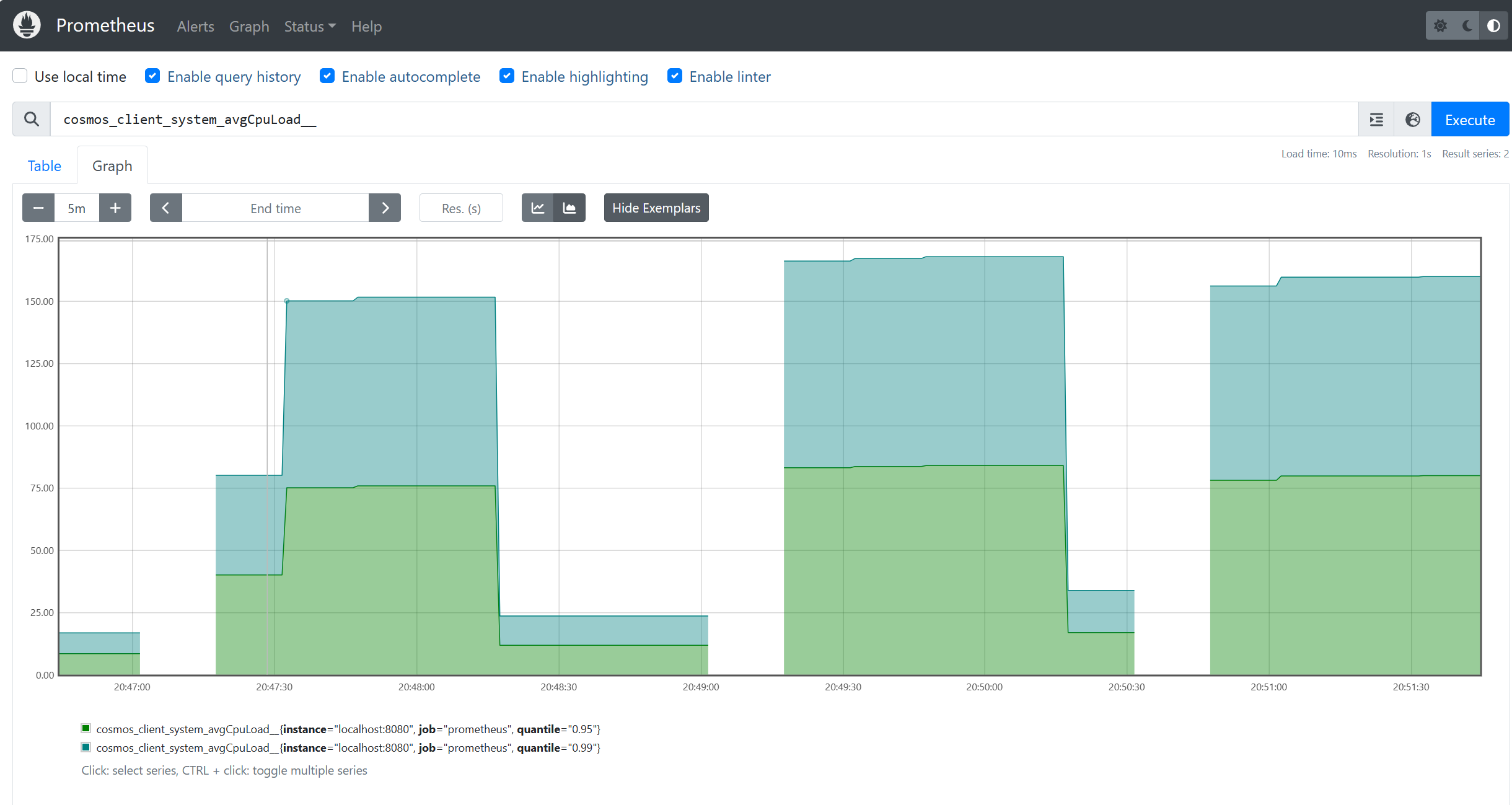
Artık Prometheus ölçümlerini kullanabilirsiniz: