Not
Bu sayfaya erişim yetkilendirme gerektiriyor. Oturum açmayı veya dizinleri değiştirmeyi deneyebilirsiniz.
Bu sayfaya erişim yetkilendirme gerektiriyor. Dizinleri değiştirmeyi deneyebilirsiniz.
Bu hızlı başlangıçta, RESTful API uygulaması tasarlamak, oluşturmak ve uygulamak için TypeSpec kullanmayı öğreneceksiniz. TypeSpec, bulut hizmeti API'lerini açıklamaya yönelik bir açık kaynak dildir ve birden çok platform için istemci ve sunucu kodu oluşturur. Bu hızlı başlangıcı izleyerek, API sözleşmenizi bir kez tanımlayıp tutarlı uygulamalar oluşturarak daha sürdürülebilir ve iyi belgelenmiş API hizmetleri oluşturmanıza yardımcı olmayı öğreneceksiniz.
TypeSpec'in kod oluşturucusu ile yönlendirme ve Swagger kullanıcı arabirimine sahip bir ASP.NET Core sunucusunun iskelesini oluşturacak, kalıcılık için Azure Cosmos DB'ye bağlayacak ve Azure Container Apps'e dağıtacaksınız.
TypeSpec'in API geliştirmedeki rolüne ilişkin bağlam için bkz. TypeSpec'e Genel Bakış.
Tamamlanma süresi: 20-25 dakika
Bu hızlı başlangıç rehberinde şunları yapacaksınız:
- TypeSpec kullanarak API'nizi tanımlama
- API sunucusu uygulaması oluşturma
- Azure Cosmos DB'yi kalıcı depolama için tümleştirme
- API'nizi yerel olarak çalıştırma ve test edin
- Azure Container Apps'a dağıtım
Prerequisites
- Etkin bir Azure hesabı. Hesabınız yoksa ücretsiz bir hesap oluşturun.
- .NET 9 SDK
- Node.js LTS — TypeSpec CLI ve paket yöneticisi için gereklidir.
- Visual Studio Code aşağıdaki uzantılarla:
- TypeSpec uzantısı
- İsteğe bağlı: Azure Geliştirici CLI ile dağıtım
TypeSpec ile geliştirme
TypeSpec, API'nizi dilden bağımsız bir şekilde tanımlar ve birden çok platform için API sunucusunu ve istemci kitaplığını oluşturur. Bu işlev şunları yapmanızı sağlar:
- API sözleşmenizi bir kez tanımlama
- Tutarlı sunucu ve istemci kodu oluşturma
- API altyapısı yerine iş mantığı uygulamaya odaklanma
TypeSpec, API hizmet yönetimi sağlar:
- API tanım dili
- API için sunucu tarafı yönlendirme ara yazılımı
- API'yi tüketmek için istemci kitaplıkları
İstemci istekleri ve sunucu tümleştirmeleri sağlarsınız:
- Veritabanları, depolama ve mesajlaşma için Azure hizmetleri gibi ara yazılımlarda iş mantığı uygulama
- API'niz için barındırma sunucusu (yerel olarak veya Azure'da)
- Yinelenebilir hazırlık ve dağıtım için dağıtım betikleri
Yeni bir TypeSpec uygulaması oluşturma
API sunucusunu ve TypeSpec dosyalarını tutmak için yeni bir klasör oluşturun.
mkdir my_typespec_quickstart
cd my_typespec_quickstart
TypeSpec derleyicisini genel olarak yükleyin:
npm install -g @typespec/compilerTypeSpec'in doğru yüklendiğini denetleyin:
tsp --versionTypeSpec projesini başlatın:
tsp initSağlanan yanıtlarla aşağıdaki istemleri yanıtlayın:
- Burada yeni bir proje başlatılasın mı? Y
- Proje şablonu seçlsin mi? Genel REST API
- Proje adı girin: Pencere öğeleri
- Hangi yayıcıları kullanmak istiyorsunuz?
- OpenAPI 3.1 belgesi
- C# sunucu saptamaları
TypeSpec emitter'lar, TypeSpec derleme işlemini yansıtmak ve yapıtlar oluşturmak için çeşitli TypeSpec derleyici API'lerini kullanan kütüphanelerdir.
Devam etmeden önce başlatma işleminin tamamlanmasını bekleyin.
Run tsp compile . to build the project.

Please review the following messages from emitters:
  @typespec/http-server-csharp:

        Generated ASP.Net services require dotnet 9:
        https://dotnet.microsoft.com/download

        Create an ASP.Net service project for your TypeSpec:
        > npx hscs-scaffold . --use-swaggerui --overwrite

        More information on getting started:
        https://aka.ms/tsp/hscs/start
Projeyi derleyin:
tsp compile .Tavsiye
Yinelemeli geliştirme için, dosya değişikliklerini otomatik olarak yeniden derlemek için izleme modunu kullanın:
tsp compile . --watch. Bu,main.tspdeğiştirirken oluşturulan sunucu ve şemanızı güncel tutar.TypeSpec, içinde
./tsp-outputvarsayılan projeyi oluşturur ve iki ayrı klasör oluşturur:- schema
- server
./tsp-output/schema/openapi.yamldosyasını açın. içindeki./main.tspbirkaç satırın sizin için 200'den fazla OpenApi belirtimi satırı oluşturduğuna dikkat edin../tsp-output/server/aspnetklasörünü açın. .NET dosyalarının hazırlanan şunları içerdiğine dikkat etmeniz gerekmektedir:-
./generated/operations/IWidgets.csPencere öğeleri yöntemlerinin arabirimini tanımlar. -
./generated/controllers/WidgetsController.csWidgets yöntemleriyle tümleştirmeyi uygular. burası iş mantığınızı yerleştirdiğiniz yerdir. -
./generated/modelsPencere Öğesi API'sinin modellerini tanımlar.
-
TypeSpec vericilerini yapılandırma
API sunucusu oluşturmayı yapılandırmak için TypeSpec dosyalarını kullanın.
tspconfig.yamlöğesini açın ve mevcut yapılandırmayı aşağıdaki YAML ile değiştirin:emit: - "@typespec/openapi3" - "@typespec/http-server-csharp" options: "@typespec/openapi3": emitter-output-dir: "{cwd}/server/wwwroot" openapi-versions: - 3.1.0 "@typespec/http-server-csharp": emitter-output-dir: "{cwd}/server/" use-swaggerui: true overwrite: true emit-mocks: "mocks-and-project-files"Bu yapılandırma, tam olarak oluşturulmuş bir .NET API sunucusu için ihtiyacımız olan çeşitli değişiklikleri projelendirir:
-
emit-mocks: Sunucu için gereken tüm proje dosyalarını oluşturun. -
use-swaggerui: API'yi tarayıcı dostu bir şekilde kullanabilmek için Swagger kullanıcı arabirimini tümleştirin. -
emitter-output-dir: Hem sunucu oluşturma hem de OpenApi belirtimi oluşturma için çıkış dizinini ayarlayın. - Her şeyi
./serveriçine dönüştürün.
-
Projeyi yeniden derleyin:
tsp compile .Yeni
/serverdizine geçin:cd serverHenüz yoksa varsayılan bir geliştirici sertifikası oluşturun:
dotnet dev-certs httpsProjeyi çalıştırın:
dotnet runBildirimin Tarayıcıda açılmasını bekleyin.
Tarayıcıyı açın ve Swagger UI yolunu
/swaggerekleyin.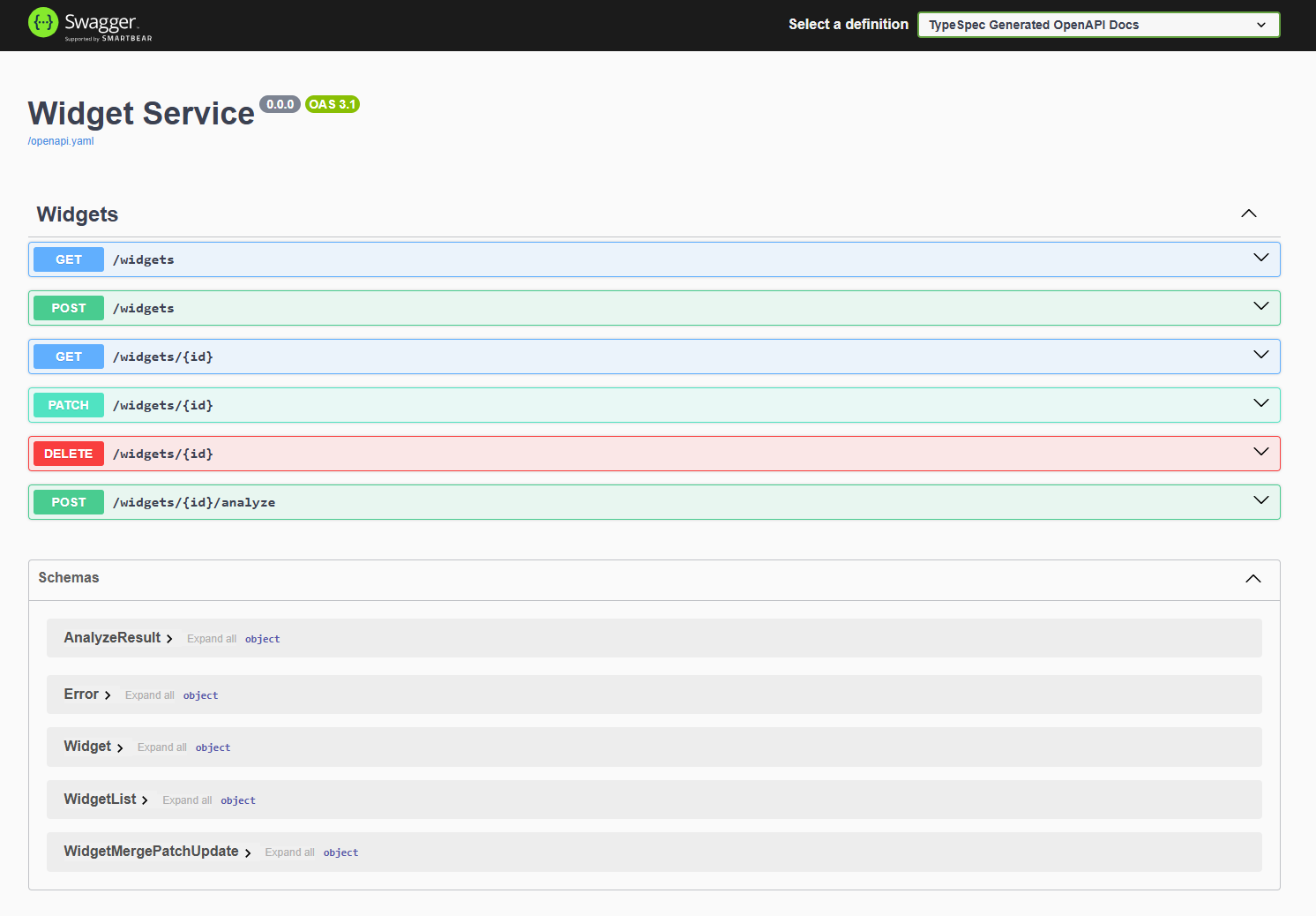
Varsayılan TypeSpec API'sinin ve sunucunun her ikisi de çalışır.
Uygulama dosyası yapısını anlama
Oluşturulan sunucunun proje yapısı .NET denetleyici tabanlı API sunucusunu, projeyi oluşturmaya yönelik .NET dosyalarını ve Azure tümleştirmeniz için ara yazılımı içerir.
├── appsettings.Development.json
├── appsettings.json
├── docs
├── generated
├── mocks
├── Program.cs
├── Properties
├── README.md
├── ServiceProject.csproj
└── wwwroot
-
İş mantığınızı ekleyin: Bu örnekte dosyayla
./server/mocks/Widget.csbaşlayın. OluşturulanWidget.csşablon yöntemler sağlar. -
Sunucuyu güncelleştirin: belirli sunucu yapılandırmalarını
./program.csöğesine ekleyin. -
OpenApi belirtimini kullanın: TypeSpec, OpenApi3.json dosyasını dosyaya
./server/wwwrootoluşturup geliştirme sırasında Swagger kullanıcı arabirimi için kullanılabilir hale getirdi. Bu, belirtiminiz için bir kullanıcı arabirimi sağlar. REST istemcisi veya web ön ucu gibi bir istek mekanizması sağlamak zorunda kalmadan API'nizle etkileşim kurabilirsiniz.
Kalıcılığı Azure Cosmos DB'nin no-sql veri tabanına değiştirin
Temel Pencere Öğesi API sunucusu çalıştığına göre, sunucuyu kalıcı bir veri deposu için Azure Cosmos DB ile çalışacak şekilde güncelleştirin.
Dizininde
./serverAzure Cosmos DB'yi projeye ekleyin:dotnet add package Microsoft.Azure.CosmosAzure'dakimlik doğrulaması yapmak için Azure Kimlik kitaplığını ekleyin:
dotnet add package Azure.Identity./server/ServiceProject.csprojCosmos DB tümleştirme ayarlarını güncelleştirin:<Project Sdk="Microsoft.NET.Sdk.Web"> <PropertyGroup> ... existing settings ... <EnableSdkContainerSupport>true</EnableSdkContainerSupport> </PropertyGroup> <ItemGroup> ... existing settings ... <PackageReference Include="Newtonsoft.Json" Version="13.0.3" /> </ItemGroup> </Project>- EnableSdkContainerSupport, Dockerfile yazmadan .NET SDK'sının yerleşik kapsayıcı derleme desteğini (dotnet publish ––container) kullanmanıza olanak tanır.
- Newtonsoft.Json, Cosmos DB SDK'sının .NET nesnelerinizi JSON'a ve JSON'dan dönüştürmek için kullandığı Json .NET seri hale getiricisini ekler.
Cosmos DB kaydını yönetmek için yeni bir kayıt dosyası
./azure/CosmosDbRegistrationoluşturun:using Microsoft.Azure.Cosmos; using Microsoft.Extensions.Configuration; using System; using System.Threading.Tasks; using Azure.Identity; using DemoService; namespace WidgetService.Service { /// <summary> /// Registration class for Azure Cosmos DB services and implementations /// </summary> public static class CosmosDbRegistration { /// <summary> /// Registers the Cosmos DB client and related services for dependency injection /// </summary> /// <param name="builder">The web application builder</param> public static void RegisterCosmosServices(this WebApplicationBuilder builder) { // Register the HttpContextAccessor for accessing the HTTP context builder.Services.AddHttpContextAccessor(); // Get configuration settings var cosmosEndpoint = builder.Configuration["Configuration:AzureCosmosDb:Endpoint"]; // Validate configuration ValidateCosmosDbConfiguration(cosmosEndpoint); // Configure Cosmos DB client options var cosmosClientOptions = new CosmosClientOptions { SerializerOptions = new CosmosSerializationOptions { PropertyNamingPolicy = CosmosPropertyNamingPolicy.CamelCase }, ConnectionMode = ConnectionMode.Direct }; builder.Services.AddSingleton(serviceProvider => { var credential = new DefaultAzureCredential(); // Create Cosmos client with token credential authentication return new CosmosClient(cosmosEndpoint, credential, cosmosClientOptions); }); // Initialize Cosmos DB if needed builder.Services.AddHostedService<CosmosDbInitializer>(); // Register WidgetsCosmos implementation of IWidgets builder.Services.AddScoped<IWidgets, WidgetsCosmos>(); } /// <summary> /// Validates the Cosmos DB configuration settings /// </summary> /// <param name="cosmosEndpoint">The Cosmos DB endpoint</param> /// <exception cref="ArgumentException">Thrown when configuration is invalid</exception> private static void ValidateCosmosDbConfiguration(string cosmosEndpoint) { if (string.IsNullOrEmpty(cosmosEndpoint)) { throw new ArgumentException("Cosmos DB Endpoint must be specified in configuration"); } } } }Uç nokta için ortam değişkenine dikkat edin:
var cosmosEndpoint = builder.Configuration["Configuration:AzureCosmosDb:Endpoint"];Kalıcı deponuz için Azure Cosmos DB ile tümleştirmeye yönelik iş mantığı sağlamak üzere yeni bir Pencere Öğesi sınıfı
./azure/WidgetsCosmos.csoluşturun.using System; using System.Net; using System.Threading.Tasks; using Microsoft.Azure.Cosmos; using Microsoft.Extensions.Logging; using System.Collections.Generic; using System.Linq; // Use generated models and operations using DemoService; namespace WidgetService.Service { /// <summary> /// Implementation of the IWidgets interface that uses Azure Cosmos DB for persistence /// </summary> public class WidgetsCosmos : IWidgets { private readonly CosmosClient _cosmosClient; private readonly ILogger<WidgetsCosmos> _logger; private readonly IHttpContextAccessor _httpContextAccessor; private readonly string _databaseName = "WidgetDb"; private readonly string _containerName = "Widgets"; /// <summary> /// Initializes a new instance of the WidgetsCosmos class. /// </summary> /// <param name="cosmosClient">The Cosmos DB client instance</param> /// <param name="logger">Logger for diagnostic information</param> /// <param name="httpContextAccessor">Accessor for the HTTP context</param> public WidgetsCosmos( CosmosClient cosmosClient, ILogger<WidgetsCosmos> logger, IHttpContextAccessor httpContextAccessor) { _cosmosClient = cosmosClient; _logger = logger; _httpContextAccessor = httpContextAccessor; } /// <summary> /// Gets a reference to the Cosmos DB container for widgets /// </summary> private Container WidgetsContainer => _cosmosClient.GetContainer(_databaseName, _containerName); /// <summary> /// Lists all widgets in the database /// </summary> /// <returns>Array of Widget objects</returns> public async Task<WidgetList> ListAsync() { try { var queryDefinition = new QueryDefinition("SELECT * FROM c"); var widgets = new List<Widget>(); using var iterator = WidgetsContainer.GetItemQueryIterator<Widget>(queryDefinition); while (iterator.HasMoreResults) { var response = await iterator.ReadNextAsync(); widgets.AddRange(response.ToList()); } // Create and return a WidgetList instead of Widget[] return new WidgetList { Items = widgets.ToArray() }; } catch (Exception ex) { _logger.LogError(ex, "Error listing widgets from Cosmos DB"); throw new Error(500, "Failed to retrieve widgets from database"); } } /// <summary> /// Retrieves a specific widget by ID /// </summary> /// <param name="id">The ID of the widget to retrieve</param> /// <returns>The retrieved Widget</returns> public async Task<Widget> ReadAsync(string id) { try { var response = await WidgetsContainer.ReadItemAsync<Widget>( id, new PartitionKey(id)); return response.Resource; } catch (CosmosException ex) when (ex.StatusCode == HttpStatusCode.NotFound) { _logger.LogWarning("Widget with ID {WidgetId} not found", id); throw new Error(404, $"Widget with ID '{id}' not found"); } catch (Exception ex) { _logger.LogError(ex, "Error reading widget {WidgetId} from Cosmos DB", id); throw new Error(500, "Failed to retrieve widget from database"); } } /// <summary> /// Creates a new widget from the provided Widget object /// </summary> /// <param name="body">The Widget object to store in the database</param> /// <returns>The created Widget</returns> public async Task<Widget> CreateAsync(Widget body) { try { // Validate the Widget if (body == null) { throw new Error(400, "Widget data cannot be null"); } if (string.IsNullOrEmpty(body.Id)) { throw new Error(400, "Widget must have an Id"); } if (body.Color != "red" && body.Color != "blue") { throw new Error(400, "Color must be 'red' or 'blue'"); } // Save the widget to Cosmos DB var response = await WidgetsContainer.CreateItemAsync( body, new PartitionKey(body.Id)); _logger.LogInformation("Created widget with ID {WidgetId}", body.Id); return response.Resource; } catch (CosmosException ex) when (ex.StatusCode == HttpStatusCode.Conflict) { _logger.LogError(ex, "Widget with ID {WidgetId} already exists", body.Id); throw new Error(409, $"Widget with ID '{body.Id}' already exists"); } catch (Exception ex) when (!(ex is Error)) { _logger.LogError(ex, "Error creating widget in Cosmos DB"); throw new Error(500, "Failed to create widget in database"); } } /// <summary> /// Updates an existing widget with properties specified in the patch document /// </summary> /// <param name="id">The ID of the widget to update</param> /// <param name="body">The WidgetMergePatchUpdate object containing properties to update</param> /// <returns>The updated Widget</returns> public async Task<Widget> UpdateAsync(string id, TypeSpec.Http.WidgetMergePatchUpdate body) { try { // Validate input parameters if (body == null) { throw new Error(400, "Update data cannot be null"); } if (body.Color != null && body.Color != "red" && body.Color != "blue") { throw new Error(400, "Color must be 'red' or 'blue'"); } // First check if the item exists Widget existingWidget; try { var response = await WidgetsContainer.ReadItemAsync<Widget>( id, new PartitionKey(id)); existingWidget = response.Resource; } catch (CosmosException ex) when (ex.StatusCode == HttpStatusCode.NotFound) { _logger.LogWarning("Widget with ID {WidgetId} not found for update", id); throw new Error(404, $"Widget with ID '{id}' not found"); } // Apply the patch updates only where properties are provided bool hasChanges = false; if (body.Weight.HasValue) { existingWidget.Weight = body.Weight.Value; hasChanges = true; } if (body.Color != null) { existingWidget.Color = body.Color; hasChanges = true; } // Only perform the update if changes were made if (hasChanges) { // Use ReplaceItemAsync for the update var updateResponse = await WidgetsContainer.ReplaceItemAsync( existingWidget, id, new PartitionKey(id)); _logger.LogInformation("Updated widget with ID {WidgetId}", id); return updateResponse.Resource; } // If no changes, return the existing widget _logger.LogInformation("No changes to apply for widget with ID {WidgetId}", id); return existingWidget; } catch (Error) { // Rethrow Error exceptions throw; } catch (Exception ex) { _logger.LogError(ex, "Error updating widget {WidgetId} in Cosmos DB", id); throw new Error(500, "Failed to update widget in database"); } } /// <summary> /// Deletes a widget by its ID /// </summary> /// <param name="id">The ID of the widget to delete</param> public async Task DeleteAsync(string id) { try { await WidgetsContainer.DeleteItemAsync<Widget>(id, new PartitionKey(id)); _logger.LogInformation("Deleted widget with ID {WidgetId}", id); } catch (CosmosException ex) when (ex.StatusCode == HttpStatusCode.NotFound) { _logger.LogWarning("Widget with ID {WidgetId} not found for deletion", id); throw new Error(404, $"Widget with ID '{id}' not found"); } catch (Exception ex) { _logger.LogError(ex, "Error deleting widget {WidgetId} from Cosmos DB", id); throw new Error(500, "Failed to delete widget from database"); } } /// <summary> /// Analyzes a widget by ID and returns a simplified analysis result /// </summary> /// <param name="id">The ID of the widget to analyze</param> /// <returns>An AnalyzeResult containing the analysis of the widget</returns> public async Task<AnalyzeResult> AnalyzeAsync(string id) { try { // First retrieve the widget from the database Widget widget; try { var response = await WidgetsContainer.ReadItemAsync<Widget>( id, new PartitionKey(id)); widget = response.Resource; } catch (CosmosException ex) when (ex.StatusCode == HttpStatusCode.NotFound) { _logger.LogWarning("Widget with ID {WidgetId} not found for analysis", id); throw new Error(404, $"Widget with ID '{id}' not found"); } // Create the analysis result var result = new AnalyzeResult { Id = widget.Id, Analysis = $"Weight: {widget.Weight}, Color: {widget.Color}" }; _logger.LogInformation("Analyzed widget with ID {WidgetId}", id); return result; } catch (Error) { // Rethrow Error exceptions throw; } catch (Exception ex) { _logger.LogError(ex, "Error analyzing widget {WidgetId} from Cosmos DB", id); throw new Error(500, "Failed to analyze widget from database"); } } } }Azure'da
./server/services/CosmosDbInitializer.cskimlik doğrulaması yapmak için dosyayı oluşturun:using System; using System.Threading; using System.Threading.Tasks; using Microsoft.Azure.Cosmos; using Microsoft.Extensions.Configuration; using Microsoft.Extensions.Hosting; using Microsoft.Extensions.Logging; namespace WidgetService.Service { /// <summary> /// Hosted service that initializes Cosmos DB resources on application startup /// </summary> public class CosmosDbInitializer : IHostedService { private readonly CosmosClient _cosmosClient; private readonly ILogger<CosmosDbInitializer> _logger; private readonly IConfiguration _configuration; private readonly string _databaseName; private readonly string _containerName = "Widgets"; public CosmosDbInitializer(CosmosClient cosmosClient, ILogger<CosmosDbInitializer> logger, IConfiguration configuration) { _cosmosClient = cosmosClient; _logger = logger; _configuration = configuration; _databaseName = _configuration["CosmosDb:DatabaseName"] ?? "WidgetDb"; } public async Task StartAsync(CancellationToken cancellationToken) { _logger.LogInformation("Ensuring Cosmos DB database and container exist..."); try { // Create database if it doesn't exist var databaseResponse = await _cosmosClient.CreateDatabaseIfNotExistsAsync( _databaseName, cancellationToken: cancellationToken); _logger.LogInformation("Database {DatabaseName} status: {Status}", _databaseName, databaseResponse.StatusCode == System.Net.HttpStatusCode.Created ? "Created" : "Already exists"); // Create container if it doesn't exist (using id as partition key) var containerResponse = await databaseResponse.Database.CreateContainerIfNotExistsAsync( new ContainerProperties { Id = _containerName, PartitionKeyPath = "/id" }, throughput: 400, // Minimum RU/s cancellationToken: cancellationToken); _logger.LogInformation("Container {ContainerName} status: {Status}", _containerName, containerResponse.StatusCode == System.Net.HttpStatusCode.Created ? "Created" : "Already exists"); } catch (Exception ex) { _logger.LogError(ex, "Error initializing Cosmos DB"); throw; } } public Task StopAsync(CancellationToken cancellationToken) { return Task.CompletedTask; } } }./server/program.csöğesini Cosmos DB'yi kullanacak şekilde güncelleyin ve Swagger kullanıcı arabiriminin üretim ortamında kullanılmasına izin verin. Dosyanın tamamını kopyalayın:// Generated by @typespec/http-server-csharp // <auto-generated /> #nullable enable using TypeSpec.Helpers; using WidgetService.Service; var builder = WebApplication.CreateBuilder(args); // Add services to the container. builder.Services.AddControllersWithViews(options => { options.Filters.Add<HttpServiceExceptionFilter>(); }); builder.Services.AddEndpointsApiExplorer(); builder.Services.AddSwaggerGen(); // Replace original registration with the Cosmos DB one CosmosDbRegistration.RegisterCosmosServices(builder); var app = builder.Build(); // Configure the HTTP request pipeline. if (!app.Environment.IsDevelopment()) { app.UseExceptionHandler("/Home/Error"); // The default HSTS value is 30 days. You may want to change this for production scenarios, see https://aka.ms/aspnetcore-hsts. app.UseHsts(); } // Swagger UI is always available app.UseSwagger(); app.UseSwaggerUI(c => { c.DocumentTitle = "TypeSpec Generated OpenAPI Viewer"; c.SwaggerEndpoint("/openapi.yaml", "TypeSpec Generated OpenAPI Docs"); c.RoutePrefix = "swagger"; }); app.UseHttpsRedirection(); app.UseStaticFiles(); app.Use(async (context, next) => { context.Request.EnableBuffering(); await next(); }); app.MapGet("/openapi.yaml", async (HttpContext context) => { var externalFilePath = "wwwroot/openapi.yaml"; if (!File.Exists(externalFilePath)) { context.Response.StatusCode = StatusCodes.Status404NotFound; await context.Response.WriteAsync("OpenAPI spec not found."); return; } context.Response.ContentType = "application/json"; await context.Response.SendFileAsync(externalFilePath); }); app.UseRouting(); app.UseAuthorization(); app.MapControllerRoute( name: "default", pattern: "{controller=Home}/{action=Index}/{id?}"); app.Run();Projeyi oluşturun:
dotnet buildProje artık Cosmos DB entegrasyonu ile çalışıyor. Şimdi Azure kaynaklarını oluşturmak ve projeyi dağıtmak için dağıtım betiklerini oluşturalım.
Dağıtım altyapısı oluşturma
Azure Geliştirici CLI ve Bicep şablonlarıyla tekrarlanabilir bir dağıtıma sahip olmak için gereken dosyaları oluşturun.
TypeSpec projesinin kökünde bir
azure.yamldağıtım tanımı dosyası oluşturun ve aşağıdaki kaynağa yapıştırın:# yaml-language-server: $schema=https://raw.githubusercontent.com/Azure/azure-dev/main/schemas/v1.0/azure.yaml.json name: azure-typespec-scaffold-dotnet metadata: template: azd-init@1.14.0 services: api: project: ./server host: containerapp language: dotnet pipeline: provider: githubBu yapılandırmanın oluşturulan proje konumuna (
./server) başvurduğunu unutmayın../tspconfig.yamlöğesinin,./azure.yamlbelirtilen konumla eşleştiğinden emin olun.TypeSpec projesinin kökünde bir
./infradizin oluşturun../infra/main.bicepparamDağıtım için ihtiyacımız olan parametreleri tanımlamak için aşağıdaki dosyayı oluşturun ve kopyalayın:using './main.bicep' param environmentName = readEnvironmentVariable('AZURE_ENV_NAME', 'dev') param location = readEnvironmentVariable('AZURE_LOCATION', 'eastus2') param deploymentUserPrincipalId = readEnvironmentVariable('AZURE_PRINCIPAL_ID', '')Bu param listesi, bu dağıtım için gereken en düşük parametreleri sağlar.
./infra/main.bicepSağlama ve dağıtım için Azure kaynaklarını tanımlamak üzere aşağıdaki dosya ve kopyayı oluşturun:metadata description = 'Bicep template for deploying a GitHub App using Azure Container Apps and Azure Container Registry.' targetScope = 'resourceGroup' param serviceName string = 'api' var databaseName = 'WidgetDb' var containerName = 'Widgets' @minLength(1) @maxLength(64) @description('Name of the environment that can be used as part of naming resource convention') param environmentName string @minLength(1) @description('Primary location for all resources') param location string @description('Id of the principal to assign database and application roles.') param deploymentUserPrincipalId string = '' var resourceToken = toLower(uniqueString(resourceGroup().id, environmentName, location)) var tags = { 'azd-env-name': environmentName repo: 'https://github.com/typespec' } module managedIdentity 'br/public:avm/res/managed-identity/user-assigned-identity:0.4.1' = { name: 'user-assigned-identity' params: { name: 'identity-${resourceToken}' location: location tags: tags } } module cosmosDb 'br/public:avm/res/document-db/database-account:0.8.1' = { name: 'cosmos-db-account' params: { name: 'cosmos-db-nosql-${resourceToken}' location: location locations: [ { failoverPriority: 0 locationName: location isZoneRedundant: false } ] tags: tags disableKeyBasedMetadataWriteAccess: true disableLocalAuth: true networkRestrictions: { publicNetworkAccess: 'Enabled' ipRules: [] virtualNetworkRules: [] } capabilitiesToAdd: [ 'EnableServerless' ] sqlRoleDefinitions: [ { name: 'nosql-data-plane-contributor' dataAction: [ 'Microsoft.DocumentDB/databaseAccounts/readMetadata' 'Microsoft.DocumentDB/databaseAccounts/sqlDatabases/containers/items/*' 'Microsoft.DocumentDB/databaseAccounts/sqlDatabases/containers/*' ] } ] sqlRoleAssignmentsPrincipalIds: union( [ managedIdentity.outputs.principalId ], !empty(deploymentUserPrincipalId) ? [deploymentUserPrincipalId] : [] ) sqlDatabases: [ { name: databaseName containers: [ { name: containerName paths: [ '/id' ] } ] } ] } } module containerRegistry 'br/public:avm/res/container-registry/registry:0.5.1' = { name: 'container-registry' params: { name: 'containerreg${resourceToken}' location: location tags: tags acrAdminUserEnabled: false anonymousPullEnabled: true publicNetworkAccess: 'Enabled' acrSku: 'Standard' } } var containerRegistryRole = subscriptionResourceId( 'Microsoft.Authorization/roleDefinitions', '8311e382-0749-4cb8-b61a-304f252e45ec' ) module registryUserAssignment 'br/public:avm/ptn/authorization/resource-role-assignment:0.1.1' = if (!empty(deploymentUserPrincipalId)) { name: 'container-registry-role-assignment-push-user' params: { principalId: deploymentUserPrincipalId resourceId: containerRegistry.outputs.resourceId roleDefinitionId: containerRegistryRole } } module logAnalyticsWorkspace 'br/public:avm/res/operational-insights/workspace:0.7.0' = { name: 'log-analytics-workspace' params: { name: 'log-analytics-${resourceToken}' location: location tags: tags } } module containerAppsEnvironment 'br/public:avm/res/app/managed-environment:0.8.0' = { name: 'container-apps-env' params: { name: 'container-env-${resourceToken}' location: location tags: tags logAnalyticsWorkspaceResourceId: logAnalyticsWorkspace.outputs.resourceId zoneRedundant: false } } module containerAppsApp 'br/public:avm/res/app/container-app:0.9.0' = { name: 'container-apps-app' params: { name: 'container-app-${resourceToken}' environmentResourceId: containerAppsEnvironment.outputs.resourceId location: location tags: union(tags, { 'azd-service-name': serviceName }) ingressTargetPort: 8080 ingressExternal: true ingressTransport: 'auto' stickySessionsAffinity: 'sticky' scaleMaxReplicas: 1 scaleMinReplicas: 1 corsPolicy: { allowCredentials: true allowedOrigins: [ '*' ] } managedIdentities: { systemAssigned: false userAssignedResourceIds: [ managedIdentity.outputs.resourceId ] } secrets: { secureList: [ { name: 'azure-cosmos-db-nosql-endpoint' value: cosmosDb.outputs.endpoint } { name: 'user-assigned-managed-identity-client-id' value: managedIdentity.outputs.clientId } ] } containers: [ { image: 'mcr.microsoft.com/dotnet/samples:aspnetapp-9.0' name: serviceName resources: { cpu: '0.25' memory: '.5Gi' } env: [ { name: 'CONFIGURATION__AZURECOSMOSDB__ENDPOINT' secretRef: 'azure-cosmos-db-nosql-endpoint' } { name: 'AZURE_CLIENT_ID' secretRef: 'user-assigned-managed-identity-client-id' } ] } ] } } output CONFIGURATION__AZURECOSMOSDB__ENDPOINT string = cosmosDb.outputs.endpoint output CONFIGURATION__AZURECOSMOSDB__DATABASENAME string = databaseName output CONFIGURATION__AZURECOSMOSDB__CONTAINERNAME string = containerName output AZURE_CONTAINER_REGISTRY_ENDPOINT string = containerRegistry.outputs.loginServerÇıkış değişkenleri, sağlanan bulut kaynaklarını yerel geliştirmenizle birlikte kullanmanıza olanak sağlar.
containerAppsApp etiketi serviceName değişkenini (dosyanın en üstünde
apiolarak ayarlanmış) veapi'de belirtilen./azure.yamldeğerini kullanır. Bu bağlantı, Azure Geliştirici CLI'sine .NET projesini Azure Container Apps barındırma kaynağına nereye dağıtacaklarını bildirir....bicep... module containerAppsApp 'br/public:avm/res/app/container-app:0.9.0' = { name: 'container-apps-app' params: { name: 'container-app-${resourceToken}' environmentResourceId: containerAppsEnvironment.outputs.resourceId location: location tags: union(tags, { 'azd-service-name': serviceName }) <--------- `API` ...bicep..
Proje yapısı
Son proje yapısı TypeSpec API dosyalarını, Express.js sunucusunu ve Azure dağıtım dosyalarını içerir:
├── infra
├── tsp-output
├── .gitignore
├── .azure.yaml
├── Dockerfile
├── main.tsp
├── package-lock.json
├── package.json
├── tspconfig.yaml
| Area | Dosyalar/Dizinler |
|---|---|
| TypeSpec |
main.tsp, tspconfig.yaml |
| Express.js sunucusu |
./tsp-output/server/(, controllers/, models/gibi ServiceProject.csprojoluşturulan dosyaları içerir) |
| Azure Geliştirici CLI dağıtımı |
./azure.yaml,./infra/ |
Uygulamayı Azure'a dağıtma
Bu uygulamayı Azure Container Apps kullanarak Azure'a dağıtabilirsiniz:
Azure Geliştirici CLI'sinde kimlik doğrulaması:
azd auth loginAzure Geliştirici CLI'sini kullanarak Azure Container Apps'e dağıtma:
azd up
Uygulamayı tarayıcıda kullanma
Dağıtıldıktan sonra şunları yapabilirsiniz:
- API'nizi test etmek için
/swaggerkonumundaki Swagger kullanıcı arabirimine erişin. - API aracılığıyla pencere öğeleri oluşturmak, okumak, güncelleştirmek ve silmek için her API'de Şimdi deneyin özelliğini kullanın.
Uygulamanızı büyütme
Artık uçtan uca sürecin tamamı çalıştığına göre API'nizi oluşturmaya devam edin:
- içinde daha fazla API ve API katmanı özelliği eklemek için
./main.tsphakkında daha fazla bilgi edinin. - Ek ek vericiler ekleyin ve parametrelerini
./tspconfig.yamlyapılandırın. - TypeSpec dosyalarınıza daha fazla özellik ekledikçe, bu değişiklikleri sunucu projesindeki kaynak koduyla destekleyin.
- Azure Identity ile parolasız kimlik doğrulamasını kullanmaya devam edin.
Kaynakları temizle
Bu hızlı başlangıcı tamamladığınızda Azure kaynaklarını kaldırabilirsiniz:
azd down
Veya kaynak grubunu doğrudan Azure portalından silin.
Sorun giderme
.NET 9 gereksinimi karşılanmadı
Hata:Build error: This project requires .NET 9. You have <version> installed.
Çözüm:
- .NET sürümünüzü denetleyin:
dotnet --version. - .NET 9'u dot.net'dan yükleyin.
HTTPS sertifikası hatası
Hata:System.IO.IOException: The certificate generation failed çalıştırırken dotnet dev-certs https
Çözüm:
- Var olan sertifikaya güven:
dotnet dev-certs https --trust. - Bu başarısız olursa şunu temizleyin ve yeniden oluşturun:
dotnet dev-certs https --clean, sonradotnet dev-certs https. - Windows'da terminali yönetici olarak çalıştırdığınızdan emin olun.
@typespec/http-server-csharp yayıcı çakışması
Hata:Emitter error: Dependency conflict çalıştırırken tsp compile .
Çözüm:
tspconfig.yaml'nin altındaemit:'de her iki yayıcıyı içerdiğini doğrulayın.emit: - "@typespec/openapi3" - "@typespec/http-server-csharp"Önbelleği temizle:
npm cache clean --force, sonra yeniden deneyin:tsp compile ..
Cosmos DB kimlik doğrulaması başarısız oluyor
Hata:Azure.Identity.AuthenticationFailedException Veya Connection string/key not set
Çözüm:
- Ortam değişkeninin ayarlandığından emin olun:
echo $AZURE_COSMOS_ENDPOINT(macOS/Linux) veyaecho %AZURE_COSMOS_ENDPOINT%(Windows). - Yerel geliştirme için, değeri
Program.csveya.envdosyasında ayarlayın. - Üretim için Kapsayıcı Uygulaması gizli dizisinin yapılandırıldığından emin olun (bkz. "Dağıtım altyapısı oluşturma" bölümü).
Swagger kullanıcı arabirimi 404 gösteriyor
Hata: Tarayıcı 404 Not Found öğesini /swagger konumunda gösteriyor
Çözüm:
Program.csiçinde: Swagger uç noktası yapılandırmasını doğrulayın.c.SwaggerEndpoint("/openapi.yaml", "TypeSpec Generated OpenAPI Docs"); c.RoutePrefix = "swagger";openapi.yamldosyasınınwwwroot/dizininde olduğundan emin olun.Yeniden oluşturma ve yeniden başlatma:
dotnet clean && dotnet build && dotnet run.