Not
Bu sayfaya erişim yetkilendirme gerektiriyor. Oturum açmayı veya dizinleri değiştirmeyi deneyebilirsiniz.
Bu sayfaya erişim yetkilendirme gerektiriyor. Dizinleri değiştirmeyi deneyebilirsiniz.
Aşağıdaki çizimde, ileti düzeyi güvenlik kullanılarak güvenliği sağlanan bir Windows Communication Foundation (WCF) hizmeti ve istemcisi gösterilmektedir. Hizmetin kimliği bir X.509 sertifikasıyla doğrulanır. İstemci bir kullanıcı adı ve parola kullanarak kimlik doğrulaması yapar.
Örnek uygulama için bkz. İleti Güvenliği Kullanıcı Adı.
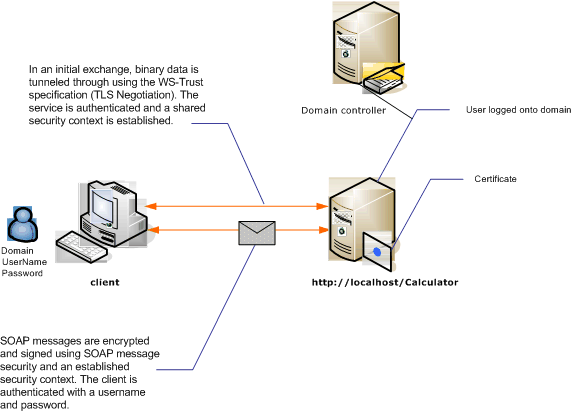
| Karakteristik | Açıklama |
|---|---|
| Güvenlik Modu | Mesaj |
| Birlikte çalışabilirlik | Yalnızca Windows Communication Foundation (WCF) |
| Kimlik Doğrulaması (Sunucu) | İlk anlaşma için sunucu kimlik doğrulaması gerekir |
| Kimlik Doğrulaması (İstemci) | Kullanıcı adı/parola |
| Dürüstlük | Evet, paylaşılan güvenlik bağlamı kullanma |
| Gizlilik | Evet, paylaşılan güvenlik bağlamı kullanma |
| Taşıma | HTTP |
| Bağlayıcılık | WSHttpBinding |
Hizmet
Aşağıdaki kod ve yapılandırma bağımsız olarak çalıştırılacaktır. Aşağıdakilerden birini yapın:
Yapılandırma olmadan kodu kullanarak tek başına bir hizmet oluşturun.
Sağlanan yapılandırmayı kullanarak bir hizmet oluşturun, ancak hiçbir uç nokta tanımlamayın.
Kod
Aşağıdaki kod, ileti güvenliği kullanan bir hizmet uç noktasının nasıl oluşturulacağını gösterir.
// Create the binding.
WSHttpBinding binding = new WSHttpBinding();
binding.Security.Mode = SecurityMode.Message;
binding.Security.Message.ClientCredentialType =
     MessageCredentialType.UserName;

// Create the URI for the endpoint.
Uri httpUri = new Uri("http://localhost/Calculator");

// Create the service host.
ServiceHost myServiceHost =
    new ServiceHost(typeof(Calculator), httpUri);
myServiceHost.AddServiceEndpoint(typeof(ICalculator), binding, "");

// Specify a certificate to authenticate the service.
myServiceHost.Credentials.ServiceCertificate.
    SetCertificate(StoreLocation.LocalMachine,
    StoreName.My,
    X509FindType.FindBySubjectName,
    "Contoso.com");

myServiceHost.Open();
Console.WriteLine("Listening...");
Console.ReadLine();

// Close the service.
myServiceHost.Close();
' Create the binding.
Dim binding As New WSHttpBinding()
binding.Security.Mode = SecurityMode.Message
binding.Security.Message.ClientCredentialType = MessageCredentialType.UserName

' Create the URI for the endpoint.
Dim httpUri As New Uri("http://localhost/Calculator")

' Create the service host.
Dim myServiceHost As New ServiceHost(GetType(ServiceModel.Calculator), httpUri)
myServiceHost.AddServiceEndpoint(GetType(ICalculator), binding, "")

' Specify a certificate to authenticate the service.
myServiceHost.Credentials.ServiceCertificate.SetCertificate(StoreLocation.LocalMachine, _
StoreName.My, X509FindType.FindBySubjectName, "Contoso.com")

myServiceHost.Open()
Console.WriteLine("Listening...")
Console.ReadLine()

' Close the service.
myServiceHost.Close()
Konfigürasyon
Kod yerine aşağıdaki yapılandırma kullanılabilir:
<?xml version="1.0" encoding="utf-8"?>
<configuration>
  <system.serviceModel>
    <behaviors>
      <serviceBehaviors>
        <behavior name="ServiceCredentialsBehavior">
          <serviceCredentials>
            <serviceCertificate findValue="Contoso.com"
                                storeLocation="LocalMachine"
                                storeName="My"
                                x509FindType="FindBySubjectName" />
          </serviceCredentials>
        </behavior>
      </serviceBehaviors>
    </behaviors>
    <services>
      <service behaviorConfiguration="ServiceCredentialsBehavior"
               name="ServiceModel.Calculator">
        <endpoint address="http://localhost/Calculator"
                  binding="wsHttpBinding"
                  bindingConfiguration="MessageAndUserName"
                  name="SecuredByTransportEndpoint"
                  contract="ServiceModel.ICalculator" />
      </service>
    </services>
    <bindings>
      <wsHttpBinding>
        <binding name="MessageAndUserName">
          <security mode="Message">
            <message clientCredentialType="UserName" />
          </security>
        </binding>
      </wsHttpBinding>
    </bindings>
    <client />
  </system.serviceModel>
</configuration>
Müşteri
Kod
Aşağıdaki kod istemcisini oluşturur. Bağlama, ileti modu güvenliğine ve istemci kimlik bilgisi türü olarak UserNameayarlanır. Kullanıcı adı ve parola yalnızca kod kullanılarak belirtilebilir (yapılandırılamaz). Uygulama düzeyinde yapılması gerektiğinden, kullanıcı adı ve parola döndürme kodu burada gösterilmez. Örneğin, kullanıcıyı verileri sorgulamak için bir Windows Forms iletişim kutusu kullanın.
// Create the binding.
WSHttpBinding myBinding = new WSHttpBinding();
myBinding.Security.Mode = SecurityMode.Message;
myBinding.Security.Message.ClientCredentialType =
    MessageCredentialType.UserName;

// Create the endpoint address.
EndpointAddress ea = new
    EndpointAddress("http://machineName/Calculator");

// Create the client.
CalculatorClient cc =
    new CalculatorClient(myBinding, ea);

// Set the user name and password. The code to
// return the user name and password is not shown here. Use
// an interface to query the user for the information.
cc.ClientCredentials.UserName.UserName = ReturnUsername();
cc.ClientCredentials.UserName.Password = ReturnPassword();

// Begin using the client.
try
{
    cc.Open();
    Console.WriteLine(cc.Add(200, 1111));
    Console.ReadLine();

    // Close the client.
    cc.Close();
}
' Create the binding.
Dim myBinding As New WSHttpBinding()
myBinding.Security.Mode = SecurityMode.Message
myBinding.Security.Message.ClientCredentialType = _
   MessageCredentialType.UserName

' Create the endpoint address.
Dim ea As New EndpointAddress("http://machineName/Calculator")

' Create the client.
Dim cc As New CalculatorClient(myBinding, ea)

' Set the user name and password. The code to
' return the user name and password is not shown here. Use
' an interface to query the user for the information.
cc.ClientCredentials.UserName.UserName = ReturnUsername()
cc.ClientCredentials.UserName.Password = ReturnPassword()

' Begin using the client.
Try
    cc.Open()

    Console.WriteLine(cc.Add(100, 11))
    Console.ReadLine()

    ' Close the client.
    cc.Close()
Catch tex As TimeoutException
    Console.WriteLine(tex.Message)
    cc.Abort()
Catch cex As CommunicationException
    Console.WriteLine(cex.Message)
    cc.Abort()
Finally
    Console.WriteLine("Closed the client")
    Console.ReadLine()
End Try
Konfigürasyon
Aşağıdaki kod istemciyi yapılandırıyor. Bağlama, ileti modu güvenliğine ve istemci kimlik bilgisi türü olarak UserNameayarlanır. Kullanıcı adı ve parola yalnızca kod kullanılarak belirtilebilir (yapılandırılamaz).
<?xml version="1.0" encoding="utf-8"?>
<configuration>
  <system.serviceModel>
    <bindings>
      <wsHttpBinding>
        <binding name="WSHttpBinding_ICalculator" >
          <security mode="Message">
            <message clientCredentialType="UserName" />
          </security>
        </binding>
      </wsHttpBinding>
    </bindings>
    <client>
      <endpoint address="http://machineName/Calculator"
                binding="wsHttpBinding"
                bindingConfiguration="WSHttpBinding_ICalculator"
                contract="ICalculator"
                name="WSHttpBinding_ICalculator">
        <identity>
          <dns value ="Contoso.com" />
        </identity>
      </endpoint>
    </client>
  </system.serviceModel>
</configuration>