Not
Bu sayfaya erişim yetkilendirme gerektiriyor. Oturum açmayı veya dizinleri değiştirmeyi deneyebilirsiniz.
Bu sayfaya erişim yetkilendirme gerektiriyor. Dizinleri değiştirmeyi deneyebilirsiniz.
Aşağıdaki çizimde bir Windows Communication Foundation (WCF) hizmeti ve istemcisi gösterilmektedir. Sunucunun Güvenli Yuva Katmanı (SSL) için kullanılabilecek geçerli bir X.509 sertifikasına ihtiyacı vardır ve istemcilerin sunucunun sertifikasına güvenmesi gerekir. Ayrıca, Web hizmeti zaten kullanılabilecek bir SSL uygulamasına sahiptir. Internet Information Services'te (IIS) temel kimlik doğrulamasını etkinleştirme hakkında daha fazla bilgi için bkz. Temel Kimlik Doğrulaması.
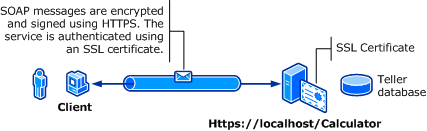
| Karakteristik | Açıklama |
|---|---|
| Güvenlik Modu | Taşıma |
| Birlikte çalışabilirlik | Mevcut Web hizmeti istemcileri ve hizmetleriyle |
| Kimlik Doğrulaması (Sunucu) Kimlik Doğrulaması (İstemci) |
Evet (HTTPS kullanarak) Evet (Kullanıcı adı/Parola aracılığıyla) |
| Dürüstlük | Evet |
| Gizlilik | Evet |
| Taşıma | HTTPS |
| Bağlayıcılık | WSHttpBinding |
Hizmet
Aşağıdaki kod ve yapılandırma bağımsız olarak çalıştırılacaktır. Aşağıdakilerden birini yapın:
Yapılandırma olmadan kodu kullanarak tek başına bir hizmet oluşturun.
Sağlanan yapılandırmayı kullanarak bir hizmet oluşturun, ancak hiçbir uç nokta tanımlamayın.
Kod
Aşağıdaki kod, aktarım güvenliği için Windows etki alanı kullanıcı adı ve parolası kullanan bir hizmet uç noktasının nasıl oluşturulacağını gösterir. Hizmetin istemcide kimlik doğrulaması için bir X.509 sertifikası gerektirdiğini unutmayın. Daha fazla bilgi için bkz. Sertifikalarla Çalışma ve Nasıl yapılır: SSL Sertifikası ile Bağlantı Noktası Yapılandırma.
// Create the binding.
WSHttpBinding binding = new WSHttpBinding();
binding.Security.Mode = SecurityMode.Transport;
binding.Security.Transport.ClientCredentialType =
    HttpClientCredentialType.Basic;

// Create the URI for the endpoint.
Uri httpUri = new Uri("https://localhost/Calculator");

// Create the service host and add an endpoint.
ServiceHost myServiceHost = new ServiceHost(
    typeof(ServiceModel.Calculator), httpUri);
myServiceHost.AddServiceEndpoint(
    typeof(ServiceModel.ICalculator), binding, "");

// Open the service.
myServiceHost.Open();
Console.WriteLine("Listening...");
Console.WriteLine("Press Enter to exit.");
Console.ReadLine();

// Close the service.
myServiceHost.Close();
' Create the binding.
Dim binding As New WSHttpBinding()
binding.Security.Mode = SecurityMode.Transport
binding.Security.Transport.ClientCredentialType = HttpClientCredentialType.Basic

' Create the URI for the endpoint.
Dim httpUri As New Uri("https://localhost/Calculator")

' Create the service host and add an endpoint.
Dim myServiceHost As New ServiceHost(GetType(ServiceModel.Calculator), httpUri)
myServiceHost.AddServiceEndpoint(GetType(ServiceModel.ICalculator), binding, "")

' Open the service.
myServiceHost.Open()
Console.WriteLine("Listening...")
Console.WriteLine("Press Enter to exit.")
Console.ReadLine()

' Close the service.
myServiceHost.Close()
Konfigürasyon
Aşağıda, bir hizmeti aktarım düzeyi güvenlikle temel kimlik doğrulamasını kullanacak şekilde yapılandırılır:
<?xml version="1.0" encoding="utf-8"?>
<configuration>
    <system.serviceModel>
        <bindings>
            <wsHttpBinding>
                <binding name="UsernameWithTransport">
                    <security mode="Transport">
                        <transport clientCredentialType="Basic" />
                    </security>
                </binding>
            </wsHttpBinding>
        </bindings>
        <services>
            <service name="BasicAuthentication.Calculator">
                <endpoint address="https://localhost/Calculator"
                          binding="wsHttpBinding"
                          bindingConfiguration="UsernameWithTransport"
                          name="BasicEndpoint"
                          contract="BasicAuthentication.ICalculator" />
            </service>
        </services>
    </system.serviceModel>
</configuration>
Müşteri
Kod
Aşağıdaki kod, kullanıcı adı ve parolayı içeren istemci kodunu gösterir. Kullanıcının geçerli bir Windows kullanıcı adı ve parolası sağlaması gerektiğini unutmayın. Kullanıcı adını ve parolayı döndürme kodu burada gösterilmez. Kullanıcıyı bilgi için sorgulamak için bir iletişim kutusu veya başka bir arabirim kullanın.
Uyarı
Kullanıcı adı ve parola yalnızca kod kullanılarak ayarlanabilir.
// Create the binding.
WSHttpBinding myBinding = new WSHttpBinding();
myBinding.Security.Mode = SecurityMode.Transport;
myBinding.Security.Transport.ClientCredentialType =
    HttpClientCredentialType.Basic;

// Create the endpoint address. Note that the machine name
// must match the subject or DNS field of the X.509 certificate
// used to authenticate the service.
EndpointAddress ea = new
    EndpointAddress("https://machineName/Calculator");

// Create the client. The code for the calculator
// client is not shown here. See the sample applications
// for examples of the calculator code.
CalculatorClient cc =
    new CalculatorClient(myBinding, ea);
// The client must provide a user name and password. The code
// to return the user name and password is not shown here. Use
// a database to store the user name and passwords, or use the
// ASP.NET Membership provider database.
cc.ClientCredentials.UserName.UserName = ReturnUsername();
cc.ClientCredentials.UserName.Password = ReturnPassword();
try
{
    // Begin using the client.
    cc.Open();
    Console.WriteLine(cc.Add(100, 11));
    Console.ReadLine();

    // Close the client.
    cc.Close();
}
' Create the binding.
Dim myBinding As New WSHttpBinding()
myBinding.Security.Mode = SecurityMode.Transport
myBinding.Security.Transport.ClientCredentialType = HttpClientCredentialType.Basic

' Create the endpoint address. Note that the machine name
' must match the subject or DNS field of the X.509 certificate
' used to authenticate the service.
Dim ea As New EndpointAddress("https://machineName/Calculator")

' Create the client. The code for the calculator
' client is not shown here. See the sample applications
' for examples of the calculator code.
Dim cc As New CalculatorClient(myBinding, ea)

' The client must provide a user name and password. The code
' to return the user name and password is not shown here. Use
' a database to store the user name and passwords, or use the
' ASP.NET Membership provider database.
cc.ClientCredentials.UserName.UserName = ReturnUsername()
cc.ClientCredentials.UserName.Password = ReturnPassword()

' Begin using the client.
Try
    cc.Open()

    Console.WriteLine(cc.Add(100, 11))
    Console.ReadLine()

    ' Close the client.
    cc.Close()
Catch tex As TimeoutException
    Console.WriteLine(tex.Message)
    cc.Abort()
Catch cex As CommunicationException
    Console.WriteLine(cex.Message)
    cc.Abort()
Finally
    Console.WriteLine("Closed the client")
    Console.ReadLine()
End Try
Konfigürasyon
Aşağıdaki kod istemci yapılandırmasını gösterir.
Uyarı
Kullanıcı adını ve parolayı ayarlamak için yapılandırma kullanamazsınız. Burada gösterilen yapılandırma, kullanıcı adı ve parolayı ayarlamak için kod kullanılarak artırılmalıdır.
<?xml version="1.0" encoding="utf-8"?>
<configuration>
  <system.serviceModel>
    <bindings>
      <wsHttpBinding>
        <binding name="WSHttpBinding_ICalculator" >
          <security mode="Transport">
            <transport clientCredentialType="Basic" />
          </security>
        </binding>
      </wsHttpBinding>
    </bindings>
    <client>
      <endpoint address="https://machineName/Calculator"
                binding="wsHttpBinding"
                bindingConfiguration="WSHttpBinding_ICalculator"
                contract="ICalculator"
                name="WSHttpBinding_ICalculator" />
    </client>
  </system.serviceModel>
</configuration>