Genel bakış
Microsoft Entra Doğrulanmış Kimliği İstek Hizmeti REST API'sini içerir. Bu API, kimlik bilgilerini vermenizi ve doğrulamanızı sağlar. Bu makalede İstek Hizmeti REST API'sini kullanmaya nasıl başlayacağınız gösterilmektedir.
API erişim belirteci
Uygulamanızın İstek Hizmeti REST API'sine erişebilmesi için gerekli izinlere sahip geçerli bir erişim belirteci içermesi gerekir. Microsoft kimlik platformu tarafından verilen erişim belirteçleri, İstek Hizmeti REST API'sinin çağıranı doğrulamak için kullandığı bilgileri (kapsamları) içerir. Erişim belirteci, çağıranın istediği işlemi gerçekleştirmek için uygun izinlere sahip olmasını sağlar.
Erişim belirteci almak için uygulamanızın Microsoft kimlik platformuna kayıtlı olması ve İstek Hizmeti REST API'sine erişim için bir yönetici tarafından yetkilendirilmiş olması gerekir. verifiable-credentials-app uygulamasını kaydetmediyseniz, uygulamayı nasıl kaydedeceğinizi görmek için bkz. ve ardından bir uygulama gizli anahtarı oluşturun.
Erişim belirteci alma
Microsoft kimlik platformunu kullanarak erişim belirtecini almak için OAuth 2.0 istemci kimlik bilgileri verme akışı kullanın. Bu amaçla güvenilen bir kitaplık kullanın. Bu öğreticide Microsoft Kimlik Doğrulama Kitaplığı (MSAL) kullanılır. MSAL, güvenli bir web API'sini çağırabilen bir uygulamaya kimlik doğrulaması ve yetkilendirme eklemeyi kolaylaştırır.
POST /{tenant}/oauth2/v2.0/token HTTP/1.1           //Line breaks for clarity
Host: login.microsoftonline.com
Content-Type: application/x-www-form-urlencoded

client_id=00001111-aaaa-2222-bbbb-3333cccc4444
&scope=3db474b9-6a0c-4840-96ac-1fceb342124f/.default
&client_secret=sampleCredentia1s
&grant_type=client_credentials
// Initialize MSAL library by using the following code
ConfidentialClientApplicationBuilder.Create(AppSettings.ClientId)
    .WithClientSecret(AppSettings.ClientSecret)
    .WithAuthority(new Uri(AppSettings.Authority))
    .Build();

// Acquire an access token
result = await app.AcquireTokenForClient(AppSettings.Scopes)
                .ExecuteAsync();
// Initialize MSAL library by using the following code
const msalConfig = {
  auth: {
      clientId: config.azClientId,
      authority: `https://login.microsoftonline.com/${config.azTenantId}`,
      clientSecret: config.azClientSecret,
  },
  system: {
      loggerOptions: {
          loggerCallback(loglevel, message, containsPii) {
              console.log(message);
          },
          piiLoggingEnabled: false,
          logLevel: msal.LogLevel.Verbose,
      }
  }
};
const cca = new msal.ConfidentialClientApplication(msalConfig);
const msalClientCredentialRequest = {
  scopes: ["3db474b9-6a0c-4840-96ac-1fceb342124f/.default"],
  skipCache: false,
};
module.exports.msalCca = cca;
module.exports.msalClientCredentialRequest = msalClientCredentialRequest;

// Acquire an access token
const result = await mainApp.msalCca.acquireTokenByClientCredential(mainApp.msalClientCredentialRequest);
    if ( result ) {
      accessToken = result.accessToken;
    }
# Initialize MSAL library by using the following code
msalCca = msal.ConfidentialClientApplication( config["azClientId"],
    authority="https://login.microsoftonline.com/" + config["azTenantId"],
    client_credential=config["azClientSecret"],
    )

# Acquire an access token
accessToken = ""
result = msalCca.acquire_token_for_client( scopes="3db474b9-6a0c-4840-96ac-1fceb342124f/.default" )
if "access_token" in result:
    accessToken = result['access_token']
// Initialize MSAL library by using the following code
ConfidentialClientApplication app = ConfidentialClientApplication.builder(
                clientId,
                ClientCredentialFactory.createFromSecret(clientSecret))
                .authority(authority)
                .build();

// Acquire an access token
ClientCredentialParameters clientCredentialParam = ClientCredentialParameters.builder(
                Collections.singleton(scope))
                .build();
CompletableFuture<IAuthenticationResult> future = app.acquireToken(clientCredentialParam);
IAuthenticationResult result = future.get();
return result.accessToken();
Yukarıdaki kodda aşağıdaki parametreleri sağlayın:
| Parametre |
Koşul |
Açıklama |
| Otorite |
Gerekli |
Uygulamanın üzerinde çalışmak üzere planladığı dizin kiracısı. Örneğin: https://login.microsoftonline.com/{your-tenant}. (your-tenant ile kiracı kimliğinizi veya adınızıdeğiştirin.) |
| İstemci Kimliği |
Gerekli |
Uygulamanıza atanan uygulama kimliği. Bu bilgileri uygulamanızı kaydettiğiniz Azure portalında bulabilirsiniz. |
| İstemci sırrı |
Gerekli |
Uygulamanız için oluşturduğunuz istemci gizli anahtarı. |
| Kapsam |
Gerekli |
3db474b9-6a0c-4840-96ac-1fceb342124f/.defaultolarak ayarlanmalıdır. Bu ayar, talebi rolleri olan bir erişim belirteci oluşturur. |
Konsol uygulamasının kimliğini kullanarak erişim belirteci alma hakkında daha fazla bilgi için aşağıdaki makalelerden birine bakın:
Ayrıca, istemci sırrı yerine sertifika içeren bir belirteç de isteyebilirsiniz.
POST /{tenant}/oauth2/v2.0/token HTTP/1.1   //Line breaks for clarity
Host: login.microsoftonline.com
Content-Type: application/x-www-form-urlencoded

client_id=00001111-aaaa-2222-bbbb-3333cccc4444
&scope=3db474b9-6a0c-4840-96ac-1fceb342124f/.default
&client_assertion_type=urn%3Aietf%3Aparams%3Aoauth%3Aclient-assertion-type%3Ajwt-bearer
&client_assertion=eyJhbGciOiJSUzI1NiIsIng1dCI6Imd4OHRHeXN5amNScUtqRlBuZDdSRnd2d1pJMCJ9.eyJ{a lot of characters here}M8U3bSUKKJDEg
&grant_type=client_credentials
// Initialize MSAL library by using the following code
X509Certificate2 certificate = AppSettings.ReadCertificate(AppSettings.CertificateName);
    app = ConfidentialClientApplicationBuilder.Create(AppSettings.ClientId)
        .WithCertificate(certificate)
        .WithAuthority(new Uri(AppSettings.Authority))
        .Build();

// Acquire an access token
result = await app.AcquireTokenForClient(AppSettings.Scopes)
                .ExecuteAsync();
// Initialize MSAL library by using the following code
const msalConfig = {
  auth: {
      clientId: config.azClientId,
      authority: `https://login.microsoftonline.com/${config.azTenantId}`,
      clientCertificate: {
            thumbprint: "CERT_THUMBPRINT", // a 40-digit hexadecimal string
            privateKey: "CERT_PRIVATE_KEY"
        }
  },
  system: {
      loggerOptions: {
          loggerCallback(loglevel, message, containsPii) {
              console.log(message);
          },
          piiLoggingEnabled: false,
          logLevel: msal.LogLevel.Verbose,
      }
  }
};
const cca = new msal.ConfidentialClientApplication(msalConfig);
const msalClientCredentialRequest = {
  scopes: ["3db474b9-6a0c-4840-96ac-1fceb342124f/.default"],
  skipCache: false,
};
module.exports.msalCca = cca;
module.exports.msalClientCredentialRequest = msalClientCredentialRequest;

// Acquire an access token
const result = await mainApp.msalCca.acquireTokenByClientCredential(mainApp.msalClientCredentialRequest);
    if ( result ) {
      accessToken = result.accessToken;
    }
# Initialize MSAL library by using the following code
with open(config["azCertificatePrivateKeyLocation"], "rb") as file:
    private_key = file.read()
with open(config["azCertificateLocation"]) as file:
    public_certificate = file.read()
cert = load_pem_x509_certificate(data=bytes(public_certificate, 'UTF-8'), backend=default_backend())
thumbprint = (cert.fingerprint(hashes.SHA1()).hex())
msalCca = msal.ConfidentialClientApplication( config["azClientId"],
    authority="https://login.microsoftonline.com/" + config["azTenantId"],
    client_credential={
        "private_key": private_key,
        "thumbprint": thumbprint,
        "public_certificate": public_certificate
    }
)
# Acquire an access token
accessToken = ""
result = msalCca.acquire_token_for_client( scopes="3db474b9-6a0c-4840-96ac-1fceb342124f/.default" )
if "access_token" in result:
    accessToken = result['access_token']
// Initialize MSAL library by using the following code
PKCS8EncodedKeySpec spec = new PKCS8EncodedKeySpec(Files.readAllBytes(Paths.get(certKeyLocation)));
PrivateKey key = KeyFactory.getInstance("RSA").generatePrivate(spec);
java.io.InputStream certStream = (java.io.InputStream)new ByteArrayInputStream(Files.readAllBytes(Paths.get(certLocation)));
X509Certificate cert = (X509Certificate) CertificateFactory.getInstance("X.509").generateCertificate(certStream);
ConfidentialClientApplication app = ConfidentialClientApplication.builder(
                clientId,
                ClientCredentialFactory.createFromCertificate(key, cert))
                .authority(authority)
                .build();
// Acquire an access token
ClientCredentialParameters clientCredentialParam = ClientCredentialParameters.builder(
                Collections.singleton(scope))
                .build();
CompletableFuture<IAuthenticationResult> future = app.acquireToken(clientCredentialParam);
IAuthenticationResult result = future.get();
return result.accessToken();
API'yi çağırma
Doğrulanabilir bir kimlik belgesi vermek veya doğrulamasını yapmak için:
İstek Hizmeti REST API'sine bir HTTP POST isteği oluşturun. Erişim belirtecinde talep olarak bulunduğundan artık URL'de kiracı kimliği gerekli değildir.
Sorun
POST https://verifiedid.did.msidentity.com/v1.0/verifiableCredentials/createIssuanceRequest
Doğrula
POST https://verifiedid.did.msidentity.com/v1.0/verifiableCredentials/createPresentationRequest
Erişim belirtecini bir HTTP isteğindeki yetkilendirme üst bilgisine taşıyıcı belirteç olarak ekleyin.
Authorization: Bearer <token>
Content-Type üst bilgisini application/jsonolarak ayarlayın.
İstek gövdesine verme veya sunu talep yükünü hazırlayın ve ekleyin.
İsteği İstek Hizmeti REST API'sine gönderin.
İstek Hizmeti API'si, başarılı bir çağrıda bir HTTP Durum Kodu 201 Created döndürür. API çağrısı bir hata döndürürse,hata başvurusu belgelerine bakın.
Belge verme talebi örneği
Aşağıdaki örnekte doğrulanabilir kimlik bilgileri verme isteği gösterilmektedir. Yük hakkında bilgi için bkz. İstek Hizmeti REST API'nin yayımlama belirtimi.
POST https://verifiedid.did.msidentity.com/v1.0/verifiableCredentials/createIssuanceRequest
Content-Type: application/json
Authorization: Bearer  <token>

{...JSON payload...}
idTokenHint kanıtlama akışını kullanarak talep oluşturma isteği:
{
    "authority": "did:web:verifiedid.contoso.com",
    "callback": {
        "url": "https://contoso.com/api/issuer/issuanceCallback",
        "state": "de19cb6b-36c1-45fe-9409-909a51292a9c",
        "headers": {
            "api-key": "OPTIONAL API-KEY for CALLBACK EVENTS"
        }
    },
    "registration": {
        "clientName": "Verifiable Credential Expert Sample"
    },
    "type": "VerifiedCredentialExpert",
    "manifestUrl": "https://verifiedid.did.msidentity.com/v1.0/00001111-aaaa-2222-bbbb-3333cccc4444/verifiableCredentials/contracts/VerifiedCredentialExpert1",
    "pin": {
        "value": "3539",
        "length": 4
    },
    "claims": {
        "given_name": "Megan",
        "family_name": "Bowen"
    }
}
idTokenHintayarlayan kanıtlama akışını kullanarak verme isteği:
{
    "authority": "did:web:verifiedid.contoso.com",
    "callback": {
        "url": "https://contoso.com/api/issuer/issuanceCallback",
        "state": "de19cb6b-36c1-45fe-9409-909a51292a9c",
        "headers": {
            "api-key": "OPTIONAL API-KEY for CALLBACK EVENTS"
        }
    },
    "registration": {
        "clientName": "Verifiable Credential Expert Sample"
    },
    "type": "VerifiedCredentialExpert",
    "manifestUrl": "https://verifiedid.did.msidentity.com/v1.0/00001111-aaaa-2222-bbbb-3333cccc4444/verifiableCredentials/contracts/VerifiedCredentialExpert1",
    "pin": {
        "value": "3539",
        "length": 4
    },
    "claims": {
        "given_name": "Megan",
        "family_name": "Bowen"
    },
    "expirationDate": "2024-12-31T23:59:59.000Z"
}
Kodun tamamı için aşağıdaki kod örneklerinden birine bakın:
Sunu isteği örneği
Aşağıdaki örnekte doğrulanabilir kimlik bilgileri sunu isteği gösterilmektedir. Yük hakkında daha fazla bilgi için bkz. İstek Hizmeti REST API sunum belirtimi.
POST https://verifiedid.did.msidentity.com/v1.0/verifiableCredentials/createPresentationRequest
Content-Type: application/json
Authorization: Bearer  <token>

{...JSON payload...}
Belirli bir tür ve verene sahip bir kimlik bilgisi için sunum talebi:
{
  "authority": "did:web:verifiedid.contoso.com",
  "callback": {
    "url": "https://contoso.com/api/verifier/presentationCallback",
    "state": "92d076dd-450a-4247-aa5b-d2e75a1a5d58",
    "headers": {
      "api-key": "OPTIONAL API-KEY for CALLBACK EVENTS"
    }
  },
  "registration": {
    "clientName": "Veritable Credential Expert Verifier"
  },
  "includeReceipt": true,
  "requestedCredentials": [
    {
      "type": "VerifiedCredentialExpert",
      "purpose": "So we can see that you are a veritable credentials expert",
      "acceptedIssuers": [
        "did:web:verifiedid.contoso.com"
      ],
      "configuration": {
        "validation": {
          "allowRevoked": true,
          "validateLinkedDomain": true
        }
      }
    }
  ]
}
talep kısıtlamalarısunu isteği:
{
  "authority": "did:web:verifiedid.contoso.com",
  "includeReceipt": false,
  "registration": {
    "clientName": "Contoso Job Application Center",
    "purpose": "Provide proof of attended courses"
  },
  "callback": {
    "url": "https://contoso.com/api/verifier/presentationCallback",
    "state": "92d076dd-450a-4247-aa5b-d2e75a1a5d58",
    "headers": {
      "api-key": "OPTIONAL API-KEY for CALLBACK EVENTS"
    }
  },
  "requestedCredentials": [
    {
      "type": "FabrikamCourseCertification",
      "acceptedIssuers": [ "did:web:learn.fabrikam.com" ],
      "constraints": [
        {
          "claimName": "courseCode",
          "values": ["FC100", "FC110", "FC150"],
        },
        {
          "claimName": "courseTitle",
          "contains": "network",
        }
      ],
      "configuration": {
        "validation": {
          "allowRevoked": false,
          "validateLinkedDomain": true
        }
      }
    }
  ]
}
FaceCheck kullanarak sunum isteği. FaceCheck kullanılırken, includeReceipt makbuzlar FaceCheck ile desteklenmediğinden false olmalıdır.
{
  "authority": "did:web:verifiedid.contoso.com",
  "includeReceipt": false,
  "registration": {
    "clientName": "Contoso Job Application Center",
    "purpose": "Provide proof of attended courses"
  },
  "callback": {
    "url": "https://contoso.com/api/verifier/presentationCallback",
    "state": "92d076dd-450a-4247-aa5b-d2e75a1a5d58",
    "headers": {
      "api-key": "OPTIONAL API-KEY for CALLBACK EVENTS"
    }
  },
  "requestedCredentials": [
    {
      "type": "VerifiedEmployee",
      "acceptedIssuers": [ "did:web:learn.contoso.com" ],
      "configuration": {
        "validation": {
          "allowRevoked": false,
          "validateLinkedDomain": true,
          "faceCheck": {
            "sourcePhotoClaimName": "photo",
            "matchConfidenceThreshold": 70
          }
        }
      }
    }
  ]
}
Kodun tamamı için aşağıdaki kod örneklerinden birine bakın:
Geri arama olayları
İstek yükü, oluşturma ve sunum geri çağırma uç noktasını içerir. Uç nokta web uygulamanızın bir parçasıdır ve HTTPS protokolü aracılığıyla genel kullanıma açık olmalıdır. İstek Hizmeti API'si, uygulamanızı belirli olaylar hakkında bilgilendirmek için uç noktanızı çağırır. Örneğin, bu tür olaylar bir kullanıcı QR kodunu taradığında, doğrulayıcı uygulamasının derin bağlantısını kullandığında veya sunu işlemini tamamladığında olabilir.
Aşağıdaki diyagramda uygulamanızın İstek Hizmeti REST API'sine yaptığı çağrı ve uygulamanıza yapılan geri çağırmalar açıklanmaktadır.
API'ye çağrıyı ve geri çağırma olaylarını gösteren 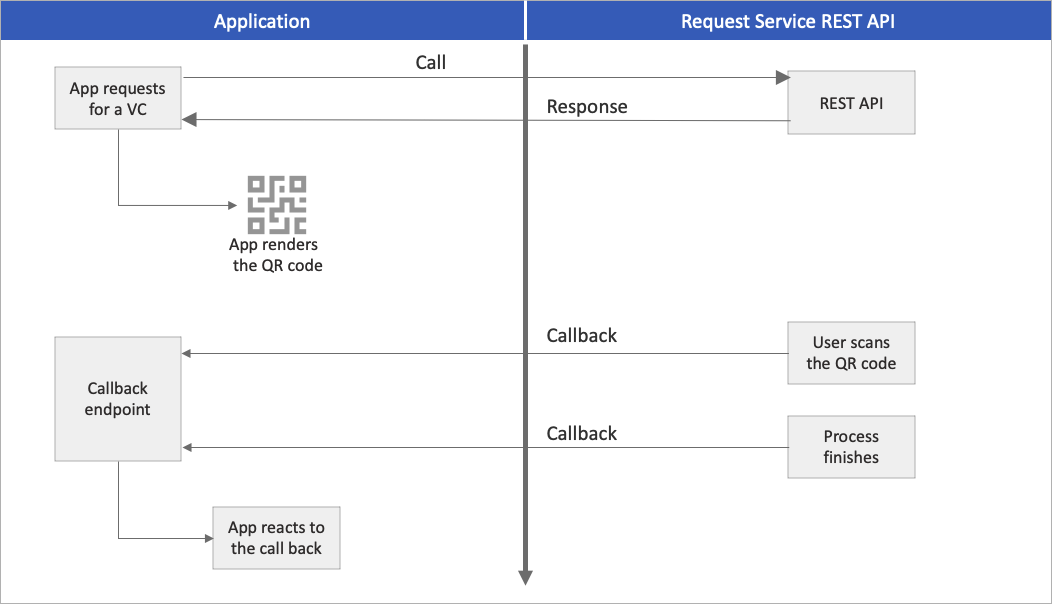
Uç noktanızı gelen HTTP POST isteklerini dinleyecek şekilde yapılandırın. Aşağıdaki kod parçacığı, verme geri çağırma HTTP isteğinin nasıl işleneceğini ve kullanıcı arabiriminin buna göre nasıl güncelleştirileceklerini gösterir:
Uygulanamaz. Diğer programlama dillerinden birini seçin.
[HttpPost]
public async Task<ActionResult> IssuanceCallback()
{
try
{
    string content = new System.IO.StreamReader(this.Request.Body).ReadToEndAsync().Result;
    _log.LogTrace("callback!: " + content);
    JObject issuanceResponse = JObject.Parse(content);

    // More code here
    if (issuanceResponse["code"].ToString() == "request_retrieved")
    {
        var cacheData = new
        {
            status = "request_retrieved",
            message = "QR Code is scanned. Waiting for issuance...",
        };
        _cache.Set(state, JsonConvert.SerializeObject(cacheData));

        // More code here
    }
}
Tam kod için GitHub deposundaki yayım ve sunum koduna bakın.
mainApp.app.post('/api/issuer/issuance-request-callback', parser, async (req, res) => {
  var body = '';
  req.on('data', function (data) {
    body += data;
  });
  req.on('end', function () {
    requestTrace( req );
    console.log( body );
    var issuanceResponse = JSON.parse(body.toString());
    var message = null;

    if ( issuanceResponse.code == "request_retrieved" ) {
      message = "QR Code is scanned. Waiting for issuance to complete...";
    }
    if ( issuanceResponse.code == "issuance_successful" ) {
      message = "Credential successfully issued";
    }
    if ( issuanceResponse.code == "issuance_error" ) {
      message = issuanceResponse.error.message;
    }

    // More code here
    res.send()
  });
  res.send()
})
@app.route("/api/issuer/issuance-request-callback", methods = ['POST'])
def issuanceRequestApiCallback():
    if request.headers['api-key'] != apiKey:
        return Response( jsonify({'error':'api-key wrong or missing'}), status=401, mimetype='application/json')

    issuanceResponse = request.json
    if issuanceResponse["code"] == "request_retrieved":
        cacheData = {
            "status": issuanceResponse["code"],
            "message": "QR Code is scanned. Waiting for issuance to complete..."
        }
        cache.set( issuanceResponse["state"], json.dumps(cacheData) )
        return ""

    if issuanceResponse["code"] == "issuance_successful":
        cacheData = {
            "status": issuanceResponse["code"],
            "message": "Credential successfully issued"
        }
        cache.set( issuanceResponse["state"], json.dumps(cacheData) )
        return ""

    if issuanceResponse["code"] == "issuance_error":
        cacheData = {
            "status": issuanceResponse["code"],
            "message": issuanceResponse["error"]["message"]
        }
        cache.set( issuanceResponse["state"], json.dumps(cacheData) )
        return ""

    return ""
@RequestMapping(value = "/api/issuer/issue-request-callback", method = RequestMethod.POST, produces = "application/json", consumes = "application/json")
    public ResponseEntity<String> issueRequestCallback( HttpServletRequest request
                                                      , @RequestHeader HttpHeaders headers
                                                      , @RequestBody String body ) {
        ObjectMapper objectMapper = new ObjectMapper();
        try {
            if ( !request.getHeader("api-key").equals(apiKey) ) {
                lgr.info( "api-key wrong or missing" );
                return ResponseEntity.status(HttpStatus.UNAUTHORIZED).body( "api-key wrong or missing" );
            }
            JsonNode presentationResponse = objectMapper.readTree( body );
            String code = presentationResponse.path("code").asText();
            ObjectNode data = null;
            if ( code.equals( "request_retrieved" )  ) {
                data = objectMapper.createObjectNode();
                data.put("message", "QR Code is scanned. Waiting for issuance to complete..." );
            }
            if ( code.equals("issuance_successful") ) {
                data = objectMapper.createObjectNode();
                data.put("message", "Credential successfully issued" );
            }
            if ( code.equals( "issuance_error" ) ) {
                data = objectMapper.createObjectNode();
                data.put("message", presentationResponse.path("error").path("message").asText() );
            }
            if ( data != null ) {
                data.put("status", code );
                cache.put( presentationResponse.path("state").asText(), objectMapper.writerWithDefaultPrettyPrinter().writeValueAsString(data) );
            }
        } catch (java.io.IOException ex) {
            ex.printStackTrace();
            return ResponseEntity.status(HttpStatus.BAD_REQUEST).body( "Technical error" );
        }
        return ResponseEntity.ok().body( "{}" );
    }
Tam kod için GitHub deposundaki yayım ve sunum koduna bakın.
Sonraki adımlar
Bu belirtimler hakkında daha fazla bilgi edinin: