Not
Bu sayfaya erişim yetkilendirme gerektiriyor. Oturum açmayı veya dizinleri değiştirmeyi deneyebilirsiniz.
Bu sayfaya erişim yetkilendirme gerektiriyor. Dizinleri değiştirmeyi deneyebilirsiniz.
Önemli
Aracı Çerçevesi'ndeki Aracı Orkestrasyonu özellikleri deneysel aşamadadır. Bunlar etkin geliştirme aşamasındadır ve önizleme veya sürüm adayı aşamasına geçmeden önce önemli ölçüde değişebilir.
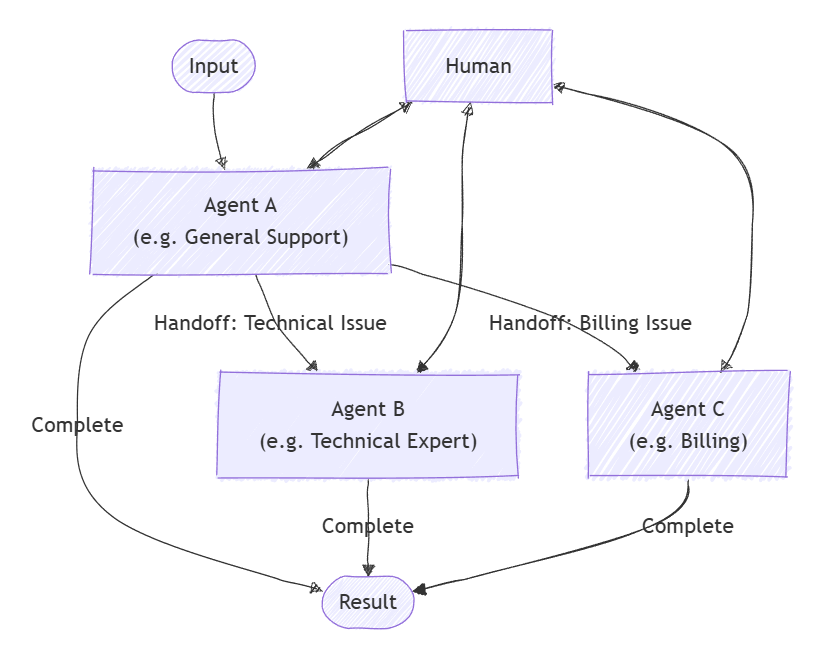
Kontrol devri düzenlemesi, aracıların bağlam veya kullanıcı isteğine göre denetimi birbirine aktarmasına olanak tanır. Her temsilci, uygun uzmanlığa sahip başka bir yetkiliye konuşmayı "devredebilir", böylece doğru yetkili görevin her kısmını ele alır. Bu özellikle müşteri desteği, uzman sistemler veya dinamik temsilci gerektiren herhangi bir senaryoda kullanışlıdır.
Desen hakkında daha fazla bilgi edinmek için, örneğin desenin ne zaman kullanılacağı veya iş yükünüzdeki desenden ne zaman kaçınılması gerektiğini öğrenmek için bkz. İletim düzenlemesi.
Genel Kullanım Örnekleri
Müşteri destek temsilcisi genel bir sorguyla ilgilenir, ardından sorun giderme için bir teknik uzman temsilcisine veya gerekirse bir faturalama temsilcisine iletir:
Öğrenecekler
- Temsilcileri ve onların devretme ilişkilerini nasıl tanımlayacağınızı öğrenin
- Dinamik aracı yönlendirmesi için devretme orkestrasyonu ayarlama
- Konuşma döngüsüne bir insanı dahil etme
Uzmanlaşmış Aracıları Tanımla
Her ajan belirli bir alanın sorumluluğunu taşır. Bu örnekte önceliklendirme aracısı, para iadesi aracısı, sipariş durumu aracısı ve sipariş iade aracısı tanımlayacağız. Bazı aracılar belirli görevleri işlemek için eklentileri kullanır.
Tavsiye
ChatCompletionAgent burada kullanılır, ancak herhangi bir aracı türünü kullanabilirsiniz.
using Microsoft.SemanticKernel;
using Microsoft.SemanticKernel.Agents;
using Microsoft.SemanticKernel.Agents.Orchestration;
using Microsoft.SemanticKernel.Agents.Orchestration.Handoff;
using Microsoft.SemanticKernel.Agents.Runtime.InProcess;
using Microsoft.SemanticKernel.ChatCompletion;

// Plugin implementations
public sealed class OrderStatusPlugin {
    [KernelFunction]
    public string CheckOrderStatus(string orderId) => $"Order {orderId} is shipped and will arrive in 2-3 days.";
}
public sealed class OrderReturnPlugin {
    [KernelFunction]
    public string ProcessReturn(string orderId, string reason) => $"Return for order {orderId} has been processed successfully.";
}
public sealed class OrderRefundPlugin {
    [KernelFunction]
    public string ProcessReturn(string orderId, string reason) => $"Refund for order {orderId} has been processed successfully.";
}

// Helper function to create a kernel with chat completion
public static Kernel CreateKernelWithChatCompletion(...)
{
    ...
}

ChatCompletionAgent triageAgent = new ChatCompletionAgent {
    Name = "TriageAgent",
    Description = "Handle customer requests.",
    Instructions = "A customer support agent that triages issues.",
    Kernel = CreateKernelWithChatCompletion(...),
};

ChatCompletionAgent statusAgent = new ChatCompletionAgent {
    Name = "OrderStatusAgent",
    Description = "A customer support agent that checks order status.",
    Instructions = "Handle order status requests.",
    Kernel = CreateKernelWithChatCompletion(...),
};
statusAgent.Kernel.Plugins.Add(KernelPluginFactory.CreateFromObject(new OrderStatusPlugin()));

ChatCompletionAgent returnAgent = new ChatCompletionAgent {
    Name = "OrderReturnAgent",
    Description = "A customer support agent that handles order returns.",
    Instructions = "Handle order return requests.",
    Kernel = CreateKernelWithChatCompletion(...),
};
returnAgent.Kernel.Plugins.Add(KernelPluginFactory.CreateFromObject(new OrderReturnPlugin()));

ChatCompletionAgent refundAgent = new ChatCompletionAgent {
    Name = "OrderRefundAgent",
    Description = "A customer support agent that handles order refund.",
    Instructions = "Handle order refund requests.",
    Kernel = CreateKernelWithChatCompletion(...),
};
refundAgent.Kernel.Plugins.Add(KernelPluginFactory.CreateFromObject(new OrderRefundPlugin()));
Geçiş İlişkilerini Kurma
Hangi temsilcinin hangi temsilciye ve hangi koşullarda devredeceğini belirtmek için OrchestrationHandoffs kullanın.
var handoffs = OrchestrationHandoffs
    .StartWith(triageAgent)
    .Add(triageAgent, statusAgent, returnAgent, refundAgent)
    .Add(statusAgent, triageAgent, "Transfer to this agent if the issue is not status related")
    .Add(returnAgent, triageAgent, "Transfer to this agent if the issue is not return related")
    .Add(refundAgent, triageAgent, "Transfer to this agent if the issue is not refund related");
Aracı Yanıtlarını Gözlemleme
ResponseCallback özelliği aracılığıyla konuşma ilerledikçe aracı yanıtlarını yakalamak için bir geri çağırma oluşturabilirsiniz.
ChatHistory history = [];

ValueTask responseCallback(ChatMessageContent response)
{
    history.Add(response);
    return ValueTask.CompletedTask;
}
Döngüdeki İnsan
Devretme koordine etmenin önemli özelliklerinden biri, bir insanın iletişime katılabilmesidir. Bu, bir ajan kullanıcıdan giriş istediğinde çağrılan bir InteractiveCallback sağlayarak gerçekleştirilir. Gerçek bir uygulamada bu, kullanıcıdan giriş ister; bir örnekte yanıt kuyruğu kullanabilirsiniz.
// Simulate user input with a queue
Queue<string> responses = new();
responses.Enqueue("I'd like to track the status of my order");
responses.Enqueue("My order ID is 123");
responses.Enqueue("I want to return another order of mine");
responses.Enqueue("Order ID 321");
responses.Enqueue("Broken item");
responses.Enqueue("No, bye");

ValueTask<ChatMessageContent> interactiveCallback()
{
    string input = responses.Dequeue();
    Console.WriteLine($"\n# INPUT: {input}\n");
    return ValueTask.FromResult(new ChatMessageContent(AuthorRole.User, input));
}
İletim Düzenlemesini Ayarlama
Aracılar, iletim ilişkileri ve callback'leri geçirerek bir HandoffOrchestration nesnesi oluşturun.
HandoffOrchestration orchestration = new HandoffOrchestration(
    handoffs,
    triageAgent,
    statusAgent,
    returnAgent,
    refundAgent)
{
    InteractiveCallback = interactiveCallback,
    ResponseCallback = responseCallback,
};
Çalışma Zamanını Başlat
Aracıların yürütülmesini yönetmek için bir çalışma zamanı gereklidir. Burada InProcessRuntime kullanıyoruz ve bunu, orkestrasyonu çağırmadan önce başlatıyoruz.
InProcessRuntime runtime = new InProcessRuntime();
await runtime.StartAsync();
Orchestration'ı başlat
düzenlemeyi ilk görevinizle çağırın (örneğin, "Siparişlerim konusunda yardıma ihtiyacı olan bir müşteriyim"). Aracılar gerektiğinde konuşmayı yönlendirecek ve gerektiğinde insanı da dahil edecektir.
string task = "I am a customer that needs help with my orders";
var result = await orchestration.InvokeAsync(task, runtime);
Sonuçları Topla
Orkestrasyonun tamamlanmasını bekleyin ve nihai çıktıyı alın.
string output = await result.GetValueAsync(TimeSpan.FromSeconds(300));
Console.WriteLine($"\n# RESULT: {output}");
Console.WriteLine("\n\nORCHESTRATION HISTORY");
foreach (ChatMessageContent message in history)
{
    // Print each message
    Console.WriteLine($"# {message.Role} - {message.AuthorName}: {message.Content}");
}
İsteğe bağlı: Çalışma Zamanını Durdur
İşlem tamamlandıktan sonra kaynakları temizlemek için çalışma zamanını durdurun.
await runtime.RunUntilIdleAsync();
Örnek Çıkış
# RESULT: Handled order return for order ID 321 due to a broken item, and successfully processed the return.

ORCHESTRATION HISTORY

# Assistant - TriageAgent: Could you please specify what kind of help you need with your orders? Are you looking to check the order status, return an item, or request a refund?

# Assistant - OrderStatusAgent: Could you please tell me your order ID?

# Assistant - OrderStatusAgent: Your order with ID 123 has been shipped and will arrive in 2-3 days. Anything else I can assist you with?

# Assistant - OrderReturnAgent: I can help you with that. Could you please provide the order ID and the reason you'd like to return it?

# Assistant - OrderReturnAgent: Please provide the reason for returning the order with ID 321.

# Assistant - OrderReturnAgent: The return for your order with ID 321 has been successfully processed due to the broken item. Anything else I can assist you with?
Tavsiye
Örnek kodun tamamına buradan ulaşabilirsiniz
Uzmanlaşmış Aracıları Tanımla
Her ajan belirli bir alanın sorumluluğunu taşır. Örneğin:
- TriageAgent: İlk müşteri isteklerini işler ve hangi uzmanın dahil gerektiğine karar verir.
- RefundAgent: Para iadesi isteklerini işler.
- OrderStatusAgent: Sipariş durumunu denetler.
- OrderReturnAgent: Sipariş iadelerini işler.
Eklentiler
İlk olarak aracılarda kullanılacak eklentileri tanımlamamız gerekir. Bu eklentiler belirli görevleri işleme mantığını içerir.
from semantic_kernel.functions import kernel_function

class OrderStatusPlugin:
    @kernel_function
    def check_order_status(self, order_id: str) -> str:
        """Check the status of an order."""
        # Simulate checking the order status
        return f"Order {order_id} is shipped and will arrive in 2-3 days."


class OrderRefundPlugin:
    @kernel_function
    def process_refund(self, order_id: str, reason: str) -> str:
        """Process a refund for an order."""
        # Simulate processing a refund
        print(f"Processing refund for order {order_id} due to: {reason}")
        return f"Refund for order {order_id} has been processed successfully."


class OrderReturnPlugin:
    @kernel_function
    def process_return(self, order_id: str, reason: str) -> str:
        """Process a return for an order."""
        # Simulate processing a return
        print(f"Processing return for order {order_id} due to: {reason}")
        return f"Return for order {order_id} has been processed successfully."
Ajanlar
Ardından, bu eklentileri kullanacak aracıları tanımlayacağız.
Tavsiye
ChatCompletionAgent burada Azure OpenAI ile kullanılır, ancak herhangi bir aracı türünü veya model hizmetini kullanabilirsiniz.
from semantic_kernel.agents import ChatCompletionAgent
from semantic_kernel.connectors.ai.open_ai import OpenAIChatCompletion

support_agent = ChatCompletionAgent(
    name="TriageAgent",
    description="A customer support agent that triages issues.",
    instructions="Handle customer requests.",
    service=OpenAIChatCompletion(),
)

refund_agent = ChatCompletionAgent(
    name="RefundAgent",
    description="A customer support agent that handles refunds.",
    instructions="Handle refund requests.",
    service=OpenAIChatCompletion(),
    plugins=[OrderRefundPlugin()],
)

order_status_agent = ChatCompletionAgent(
    name="OrderStatusAgent",
    description="A customer support agent that checks order status.",
    instructions="Handle order status requests.",
    service=OpenAIChatCompletion(),
    plugins=[OrderStatusPlugin()],
)

order_return_agent = ChatCompletionAgent(
    name="OrderReturnAgent",
    description="A customer support agent that handles order returns.",
    instructions="Handle order return requests.",
    service=OpenAIChatCompletion(),
    plugins=[OrderReturnPlugin()],
)
Devretme İlişkilerini Tanımlama
Hangi temsilcinin hangi temsilciye ve hangi koşullarda devredeceğini belirtmek için OrchestrationHandoffs kullanın.
from semantic_kernel.agents import OrchestrationHandoffs

handoffs = (
    OrchestrationHandoffs()
    .add_many(    # Use add_many to add multiple handoffs to the same source agent at once
        source_agent=support_agent.name,
        target_agents={
            refund_agent.name: "Transfer to this agent if the issue is refund related",
            order_status_agent.name: "Transfer to this agent if the issue is order status related",
            order_return_agent.name: "Transfer to this agent if the issue is order return related",
        },
    )
    .add(    # Use add to add a single handoff
        source_agent=refund_agent.name,
        target_agent=support_agent.name,
        description="Transfer to this agent if the issue is not refund related",
    )
    .add(
        source_agent=order_status_agent.name,
        target_agent=support_agent.name,
        description="Transfer to this agent if the issue is not order status related",
    )
    .add(
        source_agent=order_return_agent.name,
        target_agent=support_agent.name,
        description="Transfer to this agent if the issue is not order return related",
    )
)
Aracı Yanıtlarını Gözlemleme
Konuşma ilerledikçe, her bir temsilcinin iletisini yazdırmak için bir callback (geri çağırma) tanımlayabilirsiniz.
from semantic_kernel.contents import ChatMessageContent

def agent_response_callback(message: ChatMessageContent) -> None:
    print(f"{message.name}: {message.content}")
Döngüdeki İnsan
Devretme koordine etmenin önemli özelliklerinden biri, bir insanın iletişime katılabilmesidir. Bu, bir geri çağırma human_response_function sağlayarak, bir temsilci kullanıcıdan her giriş istediğinde çağrılmasıyla elde edilir.
from semantic_kernel.contents import AuthorRole, ChatMessageContent

def human_response_function() -> ChatMessageContent:
    user_input = input("User: ")
    return ChatMessageContent(role=AuthorRole.USER, content=user_input)
İletim Düzenlemesini Ayarlama
Aracılar, iletim ilişkileri ve callback'leri geçirerek bir HandoffOrchestration nesnesi oluşturun.
from semantic_kernel.agents import HandoffOrchestration

handoff_orchestration = HandoffOrchestration(
    members=[
        support_agent,
        refund_agent,
        order_status_agent,
        order_return_agent,
    ],
    handoffs=handoffs,
    agent_response_callback=agent_response_callback,
    human_response_function=human_response_function,
)
Çalışma Zamanını Başlat
Aracı çalıştırmayı yönetmek için çalışma zamanını başlatın.
from semantic_kernel.agents.runtime import InProcessRuntime

runtime = InProcessRuntime()
runtime.start()
Orchestration'ı başlat
Orkestrasyonu ilk görevinizle başlatın (örneğin, "Müşteri hatta."). Aracılar gerektiğinde konuşmayı yönlendirecek ve gerektiğinde insanı da dahil edecektir.
orchestration_result = await handoff_orchestration.invoke(
    task="A customer is on the line.",
    runtime=runtime,
)
Sonuçları Topla
Düzenlemenin tamamlanmasını bekleyin.
value = await orchestration_result.get()
print(value)
İsteğe bağlı: Çalışma Zamanını Durdur
İşlem tamamlandıktan sonra kaynakları temizlemek için çalışma zamanını durdurun.
await runtime.stop_when_idle()
Örnek Çıkış
TriageAgent: Hello! Thank you for reaching out. How can I assist you today?
User: I'd like to track the status of my order
OrderStatusAgent: Sure, I can help you with that. Could you please provide me with your order ID?
User: My order ID is 123
OrderStatusAgent: Your order with ID 123 has been shipped and is expected to arrive in 2-3 days. Is there anything else I can assist you with?
User: I want to return another order of mine
OrderReturnAgent: I can help you with returning your order. Could you please provide the order ID for the return and the reason you'd like to return it?
User: Order ID 321
OrderReturnAgent: Please provide the reason for returning the order with ID 321.
User: Broken item
OrderReturnAgent: The return for your order with ID 321 has been successfully processed due to the broken item. Is there anything else I can assist you with?
User: No, bye
Task is completed with summary: Handled order return for order ID 321 due to a broken item, and successfully processed the return.
Tavsiye
Örnek kodun tamamına buradan ulaşabilirsiniz.
Uyarı
Ajan düzenlemesi henüz Java SDK'de mevcut değil.