Not
Bu sayfaya erişim yetkilendirme gerektiriyor. Oturum açmayı veya dizinleri değiştirmeyi deneyebilirsiniz.
Bu sayfaya erişim yetkilendirme gerektiriyor. Dizinleri değiştirmeyi deneyebilirsiniz.
Windows 10, sürüm 1803'ten başlayarak , Windows.Graphics.Capture ad alanı, işbirliğine dayalı ve etkileşimli deneyimler oluşturmak üzere video akışları veya anlık görüntüler oluşturmak üzere bir görüntü veya uygulama penceresinden çerçeveler almak için API'ler sağlar.
Ekran yakalama ile geliştiriciler, son kullanıcıların yakalanacak ekranı veya uygulama penceresini seçmesi için güvenli sistem kullanıcı arabirimini çağırır ve etkin olarak yakalanan öğenin çevresinde sistem tarafından sarı bir bildirim kenarliği çizilir. Birden çok eşzamanlı yakalama oturumu söz konusu olduğunda, yakalanan her öğenin çevresine sarı bir kenarlık çizilir.
Uyarı
Ekran yakalama API'leri yalnızca Windows cihazlarda ve Windows Mixed Reality çevreleyici kulaklıklarda desteklenir.
Bu makalede, görüntü veya uygulama penceresinin tek bir görüntüsünü yakalama açıklanmaktadır. Ekran kaydını video dosyasına kodlama hakkında bilgi için bkz. Ekran kaydından videoya
Ekran yakalama özelliğini ekleme
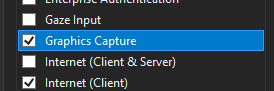
Windows.Graphics.Capture ad alanında bulunan API'ler, uygulamanızın manifestosunda genel bir yeteneğin bildirilmesi gerektiğini gerektirir.
- Çözüm Gezginiiçinde Package.appxmanifest dosyasını açın.
- Özellikleri sekmesini seçin.
- Grafik Yakalamadenetleyin.
Ekran yakalamayı başlatmak için sistem kullanıcı arabirimini başlatma
Sistem kullanıcı arabirimini başlatmadan önce, uygulamanızın şu anda ekran yakalamaları alıp alamayacağını kontrol edebilirsiniz. Cihazınızın donanım gereksinimlerini karşılamaması veya yakalama için hedeflenen uygulamanın ekran yakalamayı engellemesi dahil olmak üzere uygulamanızın ekran yakalamayı kullanamamasının çeşitli nedenleri vardır. UWP ekran yakalamanın desteklenip desteklenmediğini belirlemek için GraphicsCaptureSession sınıfında IsSupported yöntemini kullanın:
// This runs when the application starts.
public void OnInitialization()
{
    if (!GraphicsCaptureSession.IsSupported())
    {
        // Hide the capture UI if screen capture is not supported.
        CaptureButton.Visibility = Visibility.Collapsed;
    }
}
Public Sub OnInitialization()
    If Not GraphicsCaptureSession.IsSupported Then
        CaptureButton.Visibility = Visibility.Collapsed
    End If
End Sub
Ekran yakalamanın desteklendiğini doğruladıktan sonra, sistem seçici kullanıcı arabirimini çağırmak için GraphicsCapturePicker sınıfını kullanın. Son kullanıcı bu kullanıcı arabirimini, ekran yakalamaları alacak olan görüntüleme veya uygulama penceresini seçmek için kullanır. Seçici, bir GraphicsCaptureItem döndürecek ve bu da bir GraphicsCaptureSessionoluşturmak için kullanılacaktır:
public async Task StartCaptureAsync()
{
    // The GraphicsCapturePicker follows the same pattern the
    // file pickers do.
    var picker = new GraphicsCapturePicker();
    GraphicsCaptureItem item = await picker.PickSingleItemAsync();

    // The item may be null if the user dismissed the
    // control without making a selection or hit Cancel.
    if (item != null)
    {
        // We'll define this method later in the document.
        StartCaptureInternal(item);
    }
}
Public Async Function StartCaptureAsync() As Task
    ' The GraphicsCapturePicker follows the same pattern the
    ' file pickers do.
    Dim picker As New GraphicsCapturePicker
    Dim item As GraphicsCaptureItem = Await picker.PickSingleItemAsync()

    ' The item may be null if the user dismissed the
    ' control without making a selection or hit Cancel.
    If item IsNot Nothing Then
        StartCaptureInternal(item)
    End If
End Function
Bu kullanıcı arabirimi kodu olduğundan, kullanıcı arabirimi iş parçacığında çağrılması gerekir. Uygulamanızın bir sayfası (MainPage.xaml.csgibi) için kod arka planından çağırıyorsanız, bu sizin için otomatik olarak yapılır, ancak aksi takdirde, aşağıdaki kodla UI iş parçacığında çalışmaya zorlayabilirsiniz.
CoreWindow window = CoreApplication.MainView.CoreWindow;

await window.Dispatcher.RunAsync(CoreDispatcherPriority.Normal, async () =>
{
    await StartCaptureAsync();
});
Dim window As CoreWindow = CoreApplication.MainView.CoreWindow
Await window.Dispatcher.RunAsync(CoreDispatcherPriority.Normal,
                                 Async Sub() Await StartCaptureAsync())
Yakalama çerçevesi havuzu oluştur ve yakalama oturumu başlat
GraphicsCaptureItem kullanarak D3D cihazınız, desteklenen piksel biçimi (DXGI_FORMAT_B8G8R8A8_UNORM), istenen kare sayısı (herhangi bir tamsayı olabilir) ve çerçeve boyutu ile bir Direct3D11CaptureFramePool oluşturacaksınız. GraphicsCaptureItem sınıfının ContentSize özelliği, çerçevenizin boyutu olarak kullanılabilir:
Uyarı
Windows HD rengi etkinleştirilmiş sistemlerde içerik pikseli biçiminin DXGI_FORMAT_B8G8R8A8_UNORM olması gerekmeyebilir. HDR içeriği yakalarken piksel aşırı kırpılmasını önlemek için (yakalanan içerik solgun görünüyor), Direct3D11CaptureFramePooldahil olmak üzere yakalama işlem hattındaki her bileşen için DXGI_FORMAT_R16G16B16A16_FLOAT formatını kullanmayı düşünün. Hedef varış noktası olarak CanvasBitmapgibi bir hedef kullanabilirsiniz. ihtiyaca bağlı olarak, HDR içerik biçimine kaydetme veya HDR-SDR ton eşlemesi gibi ek işlemler gerekebilir. Bu makale SDR içerik yakalamaya odaklanacaktır. Daha fazla bilgi için bkz. Yüksek Dinamik Aralıklı Monitörlerde ve Gelişmiş Renkte DirectX Kullanımı.
private GraphicsCaptureItem _item;
private Direct3D11CaptureFramePool _framePool;
private CanvasDevice _canvasDevice;
private GraphicsCaptureSession _session;

public void StartCaptureInternal(GraphicsCaptureItem item)
{
    _item = item;

    _framePool = Direct3D11CaptureFramePool.Create(
        _canvasDevice, // D3D device
        DirectXPixelFormat.B8G8R8A8UIntNormalized, // Pixel format
        2, // Number of frames
        _item.Size); // Size of the buffers
}
WithEvents CaptureItem As GraphicsCaptureItem
WithEvents FramePool As Direct3D11CaptureFramePool
Private _canvasDevice As CanvasDevice
Private _session As GraphicsCaptureSession

Private Sub StartCaptureInternal(item As GraphicsCaptureItem)
    CaptureItem = item

    FramePool = Direct3D11CaptureFramePool.Create(
        _canvasDevice, ' D3D device
        DirectXPixelFormat.B8G8R8A8UIntNormalized, ' Pixel format
        2, '  Number of frames
        CaptureItem.Size) ' Size of the buffers
End Sub
Ardından, GraphicsCaptureItem öğesini CreateCaptureSession yöntemine geçirerek, Direct3D11CaptureFramePool için GraphicsCaptureSession sınıfının bir örneğini edinin.
_session = _framePool.CreateCaptureSession(_item);
_session = FramePool.CreateCaptureSession(CaptureItem)
Kullanıcı bir uygulama penceresini yakalamaya veya sistem kullanıcı arabiriminde görüntülemeye açıkça izin verdikten sonra , GraphicsCaptureItem birden çok CaptureSession nesnesiyle ilişkilendirilebilir. Bu şekilde uygulamanız çeşitli deneyimler için aynı öğeyi yakalamayı seçebilir.
Aynı anda birden çok öğe yakalamak için, uygulamanızın yakalanacak her öğe için bir yakalama oturumu oluşturması gerekir. Bu, yakalanacak her öğe için seçici kullanıcı arabiriminin çağrılması gerekir.
Yakalama çerçeveleri alma
Çerçeve havuzunuz ve yakalama oturumunuz oluşturulduktan sonra, sistemi uygulamanıza yakalama kareleri göndermeye başlamasını bildirmek için GraphicsCaptureSession örneğinizdeki StartCapture yöntemini çağırın:
_session.StartCapture();
_session.StartCapture()
Direct3D11CaptureFrame nesneleri
_framePool.FrameArrived += (s, a) =>
{
    // The FrameArrived event fires for every frame on the thread that
    // created the Direct3D11CaptureFramePool. This means we don't have to
    // do a null-check here, as we know we're the only one
    // dequeueing frames in our application.

    // NOTE: Disposing the frame retires it and returns
    // the buffer to the pool.
    using (var frame = _framePool.TryGetNextFrame())
    {
        // We'll define this method later in the document.
        ProcessFrame(frame);
    }
};
Private Sub FramePool_FrameArrived(sender As Direct3D11CaptureFramePool, args As Object) Handles FramePool.FrameArrived
    ' The FrameArrived event is raised for every frame on the thread
    ' that created the Direct3D11CaptureFramePool. This means we
    ' don't have to do a null-check here, as we know we're the only
    ' one dequeueing frames in our application.

    ' NOTE Disposing the frame retires it And returns
    ' the buffer to the pool.

    Using frame = FramePool.TryGetNextFrame()
        ProcessFrame(frame)
    End Using
End Sub
FrameArrivediçin mümkünse UI iş parçacığını kullanmaktan kaçınmanızı öneririz, çünkü bu olay her yeni çerçeve kullanılabilir olduğunda tetiklenir, bu da sık sık meydana gelir. Kullanıcı Arayüzü iş parçacığında FrameArrived dinlemeyi tercih ederseniz, olay her tetiklendiğinde ne kadar iş yaptığınıza dikkat edin.
Alternatif olarak, ihtiyacınız olan tüm çerçeveleri elde edene kadar Direct3D11CaptureFramePool.TryGetNextFrame yöntemiyle çerçeveleri el ile çekebilirsiniz.
Direct3D11CaptureFrame nesnesi, ContentSize, Surfaceve SystemRelativeTimeözelliklerini içerir. SystemRelativeTime, diğer medya öğelerini eşitlemek için kullanılabilecek QPC (QueryPerformanceCounter) zamanıdır.
Süreç yakalama kareleri
Uygulamalar Direct3D11CaptureFrame nesnelerine ya da çerçeve geri verildikten sonra temel alınan Direct3D yüzeyine başvurularını kaydetmemelidir.
Bir çerçeve işlenirken, uygulamaların
Oluşturulurken (veya yeniden oluşturulurken), temel Direct3D yüzeyi her zaman belirtilen boyutta olacaktır, Direct3D11CaptureFramePool . İçerik çerçeveden büyükse, içerik çerçevenin boyutuna kırpılır. İçerik çerçeveden küçükse, çerçevenin geri kalanı tanımlanmamış veriler içerir. Uygulamaların tanımlanmamış içerik göstermesini önlemek için bu Direct3D11CaptureFrame için ContentSize özelliğini kullanarak bir alt rect kopyalaması önerilir.
Ekran görüntüsü alma
Örneğimizde, her bir Direct3D11CaptureFrame'i, Win2D API'lerininbir parçası olan bir CanvasBitmap'e dönüştürüyoruz.
// Convert our D3D11 surface into a Win2D object.
CanvasBitmap canvasBitmap = CanvasBitmap.CreateFromDirect3D11Surface(
    _canvasDevice,
    frame.Surface);
CanvasBitmap'i aldıktan sonra bunu bir görüntü dosyası olarak kaydedebiliriz. Aşağıdaki örnekte, bunu kullanıcının Kaydedilmiş Resimler klasörüne PNG dosyası olarak kaydediyoruz.
StorageFolder pictureFolder = KnownFolders.SavedPictures;
StorageFile file = await pictureFolder.CreateFileAsync("test.png", CreationCollisionOption.ReplaceExisting);

using (var fileStream = await file.OpenAsync(FileAccessMode.ReadWrite))
{
    await canvasBitmap.SaveAsync(fileStream, CanvasBitmapFileFormat.Png, 1f);
}
** Öğenin yeniden boyutlandırılması veya cihaz kaybı durumunda tepki ver.
Yakalama işlemi sırasında, uygulamalar Direct3D11CaptureFramePoolözelliklerini değiştirmek isteyebilir. Bu, yeni bir Direct3D cihazı sağlamayı, çerçeve arabelleklerinin boyutunu değiştirmeyi ve hatta havuzdaki arabellek sayısını değiştirmeyi içerir. Bu senaryoların her birinde Direct3D11CaptureFramePool nesnesindeki Yeniden Oluşturma yöntemi önerilen araçtır.
Yeniden Oluştur çağrıldığında, var olan tüm çerçeveler atılır. Bu, artık erişimi olmadığı bir cihaza ait olan temel Direct3D yüzeyleri içeren çerçevelerin uygulama tarafından dağıtılmasını önlemek içindir. Bu nedenle, Yeniden Oluşturçağırmadan önce bekleyen tüm çerçeveleri işlemek akıllıca olabilir.
Hepsini bir araya getirmek
Aşağıdaki kod parçacığı, UWP uygulamasında ekran yakalamanın nasıl uygulaneceğini gösteren uçtan uca bir örnektir. Bu örnekte ön uçta iki düğme vardır: biri Button_ClickAsync, diğeri ScreenshotButton_ClickAsync çağırır.
Uyarı
Bu kod parçacığı, 2B grafik işleme için bir kitaplık olan Win2D'yi kullanır. Projeniz için nasıl ayarlanacağı hakkında bilgi için belgelerine bakın.
using Microsoft.Graphics.Canvas;
using Microsoft.Graphics.Canvas.UI.Composition;
using System;
using System.Numerics;
using System.Threading.Tasks;
using Windows.Foundation;
using Windows.Graphics;
using Windows.Graphics.Capture;
using Windows.Graphics.DirectX;
using Windows.Storage;
using Windows.UI;
using Windows.UI.Composition;
using Windows.UI.Xaml;
using Windows.UI.Xaml.Controls;
using Windows.UI.Xaml.Hosting;

namespace ScreenCaptureTest
{
    /// <summary>
    /// An empty page that can be used on its own or navigated to within a Frame.
    /// </summary>
    public sealed partial class MainPage : Page
    {
        // Capture API objects.
        private SizeInt32 _lastSize;
        private GraphicsCaptureItem _item;
        private Direct3D11CaptureFramePool _framePool;
        private GraphicsCaptureSession _session;

        // Non-API related members.
        private CanvasDevice _canvasDevice;
        private CompositionGraphicsDevice _compositionGraphicsDevice;
        private Compositor _compositor;
        private CompositionDrawingSurface _surface;
        private CanvasBitmap _currentFrame;
        private string _screenshotFilename = "test.png";

        public MainPage()
        {
            this.InitializeComponent();
            Setup();
        }

        private void Setup()
        {
            _canvasDevice = new CanvasDevice();

            _compositionGraphicsDevice = CanvasComposition.CreateCompositionGraphicsDevice(
                Window.Current.Compositor,
                _canvasDevice);

            _compositor = Window.Current.Compositor;

            _surface = _compositionGraphicsDevice.CreateDrawingSurface(
                new Size(400, 400),
                DirectXPixelFormat.B8G8R8A8UIntNormalized,
                DirectXAlphaMode.Premultiplied);    // This is the only value that currently works with
                                                    // the composition APIs.

            var visual = _compositor.CreateSpriteVisual();
            visual.RelativeSizeAdjustment = Vector2.One;
            var brush = _compositor.CreateSurfaceBrush(_surface);
            brush.HorizontalAlignmentRatio = 0.5f;
            brush.VerticalAlignmentRatio = 0.5f;
            brush.Stretch = CompositionStretch.Uniform;
            visual.Brush = brush;
            ElementCompositionPreview.SetElementChildVisual(this, visual);
        }

        public async Task StartCaptureAsync()
        {
            // The GraphicsCapturePicker follows the same pattern the
            // file pickers do.
            var picker = new GraphicsCapturePicker();
            GraphicsCaptureItem item = await picker.PickSingleItemAsync();

            // The item may be null if the user dismissed the
            // control without making a selection or hit Cancel.
            if (item != null)
            {
                StartCaptureInternal(item);
            }
        }

        private void StartCaptureInternal(GraphicsCaptureItem item)
        {
            // Stop the previous capture if we had one.
            StopCapture();

            _item = item;
            _lastSize = _item.Size;

            _framePool = Direct3D11CaptureFramePool.Create(
               _canvasDevice, // D3D device
               DirectXPixelFormat.B8G8R8A8UIntNormalized, // Pixel format
               2, // Number of frames
               _item.Size); // Size of the buffers

            _framePool.FrameArrived += (s, a) =>
            {
                // The FrameArrived event is raised for every frame on the thread
                // that created the Direct3D11CaptureFramePool. This means we
                // don't have to do a null-check here, as we know we're the only
                // one dequeueing frames in our application.

                // NOTE: Disposing the frame retires it and returns
                // the buffer to the pool.

                using (var frame = _framePool.TryGetNextFrame())
                {
                    ProcessFrame(frame);
                }
            };

            _item.Closed += (s, a) =>
            {
                StopCapture();
            };

            _session = _framePool.CreateCaptureSession(_item);
            _session.StartCapture();
        }

        public void StopCapture()
        {
            _session?.Dispose();
            _framePool?.Dispose();
            _item = null;
            _session = null;
            _framePool = null;
        }

        private void ProcessFrame(Direct3D11CaptureFrame frame)
        {
            // Resize and device-lost leverage the same function on the
            // Direct3D11CaptureFramePool. Refactoring it this way avoids
            // throwing in the catch block below (device creation could always
            // fail) along with ensuring that resize completes successfully and
            // isn’t vulnerable to device-lost.
            bool needsReset = false;
            bool recreateDevice = false;

            if ((frame.ContentSize.Width != _lastSize.Width) ||
                (frame.ContentSize.Height != _lastSize.Height))
            {
                needsReset = true;
                _lastSize = frame.ContentSize;
            }

            try
            {
                // Take the D3D11 surface and draw it into a
                // Composition surface.

                // Convert our D3D11 surface into a Win2D object.
                CanvasBitmap canvasBitmap = CanvasBitmap.CreateFromDirect3D11Surface(
                    _canvasDevice,
                    frame.Surface);

                _currentFrame = canvasBitmap;

                // Helper that handles the drawing for us.
                FillSurfaceWithBitmap(canvasBitmap);
            }

            // This is the device-lost convention for Win2D.
            catch (Exception e) when (_canvasDevice.IsDeviceLost(e.HResult))
            {
                // We lost our graphics device. Recreate it and reset
                // our Direct3D11CaptureFramePool.
                needsReset = true;
                recreateDevice = true;
            }

            if (needsReset)
            {
                ResetFramePool(frame.ContentSize, recreateDevice);
            }
        }

        private void FillSurfaceWithBitmap(CanvasBitmap canvasBitmap)
        {
            CanvasComposition.Resize(_surface, canvasBitmap.Size);

            using (var session = CanvasComposition.CreateDrawingSession(_surface))
            {
                session.Clear(Colors.Transparent);
                session.DrawImage(canvasBitmap);
            }
        }

        private void ResetFramePool(SizeInt32 size, bool recreateDevice)
        {
            do
            {
                try
                {
                    if (recreateDevice)
                    {
                        _canvasDevice = new CanvasDevice();
                    }

                    _framePool.Recreate(
                        _canvasDevice,
                        DirectXPixelFormat.B8G8R8A8UIntNormalized,
                        2,
                        size);
                }
                // This is the device-lost convention for Win2D.
                catch (Exception e) when (_canvasDevice.IsDeviceLost(e.HResult))
                {
                    _canvasDevice = null;
                    recreateDevice = true;
                }
            } while (_canvasDevice == null);
        }

        private async void Button_ClickAsync(object sender, RoutedEventArgs e)
        {
            await StartCaptureAsync();
        }

        private async void ScreenshotButton_ClickAsync(object sender, RoutedEventArgs e)
        {
            await SaveImageAsync(_screenshotFilename, _currentFrame);
        }

        private async Task SaveImageAsync(string filename, CanvasBitmap frame)
        {
            StorageFolder pictureFolder = KnownFolders.SavedPictures;

            StorageFile file = await pictureFolder.CreateFileAsync(
                filename,
                CreationCollisionOption.ReplaceExisting);

            using (var fileStream = await file.OpenAsync(FileAccessMode.ReadWrite))
            {
                await frame.SaveAsync(fileStream, CanvasBitmapFileFormat.Png, 1f);
            }
        }
    }
}
Imports System.Numerics
Imports Microsoft.Graphics.Canvas
Imports Microsoft.Graphics.Canvas.UI.Composition
Imports Windows.Graphics
Imports Windows.Graphics.Capture
Imports Windows.Graphics.DirectX
Imports Windows.UI
Imports Windows.UI.Composition
Imports Windows.UI.Xaml.Hosting

Partial Public NotInheritable Class MainPage
    Inherits Page

    ' Capture API objects.
    WithEvents CaptureItem As GraphicsCaptureItem
    WithEvents FramePool As Direct3D11CaptureFramePool

    Private _lastSize As SizeInt32
    Private _session As GraphicsCaptureSession

    ' Non-API related members.
    Private _canvasDevice As CanvasDevice
    Private _compositionGraphicsDevice As CompositionGraphicsDevice
    Private _compositor As Compositor
    Private _surface As CompositionDrawingSurface

    Sub New()
        InitializeComponent()
        Setup()
    End Sub

    Private Sub Setup()
        _canvasDevice = New CanvasDevice()
        _compositionGraphicsDevice = CanvasComposition.CreateCompositionGraphicsDevice(Window.Current.Compositor, _canvasDevice)
        _compositor = Window.Current.Compositor
        _surface = _compositionGraphicsDevice.CreateDrawingSurface(
            New Size(400, 400), DirectXPixelFormat.B8G8R8A8UIntNormalized, DirectXAlphaMode.Premultiplied)
        Dim visual = _compositor.CreateSpriteVisual()
        visual.RelativeSizeAdjustment = Vector2.One
        Dim brush = _compositor.CreateSurfaceBrush(_surface)
        brush.HorizontalAlignmentRatio = 0.5F
        brush.VerticalAlignmentRatio = 0.5F
        brush.Stretch = CompositionStretch.Uniform
        visual.Brush = brush
        ElementCompositionPreview.SetElementChildVisual(Me, visual)
    End Sub

    Public Async Function StartCaptureAsync() As Task
        ' The GraphicsCapturePicker follows the same pattern the
        ' file pickers do.
        Dim picker As New GraphicsCapturePicker
        Dim item As GraphicsCaptureItem = Await picker.PickSingleItemAsync()

        ' The item may be null if the user dismissed the
        ' control without making a selection or hit Cancel.
        If item IsNot Nothing Then
            StartCaptureInternal(item)
        End If
    End Function

    Private Sub StartCaptureInternal(item As GraphicsCaptureItem)
        ' Stop the previous capture if we had one.
        StopCapture()

        CaptureItem = item
        _lastSize = CaptureItem.Size

        FramePool = Direct3D11CaptureFramePool.Create(
            _canvasDevice, ' D3D device
            DirectXPixelFormat.B8G8R8A8UIntNormalized, ' Pixel format
            2, '  Number of frames
            CaptureItem.Size) ' Size of the buffers

        _session = FramePool.CreateCaptureSession(CaptureItem)
        _session.StartCapture()
    End Sub

    Private Sub FramePool_FrameArrived(sender As Direct3D11CaptureFramePool, args As Object) Handles FramePool.FrameArrived
        ' The FrameArrived event is raised for every frame on the thread
        ' that created the Direct3D11CaptureFramePool. This means we
        ' don't have to do a null-check here, as we know we're the only
        ' one dequeueing frames in our application.

        ' NOTE Disposing the frame retires it And returns
        ' the buffer to the pool.

        Using frame = FramePool.TryGetNextFrame()
            ProcessFrame(frame)
        End Using
    End Sub

    Private Sub CaptureItem_Closed(sender As GraphicsCaptureItem, args As Object) Handles CaptureItem.Closed
        StopCapture()
    End Sub

    Public Sub StopCapture()
        _session?.Dispose()
        FramePool?.Dispose()
        CaptureItem = Nothing
        _session = Nothing
        FramePool = Nothing
    End Sub

    Private Sub ProcessFrame(frame As Direct3D11CaptureFrame)
        ' Resize and device-lost leverage the same function on the
        ' Direct3D11CaptureFramePool. Refactoring it this way avoids
        ' throwing in the catch block below (device creation could always
        ' fail) along with ensuring that resize completes successfully And
        ' isn't vulnerable to device-lost.

        Dim needsReset As Boolean = False
        Dim recreateDevice As Boolean = False

        If (frame.ContentSize.Width <> _lastSize.Width) OrElse
            (frame.ContentSize.Height <> _lastSize.Height) Then
            needsReset = True
            _lastSize = frame.ContentSize
        End If

        Try
            ' Take the D3D11 surface and draw it into a
            ' Composition surface.

            ' Convert our D3D11 surface into a Win2D object.
            Dim bitmap = CanvasBitmap.CreateFromDirect3D11Surface(
                _canvasDevice,
                frame.Surface)

            ' Helper that handles the drawing for us.
            FillSurfaceWithBitmap(bitmap)
            ' This is the device-lost convention for Win2D.
        Catch e As Exception When _canvasDevice.IsDeviceLost(e.HResult)
            ' We lost our graphics device. Recreate it and reset
            ' our Direct3D11CaptureFramePool.
            needsReset = True
            recreateDevice = True
        End Try

        If needsReset Then
            ResetFramePool(frame.ContentSize, recreateDevice)
        End If
    End Sub

    Private Sub FillSurfaceWithBitmap(canvasBitmap As CanvasBitmap)
        CanvasComposition.Resize(_surface, canvasBitmap.Size)

        Using session = CanvasComposition.CreateDrawingSession(_surface)
            session.Clear(Colors.Transparent)
            session.DrawImage(canvasBitmap)
        End Using
    End Sub

    Private Sub ResetFramePool(size As SizeInt32, recreateDevice As Boolean)
        Do
            Try
                If recreateDevice Then
                    _canvasDevice = New CanvasDevice()
                End If
                FramePool.Recreate(_canvasDevice, DirectXPixelFormat.B8G8R8A8UIntNormalized, 2, size)
                ' This is the device-lost convention for Win2D.
            Catch e As Exception When _canvasDevice.IsDeviceLost(e.HResult)
                _canvasDevice = Nothing
                recreateDevice = True
            End Try
        Loop While _canvasDevice Is Nothing
    End Sub

    Private Async Sub Button_ClickAsync(sender As Object, e As RoutedEventArgs) Handles CaptureButton.Click
        Await StartCaptureAsync()
    End Sub

End Class
Video kaydetme
Uygulamanızın bir videosunu kaydetmek istiyorsanız, Ekran yakalamamakalesinde sunulan kılavuzu takip edebilirsiniz. Alternatif olarak , Windows.Media.AppRecording ad alanını da kullanabilirsiniz. Bu, Masaüstü uzantısı SDK'sının bir parçasıdır, bu nedenle yalnızca Windows masaüstlerinde çalışır ve projenizden buna bir başvuru eklemeniz gerekir. Daha fazla bilgi için uzantı SDK'ları ile Programlama bölümüne bakın.
Ayrıca bakınız
- Windows.Graphics.Capture İsim Alanı
- Ekran yakalamayı videoya dönüştürme