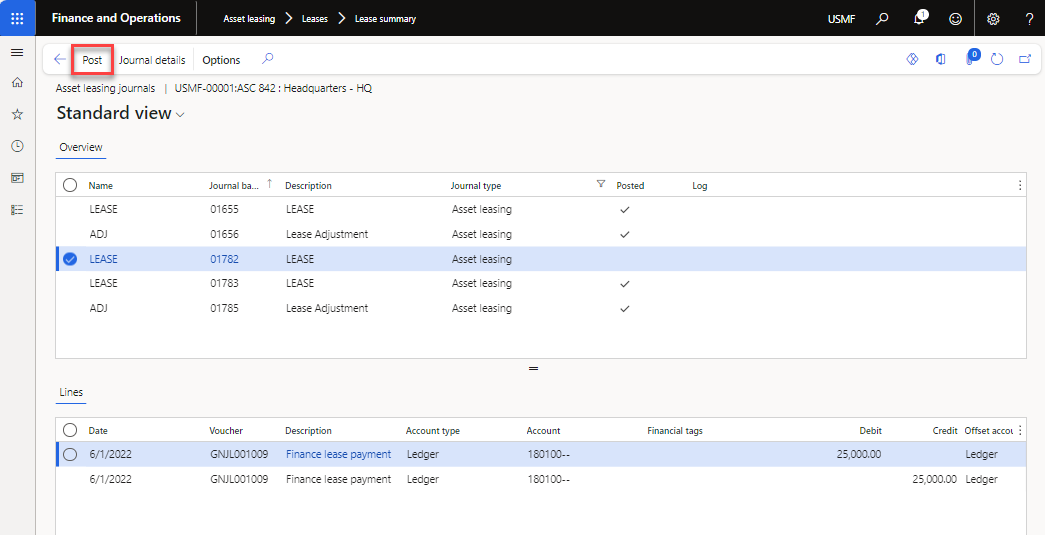
Asset leasing journal
All journal entries that are created in Asset leasing are in the Asset leasing journal.
Use the Asset leasing > Journal entries > Asset leasing journals page to filter journals by posting status, view journal entries and vouchers, and post unposted journals. Journals can be posted manually or generated and posted through Asset leasing > Periodic > Batch journal creation.
Use the Asset leasing journals page to create and post journals. Journal lines contain several fields that can be edited before posting.
You can enter values in fields such as Invoice number, Description, Date, Sales tax group, and Item sales tax group. The Description field is required. The journal can't be posted without a description.
Some fields can't be edited. These restrictions help maintain data accuracy and prevent inconsistencies. Examples include Account, Amounts, Financial dimensions, Currency, and Transaction type. You also can't add or delete journal lines because doing so could create differences between schedules and transactions. Some examples of the fields that cannot be edited include the Account, Amounts, Financial dimensions, Currency, and Transaction type fields. Additionally, you can't add or delete journal entry lines in any Asset leasing journal entry, because that action might cause variances between the schedules and the transactions.
Initial recognition journal
Initial recognition records the calculated present value of a leased asset on the balance sheet. The transaction debits the right-of-use asset account and credits the operating lease liability account.
Create and post the Initial recognition journal before recording any lease transactions. Create the journal with the following steps.
- Go to Asset leasing > Leases > Lease summary and select the correct lease.
- Select the Books link in the Action Pane.
- Select the correct Book > Function > Initial recognition. You will receive a message that the journal is created.
- Select Journals > Asset leasing journals.
- Review the details of the journal.
- If the journal is correct, select Post in the Action Pane.