Note
Access to this page requires authorization. You can try signing in or changing directories.
Access to this page requires authorization. You can try changing directories.
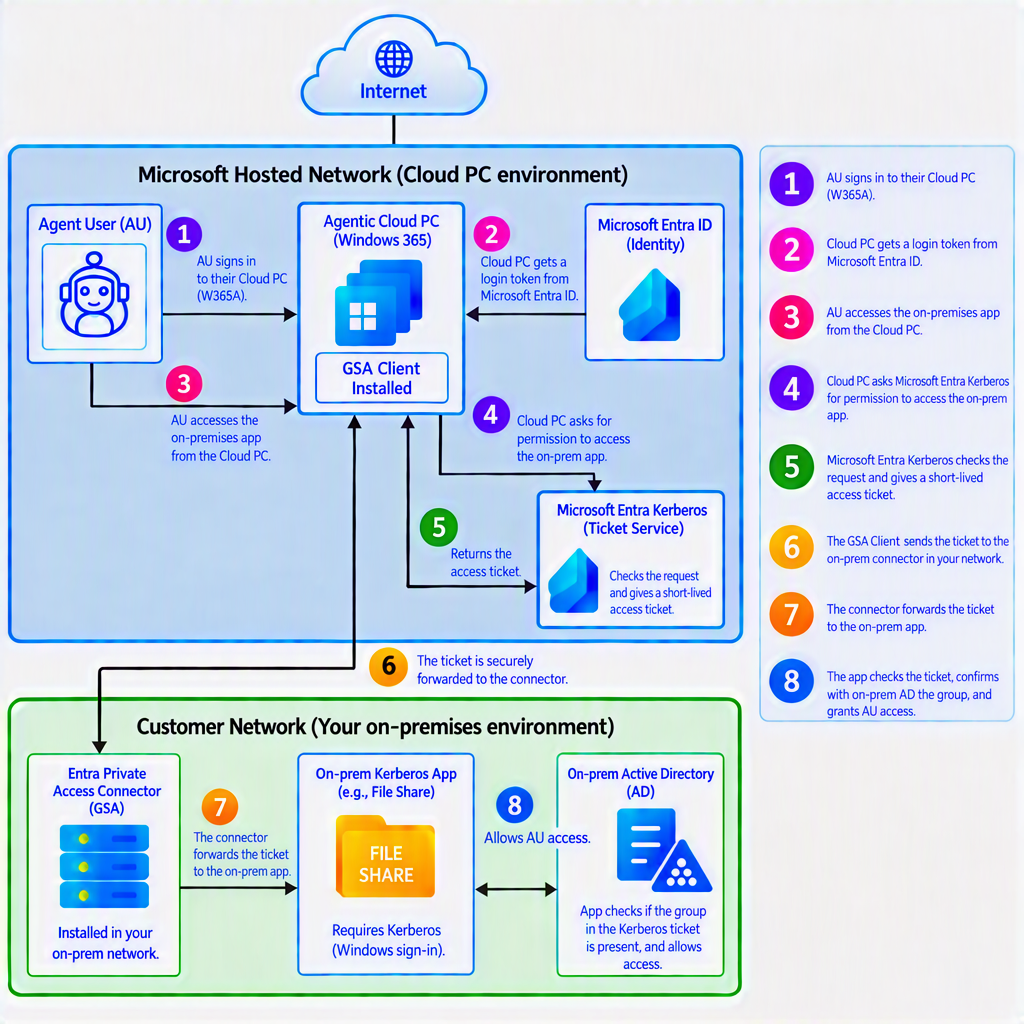
Many organizations rely on applications and data hosted on their private networks. Some applications don’t offer APIs that agents can use and instead require interaction through a browser. Agents running on Windows 365 for Agents Cloud PCs can use Global Secure Access to reach supported private applications and complete workflows involving on-premises resources. For example, an agent can retrieve information from an internal application or enter data into a line-of-business application.
How on-premises access works?
An agent needs both a network path to the resource and permission to use it.
Network access: Microsoft Entra Private Access provides a path from the Cloud PC to a configured private application. The Global Secure Access client on the Cloud PC routes the application’s traffic through that path.
Authentication and authorization: For resources or applications that use Kerberos based authentication, Microsoft Entra Kerberos lets the agent user authenticate with its Microsoft Entra identity. The resource then uses its existing access controls and the agent user’s authorized group membership to determine what the agent can access. How on-premises access works?
An agent needs both a network path to the resource and permission to use it.
Network access: Microsoft Entra Private Access provides a path from the Cloud PC to a configured private application. The Global Secure Access client on the Cloud PC routes the application’s traffic through that path.
Authentication and authorization: For resources or applications that use Kerberos based authentication, Microsoft Entra Kerberos lets the agent user authenticate with its Microsoft Entra identity. The resource then uses its existing access controls and the agent user’s authorized group membership to determine what the agent can access.
Security considerations
Limit network access. Configure access only to the applications, servers, and ports the agent needs. For sensitive resources, consider a dedicated Private Access application instead of broad Quick Access coverage.
Grant only the permissions needed. Assigning access to a private application creates a network path; the on-premises resource still enforces its own permissions. Review agent users’ group memberships as their responsibilities change.
Apply access policies where supported. For applications configured for per-application access, use Microsoft Entra Conditional Access to govern access to the network path. These policies complement the resource’s authentication and authorization checks.
Review activity across systems. When investigating access, review Microsoft Entra sign-in activity, Private Access activity, and the resource’s audit logs. Check what each application logs before relying on those records for action-level attribution.
Before you begin
Prerequisites to review for your environment:
W365 for agents licensing - Pricing for Windows 365 for Agents | Microsoft Learn
Entra and Global Secure Access licensing - Microsoft Entra Pricing | Microsoft Security
More pre-requisites
Set up agent access to an on-premises application
Set up Windows 365 for Agents: Create the Cloud PC pool and provisioning policy that the agents use - Create a provisioning policy for Windows 365 for Agents | Microsoft Learn.
- Set up the network path: Ensures that the agent can securely reach your on-prem network.
-
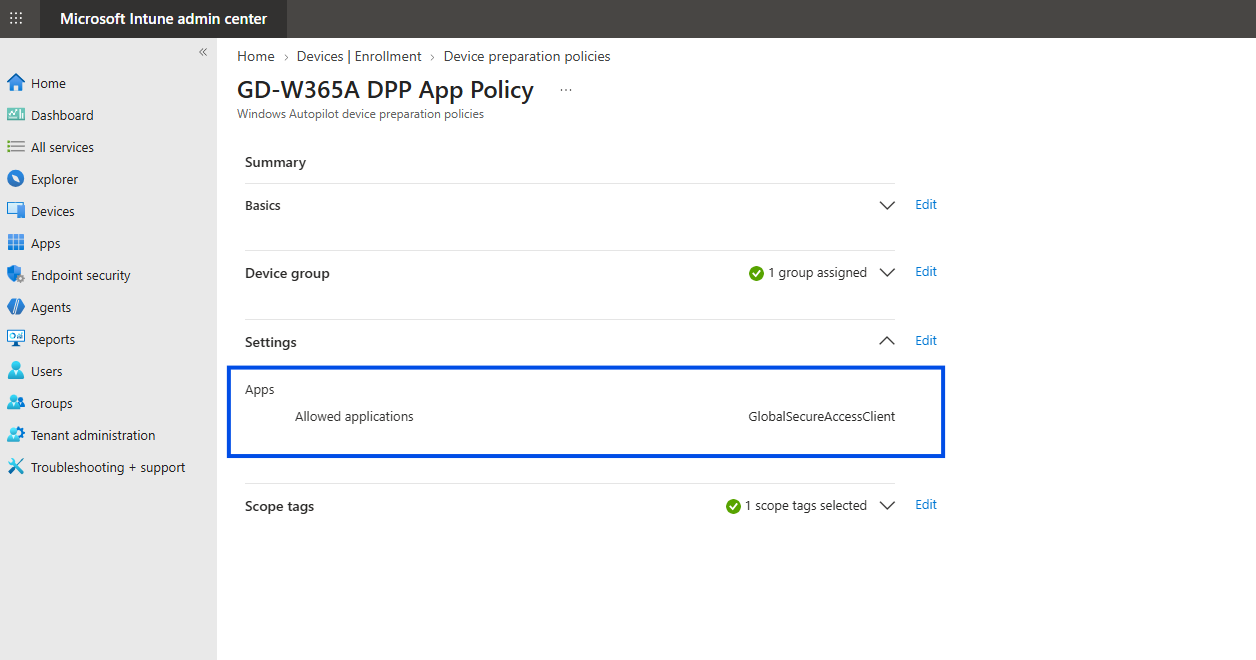
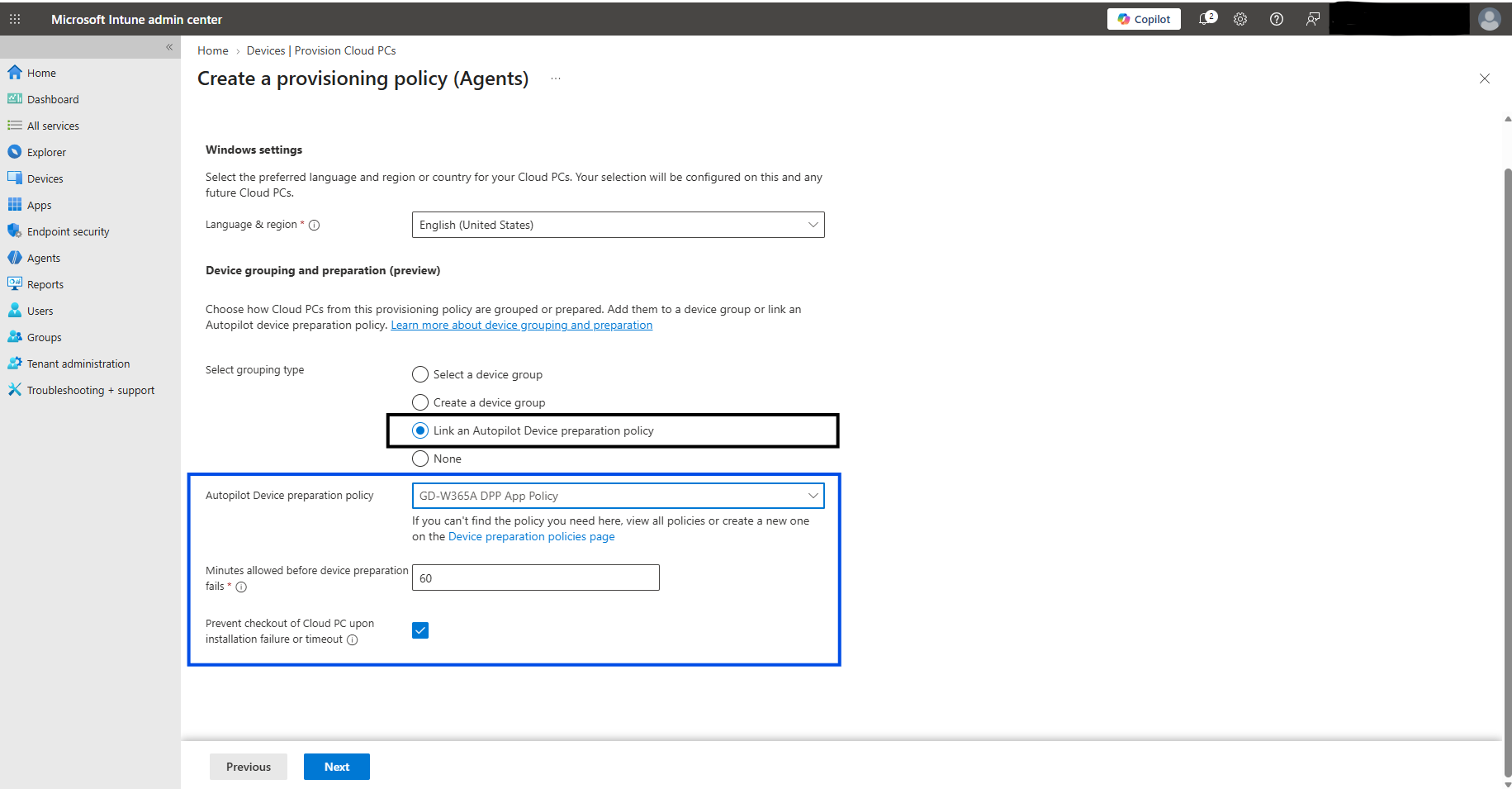
Deploy & Install the Global Secure Access client: Install and configure the client on the Cloud PC. You can use an Autopilot device preparation policy for a Cloud PC agent pool to install it during provisioning. Keep Prevent connection to Cloud PC upon installation failure or time-out selected so an agent can check out a Cloud PC only after the required installation succeeds.
Autopilot device preparation policy with GSA Client included:
Provisioning policy for W365 for agents with Autopilot device preparation policy selected:
Configure Microsoft Entra Private Access
- Enable the Private Access traffic forwarding profile. For more information, see Manage the Private Access traffic forwarding profile.
- Create a connector group, install a Private Network connector, and confirm that the connector is active.
- Configure a Quick Access application with an application segment for the resource's FQDN and required ports. For an SMB file share, include the file server and TCP port 445. For more information, see Configure Quick Access.
- Assign the required users or groups to the Quick Access application. This assignment controls network access and is separate from assigning the authorization group to the Kerberos resource application in step 3.
Configure the Windows Client: Configure the Windows client to use Microsoft Entra Kerberos when connecting to your on-premises application.
Prepare your on-premises environment: Start with the application or resource you want the agent to use. Check how your organization currently grants access, then make sure the appropriate security group has permission to use it. This lets the application continue to use its existing access controls.
Configure Microsoft Entra Kerberos configuration for an on-premises resource: Set up Microsoft Entra Kerberos to recognize your on-premises application and the groups that control access to it. This allows cloud-only users and agent users to sign in with their Microsoft Entra identities, while the application continues to decide what they can access using its existing permissions. You’ll complete the connection
Prepare the resource and its access group: Check how the on-premises resource grants access and make sure the appropriate security group has permission to use it. Make the group available and manageable in Microsoft Entra ID, then add the agent for users who need access.
Synchronize the resource Kerberos key: Synchronize the resource sign-in key to Microsoft Entra ID. This allows Microsoft Entra Kerberos to provide sign-in information that the on-premises resource can recognize.
Verify application access: From the W365A Cloud PC, verify that the agent user can reach, authenticate to, and authorize the Kerberos based on-premises application.
Troubleshooting Steps
For Cloud PC troubleshooting -Troubleshooting Windows 365 | Microsoft Learn
For Entra Kerberos troubleshooting - Troubleshoot Microsoft Entra Kerberos
For Global Secure Access troubleshooting - Troubleshoot application access - Global Secure Access | Microsoft Learn, Troubleshoot problems installing the Microsoft Entra private network connector - Global Secure Access | Microsoft Learn