Note
Access to this page requires authorization. You can try signing in or changing directories.
Access to this page requires authorization. You can try changing directories.
Overview
Remote Desktop Protocol (RDP) Multipath improves session resiliency by establishing multiple transport paths between the Windows App and your Cloud PC. By continuously monitoring these paths and automatically transitioning traffic when network conditions change, RDP Multipath helps reduce session interruptions and maintain a more reliable remote desktop experience.
RDP Multipath provides the following benefits:
Improved session resiliency – Multiple transport paths help maintain connectivity during transient network issues and reduce the likelihood of session interruptions
Automatic path selection and failover – RDP Multipath continuously evaluates available transport paths and automatically uses the most reliable path.
Support for UDP and TCP connectivity scenarios – Users can benefit from RDP Multipath across a variety of network environments, including networks where UDP connectivity is restricted.
Seamless integration – No additional configuration is required beyond ensuring your environment meets the prerequisites and is configured to use RDP Shortpath.
RDP Multipath automatically maintains multiple transport paths between the Windows App and your Cloud PC. If the active transport path becomes unavailable or degraded, traffic can transition to an alternate path to help maintain session continuity. If all transport paths are lost, such as during a local network outage, the connection attempts to recover once network connectivity is restored.
Important
- If all paths fail example due to a local network outage, the system attempts to reconnect once connectivity is restored.
How does this work?
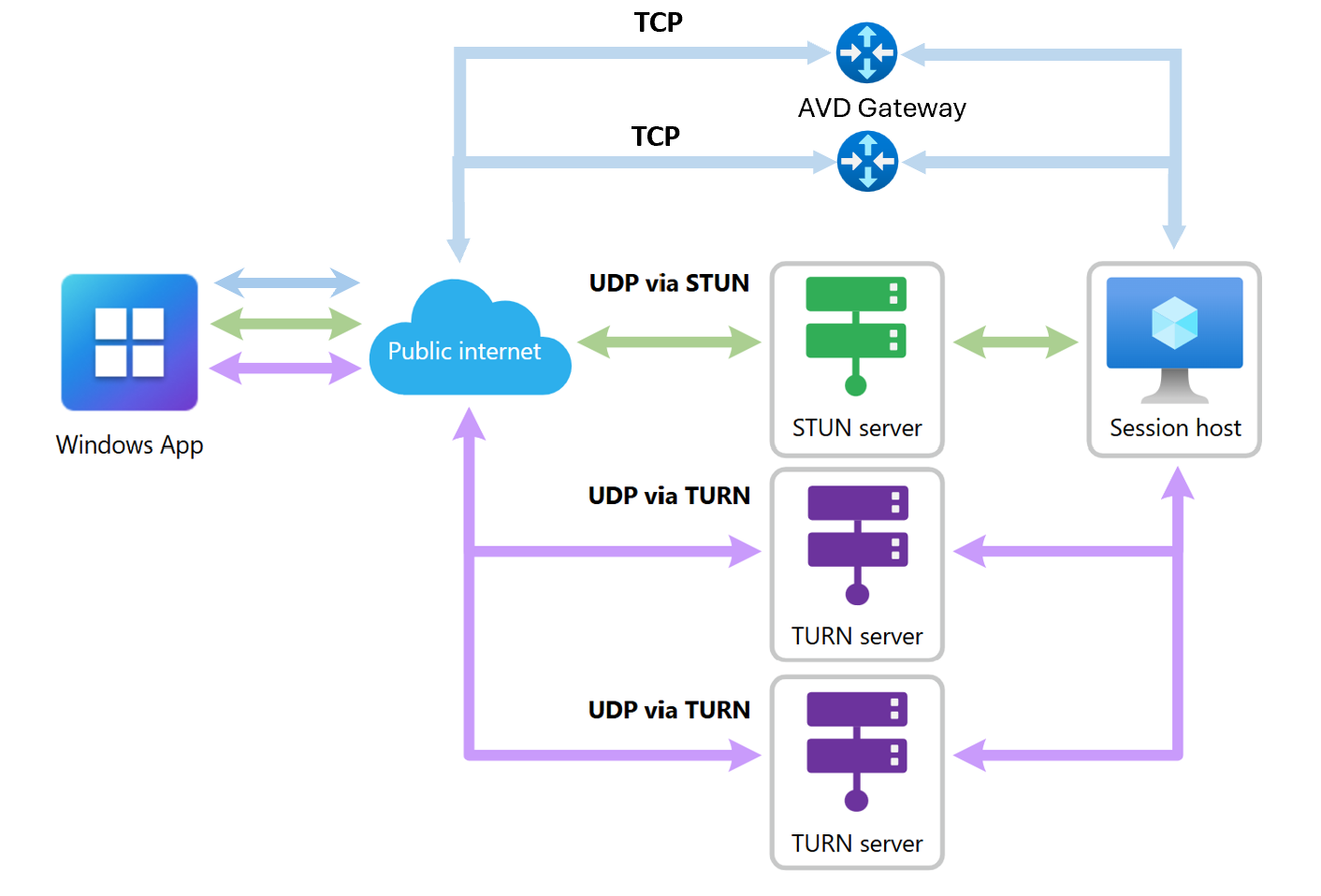
The following diagram illustrates how RDP Multipath works with Windows 365 cloud PC. In this user scenario, the primary active transport path is UDP via STUN, supplemented by redundant UDP connections through a TURN server.
When UDP‑based RDP Shortpath connectivity is available, UDP remains the preferred transport protocol for optimal performance and reliability. In addition to maintaining redundant UDP paths, Windows 365 Cloud PC can establish redundant TCP standby transport paths to improve overall session resiliency.
Availability
RDP Multipath is available for Windows 365 across the following Azure environments:
| Environment | Redundant UDP transport paths | Redundant TCP transport paths |
|---|---|---|
| Azure public cloud | Generally available | Generally available |
| Azure Government | Generally available | Generally available |
Requirements
RDP Multipath works automatically when the following prerequisites are met:
Microsoft recommends configuring RDP Shortpath as the primary transport protocol to maximize the resiliency benefits of RDP Multipath. For more information, see Configure RDP Shortpath.
Windows App for Windows:
Connections must be from a local Windows device using Windows App, version 2.0.559.0 or later, which is the minimum supported version for RDP Multipath. This version enables RDP Multipath with multiple UDP transport paths.
To take advantage of the latest RDP Multipath enhancements, including support for multiple UDP transport paths and redundant TCP transport paths, connections must use Windows App Version 2.0.1069.0 or later
Windows App for macOS Beta: RDP Multipath with multiple UDP transport paths is supported with Windows App for macOS Beta version 11.3.8 (3048).
Other platforms aren't currently supported.
Important
Microsoft recommends using Windows App version 2.0.1069.0 or later and configuring RDP Shortpath as the primary transport protocol for the best RDP Multipath experience. With Windows App version 2.0.559.0 or later, users benefit from RDP Multipath with multiple UDP transport paths. With Windows App version 2.0.1069.0 or later, users gain the additional resiliency benefits of redundant TCP transport paths. If UDP connectivity is unavailable or restricted by network policy, RDP Multipath can continue to provide resiliency through redundant TCP transport paths.
Required network endpoints
The required network endpoints vary by cloud environment. Select your environment to view the applicable IP ranges and port requirements.
| # | RDP method | FQDN | IP address | Protocol/port | Description |
|---|---|---|---|---|---|
| 1 | TCP-based RDP | *.wvd.microsoft.com |
40.64.144.0/20 |
TCP 443 | TCP-based RDP connection. The initial connection to every session host or Cloud PC uses this connection. |
| 2 | UDP-based RDP via TURN | N/A | 51.5.0.0/16 |
UDP 3478 | Relayed UDP-based RDP connection using TURN servers. This method works when direct connectivity isn't possible. |
| 3 | UDP-based RDP using STUN | N/A | 51.5.0.0/16 |
UDP 1024-65535 Default: 49152-65535 |
Direct one-to-one UDP connection between the user device and the session host or Cloud PC. |