Note
Access to this page requires authorization. You can try signing in or changing directories.
Access to this page requires authorization. You can try changing directories.
This article describes how Connected Cache nodes facilitate secure delivery of Microsoft content between Microsoft/CDN endpoints and Delivery Optimization clients.
How Connected Cache nodes facilitate secure content delivery
Connected Cache nodes act as transparent content caches, meaning any device can request Microsoft content from a Connected Cache node without needing to provide authentication of identity. This allows for efficient discovery and connectivity between devices and Connected Cache nodes on the same network.
Connected Cache nodes only download and store Microsoft content from provisioned Microsoft and Content Delivery Network (CDN) endpoints, so there are no concerns about the cache storing personal or sensitive data.
Connected Cache works in tandem with the Delivery Optimization (DO) client, a component of Windows that manages the downloading of Microsoft content. Regardless of download source, the DO client on each Windows device verifies the authenticity and integrity of downloaded content using its metadata hash and content hash. In addition, the downloaded content's signature is verified before it's installed. This process ensures that the Windows device is protected against man-in-the-middle attacks that attempt to tamper with content while it's in transit.
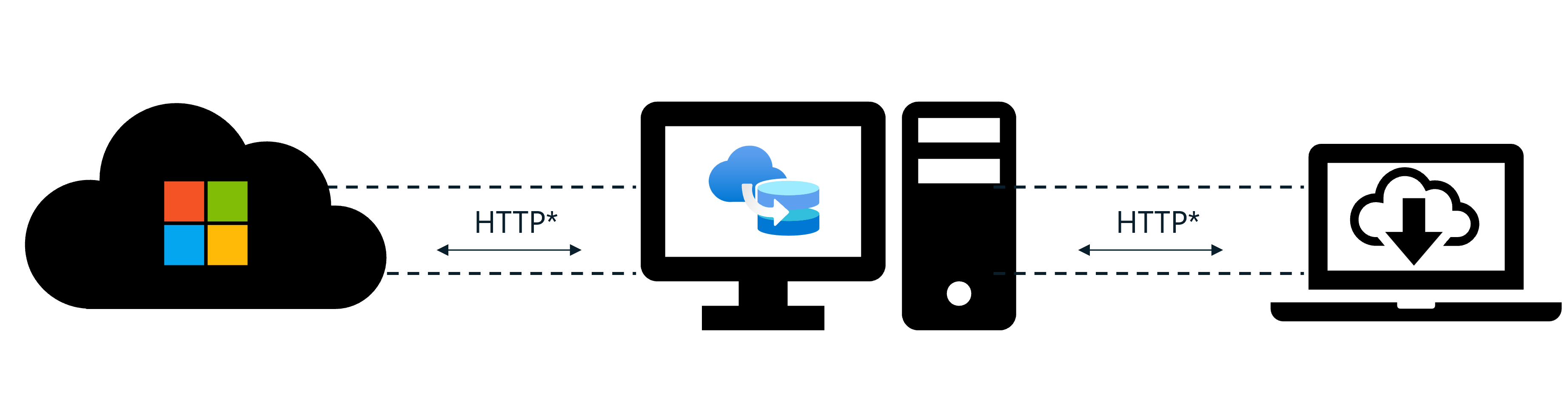
As shown in the diagram, Connected Cache nodes currently utilize HTTP to communicate with CDN endpoints and Delivery Optimization clients. There's work planned to support HTTPS communication between CDN endpoints, Connected Cache nodes, and Delivery Optimization clients in the future for content that utilizes HTTPS.
Security considerations for Connected Cache nodes
The security of each Connected Cache node is dependent on the security of its environment.
In order to securely function as designed, Connected Cache expects the user to take steps to secure the different components of their organization's network and devices.
The following section is intended to provide a high-level overview of some of the security aspects the user should consider and resources for learning more.
Azure resources
One aspect of security lies with the Azure resources that your Microsoft Connected Cache nodes communicate with. You should ensure that your organization's Azure tenant is using role-based access control (RBAC) to apply policies that enforce least-privilege access to the Azure resources for Connected Cache that you provision. Only trusted individuals should have the ability to perform create, read, update, and delete (CRUD) operations on your organization's Connected Cache Azure resources and cache nodes.
You can learn more about the principles of Azure resource security by referring to the Azure identity management and access control security best practices and the Microsoft cloud security benchmark (MCSB) documentation for Identity management.
Local network
Another aspect of security lies with your organization's local network. It's recommended that your organization adopts a Zero Trust approach to network security so that your organizational data is protected even if an attacker breaches your network perimeter.
One best practice is to utilize a firewall on your organization's network. When using a network firewall, you should configure it to allow communication between your Connected Cache nodes and the Microsoft and CDN endpoints used to install Connected Cache and download Microsoft content.
You can learn more about the principles of network security by referring to the Azure best practices for network security and the Microsoft cloud security benchmark (MCSB) documentation for Network security.
Cache node host machine OS
Another aspect of security lies with the operating system (OS) of your Connected Cache node's host machine. Your organization can choose to host Microsoft Connected Cache nodes on a compatible host OS of your choice.
Regardless of which host OS you choose to use, you should ensure that you perform regular OS updates to keep it up to date.
If you're hosting on Windows, your host machine uses Windows Subsystem for Linux (WSL) to run the Connected Cache container. You should ensure that your deployment of WSL meets the recommended Enterprise set up for WSL.
Organization-managed Windows devices
Another aspect of security lies with the organization-managed Windows devices that request Microsoft content from your Connected Cache nodes. The Windows devices that are connecting to the Connected Cache node should be secured according to your organization's security policy.
Frequently asked questions
Here are some common questions you might have about the security of Microsoft Connected Cache for Enterprise and Education.
How often is the Connected Cache container updated?
There might be several Connected Cache container updates per year. These updates may contain new features, bug fixes, and security patches. When a new Common Vulnerability and Exposure (CVE) is identified, Microsoft may release a new container update to address the vulnerability.
For more information about Connected Cache container updates and how to schedule their installation, see Update Microsoft Connected Cache for Enterprise and Education.
What security improvements are included in the latest Connected Cache container update?
You can find a list of security improvements and other fixes in the Connected Cache release notes.