Note
Access to this page requires authorization. You can try signing in or changing directories.
Access to this page requires authorization. You can try changing directories.
MSIX is the modern Windows app packaging format. It gives any Windows app a reliable, clean install and uninstall, automatic updates, and access to Windows platform features that require a package identity.
Package identity is the key concept. When your app is packaged as MSIX, Windows assigns it an identity based on manifest information such as its name, publisher, version, architecture, and resource identifier. That identity is required for:
- Windows platform APIs such as push notifications, background tasks, and live tiles
- AI features that use on-device models through the Windows AI APIs
- Store distribution and update channels
- Enterprise management through Intune and Configuration Manager
If you're not sure whether to package your app or which packaging model to use, start with the Packaging decision guide.
Key features
- Reliable install and uninstall. MSIX delivers a 99.96% install success rate across millions of installs and guarantees a clean uninstall with no leftover files or registry entries.
- Differential updates. Only changed 64 KB blocks are downloaded on update, minimizing network impact and update time.
- Disk space efficiency. Shared files across apps are managed by Windows; each app remains independent so updates don't affect other apps.
- Containerized execution. Apps run in a lightweight container with virtual file system and registry, and Windows virtualizes or redirects certain file system and registry writes to reduce system impact. See MSIX containerization overview.
- Enterprise-ready. Full support for deployment via Intune, Configuration Manager, and the Enterprise Modern App Management CSP.
Get started
| Goal | Start here |
|---|---|
| Package a new UWP app | Create an MSIX package from Visual Studio |
| Convert an existing installer to MSIX | MSIX Packaging Tool |
| Package and sign from the command line | WinApp CLI |
| Deliver updates without the Store | App Installer |
| Decide between packaged and unpackaged | Packaging decision guide |
| Understand package types | MSIX package types |
| Deploy to enterprise devices | Enterprise deployment overview |
Highlights
- WinApp CLI. The WinApp CLI provides command-line tools for the complete MSIX workflow: generating certificates, building packages, and signing without leaving the terminal.
- Package existing Windows apps. Use the MSIX Packaging Tool to create an MSIX package for any Windows app without access to source code.
- Apply runtime fixes. The Package Support Framework lets you apply compatibility fixes to packaged apps without modifying the source code.
- Cross-platform SDK. The open source MSIX SDK provides APIs to verify, validate, and unpack MSIX packages on any platform.
Inside an MSIX package
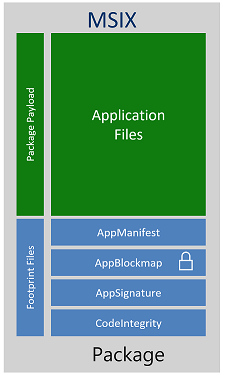
Payload files
Payload files are files stored in and delivered by the package, including executable code, libraries, assets, configuration files, and resources.
Footprint files
Footprint files are package metadata and infrastructure files that describe, validate, or support the payload. Core footprint files include:
- AppxManifest.xml declares the package identity, dependencies, capabilities, visual elements, and extension points.
- AppxBlockMap.xml lists package files with cryptographic hashes for each 64 KB block. Windows uses it for differential updates and integrity verification.
- AppxSignature.p7x contains the package signature. All MSIX packages must be signed before installation.
Other footprint files are present only when a package uses the corresponding feature. For example, AppxContentGroupMap.xml describes content groups for a streaming install, and AppxMetadata\CodeIntegrity.cat contains code-integrity metadata.
The Windows packaging APIs distinguish payload files from footprint files.
For package architecture and deployment behavior, see MSIX package types, Package storage volumes, and Package registration and lifetime.
Supported platforms
For a full list of supported platforms, see MSIX features and supported platforms.
Validation, testing, and troubleshooting
For testing and common errors, see the MSIX troubleshooting guide and MSIX validation and testing overview.
Benefits of app containers
Apps packaged with MSIX can be configured to run in a lightweight app container that isolates the process using file system and registry virtualization. For a full explanation of what the container changes and how to work with it, see MSIX containerization overview.