Note
Access to this page requires authorization. You can try signing in or changing directories.
Access to this page requires authorization. You can try changing directories.
Built-in System Monitor (Sysmon) is an optional Windows feature on Windows 11 and Windows Server 2025 that when enabled, remains resident across system reboots to monitor and log system activity to the Windows event log. It provides detailed information about process creation, network connection, and file creation time change events. By collecting its events through Windows Event Collection or a SIEM agent, you can better understand what the system is doing. These events help you detect malicious or unusual behavior and reveal how intruders or malware move and operate within your environment.
Sysmon doesn't analyze the events it generates, nor does it attempt to conceal its presence from attackers.
Sysmon capabilities
Sysmon includes the following capabilities:
Logs process creation with full command line for both current and parent processes.
Records the hash of process image files using SHA1 (the default), MD5, SHA256 or IMPHASH.
Multiple hashes can be used at the same time.
Includes a process GUID in process create events to allow for correlation of events even when Windows reuses process IDs.
Includes a session GUID in each event to allow correlation of events on same logon session.
Logs loading of drivers or DLLs with their signatures and hashes.
Logs when disks or volumes are opened with raw read access.
Optionally logs network connections, including each connection’s source process, IP addresses, port numbers, hostnames and port names.
Detects changes in file creation time to understand when a file was actually created. Modification of file create timestamps is a technique commonly used by malware to cover its tracks.
Automatically reload configuration if changed in the registry.
Rule filtering to include or exclude certain events dynamically.
Generates events from early in the boot process to capture activity made by even sophisticated kernel-mode malware.
These capabilities give security teams better context than default audit logs alone and improve detection of suspicious behaviors such as living-off-the-land execution, lateral movement, and malicious activity.
Usage
Some common usage examples featuring simple command-line options to install and uninstall Sysmon, as well as to check and modify its configuration:
Install:
sysmon -i [<configfile>]
Update configuration:
sysmon -c [<configfile>]
Install event manifest:
sysmon -m
Print schema:
sysmon -s
Uninstall:
sysmon -u [force]
Screenshots
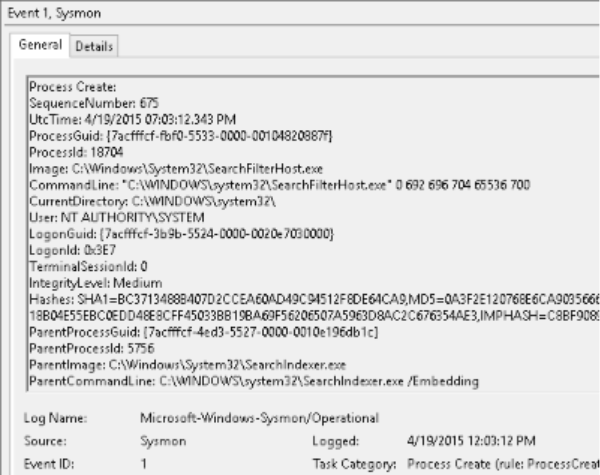
The following screenshot shows typical Sysmon telemetry in the built-in Windows Event Viewer:
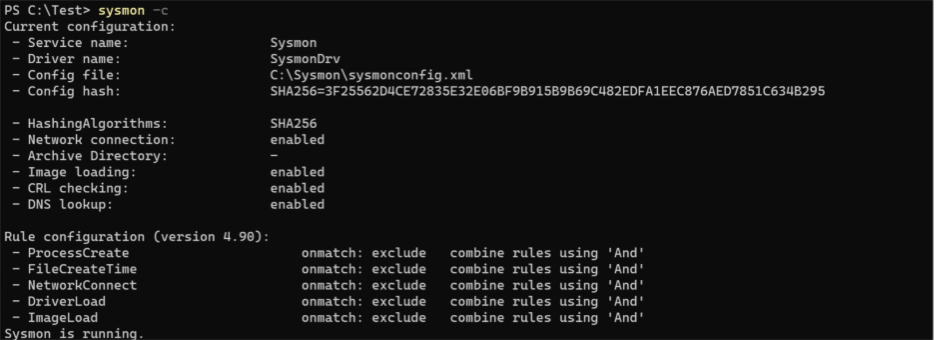
The following screenshot showcases Sysmon outputs when confirming the telemetry configuration:
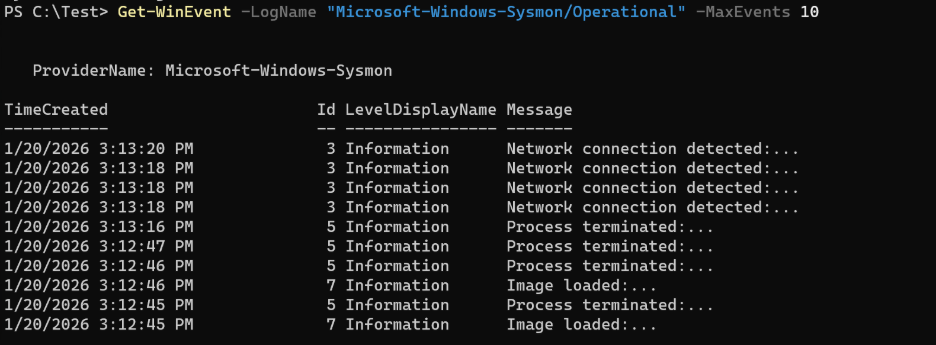
The following screenshot showcases Sysmon actively storing telemetry events:
Localized events
Built-in Sysmon events written to the Windows event log are localized, providing a consistent experience with other Windows system events and aligning with the language configured on the device. While the rendered event message (the display text shown in tools such as Event Viewer) is localized, the underlying XML event data is not localized and remains consistent across all languages. This XML representation can be used for reliable event collection, aggregation, and analysis across environments.
This behavior differs from standalone Sysmon and is important to consider when integrating built-in Sysmon with log collection pipelines, SIEM solutions, or custom event processing logic.
Note
If you currently collect or process Sysmon events using non-XML representations (such as rendered message text), you may need to update event processing scripts to account for localization on non-English systems.
Servicing and updates
Enhancements and non-security improvements to built-in Sysmon are delivered through the standard Windows quality update process, with changes first available in optional Windows preview updates and then broadly deployed in the next regularly scheduled Windows update. For more information, see Windows quality updates overview.
During these feature updates:
Built-in Sysmon binaries are updated whether or not Sysmon is currently enabled.
If built-in Sysmon is enabled, the transition to the updated binaries is seamless, existing configuration is preserved, and no system restart is required.
If built-in Sysmon isn't enabled, the update replaces the binaries but Sysmon remains disabled.
Feature updates to built-in Sysmon don't impact standalone Sysmon installations on the device. Coexistence between built-in Sysmon and standalone Sysmon isn't supported.
Testing and validation
Organizations should follow standard Windows update testing practices when adopting new built-in Sysmon features:
Evaluate optional preview updates in test or pilot environments.
Review Sysmon event output and behavior after updates.
Adjust Sysmon configuration as needed prior to broad deployment.
This approach allows teams to validate changes while maintaining alignment with their existing Windows update management processes.
Quality updates
If a critical security issue affecting built-in Sysmon is identified, the fix is delivered as part of the Monthly Security Update Release (Update Tuesday / B release).
Security updates are deployed broadly and don't require opt-in preview updates.
Updates apply regardless of whether built-in Sysmon is enabled, ensuring that Sysmon components remain protected.
Coexistence with Sysmon & Other Security Products
Built-in Sysmon is designed to operate as a native Windows capability and doesn't support coexistence with standalone Sysmon.
Standalone Sysmon and built-in Sysmon can't be enabled on the same device at the same time.
Standalone Sysmon must be uninstalled before enabling built-in Sysmon.
Windows updates that deliver or update built-in Sysmon don't affect standalone Sysmon installations. If standalone Sysmon is installed, it remains unchanged and built-in Sysmon remains disabled.
Sysmon is compatible with other security products such as:
Windows Event Forwarding and Windows Event Collection, which aggregate Sysmon logs centrally for analysis.
Microsoft Defender for Endpoint and other EDR platforms that consume Sysmon events for enhanced detection logic.
SIEM solutions to correlate Sysmon telemetry with other log sources.
Sysmon’s filtering and configuration capabilities allow administrators to tailor event capture so that data volumes remain manageable, minimizing overlap with other agents while maximizing signal quality. It doesn't conflict with antivirus or other monitoring tools, as it provides raw telemetry rather than active prevention.