注意
新的和改進 的 Power Platform 管理中心 現已正式發佈。 我們目前正在更新文件以反映這些更改,因此請回來查看以確保您獲得最新的更新。
在受控環境中,管理員可以限制使用者共用畫布應用程式、流程和代理程式的範圍。
要設定這些規則,請執行以下作:
- 登入 Power Platform 系統管理中心。
- 在導覽窗格中,選擇管理。
- 在管理窗格中,選擇環境。
- 在「環境」 頁上,選擇託管環境。
- 在命令欄中, 編輯託管環境。
- 共用規則位於管理共用區段。
- 選擇所需的設置,然後選擇 保存以 應用更改。
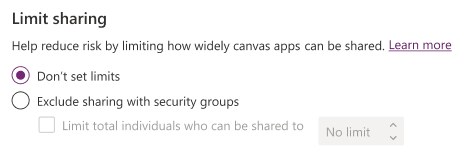
Canvas 應用程式共用規則
| Canvas應用程式共用規則 | 名描述 |
|---|---|
| 不要設定限制 | 選取此項以不限制共用的畫布應用程式。 |
| 排除與安全性群組共用 | 選取是否允許使用者與任何安全性群組或所有人共用畫布應用程式。 |
| 限制可共用的個人總數 | 如果已選取排除與安全性群組共用,您可以控制可共用畫布應用程式的最大使用者數目。 |
解決方案感知的雲端流量共用規則
| 解決方案感知的雲端流量共用規則 | 名描述 |
|---|---|
| 讓人們共用感知解決方案的雲端流程 |
選取後:使用者可以與任意數量的個人或安全性群組共用解決方案感知的雲端流程。 未選取時:使用者無法與任何個人或安全性群組共用其雲端流程。 |
代理共享規則
[本區段是發行前版本文件,並且隨時可能變更。]
| 代理程式共用規則 | 名描述 |
|---|---|
| 共用代理程式時,允許人們授予編輯者權限 |
選取後:擁有者和編輯者可以作為編輯者與任何個人共用。 未選取時:擁有者和編輯者無法與作為編輯者的個人分享。 此控制項不會影響擁有者或編輯者與檢視者共用的能力。 |
| 共用代理程式時,允許人們授予檢視人員權限 |
選取後:擁有者和編輯者可以與作為檢視者的任何個人以及任何安全性群組共用。 未選取時:擁有者和編輯者不能與作為查看者的個人共用,也不能與安全性群組共用。 這種控制並不妨礙他們與作為編輯的個人共用副手。 |
| 只與個人分享 (無安全性群組) | 如果選擇此設置,擁有者和編輯者只能與作為查看者的個人共用。 他們無法與安全性群組共用。 此控制項不會影響擁有者或編輯者作為編輯者與個人共用的能力。 |
| 限制可以存取每個代理程式的查看者數量 | 如果選擇僅與個人共用 (無安全性群組),您可以控制可以與其共用代理程式的最大查看者數量。 |
重要
- 這是生產就緒型預覽功能。
- 生產就緒型預覽版應受補充使用條款所拘束。
要了解有關代理程式的編輯者和檢視人員權限的更多資訊,請前往 Copilot Studio 安全性和治理。
注意
當使用者嘗試共用應用程式、流程或代理程式時,將強制執行共用規則。 此限制不會影響在應用共享規則之前已有權訪問應用、流或代理的任何現有使用者。 但是,如果應用程式、流或代理在設置規則后不合規,則在應用程式、流或代理符合新規則之前,只允許取消共用。
在 Power Platform 系統管理中心中設定共用規則之後,可能需要一小時才能開始實施。
選擇發佈到 Teams 時, Dataverse for Teams 環境中的 共享規則不會影響與團隊的共用。 不過,當使用者嘗試與繫結到環境之團隊以外的團隊中個人或群組共用時,會強制執行共用限制。
如果使用者嘗試共用與共享規則相矛盾的畫布應用、解決方案感知雲端流或代理,則會通知他們,如圖所示。

使用 PowerShell 設定共用限制
您也可以使用 PowerShell 設定和移除共用限制。
設定共用限制
以下是一個 PowerShell 指令碼,可防止畫布應用程式與安全性群組共用,並將畫布應用程式可共用的人數限制為 20 人。
# Retrieve the environment
$environment = Get-AdminPowerAppEnvironment -EnvironmentName <EnvironmentId>

# Update the Managed Environment settings
$governanceConfiguration = $environment.Internal.properties.governanceConfiguration
$governanceConfiguration.settings.extendedSettings | Add-Member -MemberType NoteProperty -Name 'limitSharingMode' -Value "excludeSharingToSecurityGroups" -Force
$governanceConfiguration.settings.extendedSettings | Add-Member -MemberType NoteProperty -Name 'maxLimitUserSharing' -Value "20" -Force

# Save the updated Managed Environment settings
Set-AdminPowerAppEnvironmentGovernanceConfiguration -EnvironmentName <EnvironmentId> -UpdatedGovernanceConfiguration $governanceConfiguration
以下是一個 PowerShell 指令碼,用於關閉解決方案感知雲端流程的共用。
# Retrieve the environment
$environment = Get-AdminPowerAppEnvironment -EnvironmentName <EnvironmentId>

# Update the Managed Environment settings
$governanceConfiguration = $environment.Internal.properties.governanceConfiguration
$governanceConfiguration.settings.extendedSettings | Add-Member -MemberType NoteProperty -Name 'solutionCloudFlows-limitSharingMode' -Value "disableSharing" -Force

# Save the updated Managed Environment settings
Set-AdminPowerAppEnvironmentGovernanceConfiguration -EnvironmentName <EnvironmentId> -UpdatedGovernanceConfiguration $governanceConfiguration
以下是一個 PowerShell 指令碼,可防止代理程式與安全性群組共用,並將可存取代理程式的檢視者數量限制為 20 個。
# Retrieve the environment
$environment = Get-AdminPowerAppEnvironment -EnvironmentName <EnvironmentId>

# Update the Managed Environment settings
$governanceConfiguration.settings.extendedSettings | Add-Member -MemberType NoteProperty -Name 'bot-limitSharingMode' -Value "ExcludeSharingToSecurityGroups" -Force
$governanceConfiguration.settings.extendedSettings | Add-Member -MemberType NoteProperty -Name 'bot-maxLimitUserSharing' -Value "20" -Force

# Save the updated Managed Environment settings
Set-AdminPowerAppEnvironmentGovernanceConfiguration -EnvironmentName <EnvironmentId> -UpdatedGovernanceConfiguration $governanceConfiguration
下面是一個 PowerShell 指令碼,它關閉了與個人作為編輯者共用代理程式的功能。
# Retrieve the environment
$environment = Get-AdminPowerAppEnvironment -EnvironmentName <EnvironmentId>

# Update the Managed Environment settings
$governanceConfiguration = $environment.Internal.properties.governanceConfiguration
$governanceConfiguration.settings.extendedSettings | Add-Member -MemberType NoteProperty -Name 'bot-authoringSharingDisabled' -Value True -Force

# Save the updated Managed Environment settings
Set-AdminPowerAppEnvironmentGovernanceConfiguration -EnvironmentName <EnvironmentId> -UpdatedGovernanceConfiguration $governanceConfiguration
將 'bot-authoringSharingDisabled' 設定為 False 以啟用與個人作為編輯者的共用。
移除共用限制
下面是一個刪除畫布應用程式共用限制的 PowerShell 指令碼。
# Retrieve the environment
$environment = Get-AdminPowerAppEnvironment -EnvironmentName <EnvironmentId>

# Update the Managed Environment settings
$governanceConfiguration = $environment.Internal.properties.governanceConfiguration
$governanceConfiguration.settings.extendedSettings | Add-Member -MemberType NoteProperty -Name 'limitSharingMode' -Value "noLimit" -Force
$governanceConfiguration.settings.extendedSettings | Add-Member -MemberType NoteProperty -Name 'maxLimitUserSharing' -Value "-1" -Force

# Save the updated Managed Environment settings
Set-AdminPowerAppEnvironmentGovernanceConfiguration -EnvironmentName <EnvironmentId> -UpdatedGovernanceConfiguration $governanceConfiguration
若要刪除解決方案感知的雲端流程的共用限制,請執行下列指令碼。
# Retrieve the environment
$environment = Get-AdminPowerAppEnvironment -EnvironmentName <EnvironmentId>

# Update the Managed Environment settings
$governanceConfiguration = $environment.Internal.properties.governanceConfiguration
$governanceConfiguration.settings.extendedSettings | Add-Member -MemberType NoteProperty -Name 'solutionCloudFlows-limitSharingMode' -Value "noLimit" -Force

# Save the updated Managed Environment settings
Set-AdminPowerAppEnvironmentGovernanceConfiguration -EnvironmentName <EnvironmentId> -UpdatedGovernanceConfiguration $governanceConfiguration
若要取消與安全性群組或個人作為檢視者共用代理程式的限制,請執行下列指令碼。
# Retrieve the environment
$environment = Get-AdminPowerAppEnvironment -EnvironmentName <EnvironmentId>

# Update the Managed Environment settings
$governanceConfiguration = $environment.Internal.properties.governanceConfiguration
$governanceConfiguration.settings.extendedSettings | Add-Member -MemberType NoteProperty -Name 'bot-limitSharingMode' -Value "noLimit" -Force

# Save the updated Managed Environment settings
Set-AdminPowerAppEnvironmentGovernanceConfiguration -EnvironmentName <EnvironmentId> -UpdatedGovernanceConfiguration $governanceConfiguration
公開組織的治理錯誤內容
如果您指定治理,則錯誤訊息內容將顯示在錯誤訊息中,它將包含在向使用者顯示的錯誤訊息中。 如需進一步了解,請參閱 PowerShell 治理錯誤訊息內容命令。