使用逐欄綁定時,應用程式會將一至兩個,甚至在某些情況下三個陣列綁定到要回傳資料的每一欄。 第一個陣列儲存資料值,第二個陣列儲存長度/指示符緩衝區。 指示符與長度值可透過將SQL_DESC_INDICATOR_PTR與SQL_DESC_OCTET_LENGTH_PTR描述符欄位設定為不同值,分別儲存在不同的緩衝區;若如此,則會綁定第三個陣列。 每個數組包含與行集中的列數相同的元素數量。
應用程式宣告使用列對列綁定,並使用 SQL_ATTR_ROW_BIND_TYPE 陳述句屬性,該屬性決定列集緩衝區的綁定類型,而非參數集緩衝區。 驅動程式會回傳每個陣列中每個後續元素的資料。 以下圖示展示了逐欄綁定的運作方式。
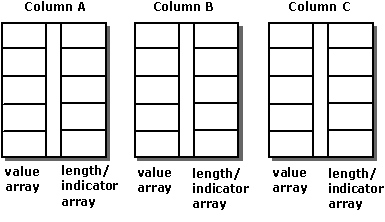
例如,以下程式碼將 10 元素陣列綁定到 OrderID、SalesPerson 和 Status 欄位:
#define ROW_ARRAY_SIZE 10

SQLUINTEGER    OrderIDArray[ROW_ARRAY_SIZE], NumRowsFetched;
SQLCHAR        SalesPersonArray[ROW_ARRAY_SIZE][11],
               StatusArray[ROW_ARRAY_SIZE][7];
SQLINTEGER     OrderIDIndArray[ROW_ARRAY_SIZE],
               SalesPersonLenOrIndArray[ROW_ARRAY_SIZE],
               StatusLenOrIndArray[ROW_ARRAY_SIZE];
SQLUSMALLINT   RowStatusArray[ROW_ARRAY_SIZE], i;
SQLRETURN      rc;
SQLHSTMT       hstmt;

// Set the SQL_ATTR_ROW_BIND_TYPE statement attribute to use
// column-wise binding. Declare the rowset size with the
// SQL_ATTR_ROW_ARRAY_SIZE statement attribute. Set the
// SQL_ATTR_ROW_STATUS_PTR statement attribute to point to the
// row status array. Set the SQL_ATTR_ROWS_FETCHED_PTR statement
// attribute to point to cRowsFetched.
SQLSetStmtAttr(hstmt, SQL_ATTR_ROW_BIND_TYPE, SQL_BIND_BY_COLUMN, 0);
SQLSetStmtAttr(hstmt, SQL_ATTR_ROW_ARRAY_SIZE, ROW_ARRAY_SIZE, 0);
SQLSetStmtAttr(hstmt, SQL_ATTR_ROW_STATUS_PTR, RowStatusArray, 0);
SQLSetStmtAttr(hstmt, SQL_ATTR_ROWS_FETCHED_PTR, &NumRowsFetched, 0);

// Bind arrays to the OrderID, SalesPerson, and Status columns.
SQLBindCol(hstmt, 1, SQL_C_ULONG, OrderIDArray, 0, OrderIDIndArray);
SQLBindCol(hstmt, 2, SQL_C_CHAR, SalesPersonArray, sizeof(SalesPersonArray[0]),
            SalesPersonLenOrIndArray);
SQLBindCol(hstmt, 3, SQL_C_CHAR, StatusArray, sizeof(StatusArray[0]),
            StatusLenOrIndArray);

// Execute a statement to retrieve rows from the Orders table.
SQLExecDirect(hstmt, "SELECT OrderID, SalesPerson, Status FROM Orders", SQL_NTS);

// Fetch up to the rowset size number of rows at a time. Print the actual
// number of rows fetched; this number is returned in NumRowsFetched.
// Check the row status array to print only those rows successfully
// fetched. Code to check if rc equals SQL_SUCCESS_WITH_INFO or
// SQL_ERROR not shown.
while ((rc = SQLFetchScroll(hstmt,SQL_FETCH_NEXT,0)) != SQL_NO_DATA) {
   for (i = 0; i < NumRowsFetched; i++) {
      if ((RowStatusArray[i] == SQL_ROW_SUCCESS) ||
            (RowStatusArray[i] == SQL_ROW_SUCCESS_WITH_INFO)) {
         if (OrderIDIndArray[i] == SQL_NULL_DATA)
            printf(" NULL      ");
         else
            printf("%d\t", OrderIDArray[i]);
         if (SalesPersonLenOrIndArray[i] == SQL_NULL_DATA)
            printf(" NULL      ");
         else
            printf("%s\t", SalesPersonArray[i]);
         if (StatusLenOrIndArray[i] == SQL_NULL_DATA)
            printf(" NULL\n");
         else
            printf("%s\n", StatusArray[i]);
      }
   }
}

// Close the cursor.
SQLCloseCursor(hstmt);